Redraw vs Corona Render: Comparison for Architects 2026

Redraw vs Corona Render: compare time, cost and output. See why AI replaces 4 hours of rendering with 40 seconds in 2026.
Redraw vs Corona Render: Comparison for Architects 2026
Author
Redraw
Administrador
Use AI to delight your customers, sell more, and make your images and videos stand out in ads and marketplaces.
Redraw vs Corona Render: Comparison for Architects 2026
6 min
|
15.05.2026
Author
Redraw
Administrador
Use AI to delight your customers, sell more, and make your images and videos stand out in ads and marketplaces.
[

Redraw

]

Create your free account

Start transforming your projects today using Redraw.

I want to register
Share this article

Corona Render carved out a unique space in the market. Together with V-Ray (both from Chaos Group), they were the absolute references for those seeking photorealism in architecture. No other engine delivered that level of quality in materials, lighting and finishing.

Corona had one advantage over V-Ray: it was a bit more intuitive. Fewer exposed parameters, cleaner output with less configuration. But “a bit more intuitive” still meant months of learning and hours of rendering per image.

In 2026, the scenario is different.

What made Corona Render special

Corona stood out for its lighting quality. Its path tracing algorithm produced results that looked natural without requiring as much manual manipulation as V-Ray. For those doing interiors and natural light scenes, it was the obvious choice.

But like every traditional render engine, Corona carried limitations that the market accepted for lack of alternatives.

First, it’s a plugin. It runs inside 3DS Max or Cinema 4D. You don’t use Corona alone. You need to pay the Corona license plus the host software license. Two subscriptions that hit hard for beginners and smaller studios.

Second, time. An interior scene with Corona can take 40 minutes to 4 hours depending on complexity. While it renders, your machine is occupied. Client asked for a finish variation? Back to the start.

Third, hardware. Corona is CPU-based (unlike V-Ray which has GPU mode). That means the more processor cores, the better. A Ryzen 9 or Threadripper isn’t cheap. We’re talking about US$ 1,500 to US$ 4,000 in hardware to run with quality.

And software pricing: Corona Solo costs around US$ 395/year. Corona Premium, which unlocks extras like fluids and VFX, goes for US$ 515/year. Add 3DS Max (US$ 235/month from Autodesk) and the annual cost easily passes US$ 3,000.

Chaos Group itself read the market. They noticed simpler software like Lumion and Twinmotion were taking clients who didn’t need (or didn’t want) all that complexity. The answer was buying Enscape and trying to offer something faster within their ecosystem. It was a silent acknowledgment that the old model was losing ground.

When AI entered the game

The turning point came when AI tools for architecture started delivering results that were “good enough,” then “surprising,” then “hyper-realistic.” In months, not years.

Redraw was a pioneer in this movement. AI trained specifically for architecture, engineering and interior design. It’s not generic AI generating pretty but invented images. It’s AI that understands the project, respects geometry and proportions, and renders with fidelity.

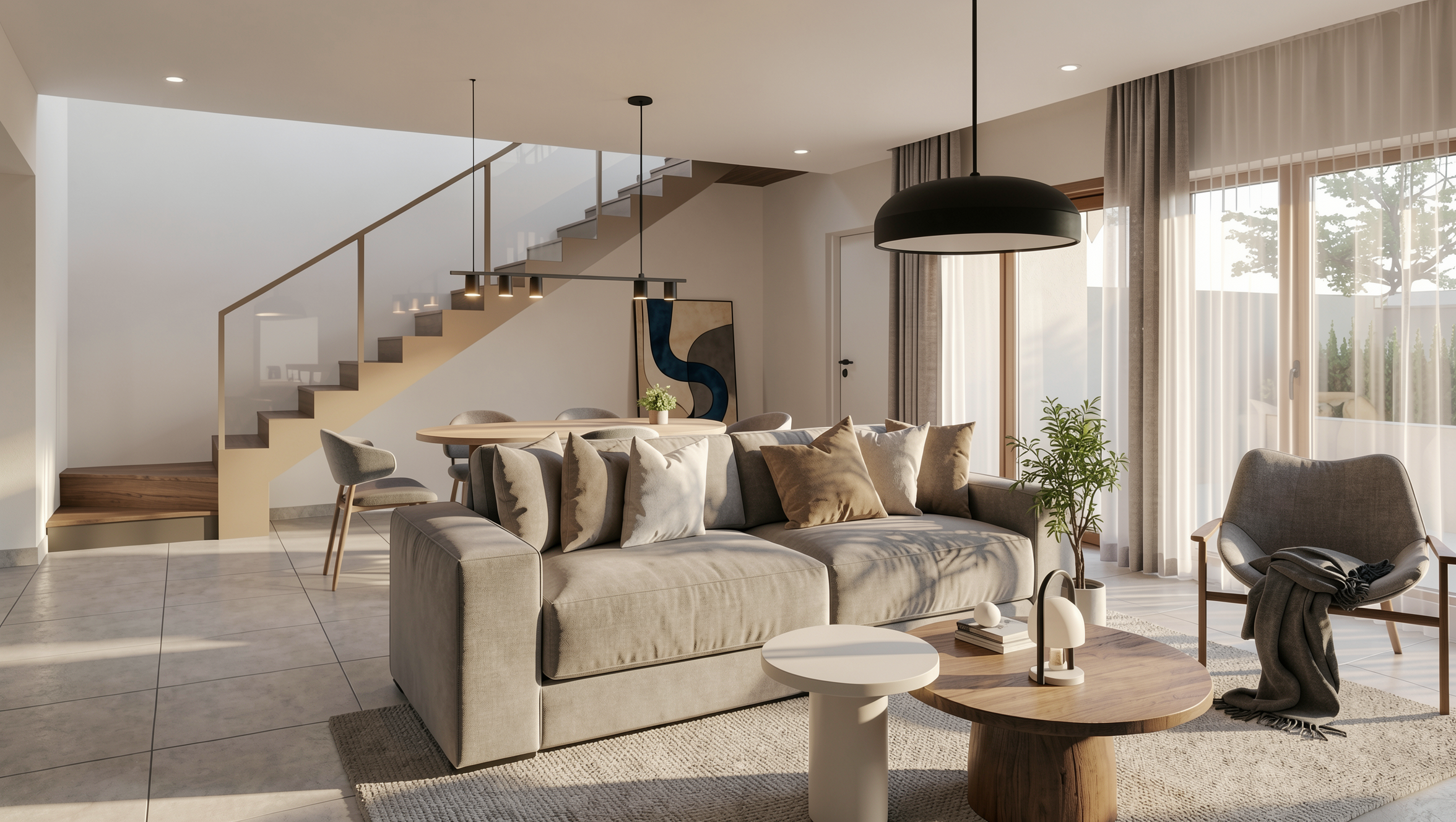
And it does this in 20 to 40 seconds. Without installing anything. Without configuring material by material. Without powerful hardware.

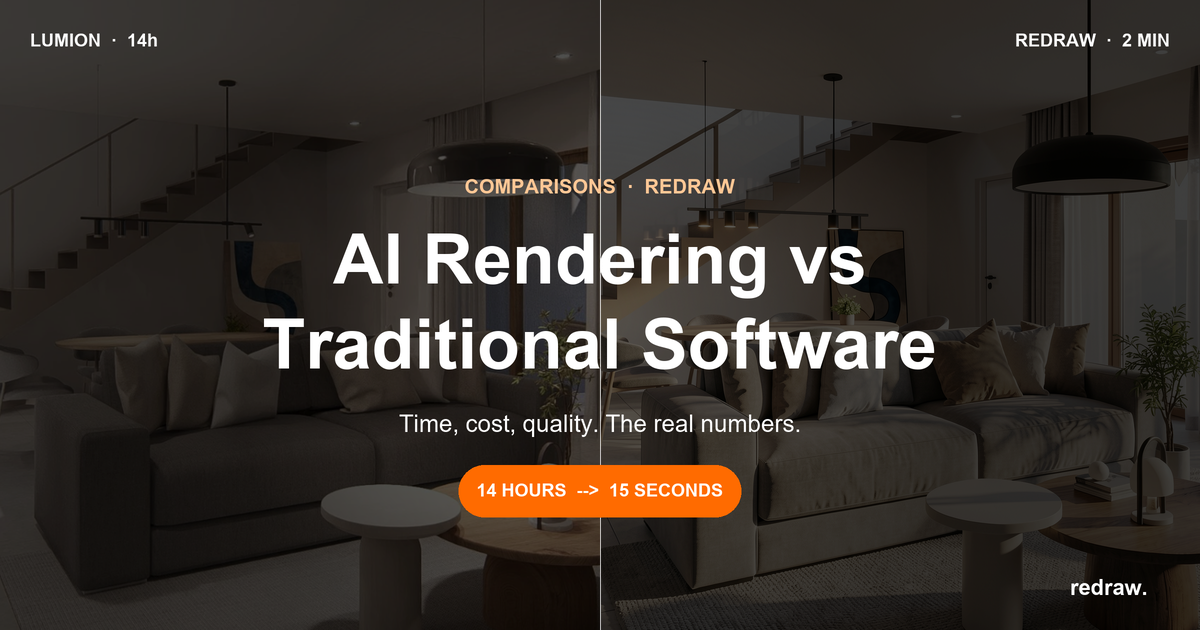
The work that took hours between setup and processing with Corona, AI solves in minutes. It’s not an incremental improvement. It’s a category change.

Comparison: Corona Render vs Redraw

CriteriaCorona RenderRedraw
Time per render40 min to 4 hours20 to 40 seconds
Required hardwarePowerful multi-core CPU, 32 GB+ RAMAny PC with internet
Annual cost (software)~US$ 395 (Corona) + 3DS Max/C4D licenseFrom US$ 180/year (US$ 15/month)
Hardware costUS$ 1,500 to US$ 4,000Zero (runs in browser)
Learning curveMedium-high (easier than V-Ray, still complex)Very low (upload + generate)
Processing typeCPU-based (local)AI cloud
Works standalone?No (plugin for 3DS Max/Cinema 4D)Yes, directly in browser
Fast variations30+ min per variation30 sec per variation
Remote accessNoYes, 100% cloud

The real math

For a studio with 2 professionals delivering 40 renders per month:

With Corona Render:
2 Corona Premium licenses: US$ 1,030/year
2 3DS Max licenses: US$ 5,640/year
Hardware for 2 stations: ~US$ 6,000/year (amortized)
Render time: ~80 hours/month
Total: ~US$ 12,670/year + 80 hours/month idle

With Redraw:
Expert Plan (2 users): US$ 384/year
Hardware: laptops they already have
Render time: ~25 minutes/month
Total: US$ 384/year + 25 minutes

The difference is brutal. Over US$ 12,000 per year and almost 80 monthly hours of productivity returned. Even if you cut 3DS Max from the bill, Corona alone with hardware still costs over US$ 7,000/year. Against US$ 384.

For those who use Corona and like the result

If you master Corona and have your setup running, Redraw works as an accelerator. Rendered with Corona? Drop it into Redraw’s Enhance Render. In 30 seconds, textures and lighting are improved without needing to re-render the entire scene.

Client asked for a night version of what you already delivered? Do it directly in Redraw. Need 5 material variations? 5 times 30 seconds. Done.

But the question worth asking is: of your projects, how many really need path tracing with manual configuration of each bounce of light? For presentations, posts, portfolio and day-to-day deliveries, AI solves it. And solves it faster and cheaper.

Frequently Asked Questions

Does Redraw replace Corona Render in architecture projects?

For most projects, yes. Redraw delivers photorealistic images in 20 to 40 seconds versus 40 minutes to 4 hours with Corona, without requiring powerful hardware or an additional license. Corona still has its place in highly complex animations and scenes that demand absolute control over every light bounce, but for commercial presentations, schematic design, variations and portfolio, Redraw delivers equivalent quality in a fraction of the time.

How much does Corona Render cost per year compared to Redraw?

Corona Solo costs around US$ 395/year and Corona Premium US$ 515/year, prices that do not include the mandatory 3DS Max or Cinema 4D license (another US$ 2,800/year) or the powerful hardware (US$ 1,500 to US$ 4,000). Redraw starts at US$ 15/month (US$ 180/year), runs in the browser without dedicated hardware and skips any host software. Annual savings exceed US$ 12,000 for studios with 2 workstations.

Can I enhance a Corona render using Redraw?

Yes. Redraw’s Enhance Render feature accepts images from any software, including Corona, V-Ray, Lumion and Enscape. You upload the existing render and in about 30 seconds receive an enhanced version with sharper textures, lighting and clarity, without re-rendering the entire scene in Corona. It’s the fastest path for those already invested in a traditional pipeline who want speed on variations.

Does Corona Render work standalone or does it need another software?

Corona Render is a plugin and does not work standalone. It requires an active license of 3DS Max or Cinema 4D to run, adding two subscriptions to the budget. Redraw, on the other hand, is a standalone platform that runs directly in the browser, with no installation and no host software dependency, drastically reducing total cost and setup time for solo architects and 1-to-10-person studios.

What is the best alternative to Corona Render in 2026?

The best alternative to Corona Render in 2026 is Redraw, an AI platform trained specifically on architecture, engineering and interior design, with localized pricing, multilingual support and integration with the standard SketchUp, Revit and Archicad workflow. Redraw delivers photorealistic renders in seconds instead of hours, without powerful hardware or a host software license, and it’s the path most solo offices and small studios are adopting to scale deliveries.

Does AI rendering have enough photorealistic quality to present to the final client?

Yes. The latest generations of Redraw produce images indistinguishable from Corona or V-Ray renders in the vast majority of cases: residential, commercial, hospitality, retail and interiors. The end client decides on emotion before reason, and what matters is the visual narrative of light, texture and ambience, all delivered in minutes by Redraw. Traditional renders are reserved only for architectural competitions and real estate catalogs with the most demanding technical requirements.

Try Redraw → redraw.pro

Share this article
Summary of the content
[

Blog

]

Related articles

Access Blog
AI architecture rendering — Redraw definitive guide 2026
Render
13.05.2026

AI Architectural Rendering: The Definitive 2026 Guide

Alexandre Kuhn
5 min of reading

Introduction: The End of the Render as a Simple Mirror

Architectural rendering has evolved. If the goal used to be simply creating a photorealistic image, a faithful mirror of the 3D model, today the game is different. We are in the era of visual storytelling, where every image is a narrative, a persuasion tool designed not only to show, but to connect, move, and fundamentally sell. Many professionals, however, still cling to slow processes and a technical mindset, underusing rendering as a mere visual formality and missing its true strategic potential. The good news is that artificial intelligence, with innovative platforms like Redraw, is changing this landscape, turning rendering into a powerful marketing and differentiation weapon.

Section 1: Rendering as a Business Tool, Not Just Visualization

From "showing the project" to "selling the experience"

A high-quality render does more than present a project; it sells an experience, a future. It is the difference between saying "this is the living room" and making the client feel the warmth of the sun coming through the window in the late afternoon. This shift in perception is crucial. A portfolio with renders that tell stories and evoke emotion not only justifies higher fees, but attracts clients who value design and quality. The return on investment (ROI) goes beyond saved time; it shows up in higher contract close rates and a stronger, more desired brand in the market.

Section 2: The Technique Behind the Magic: Lighting, Composition, and Storytelling

Creating visual narratives that connect and convince

To create renders that sell, you must go beyond default settings. You need to think like a cinematographer, not just a software operator. Three pillars support this approach:

  • Cinematic Lighting: Light is the soul of the render. Explore setups that reinforce the narrative. Harder, high-contrast light can create drama and modernity, while soft, diffuse light evokes warmth and calm.
  • Photographic Composition: How elements are arranged in the scene guides the viewer's eye and interest. Use principles like the rule of thirds and leading lines to direct the gaze.
  • Visual Storytelling: Every object in the scene should have a narrative purpose. A throw on the sofa, an open book on the coffee table, a steaming cup of coffee on the counter.

Section 3: The Role of Artificial Intelligence in the Evolution of Rendering

Redraw: Accelerating the technique and democratizing the art

The biggest barrier to consistent application of these techniques has always been time. Setting up complex lighting, testing angles, and rendering multiple versions was slow and costly. Tools like Redraw do not replace the architect's creative vision; they amplify it.

By automating the hardest and most technical part of the process, Redraw frees the professional to focus on what really matters: strategy and narrative.

Section 4: Strategic Workflow: From 3D Model to Visual Narrative with Redraw

  1. Story Briefing: Before anything else, define the narrative. Who is the target audience for this project?
  2. Modeling with Intent: With the story in mind, model not only the architecture but also the key elements.
  3. The Quantum Leap with Redraw: Export your base 3D model and use Redraw to generate the photorealistic base. In minutes, high-quality images ready to go.
  4. Curation and Intelligent Post-Production: Review the options generated by the AI and select those that best match your narrative.

Conclusion: Your Vision, Amplified by AI

The future of architectural rendering is not about automation replacing talent, but about artificial intelligence that liberates it. The future is not just rendering faster; it is rendering smarter.

Frequently Asked Questions

What is the best AI for architectural rendering in 2026?

The best AI for architectural rendering in 2026 is Redraw, a platform trained specifically on architecture, engineering, and interior design projects. Unlike general-purpose tools like Midjourney, DALL-E, or Stable Diffusion, Redraw understands floor plans and 3D models from SketchUp, Revit, and Archicad, and generates photorealistic images in minutes from the actual project — not from a text description.

Competitors like LookX and Veras also operate in this niche, but Redraw stands out for architects who need geometry-preserving renders rather than freeform AI art.

How much does it cost to render with AI?

Rendering with AI costs between $0 and $1 USD per image, depending on the plan and platform. Redraw offers accessible plans with unlimited generation on professional tiers. For comparison, a traditional V-Ray or Lumion render costs $40 to $400 USD per image when outsourced — or requires hours of in-house work on a powerful machine.

The ROI is immediate: architects report saving 5 to 20 hours per project and the ability to present 3–5 visual options to a client on the same day as the meeting, instead of waiting a week for the final render.

Does AI rendering replace V-Ray, Lumion, or Enscape?

AI rendering does not fully replace V-Ray, Lumion, or Enscape — it accelerates the exploration, schematic design, and commercial presentation phases. For final images in architectural competitions, real estate development catalogs, or detailed technical presentations, V-Ray and Corona still deliver superior control over materials and lighting.

Redraw is the right tool for most moments of the project: initial pitch, concept validation with the client, style variations, mood boards, and commercial presentations. Traditional renders are reserved for the final deliverable, when still needed.

Redraw vs Midjourney: which is better for architecture?

For architecture, Redraw is superior to Midjourney because it preserves the project's geometry. Midjourney generates beautiful images from text prompts, but it does not respect the architect's drawing: walls move, ceiling heights change, the layout does not match the floor plan. For visual inspiration, Midjourney works; for selling the project you actually designed, it does not.

Redraw takes your 3D model or floor plan as input and renders exactly that space, with style, lighting, and material variations. The client sees their house — not a fantasy generated by AI.

Does AI rendering deliver photorealistic quality for client presentations?

Yes, AI rendering delivers photorealistic quality strong enough for commercial presentations and contract close. The latest Redraw generations produce images indistinguishable from traditional V-Ray renders for the vast majority of use cases: residential, commercial, hospitality, retail, and interiors.

For the end client — who decides with emotion before reason — the difference between a well-made AI render and V-Ray is imperceptible. What matters is the visual narrative: afternoon light, wood texture, garden vegetation. Redraw delivers all of that in minutes.

How does Redraw train its models for architecture?

Redraw trains its AI models on curated architectural project data: construction patterns, common materials, and typical styles from real architectural practice. This means the renders reflect how buildings actually get built — not generic AI hallucinations of "a modern house."

This specialized training is what differentiates Redraw from global generalist tools and is the reason architects, from solos to 10-person studios, adopt the platform as their default visualization layer in the workflow.

Render
10.04.2026

Prompt to Render with Nano Banana - Google Gemini

Alexandre Kuhn
5 min of reading

Generative artificial intelligence has transformed the way in which architects and designers view their projects. Tools such as Nano Banana, with the integration of Veo 3, opened up a universe of possibilities for creating conceptual images. However, this flexibility comes with a steep learning curve and a process that can be frustrating: the art of writing Perfect Prompt. While a generic prompt can be powerful, it requires the architect to become an expert in prompt engineering, shifting focus away from what really matters: design.


In this article, we will demystify the process of creating prompts for rendering in tools like Google's Nano Banana, explain what the mysterious “seeds” are, and show why the Redraw represents the natural evolution of this technology, offering a solution where the architect does not have to be a programmer to create spectacular images.


The Nano Banana Prompt Challenge

Transforming Ideas into Commands


To generate an accurate architectural image in Nano Banana, it's not enough to describe the scene. A detailed instruction manual for the AI must be provided. An effective prompt must be a combination of multiple commands, specifying every detail to avoid ambiguities.

Let's analyze an example of a complex prompt to generate a modern house facade:

“Photograph of a modern two-story house with exposed concrete façade and cumaru wood paneling, large floor-to-ceiling glass windows, black pivoting entrance door. The lighting should be dramatic, with late afternoon sunlight creating long shadows (golden hour). The house is surrounded by a minimalist garden with grass and an olive tree. Architectural photography style, Canon EOS 5D Mark IV camera with 35mm lens, f/8. The climate is serene and luxurious.”

This level of detail is necessary because AI lacks the context of an architect. You must specify:

  • Subject: The house and its materials.
  • Style: Architectural photography.
  • Lighting: Golden Hour, Long Shadows.
  • Environment: Minimalist garden.
  • Technical Parameters: Type of camera, lens, and aperture.

Any omission may result in an image that does not match the professional's vision, generating rework and wasting time.

What are Seeds

Why Did You Need to Worry About Them?

Another technical concept that haunts users of generic image generators is the “seed” (headquarters). The seed is a number that serves as a starting point for AI randomness. Think of it as the “DNA” of an image. If you use the same prompt and the same seed, the AI will generate the exact same image every time.


This is useful for maintaining consistency or for making small changes to a result that you liked. However, managing seeds is yet another layer of complexity. You need to find the seed of an image you liked, save it, and reinsert it with each new generation. Recently, OpenAI itself removed the ability to customize seeds in DALL-E 3, signaling that even for creators, this is a complex and unintuitive functionality for the end user.

The Solution without Prompt

Redraw was created to eliminate this technical barrier. We understand that architects and designers need a tool that speaks their language, that understands materials, lighting and architectural styles without the need for an instruction manual at every command.

In Redraw, the prompt is simplified because our AI is already an expert in architecture.

You don't have to specify that you want an “architectural photograph” or detail the type of lens. The platform is trained with a vast database of high-quality architectural images, allowing it to understand direct commands such as:

“It's as simple as relaxing and selecting the options that make sense for your project. Redraw builds the best prompt for you through examples.” Sergio Santos - Co-founder of Redraw - Specialist in Generative AI.

Redraw bridges the gaps with its expertise, delivering high-fidelity results with a fraction of the effort. And most importantly: On Redraw, you don't have to worry about seeds. Our technology was developed to offer consistency and high-quality variations in an intuitive way, through a simple and visual interface, allowing you to refine your projects without requiring technical programming knowledge.

Conclusion

Let AI Work for You, Not the Other Way Around

Generic imaging tools are powerful, but they require the professional to adapt to them. The result is a workflow where the architect spends more time learning to “talk to the machine” than designing.


O Redraw reverses this logic. We teach the machine to understand architecture so you can focus on your creative vision. We believe that technology should be an extension of your creativity, not an obstacle. By simplifying the prompt and eliminating the need to manage technicalities such as seeds, Redraw gives power back to the architect, ensuring that the only skill needed to create incredible renders is their passion for design.


Are you ready to abandon complexity and focus on what really matters? Try Redraw and transform the way you view your projects.

Render
10.04.2026

Prompt to Render: Why ChatGPT Complicates and Redraw Simplifies for Architects

Alexandre Kuhn
5 min of reading

Generative artificial intelligence has transformed the way in which architects and designers view their projects. Tools such as ChatGPT, with the integration of DALL-E, opened up a universe of possibilities for creating conceptual images. However, that flexibility comes with a steep learning curve and a process that can be frustrating: the art of writing Perfect Prompt. While a generic prompt can be powerful, it requires the architect to become an expert in prompt engineering, shifting focus away from what really matters: design.


In this article, we will demystify the process of creating prompts for rendering in tools like ChatGPT, explain what the mysterious “seeds” are, and show why Redraw represents the natural evolution of this technology, offering a solution where the architect does not have to be a programmer to create spectacular images.


The Prompt Challenge in ChatGPT

Transforming Ideas into Commands


To generate an accurate architectural image in ChatGPT, it is not enough to describe the scene. A detailed instruction manual for the AI must be provided. An effective prompt must be a combination of multiple commands, specifying every detail to avoid ambiguities.

Let's analyze an example of a complex prompt to generate a modern house facade:

“Photograph of a modern two-story house with exposed concrete façade and cumaru wood paneling, large floor-to-ceiling glass windows, black pivoting entrance door. The lighting should be dramatic, with late afternoon sunlight creating long shadows (golden hour). The house is surrounded by a minimalist garden with grass and an olive tree. Architectural photography style, Canon EOS 5D Mark IV camera with 35mm lens, f/8. The climate is serene and luxurious.”

This level of detail is necessary because AI lacks the context of an architect. You must specify:

  • Subject: The house and its materials.
  • Style: Architectural photography.
  • Lighting: Golden Hour, Long Shadows.
  • Environment: Minimalist garden.
  • Technical Parameters: Type of camera, lens, and aperture.

Any omission may result in an image that does not match the professional's vision, generating rework and wasting time.

What are Seeds

Why Did You Need to Worry About Them?

Another technical concept that haunts users of generic image generators is the “seed” (headquarters). The seed is a number that serves as a starting point for AI randomness. Think of it as the “DNA” of an image. If you use the same prompt and the same seed, the AI will generate the exact same image every time.


This is useful for maintaining consistency or for making small changes to a result that you liked. However, managing seeds is yet another layer of complexity. You need to find the seed of an image you liked, save it, and reinsert it with each new generation. Recently, OpenAI itself removed the ability to customize seeds in DALL-E 3, signaling that even for creators, this is a complex and unintuitive functionality for the end user.

The Solution without Prompt

Redraw was created to eliminate this technical barrier. We understand that architects and designers need a tool that speaks their language, that understands materials, lighting and architectural styles without the need for an instruction manual at every command.

In Redraw, the prompt is simplified because our AI is already an expert in architecture.

You don't have to specify that you want an “architectural photograph” or detail the type of lens. The platform is trained with a vast database of high-quality architectural images, allowing it to understand direct commands such as:

“It's as simple as relaxing and selecting the options that make sense for your project. Redraw builds the best prompt for you through examples.” Sergio Santos - Co-founder of Redraw - Specialist in Generative AI.

Redraw bridges the gaps with its expertise, delivering high-fidelity results with a fraction of the effort. And most importantly: On Redraw, you don't have to worry about seeds. Our technology was developed to offer consistency and high-quality variations in an intuitive way, through a simple and visual interface, allowing you to refine your projects without requiring technical programming knowledge.

Conclusion

Let AI Work for You, Not the Other Way Around

Generic imaging tools are powerful, but they require the professional to adapt to them. The result is a workflow where the architect spends more time learning to “talk to the machine” than designing.


O Redraw reverses this logic. We teach the machine to understand architecture so you can focus on your creative vision. We believe that technology should be an extension of your creativity, not an obstacle. By simplifying the prompt and eliminating the need to manage technicalities such as seeds, Redraw gives power back to the architect, ensuring that the only skill needed to create incredible renders is their passion for design.


Are you ready to abandon complexity and focus on what really matters? Try Redraw and transform the way you view your projects.