Sergio is a specialist in generative AI and technology, and leads the Redraw development team.
Guide to prompts for humanized floor plans with AI — ultra realistic, clean editorial, monochromatic and luxury. For presentations and real estate sales
Redraw
Start transforming your projects today using Redraw.



The humanized floor plan is one of the most requested representations in residential presentations, portfolios, and real estate sales materials. It transforms the technical plan — full of dimensions, hatching, and symbols — into a visualization that lay clients can understand and imagine inhabiting.
With AI, you can humanize a plan in seconds. But the challenge is always the same: the AI cannot alter the layout, move walls, resize rooms, or change the original plan in any way. The prompts in this guide were developed with that central premise.
Practical heads-up: before processing any plan with AI, export it clean — no dimensions, no legend texts, no heavy hatching. The prompt already instructs the AI to ignore texts and annotations, but the cleaner the input, the more accurate the result. To skip this step entirely, Redraw processes the 3D model directly.
Architects shouldn't need to learn machine language to generate professional representation. That premise guided how Redraw was built.
Instead of writing warm late-afternoon natural light, long shadows entering from the side, in Redraw you click “Sunset”.
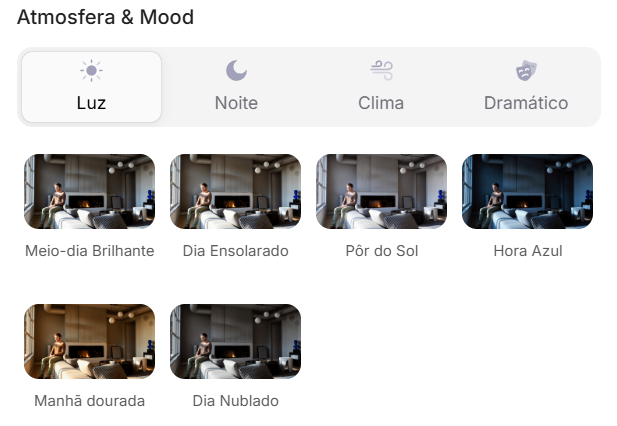
Atmosphere & Mood in Redraw: lighting in one click, no long prompt.
Instead of describing suburban residential street with visible neighbors in the background, you select the scene directly in the visual interface.
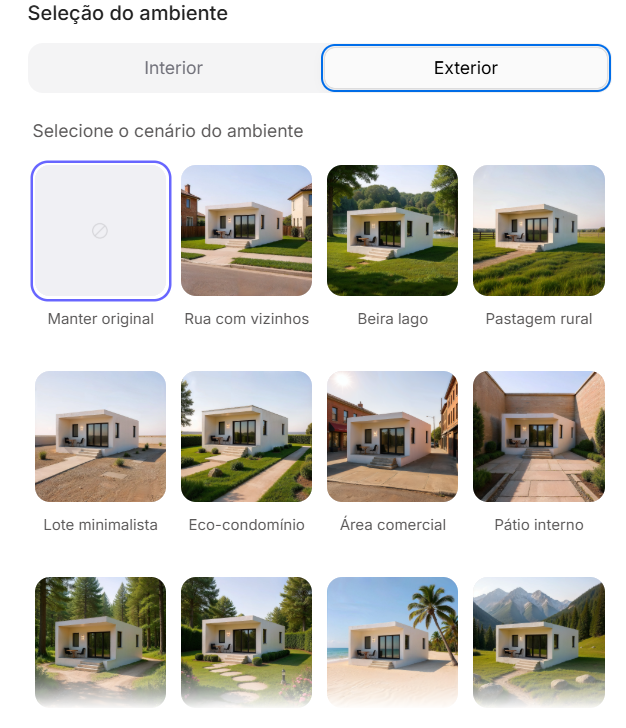
Environment Selection in Redraw: scene in one click, no text description.
Every choice you'd make in a long prompt — lighting, environment, style, camera — becomes a click. And because Redraw was trained exclusively for architecture, the model already “understands” the project context without you having to explain.
“In Redraw, the less prompt users write, the better the results.”
For humanized floor plans, the prompts in this guide remain the most efficient path — Redraw specializes in photorealistic interior and facade renders. The ideal combo: humanized plans with prompts + renders and perspectives with Redraw = complete presentation in minutes.
| Feature | Text-Prompt Tools | Redraw |
|---|---|---|
| Prompt complexity | High — requires technical, long structure | Low — natural and simple language |
| Lighting control | Based on technical text | Based on visual clicks (Atmosphere & Mood) |
| Environment control | Based on descriptive text | Based on visual clicks (Environment Selection) |
| Fidelity to 3D project | Variable — depends on reference and prompt | High — processes the model geometry directly |
| Consistency between generations | Low | High |
| User focus | Learning to command the AI | Describing the architectural vision |
| Learning curve | Steep | Fast and intuitive |
| Time per render | High (prompt + tweaking + post-production) | Low (20–40 seconds, publishable result) |
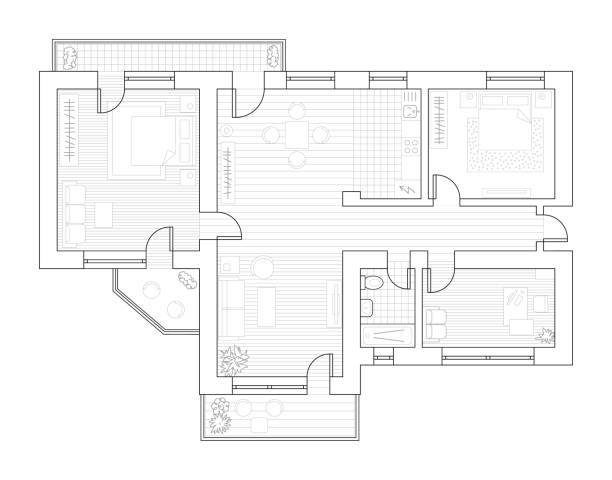
Before — technical plan exported from software
When to use: High-end presentations, real estate sales materials, portfolios where the client wants to see the plan with real material textures — wood, fabric, ceramic, rug.
Visual style: Orthographic top view, photorealistic materials, subtle depth shadows, simulated natural lighting.
The prompt:
Transform this architectural floor plan into a highly realistic humanized floor plan. Preserve 100% of the original layout, wall positions, openings, structure thickness, furniture placement, circulation areas, proportions and dimensions. Do NOT redesign, reinterpret, move, resize or modify any architectural element. Do NOT change the scale. Ignore all texts, annotations and dimension numbers. Focus only on the architectural geometry. Apply realistic top-view materials and textures: Natural wood flooring with subtle grain variation • Soft fabric texture on bed and sofa with visible folds • Realistic bedding layers and pillows with natural volume • Matte painted walls with slight tonal variation • Subtle shadowing under furniture for depth • Realistic rugs with soft texture • Desk surface with light reflection and material response • Accurate perspective strictly in orthographic top view (no camera distortion). Lighting: Soft ambient daylight simulation • Gentle global illumination • Soft contact shadows • Subtle depth separation between spaces. Enhance realism with micro-details: Slight fabric wrinkles • Wood grain variation • Soft shadow gradients • Minimal surface imperfections • Natural color balance. Style: Professional architectural presentation • High-end real estate humanized floor plan • Clean, elegant and realistic • Ultra high resolution • Balanced color grading • Sharp but natural finish. Maintain strict architectural accuracy and original proportions.
What sets this prompt apart:
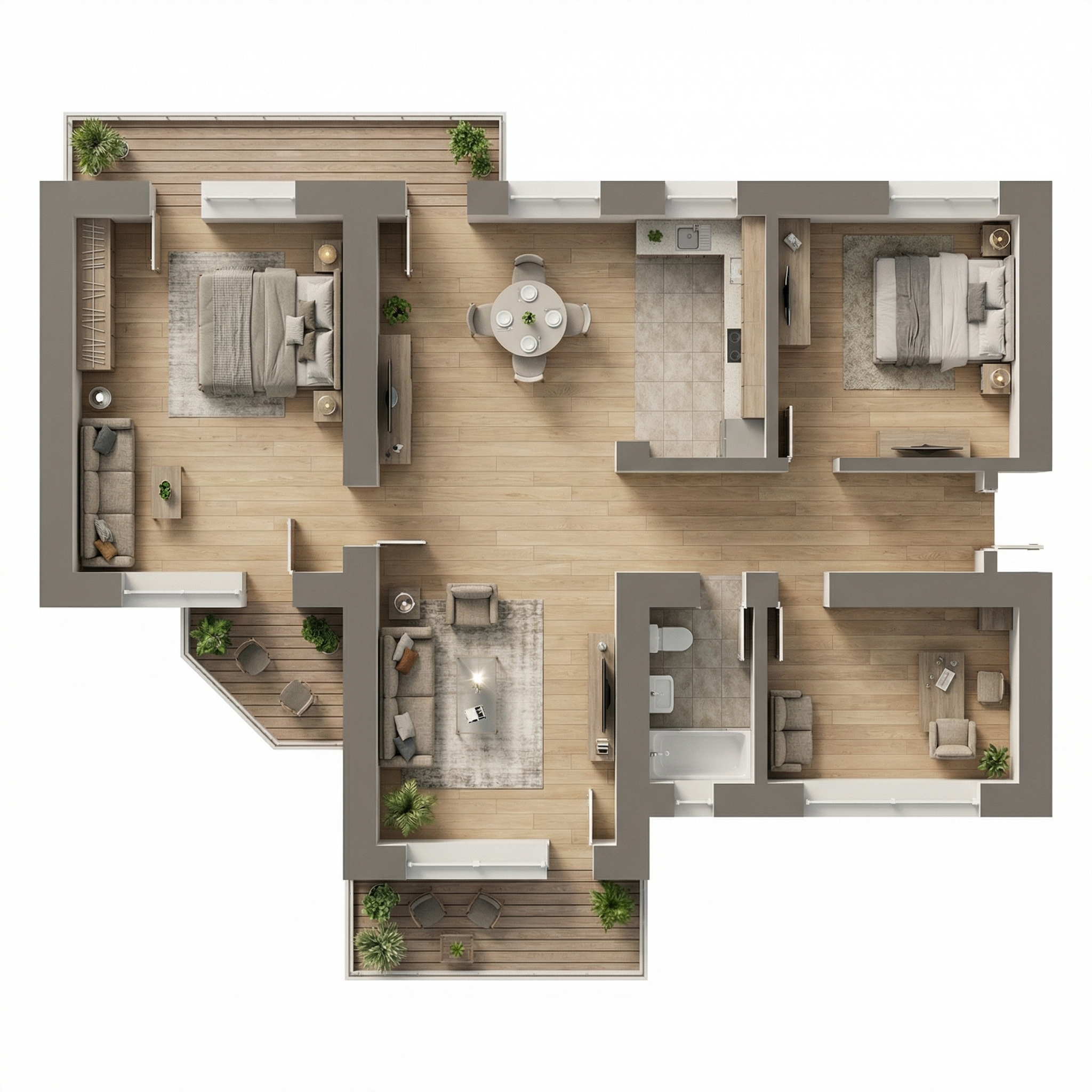
Result — Generated with Redraw
When to use: Presentation boards with Scandinavian/Japandi aesthetics, modern portfolios, mid-to-high-end real estate sales materials. It's the “Pinterest plan” style — the most visually shareable.
Visual style: Neutral desaturated palette, light wood, beige fabrics, almost imperceptible shadows, airy and clear feeling.
The prompt:
Transform this architectural floor plan into a soft, clean and refined humanized floor plan visualization. Preserve 100% of the original layout, walls, openings, structure thickness, furniture placement, circulation areas, proportions and dimensions. Do NOT redesign, reinterpret, move, resize or modify any architectural element. Do NOT change scale. Maintain strict orthographic top view (no perspective distortion). Ignore all texts, labels and dimension numbers. Focus only on architectural geometry. VISUAL STYLE: Create a light, neutral and calm presentation style, similar to modern editorial architectural boards. Avoid dramatic realism. Avoid strong shadows. Avoid high contrast. Avoid overly saturated wood tones. MATERIAL APPLICATION: Light natural oak wood flooring with very subtle grain • Neutral beige fabric upholstery • Soft linen bedding with delicate folds • Low-contrast rugs with minimal pattern • Matte off-white painted walls • Light natural wood furniture with minimal texture contrast • Soft ceramic surfaces in bathrooms • Minimal reflections. LIGHTING: Diffused ambient daylight • Very soft contact shadows • Subtle depth separation • No dramatic directional light • Balanced exposure • Clean brightness. The lighting should feel airy and evenly distributed. FINAL MOOD: Scandinavian-inspired softness • Pinterest-style clean floor plan • Calm neutral palette • Elegant and minimal • High resolution • Refined but not hyper-realistic. Maintain architectural precision and original proportions at all times.
The final mood instruction — “Scandinavian-inspired softness • Pinterest-style clean floor plan” — communicates a cohesive aesthetic reference to the AI that results in a very specific and commercially efficient palette.
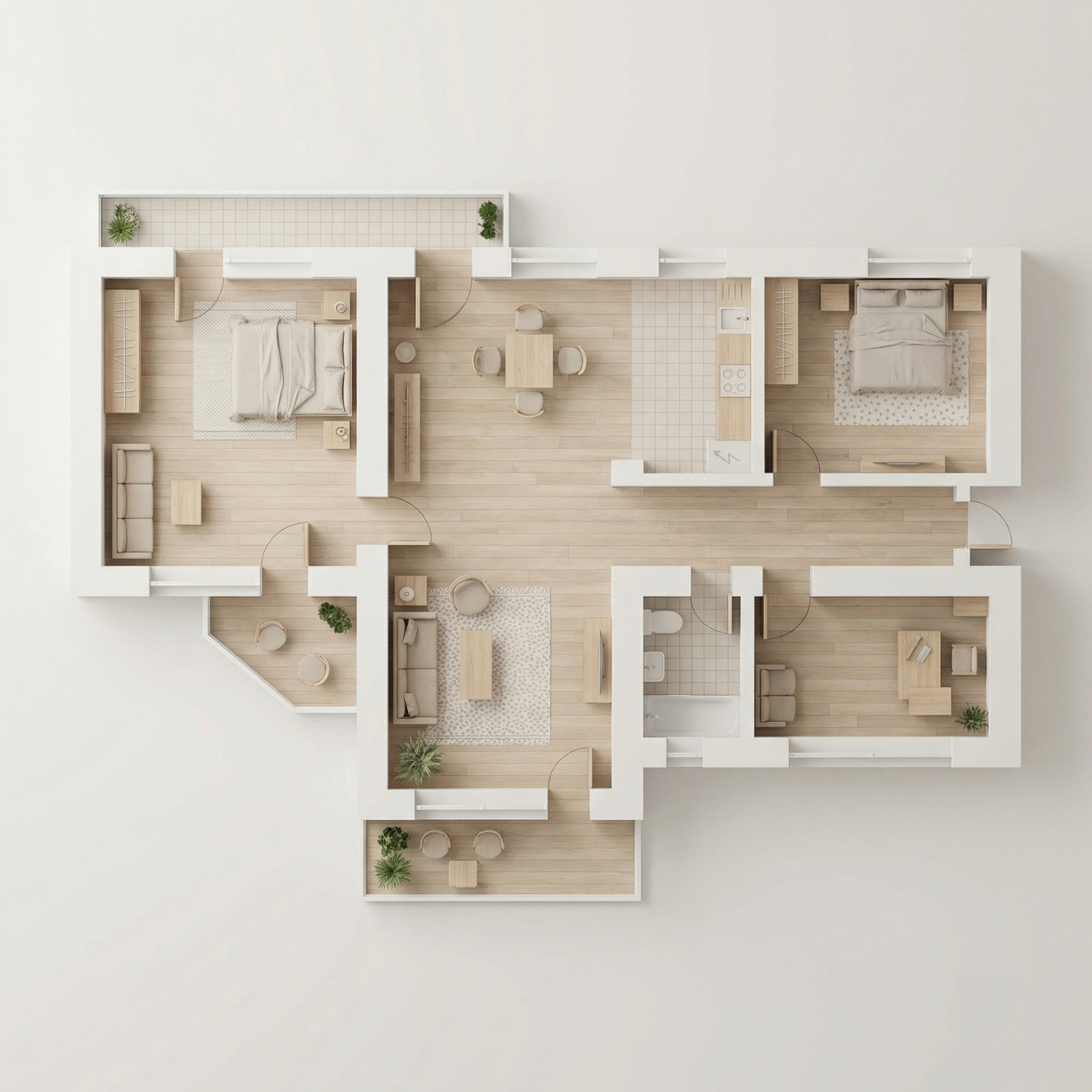
Result — Generated with Redraw
When to use: Competition boards, academic presentations, portfolios with strong visual identity where black and white is an intentional aesthetic choice.
Visual style: Solid black walls, white/light grey furniture, floor with optional subtle herringbone or flat grey, delicate shadows.
The prompt:
Transform this architectural floor plan into a refined monochromatic humanized floor plan with strong graphic contrast. Preserve 100% of the original layout, wall thickness, openings, structure, furniture placement, circulation areas, proportions and scale. Do NOT redesign, reinterpret, move, resize or modify any architectural element. Maintain strict orthographic top view (no perspective distortion). Ignore all texts, annotations and dimension numbers. Focus only on architectural geometry. WALL TREATMENT: Render all structural walls in solid matte black or very dark charcoal • Maintain accurate wall thickness • Clean crisp edges • No texture on walls (flat graphic fill). FURNITURE STYLE: All furniture in matte white or very light grey • Soft subtle contour lines in light grey • Minimal line weight • No heavy outlines • No realistic textures • No strong material detailing. SHADOW & DEPTH: Apply very soft and diffused shadows • Subtle ambient occlusion near walls • Gentle drop shadow beneath furniture • No dramatic lighting • No strong directional light • Balanced soft contrast. FLOOR TREATMENT (Option A – more minimal): Light grey flat floor. (Option B): Very subtle light wood herringbone pattern • Low contrast • Desaturated tones. STYLE DIRECTION: Minimalist architectural board style • High contrast black and white composition • Scandinavian graphic layout • Clean negative space • Elegant presentation • Modern editorial aesthetic • Ultra high resolution. Maintain architectural precision and proportional accuracy at all times.
💡 Tip: Specify in your prompt which floor option you want (A or B) by adding: “Use floor treatment Option A” or “Use floor treatment Option B”.
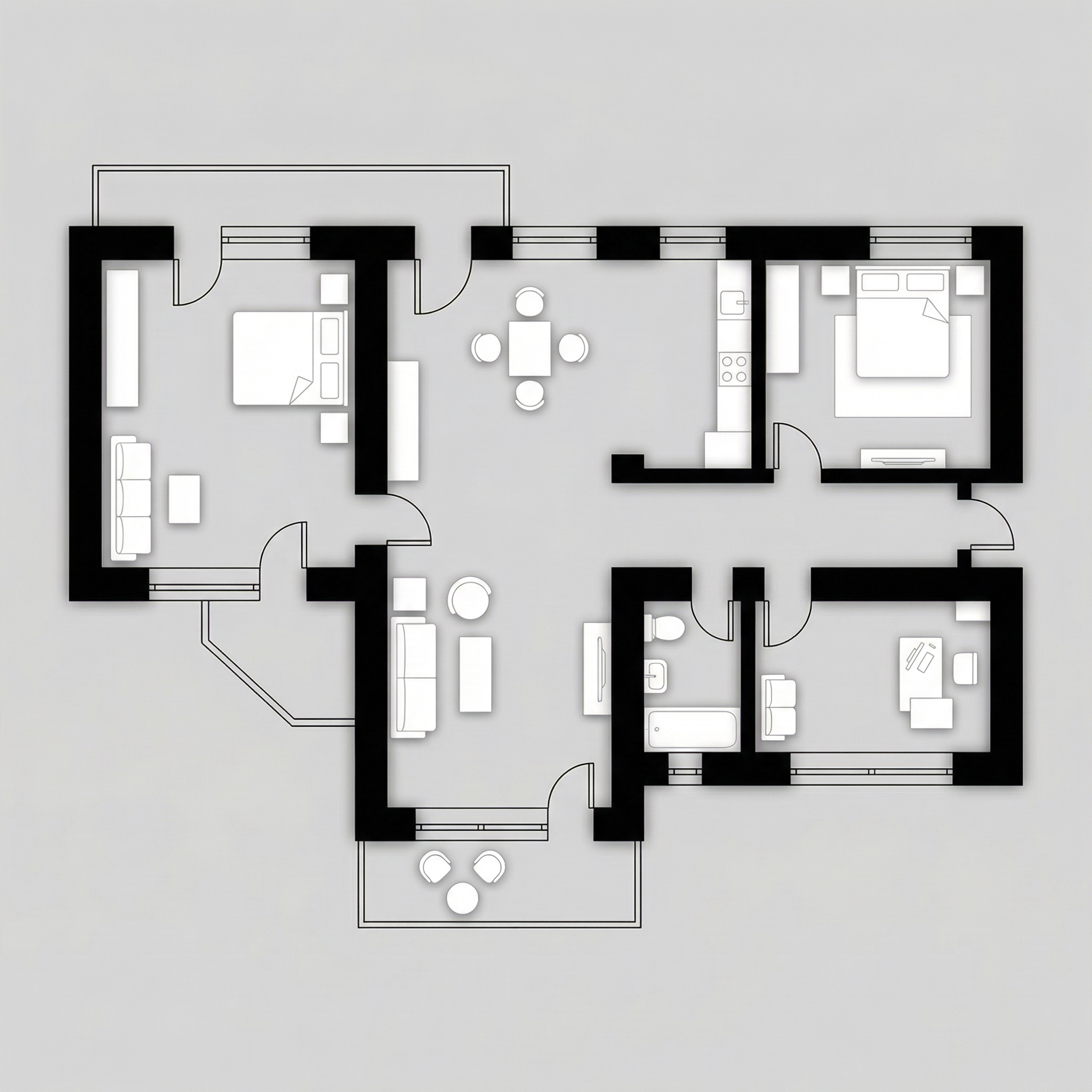
Result — Generated with Redraw
When to use: High-end projects, penthouses, luxury homes, premium sales materials. The prompt uses a specific gold/champagne palette for walls and elegant grey for floor.
Visual style: Matte medium grey floor, warm beige/sand interiors, structural walls in soft metallic gold/champagne, neutral-toned furniture.
The prompt:
Transform this architectural floor plan into a refined luxury editorial humanized floor plan. Preserve 100% of the original layout, walls, openings, structure thickness, furniture placement, circulation areas, proportions and scale. Do NOT redesign, reinterpret, move, resize or modify any architectural element. Maintain strict orthographic top view (no perspective distortion). Ignore all texts, annotations and dimension numbers. Focus strictly on architectural geometry. FLOOR TREATMENT: Apply a smooth matte medium-light grey floor • Very subtle concrete or plaster texture • Soft tonal variation • No strong pattern • Elegant neutral base. LAYOUT BASE: Render interior surfaces in warm beige / sand tones • Soft monochromatic palette • Matte finish • Very subtle texture • Gentle depth variation between rooms. WALL TREATMENT (Golden Accent): Render structural walls in soft metallic gold or brushed champagne tone • Matte metallic finish (not glossy) • Subtle light reflection on edges • Clean crisp wall geometry • Maintain accurate wall thickness. SHADOW & DEPTH: Soft diffused ambient lighting • Gentle shadow gradients • Subtle ambient occlusion along walls • Light drop shadow beneath walls to create floating effect • No dramatic lighting. FURNITURE STYLE: Soft beige / light neutral tones • Minimal texture realism • Clean simplified forms • Subtle shadow grounding • No high contrast. STYLE DIRECTION: Luxury architectural board aesthetic • Conceptual physical model feeling • Editorial presentation style • Warm neutral sophistication • Calm and balanced composition • High resolution • Refined and minimal. Maintain architectural precision and original proportions at all times.
“Matte metallic finish (not glossy)” for the gold walls — that's the distinction between elegant and tacky. The AI needs this instruction to not overdo the shine.
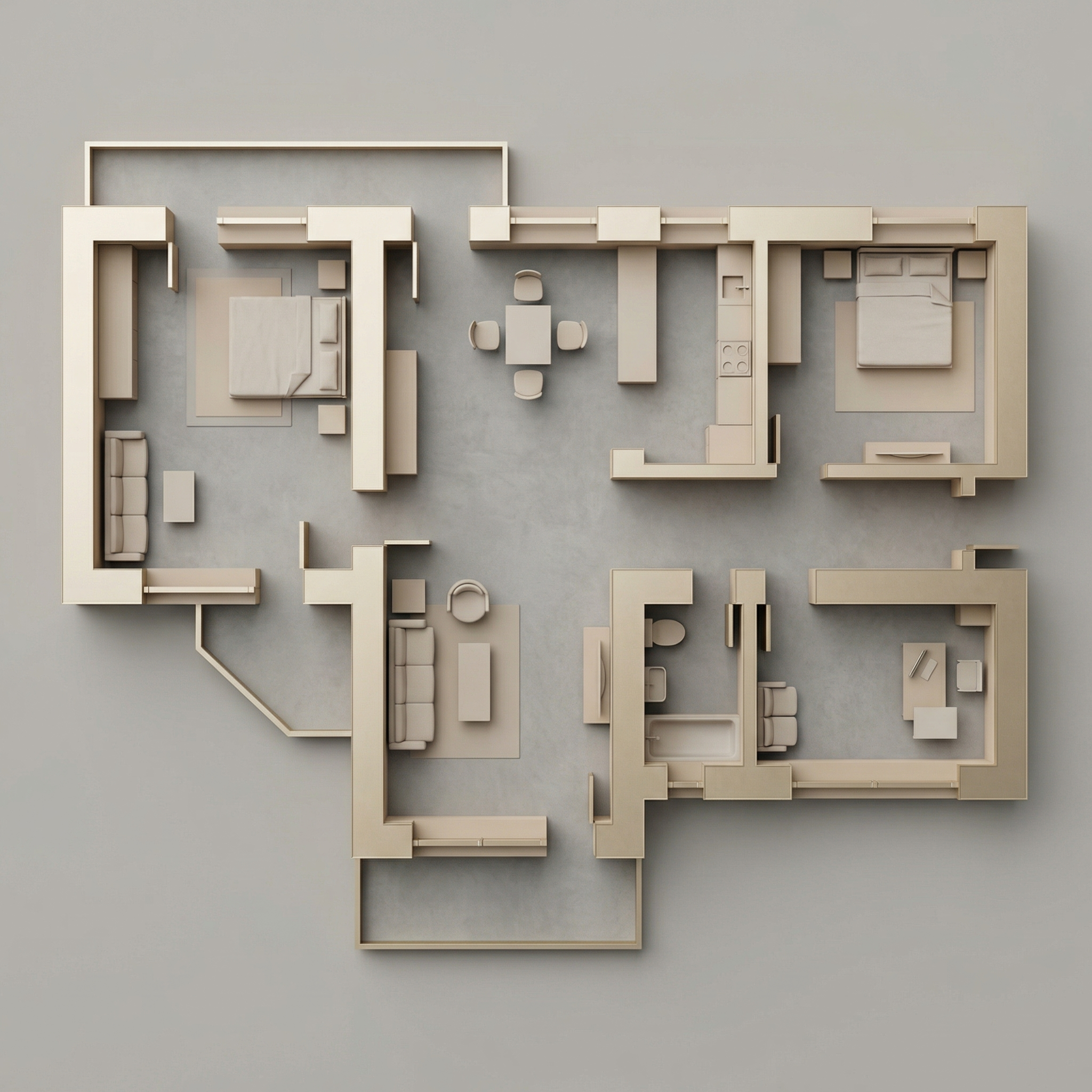
Result — Generated with Redraw
When to use: You have the technical plan in black and white (AutoCAD, Revit) and want to add only the landscaping context around it — without humanizing the interior.
The prompt:
Use the uploaded floor plan image as the absolute base reference. Preserve 100% of the original drawing, including: • All walls • Openings • Lineweights • Furniture • Text • Layout • Proportions • Scale • Orientation • Colors • Shadows • Graphic style. Do NOT modify, redesign, reinterpret, crop, rotate, resize, or alter any element of the architectural drawing. The project must remain EXACTLY as provided. Your task is ONLY to add a natural green surrounding context around the perimeter of the floor plan, similar to a soft landscape presentation style. Add: Soft green ground texture surrounding the project • Subtle grass texture variations • Light watercolor-style vegetation shadows • Natural irregular lawn tones (olive, sage, muted greens) • Soft edge fading into white background • Realistic but subtle tree canopies around the perimeter • Some semi-transparent tree crowns (top view) • Organic shadow projections from trees • Low-opacity garden textures • Light dirt / soil transitions if compositionally balanced. Guidelines: The landscape must stay OUTSIDE the built area • Do NOT overlap or cover the architecture • Maintain clean visibility of the entire floor plan • Keep architecture as the main focus • Avoid exaggerated saturation • Avoid hyperrealistic grass blades • Use soft, elegant, architectural presentation aesthetic. Lighting and mood: Soft ambient shadowing • Subtle tree cast shadows • Natural daylight tone • Professional architectural board aesthetic.
When NOT to use: If your plan is already humanized internally, use Prompt 6.
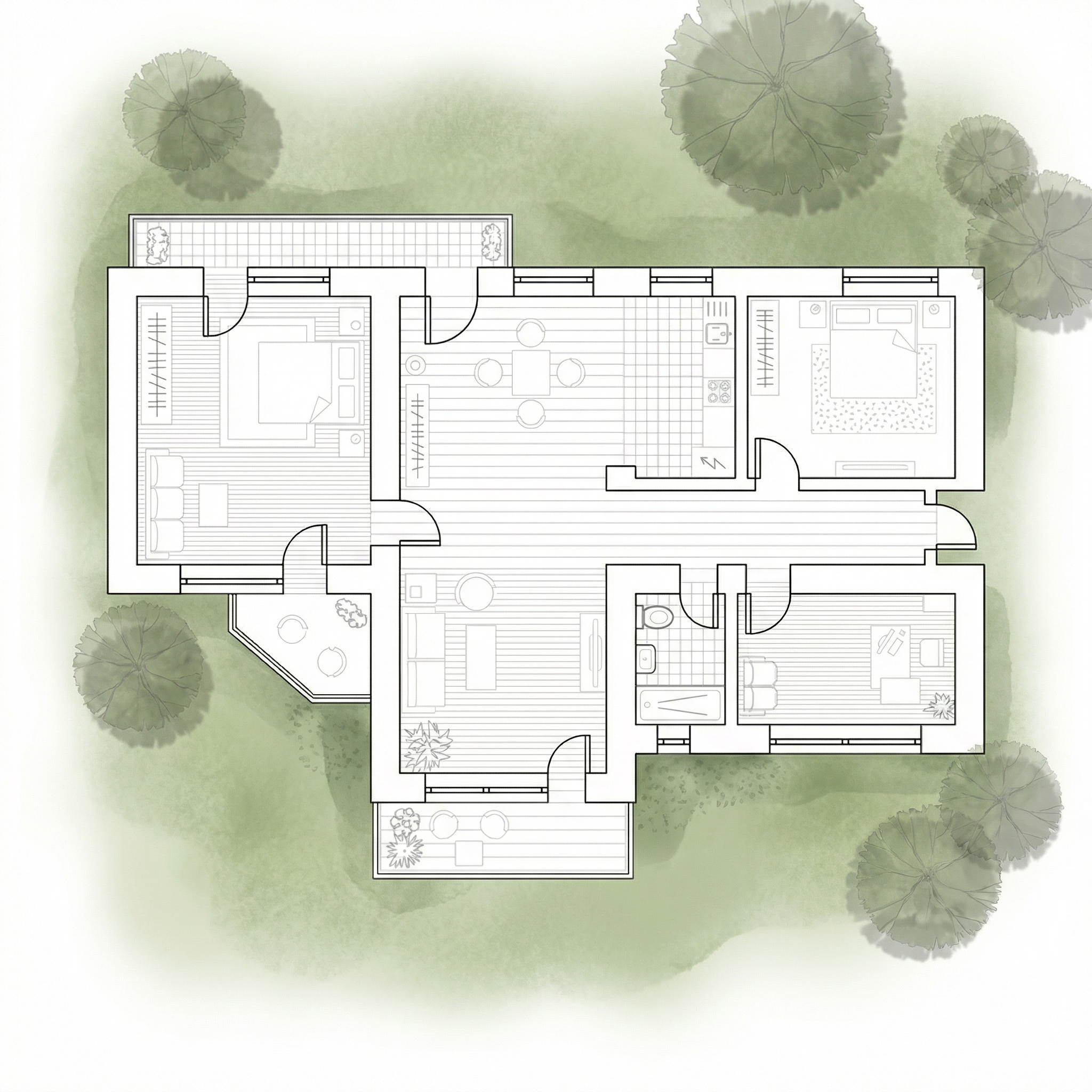
Result — Generated with Redraw
When to use: You've already humanized the plan internally (with prompts 1–4) and now want to add the landscaping context around it, without the AI reinterpreting the interior.
The prompt:
Use the uploaded image as a FINAL, FLATTENED architectural board. This image is already finished and humanized. You must treat the floor plan as a locked image layer. DO NOT redraw. DO NOT reinterpret. DO NOT convert to black and white. DO NOT restyle. DO NOT enhance. DO NOT relight. DO NOT change materials. DO NOT change shadows. DO NOT adjust colors. DO NOT increase or reduce contrast. DO NOT modify texture. DO NOT modify saturation. The floor plan must remain PIXEL-PERFECT identical to the uploaded image. No internal changes are allowed. OBJECTIVE: Add soft natural vegetation context ONLY around the external perimeter of the existing image. This is an additive background operation only. WHAT YOU CAN ADD (OUTSIDE ONLY): Soft green watercolor ground texture • Light grass tonal variation (olive, sage, muted green) • Semi-transparent tree canopies (top view) • Soft organic tree shadows • Slight edge fading into white background • Subtle natural landscape blending. STRICT LIMITATIONS: Do NOT overlap the building footprint • Do NOT cover walls, furniture or internal patios • Do NOT modify linework • Do NOT modify rendering style • Do NOT change perspective • Do NOT touch the interior. STYLE: Soft architectural presentation style • Competition board aesthetic • Subtle, elegant, low saturation • Top-view orthographic • Natural daylight tone.
The AI tends to “improve” the image when it doesn't get clear restrictions — reprocesses colors, increases contrast, changes materials. The capped “DO NOT” instructions block each of these unwanted behaviors.
Use these complementary prompts when the AI is moving walls, swapping materials, or altering the original plan.
Preserve 100% of the original architecture, layout, furniture placement, materials, colors, textures, decorative elements, proportions, lighting positions, and camera angle. Strictly forbid adding, removing, replacing, resizing, repositioning, or redesigning any element. The purpose of this transformation is ONLY to enhance realism, lighting behavior, and material response without altering the original design in any way.
Preserve the original lighting design exactly as shown in the image. Do not add new light sources, remove existing lights, or modify lighting positions. Only enhance realism through natural light diffusion, realistic light bounce, soft shadow transitions, and accurate material interaction with existing lighting.
Preserve all original materials and textures exactly as shown. Do not replace, reinterpret, or stylize materials. Enhance realism only through improved surface detailing, micro imperfections, and physically accurate light response.
For humanized floor plans, text-based AI image generation tools with the prompts in this guide are the most efficient workflow available.
For everything else in the project — interior renders, facades and perspectives — Redraw is the most direct tool: upload the 3D model, preserve the geometry, and get the result in seconds without long prompts.
Complete strategy: humanized plans with text prompts + renders and videos with Redraw = complete and professional presentation.
Blog