AI Super Prompts Don't Guarantee Good Renders — And There's a Technical Reason

Why long prompts don't deliver consistent renders — and how Redraw fixes it with a model trained for architecture and visual controls.

AI Super Prompts Don't Guarantee Good Renders — And There's a Technical Reason
Author
Alexandre Kuhn
Co-founder and marketing director
Alexandre is currently the marketing director, but he previously worked as an architect specializing in BIM.
AI Super Prompts Don't Guarantee Good Renders — And There's a Technical Reason
6 min
|
05.05.2026
Author
Alexandre Kuhn
Co-founder and marketing director
Alexandre is currently the marketing director, but he previously worked as an architect specializing in BIM.
[

Redraw

]

Create your free account

Start transforming your projects today using Redraw.

I want to register
Share this article

Have you ever spent more than 20 minutes writing a detailed prompt — specifying lighting, texture, angle, style, materials — only to get back a generic result with no coherence to the actual project?

That's the loop most architects fall into when they start using AI for renders. The “super prompt” promise is seductive: the more detail you describe, the better the AI understands. In practice, that's not what happens.

Alexandre Kuhn, founder of Redraw, breaks down the technical reason behind this — and shows why the platform was designed to work in a completely different way.

This article summarizes what is explained in depth in the video:

Why long prompts create more problems than they solve

Tools like ChatGPT Image and Nano Banana Pro (built on Gemini) work with a simple model: you describe, the AI generates. The more you detail, the more variables enter the process. It sounds logical — but that's exactly where the problem lives.

Every AI image generation starts with what we call a “seed”: a random number that defines the starting point of the creative process. Two identical prompts with different seeds produce completely different images. In other words, you can spend an hour refining the perfect prompt and still get inconsistent results on every generation.

The practical effect? Architects spend more time managing text than working on the project.

How Redraw was designed to eliminate that frustration

Redraw starts from a different premise: architects shouldn't need to describe everything. The platform was built to understand the project context and deliver high-quality renders from direct, objective commands.

A command like “render it realistically, indistinguishable from a real photo” is already enough to produce results other tools only deliver after multiple iterations and prompt tweaks.

This isn't an accident — it's the result of a model trained specifically for architectural rendering, not a generic image generation model adapted to the task.

What makes Redraw more efficient in practice:

  • Smart lighting presets: instead of describing light in words, you choose from pre-defined options (golden morning, sunset, starry night) and apply with one click. Result: consistent and controlled on every generation.
  • Direct element manipulation: add a fruit bowl, remove an object, adjust a texture — all done on the image itself, without rewriting the command from scratch.
  • Processing speed: renders in under 30 seconds, enabling more iterations and faster decisions in your workflow.
  • Short prompt, complete result: the model interprets architectural intent, not just typed words.

Redraw, ChatGPT Image and Nano Banana: what each one delivers in practice

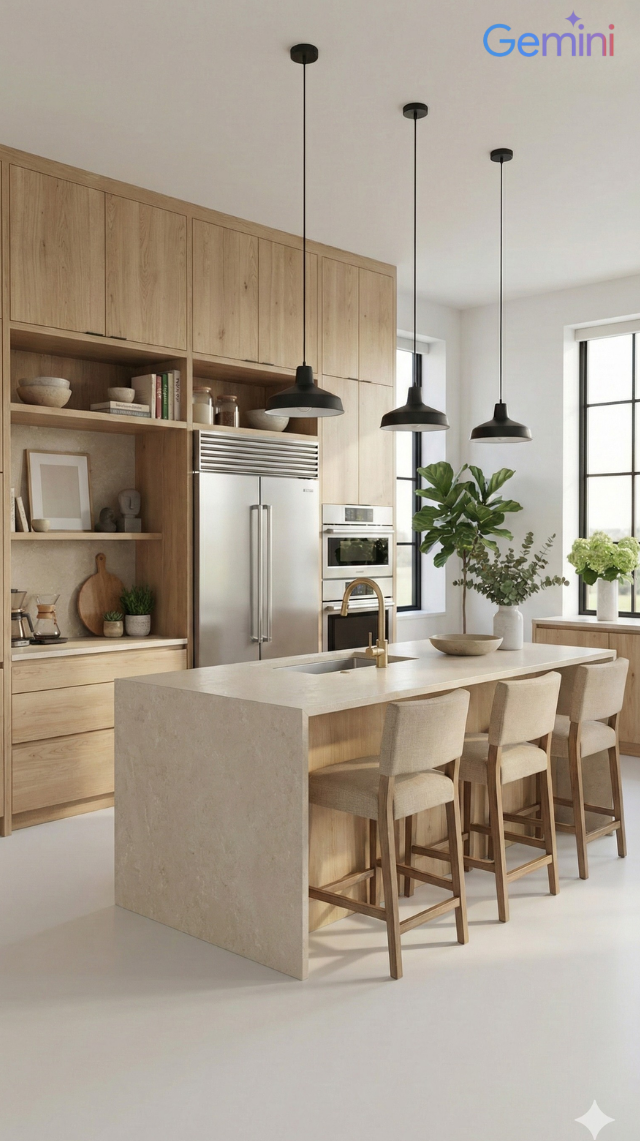
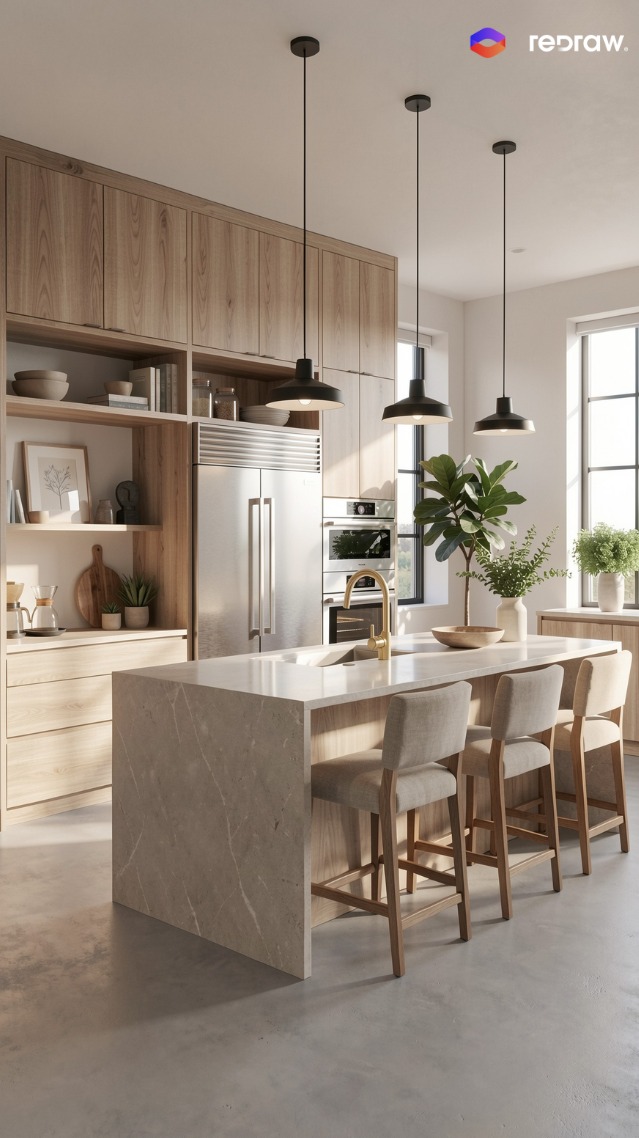
In the video, Alexandre tests the three tools side by side — with simple prompts and detailed prompts. The comparison reveals differences that go far beyond visual quality:

ChatGPT Image 1.5: requires extensive prompts to deliver architectural coherence. With simple commands, results are generic and rarely ready for professional presentation.

Nano Banana Pro (Gemini): performs well for general images, but inserts logos in some cases — a critical issue for professional use. Also depends on long descriptions for architecture-specific results.

Redraw: superior results with short prompts, direct control over lighting and project elements, no watermarks or unwanted logos. Built for the architect's workflow — not for generic use.

The difference isn't just visual. It's operational: the time invested to reach a usable result in Redraw is significantly lower than in any other tool tested.

Redraw goes beyond rendering

Rendering is the entry point, but Redraw runs as a complete AI ecosystem for architecture:

  • Idea Generator: explore facade, style and layout variations from a base image of the project.
  • Render from sketch: turn a hand drawing or floor plan into a photorealistic image — no 3D model required.
  • Brush (AI Brush): select a specific area of the image and modify only that region — texture, material, color — without altering the rest.
  • Text to Image: generate visual references for presentations from a written description.
  • Image to Video: turn a static render into an animation with depth and movement.

All in a single platform. No switching between tools, exports and separate accounts.

Professional rendering doesn't have to be complicated

The complexity of super prompts is not a sign of sophistication — it's a sign that the tool wasn't built for your work.

Redraw was made for architects, engineers and designers who need reliable, fast results with real control over the process. If you haven't tried it yet, access starts free.

Try Redraw now →

Share this article
Summary of the content
[

Blog

]

Related articles

Access Blog
Redraw
05.05.2026

Redraw Social Channels: All Official Accounts by Language

Sergio Santos
5 min of reading

Redraw maintains an active presence across multiple platforms in three languages: Portuguese, English, and Spanish. Each channel is built to serve its local audience with adapted content — not literal translation, but content tailored to each market.

Here's how it's structured: Brazil is the home market and concentrates the largest content operation. The English-language channels serve the global audience (US, Europe, Asia). Spanish covers Spanish-speaking Latin America. Not every platform exists in all three languages — some run only in Portuguese or only in English, depending on where the audience is most active.

Official website

The main Redraw site has dedicated versions per language, each with its own content and blog:

Instagram

Instagram is Redraw's strongest channel in terms of community. Three separate accounts, one per language, with original content:

YouTube

YouTube runs with two channels. The main one is in Portuguese and already includes translated videos. The English channel is dedicated to the international audience:

Facebook

Two Facebook pages, split by language:

LinkedIn

Redraw has an official company page and the personal profiles of the founders:

TikTok

Single account in Portuguese, focused on the Brazilian audience:

X (Twitter)

Single account in English, geared to the international market:

Pinterest

Official account with a visual portfolio of renders:

Reddit

Official English profile for participation in architecture and tech communities:

Review and product platforms

Redraw profiles on software review and discovery platforms:

Support channels

Redraw offers support through three channels: WhatsApp, email, and on-site chat.

WhatsApp

WhatsApp support is split by market:

  • Brazil — Support 1: +55 45 93505-0832
  • Brazil — Support 2: +55 45 99914-8182
  • Brazil — news broadcast: +55 45 93618-0383
  • International — global support: +55 11 93618-4552

In some cases team members may reach out via personal WhatsApp for one-off conversations. That's normal — but the golden rule still applies: Redraw will never ask for payment data over WhatsApp.

Email

The official email support channel is suporte@redraw.pro. For transactional emails (account confirmations, receipts, notifications), Redraw may also use the @redraw-ia.com domain — this is due to deliverability considerations on the .com domain.

If you receive an email from any other domain claiming to be from Redraw, treat it as suspicious.

On-site chat

You can also reach Redraw via the side chat that appears on the official sites (redraw.pro, redraw.pro/en, redraw.pro/es). It runs on the same system — the conversation lands with the same support team.

Security notice

Redraw never asks for credit card data, passwords, or banking information through support channels — not via WhatsApp, not via email, not via chat. All payments happen exclusively inside the platform.

If anyone reaches out asking for that data while claiming to be from Redraw, do not provide it. When in doubt, send a message through another channel listed above and confirm whether the contact is legitimate.

Our team keeps this article up to date. If a channel changes, we'll update it here.

Redraw
05.05.2026

AI Prompt Guide for Concept Diagrams and Architectural Boards

Sergio Santos
5 min of reading

Why diagrams and presentation boards make the difference

Concept diagrams and architectural presentation boards are the representations that show the reasoning behind the project — not just the outcome. They make the difference in competitions, juries, academic presentations, and high-level professional portfolios.

With AI, you can generate concept diagrams, solar/ventilation analyses, urban diagrams, and even complete board layouts in minutes. The prompts in this guide cover all those cases with precision and control.

Before the prompts: why you don't need them in Redraw

Architects shouldn't need to learn machine language to generate professional representation. That premise guided how Redraw was built.

Instead of writing warm late-afternoon natural light, long shadows entering from the side, in Redraw you click “Sunset”.

Atmosphere & Mood in Redraw: lighting in one click, no long prompt.

Instead of describing suburban residential street with visible neighbors in the background, you select the scene directly in the visual interface.

Environment Selection in Redraw: scene in one click, no text description.

Every choice you'd make in a long prompt — lighting, environment, style, camera — becomes a click. And because Redraw was trained exclusively for architecture, the model already “understands” the project context without you having to explain.

“In Redraw, the less prompt users write, the better the results.”

For diagrams and board layouts, the prompts in this guide remain the most efficient path — Redraw specializes in the photorealistic renders that go inside the board. The ideal combo: diagrams and boards with prompts + renders and perspectives with Redraw = complete presentation in minutes.

Comparison: text prompts vs. visual interface

FeatureText-Prompt ToolsRedraw
Prompt complexityHigh — requires technical, long structureLow — natural and simple language
Lighting controlBased on technical textBased on visual clicks (Atmosphere & Mood)
Environment controlBased on descriptive textBased on visual clicks (Environment Selection)
Fidelity to 3D projectVariable — depends on reference and promptHigh — processes the model geometry directly
Consistency between generationsLowHigh
User focusLearning to command the AIDescribing the architectural vision
Learning curveSteepFast and intuitive
Time per renderHigh (prompt + tweaking + post-production)Low (20–40 seconds, publishable result)

PART 1 — CONCEPT DIAGRAMS

PROMPT 1 — Automatic concept diagram generator

One of the most sophisticated prompts in the library. It instructs the AI to analyze the project's final massing and automatically derive a logical diagram sequence explaining how that form was generated.

What it produces: a sequence of 5 to 7 isometric/axonometric diagrams showing the formal evolution of the project — from initial mass to subtractions, additions, and final configuration.

When to use: Competition boards, jury presentations, portfolios with conceptual rigor. Concept diagrams are mandatory in any presentation that needs to explain why the project has the form it has.

Prerequisite: have an image of the project's final 3D massing (can be a simple render, SketchUp, photographed physical model).

The prompt:

Use the uploaded image strictly as the FINAL architectural massing reference. You must perform a geometric and spatial analysis of the final volumetry before generating any diagrams. Do NOT redesign, reinterpret, modify proportions, change geometry, adjust scale, or alter the architectural language of the final form. The final stage must be an EXACT volumetric match of the uploaded massing. STEP 1 — MORPHOLOGICAL ANALYSIS (internal reasoning): Analyze the final massing and identify: Primary geometric primitive (rectangular block, L-shape, U-shape, courtyard block, fragmented bars, rotated volume, etc.) • Volumetric operations: Subtractions, Additions, Extrusions, Rotations, Offsets, Hierarchy, Fragmentation • Presence of: Setbacks, Internal voids, Courtyards, Overhangs, Directional elongation, Axial alignment. Derive a logical and architecturally coherent transformation sequence that plausibly generates the final form. All intermediate steps must geometrically and causally lead to the final configuration. STEP 2 — GENERATE DIAGRAM SEQUENCE: Create 5 to 7 clean conceptual architectural diagrams explaining the formal evolution of the project. The sequence must include: Site + Initial Pure Mass • Solar Strategy • Ventilation Strategy • Volumetric Subtractions • Articulation / Fragmentation • Final Configuration. LANGUAGE REQUIREMENT (MANDATORY): All visible text inside the generated image MUST be written in Brazilian Portuguese. This includes: Titles, Subtitles, Diagram captions, Labels, Explanatory text, Step numbers descriptions. Do NOT use English in any visible graphic text. Use proper Brazilian architectural terminology (e.g., Implantação, Estratégia Solar, Ventilação Cruzada, Subtrações Volumétricas, Configuração Final, etc.). RULES: The final configuration must exactly match the uploaded volumetry. Do not invent architectural elements that are not present. Maintain proportional consistency between all stages. VISUAL STYLE: Isometric or axonometric projection • Pure diagrammatic style • No textures • No photorealism • Soft neutral pastel palette • Light background • Thin line weights • Minimal soft shadows only for volumetric clarity • Professional architectural competition board aesthetic • Balanced composition with white margins. GRAPHIC LANGUAGE: Sun path represented by a soft arc diagram • Wind shown with subtle curved directional arrows • Subtractions represented by dashed or transparent ghost volumes • Final massing in solid tone • Base platform indicating the site. OUTPUT REQUIREMENT: High resolution. Clean layout. Clear diagram hierarchy. Minimalist architectural presentation.

What sets this prompt apart:

  • The internal morphological analysis (Step 1) makes the AI reason about the project before generating — the result is logically coherent, not invented
  • “All visible text MUST be written in Brazilian Portuguese” — result is immediately usable in boards with no text post-editing (swap the language to suit your locale)
  • The visual hierarchy (ghost volumes for subtractions, solid for final configuration) is the standard language of international competition diagrams

Result — Generated with Redraw

PROMPT 2 — Solar and ventilation analysis

When to use: Complement to the concept diagram. Where Prompt 1 shows the formal evolution, this shows the environmental strategies that justify the formal decisions.

The prompt:

Use the attached image as base reference. Create an architectural environmental analysis diagram based strictly on the provided volumetric model. Preserve 100% of the original architecture, geometry, proportions, openings, roof shape and perspective. Do NOT modify, redesign, reinterpret, simplify or alter any element of the project. The building must remain exactly as provided. Generate a clean conceptual diagram illustrating: Solar incidence (ensolação) • Sun path direction • Light exposure areas • Prevailing wind direction • Natural ventilation flow. Representation guidelines: Use soft translucent overlays to indicate sunlight • Use subtle warm gradient tones (yellow / orange) for solar impact • Use smooth curved arrows for wind flow (blue tones) • Maintain a minimal and elegant architectural diagram style • Keep a light neutral background • Do not exaggerate graphic elements • The architecture must remain the main focus. Text and labels must be written in Brazilian Portuguese only. Include labels such as: • Insolação • Ventos predominantes • Ventilação natural • Incidência solar • Norte. High-resolution architectural presentation quality. Clean, competition-level diagram aesthetic.

What sets this prompt apart:

  • Warm gradients (yellow/orange) for solar incidence, soft curved blue arrows for ventilation — the standard visual language of competition environmental diagrams
  • “Do not exaggerate graphic elements” — prevents giant arrows and heavy overlays from visually dominating the diagram
  • All labels in Portuguese (swap to your locale as needed), ready to use

Result — Generated with Redraw

PROMPT 3 — Conceptual urban diagram (full surroundings)

When to use: Projects in urban context where you need to show circulation flows, access points, green areas, and urban connections around the lot/block. Heavily used in site plan boards and urbanism projects.

The prompt:

Use the uploaded image strictly as the base volumetric reference. The uploaded model contains only the white architectural massing. You must preserve 100% of the original building volumes, geometry, proportions, scale and perspective. Do NOT modify, redesign, reinterpret, subtract, add or distort the architectural masses in any way. The buildings must remain exactly as provided. OBJECTIVE: Transform the simple white volumetry into a complete conceptual urban architectural diagram. ADD THE FOLLOWING ELEMENTS: Urban Context: Surrounding streets around the block • Sidewalks • Street names (in Brazilian Portuguese) • Subtle lot demarcations • Clean urban grid indication. Central Landscape / Open Space: Organic pedestrian paths crossing the site • Green areas with soft shapes • Trees distributed naturally • Small plazas or gathering areas. Circulation and Flow Diagrams: Add conceptual arrows indicating: Pedestrian flow • Main access points • Secondary access • Urban connections • Possible vehicular flow. Use: Warm orange arrows for main flows • Thinner arrows for secondary paths • Soft shadows under arrows for depth • Slight transparency. Graphic Style: Architectural conceptual diagram aesthetic • White buildings (clean, no texture) • Soft pastel ground tones • Minimal color palette • Thin linework • Subtle shadows for depth • Light neutral background • Slight isometric or axonometric perspective • Professional competition board style. TEXT (MANDATORY: BRAZILIAN PORTUGUESE): Include subtle labels such as: Fluxo principal • Fluxo secundário • Acesso principal • Acesso de serviço • Área verde • Conexão urbana • Rua. IMPORTANT RULES: Architecture must remain the visual anchor. Do not exaggerate graphic elements. Vegetation must be simplified and diagrammatic. Maintain visual hierarchy.

💡 How to adapt: The prompt uses the massing as a fixed reference. You can send a simple SketchUp model exported as an image — it doesn't need to be a final render.

Result — Generated with Redraw

PROMPT 4 — Conceptual site plan with frontal streets

When to use: Variation of the urban diagram for when the focus is the project's relationship with the front streets — corners, main accesses, connection with the frontal public space.

The prompt:

Use the uploaded image strictly as the base volumetric reference. The uploaded image contains only the white architectural massing. You must preserve 100% of the original volumes, geometry, proportions, scale and perspective. Do NOT modify, redesign, reinterpret, subtract, add or distort any architectural element. The buildings must remain exactly as provided. OBJECTIVE: Transform the white volumetry into a clean conceptual urban diagram by adding only frontal street context and landscape organization. URBAN CONTEXT RULE — Very Important: Add streets ONLY in the FRONT portion of the composition. Create two perpendicular streets crossing in front of the site (forming a corner or cross intersection). Do NOT add any streets behind the buildings. The back portion must remain clean and minimal. The frontal streets must feel integrated and proportional to the building scale. ADD THE FOLLOWING ELEMENTS: Front Urban Streets: Two perpendicular streets crossing in front of the site • Sidewalks • Subtle curbs • Optional crosswalk markings (minimal) • Street names in Brazilian Portuguese. Central Landscape / Open Space: Organic pedestrian paths within the site • Trees in diagrammatic style • Soft green areas • Small plaza or gathering node if balanced. Circulation and Flow: Add conceptual arrows indicating: Fluxo principal • Fluxo secundário • Acesso principal • Conexão urbana. Use: Warm orange arrows for main flows • Thinner arrows for secondary flows • Soft drop shadows • Slight transparency. GRAPHIC STYLE: Architectural competition diagram aesthetic • White massing volumes (no texture) • Soft pastel ground tones • Thin linework • Minimal color palette • Light neutral background • Slight axonometric or isometric perspective. TEXT (MANDATORY: BRAZILIAN PORTUGUESE): Include: Fluxo principal • Fluxo secundário • Acesso principal • Área verde • Rua • Conexão urbana. Modern, clean sans-serif typography.

Difference from Prompt 3: while the full urban diagram shows the entire block context, this one focuses only on the frontal relationship — cleaner and more direct for projects where the main access is the most relevant element of the site plan.

Result — Generated with Redraw

PART 2 — ARCHITECTURAL BOARDS

PROMPT 5 — A1 vertical board (Style 01)

When to use: Competition or portfolio boards with clean layout and clear hierarchy — main render on top, plans and sections in the middle, sections at the base.

What it generates: complete A1 vertical board layout with typographic hierarchy, organized grid, and a neutral/warm tonal palette.

How to use: send the project images along with the prompt. The AI will compose the layout using the provided elements.

The prompt:

Create a professional architectural presentation board layout in A1 vertical format (portrait orientation). Background: clean white or very soft warm off-white. TOP SECTION (upper 50% of the board): Large hero architectural render (provided image) centered and occupying the full width. Maintain clean margins around the image. TITLE AREA: Large elegant serif typography for the project name at the top center. Subtitle in small uppercase sans-serif below it. Refined and minimal typographic hierarchy. MIDDLE SECTION (organized grid layout): Left side: project description text block with justified alignment. Center: site plan and masterplan drawings aligned symmetrically. Include light lineweights and minimal annotations. Right side: secondary perspective render. Add minimal technical diagrams in thin olive-green line style. BOTTOM SECTION: Long horizontal architectural sections spanning the width of the board. Light grayscale linework with subtle shadows. Small human scale figures in soft neutral tones. GRAPHIC STYLE: Architectural competition board aesthetic. Soft muted color palette inspired by warm neutrals, beige concrete tones, and subtle olive green accents. Thin grid-based layout structure. Balanced white space. Clean margins. Professional composition. Refined minimal contemporary presentation. Print-ready, high resolution, 300 dpi, architectural board layout.

Result — Generated with Redraw

PROMPT 6 — A1 vertical board (Style 02)

When to use: Boards with European competition aesthetic — more editorial composition, generous spacing, conceptual diagrams integrated into the layout, materials and plans together.

The prompt:

Create a professional architectural presentation board in A1 vertical format (portrait orientation), inspired by European competition boards and editorial architectural publications. Background: Soft warm off-white with very subtle paper texture, minimal grain, natural matte finish. Overall layout: Balanced but slightly organic composition. Elegant editorial spacing. Thin grid alignment but not rigid. Generous white margins. Clear hierarchy between text, diagrams, plans, and renders. TOP SECTION: Large project title in elegant serif typography. Subtitle in small uppercase sans-serif. Below the title: conceptual text block aligned to the left. Include: Small conceptual diagrams in thin light-gray linework. Minimal iconography in circular outline style. Concept evolution diagrams (old vs new, massing progression, relationships). UPPER RIGHT AREA: Large atmospheric perspective render. Soft daylight, diffused lighting. Natural vegetation. Subtle shadows. Editorial architectural visualization style. MIDDLE SECTION: Large humanized site plan with muted vegetation tones. Soft green landscaping. Desaturated palette. Light shadows under trees. Thin annotations. Include: Material palette circles (concrete, brick, wood, gravel). Small diagrammatic plans (ground floor, upper floor). Scale indication (1:500, 1:200). LOWER SECTION: Horizontal architectural sections across the width. Light grayscale linework. Subtle poche. Small neutral human silhouettes. BOTTOM STRIP: 2 to 4 smaller renders aligned in a clean grid. Soft atmospheric perspective. Balanced exposure. Natural color grading. GRAPHIC STYLE: Architectural competition aesthetic. Editorial European layout. Muted neutral palette: warm beige, soft olive green, dusty brick, light concrete gray. No saturated colors. No harsh contrast. No heavy black lines. Drawing style: Thin lineweights. Soft shadows. Subtle depth layering. Minimal annotations. Mood: Calm, refined, sophisticated, contemporary. Print-ready. 300 dpi. High resolution.

Result — Generated with Redraw

Tips for using the board prompts

Send elements separately: The AI composes better when it receives renders, plans, and sections as separate images that it organizes into the layout, instead of trying to extract elements from a composite image.

Specify the project name: Add to the prompt: “Project name: [project name]. Subtitle: [type/location].”

Custom palette: If your project has a defined visual identity, add: “Use [color] as the primary accent color throughout the board.”

Output format: The AI will generate an image of the layout. For later editing in Illustrator or InDesign, you can use the image as a composition reference and recreate the layout with the original files.

AI change control system

Use these complementary prompts when the AI alters elements that it shouldn't in your diagrams or boards.

Total change lock

Preserve 100% of the original architecture, layout, furniture placement, materials, colors, textures, decorative elements, proportions, lighting positions, and camera angle. Strictly forbid adding, removing, replacing, resizing, repositioning, or redesigning any element. The purpose of this transformation is ONLY to enhance realism, lighting behavior, and material response without altering the original design in any way.

Lighting design respect

Preserve the original lighting design exactly as shown in the image. Do not add new light sources, remove existing lights, or modify lighting positions. Only enhance realism through natural light diffusion, realistic light bounce, soft shadow transitions, and accurate material interaction with existing lighting.

Material protection

Preserve all original materials and textures exactly as shown. Do not replace, reinterpret, or stylize materials. Enhance realism only through improved surface detailing, micro imperfections, and physically accurate light response.

Enhance natural lighting without altering the project

Use the uploaded image strictly as the ONLY architectural reference. The architecture and scene composition are completely locked. Preserve 100% of the original: Architecture • Walls and openings • Furniture placement • Materials and colors • Textures • Layout and proportions. Enhance the scene by making natural daylight more predominant and realistic. The project must remain 100% identical to the original image. Only the lighting quality and natural daylight intensity may be improved. Ultra realistic architectural photography, high dynamic range, 8K detail.

Which AI to use for diagrams and boards?

For concept diagrams, environmental analyses, and board layouts, text-based AI image generation tools with the prompts in this guide are the most efficient workflow available — the AI reads the massing and generates the diagram in minutes.

For the renders inside the board — exterior perspectives, interior renders, facades — Redraw is the most direct and project-faithful tool. You don't need long prompts: upload the model (SketchUp, Archicad, Revit, Rhino, 3DS), pick the style and environment in clicks, and the render comes out in 20 to 40 seconds.

Inside Redraw you also access ChatGPT to write the conceptual text of the board and Nano Banana to generate project presentation videos — all in a single hub, no multiple subscriptions.

The complete flow for a competition board

  1. Concept diagrams → generated with Prompt 1 from this guide
  2. Solar/ventilation analysis → Prompt 2
  3. Perspective and facade renders → Redraw (20-40 seconds each)
  4. Humanized floor plans → prompts from the Humanized Floor Plans guide
  5. Conceptual text → ChatGPT integrated in Redraw
  6. Final layout → Prompt 5 or 6 from this guide

Create your free Redraw account →

Humanized Floor Plans — architectural visualization
Redraw
05.05.2026

AI Prompt Guide for Humanized Floor Plans

Sergio Santos
5 min of reading

Why humanized floor plans sell projects

The humanized floor plan is one of the most requested representations in residential presentations, portfolios, and real estate sales materials. It transforms the technical plan — full of dimensions, hatching, and symbols — into a visualization that lay clients can understand and imagine inhabiting.

With AI, you can humanize a plan in seconds. But the challenge is always the same: the AI cannot alter the layout, move walls, resize rooms, or change the original plan in any way. The prompts in this guide were developed with that central premise.

Practical heads-up: before processing any plan with AI, export it clean — no dimensions, no legend texts, no heavy hatching. The prompt already instructs the AI to ignore texts and annotations, but the cleaner the input, the more accurate the result. To skip this step entirely, Redraw processes the 3D model directly.

Before the prompts: why you don't need them in Redraw

Architects shouldn't need to learn machine language to generate professional representation. That premise guided how Redraw was built.

Instead of writing warm late-afternoon natural light, long shadows entering from the side, in Redraw you click “Sunset”.

Atmosphere & Mood in Redraw: lighting in one click, no long prompt.

Instead of describing suburban residential street with visible neighbors in the background, you select the scene directly in the visual interface.

Environment Selection in Redraw: scene in one click, no text description.

Every choice you'd make in a long prompt — lighting, environment, style, camera — becomes a click. And because Redraw was trained exclusively for architecture, the model already “understands” the project context without you having to explain.

“In Redraw, the less prompt users write, the better the results.”

For humanized floor plans, the prompts in this guide remain the most efficient path — Redraw specializes in photorealistic interior and facade renders. The ideal combo: humanized plans with prompts + renders and perspectives with Redraw = complete presentation in minutes.

Comparison: text prompts vs. visual interface

FeatureText-Prompt ToolsRedraw
Prompt complexityHigh — requires technical, long structureLow — natural and simple language
Lighting controlBased on technical textBased on visual clicks (Atmosphere & Mood)
Environment controlBased on descriptive textBased on visual clicks (Environment Selection)
Fidelity to 3D projectVariable — depends on reference and promptHigh — processes the model geometry directly
Consistency between generationsLowHigh
User focusLearning to command the AIDescribing the architectural vision
Learning curveSteepFast and intuitive
Time per renderHigh (prompt + tweaking + post-production)Low (20–40 seconds, publishable result)

Before — technical plan exported from software

PROMPT 1 — Ultra realistic

When to use: High-end presentations, real estate sales materials, portfolios where the client wants to see the plan with real material textures — wood, fabric, ceramic, rug.

Visual style: Orthographic top view, photorealistic materials, subtle depth shadows, simulated natural lighting.

The prompt:

Transform this architectural floor plan into a highly realistic humanized floor plan. Preserve 100% of the original layout, wall positions, openings, structure thickness, furniture placement, circulation areas, proportions and dimensions. Do NOT redesign, reinterpret, move, resize or modify any architectural element. Do NOT change the scale. Ignore all texts, annotations and dimension numbers. Focus only on the architectural geometry. Apply realistic top-view materials and textures: Natural wood flooring with subtle grain variation • Soft fabric texture on bed and sofa with visible folds • Realistic bedding layers and pillows with natural volume • Matte painted walls with slight tonal variation • Subtle shadowing under furniture for depth • Realistic rugs with soft texture • Desk surface with light reflection and material response • Accurate perspective strictly in orthographic top view (no camera distortion). Lighting: Soft ambient daylight simulation • Gentle global illumination • Soft contact shadows • Subtle depth separation between spaces. Enhance realism with micro-details: Slight fabric wrinkles • Wood grain variation • Soft shadow gradients • Minimal surface imperfections • Natural color balance. Style: Professional architectural presentation • High-end real estate humanized floor plan • Clean, elegant and realistic • Ultra high resolution • Balanced color grading • Sharp but natural finish. Maintain strict architectural accuracy and original proportions.

What sets this prompt apart:

  • Ignore all texts, annotations and dimension numbers — essential instruction so you don't get distorted dimension lines in the final image
  • Accurate perspective strictly in orthographic top view (no camera distortion) — prevents the AI from adding unwanted isometric perspective
  • Soft contact shadows — what creates realistic depth without looking like a 3D render

Result — Generated with Redraw

PROMPT 2 — Soft clean editorial

When to use: Presentation boards with Scandinavian/Japandi aesthetics, modern portfolios, mid-to-high-end real estate sales materials. It's the “Pinterest plan” style — the most visually shareable.

Visual style: Neutral desaturated palette, light wood, beige fabrics, almost imperceptible shadows, airy and clear feeling.

The prompt:

Transform this architectural floor plan into a soft, clean and refined humanized floor plan visualization. Preserve 100% of the original layout, walls, openings, structure thickness, furniture placement, circulation areas, proportions and dimensions. Do NOT redesign, reinterpret, move, resize or modify any architectural element. Do NOT change scale. Maintain strict orthographic top view (no perspective distortion). Ignore all texts, labels and dimension numbers. Focus only on architectural geometry. VISUAL STYLE: Create a light, neutral and calm presentation style, similar to modern editorial architectural boards. Avoid dramatic realism. Avoid strong shadows. Avoid high contrast. Avoid overly saturated wood tones. MATERIAL APPLICATION: Light natural oak wood flooring with very subtle grain • Neutral beige fabric upholstery • Soft linen bedding with delicate folds • Low-contrast rugs with minimal pattern • Matte off-white painted walls • Light natural wood furniture with minimal texture contrast • Soft ceramic surfaces in bathrooms • Minimal reflections. LIGHTING: Diffused ambient daylight • Very soft contact shadows • Subtle depth separation • No dramatic directional light • Balanced exposure • Clean brightness. The lighting should feel airy and evenly distributed. FINAL MOOD: Scandinavian-inspired softness • Pinterest-style clean floor plan • Calm neutral palette • Elegant and minimal • High resolution • Refined but not hyper-realistic. Maintain architectural precision and original proportions at all times.

The final mood instruction — “Scandinavian-inspired softness • Pinterest-style clean floor plan” — communicates a cohesive aesthetic reference to the AI that results in a very specific and commercially efficient palette.

Result — Generated with Redraw

PROMPT 3 — Graphic monochromatic

When to use: Competition boards, academic presentations, portfolios with strong visual identity where black and white is an intentional aesthetic choice.

Visual style: Solid black walls, white/light grey furniture, floor with optional subtle herringbone or flat grey, delicate shadows.

The prompt:

Transform this architectural floor plan into a refined monochromatic humanized floor plan with strong graphic contrast. Preserve 100% of the original layout, wall thickness, openings, structure, furniture placement, circulation areas, proportions and scale. Do NOT redesign, reinterpret, move, resize or modify any architectural element. Maintain strict orthographic top view (no perspective distortion). Ignore all texts, annotations and dimension numbers. Focus only on architectural geometry. WALL TREATMENT: Render all structural walls in solid matte black or very dark charcoal • Maintain accurate wall thickness • Clean crisp edges • No texture on walls (flat graphic fill). FURNITURE STYLE: All furniture in matte white or very light grey • Soft subtle contour lines in light grey • Minimal line weight • No heavy outlines • No realistic textures • No strong material detailing. SHADOW & DEPTH: Apply very soft and diffused shadows • Subtle ambient occlusion near walls • Gentle drop shadow beneath furniture • No dramatic lighting • No strong directional light • Balanced soft contrast. FLOOR TREATMENT (Option A – more minimal): Light grey flat floor. (Option B): Very subtle light wood herringbone pattern • Low contrast • Desaturated tones. STYLE DIRECTION: Minimalist architectural board style • High contrast black and white composition • Scandinavian graphic layout • Clean negative space • Elegant presentation • Modern editorial aesthetic • Ultra high resolution. Maintain architectural precision and proportional accuracy at all times.

💡 Tip: Specify in your prompt which floor option you want (A or B) by adding: “Use floor treatment Option A” or “Use floor treatment Option B”.

Result — Generated with Redraw

PROMPT 4 — Luxury editorial

When to use: High-end projects, penthouses, luxury homes, premium sales materials. The prompt uses a specific gold/champagne palette for walls and elegant grey for floor.

Visual style: Matte medium grey floor, warm beige/sand interiors, structural walls in soft metallic gold/champagne, neutral-toned furniture.

The prompt:

Transform this architectural floor plan into a refined luxury editorial humanized floor plan. Preserve 100% of the original layout, walls, openings, structure thickness, furniture placement, circulation areas, proportions and scale. Do NOT redesign, reinterpret, move, resize or modify any architectural element. Maintain strict orthographic top view (no perspective distortion). Ignore all texts, annotations and dimension numbers. Focus strictly on architectural geometry. FLOOR TREATMENT: Apply a smooth matte medium-light grey floor • Very subtle concrete or plaster texture • Soft tonal variation • No strong pattern • Elegant neutral base. LAYOUT BASE: Render interior surfaces in warm beige / sand tones • Soft monochromatic palette • Matte finish • Very subtle texture • Gentle depth variation between rooms. WALL TREATMENT (Golden Accent): Render structural walls in soft metallic gold or brushed champagne tone • Matte metallic finish (not glossy) • Subtle light reflection on edges • Clean crisp wall geometry • Maintain accurate wall thickness. SHADOW & DEPTH: Soft diffused ambient lighting • Gentle shadow gradients • Subtle ambient occlusion along walls • Light drop shadow beneath walls to create floating effect • No dramatic lighting. FURNITURE STYLE: Soft beige / light neutral tones • Minimal texture realism • Clean simplified forms • Subtle shadow grounding • No high contrast. STYLE DIRECTION: Luxury architectural board aesthetic • Conceptual physical model feeling • Editorial presentation style • Warm neutral sophistication • Calm and balanced composition • High resolution • Refined and minimal. Maintain architectural precision and original proportions at all times.

“Matte metallic finish (not glossy)” for the gold walls — that's the distinction between elegant and tacky. The AI needs this instruction to not overdo the shine.

Result — Generated with Redraw

PROMPT 5 — External landscaping (B&W plan)

When to use: You have the technical plan in black and white (AutoCAD, Revit) and want to add only the landscaping context around it — without humanizing the interior.

The prompt:

Use the uploaded floor plan image as the absolute base reference. Preserve 100% of the original drawing, including: • All walls • Openings • Lineweights • Furniture • Text • Layout • Proportions • Scale • Orientation • Colors • Shadows • Graphic style. Do NOT modify, redesign, reinterpret, crop, rotate, resize, or alter any element of the architectural drawing. The project must remain EXACTLY as provided. Your task is ONLY to add a natural green surrounding context around the perimeter of the floor plan, similar to a soft landscape presentation style. Add: Soft green ground texture surrounding the project • Subtle grass texture variations • Light watercolor-style vegetation shadows • Natural irregular lawn tones (olive, sage, muted greens) • Soft edge fading into white background • Realistic but subtle tree canopies around the perimeter • Some semi-transparent tree crowns (top view) • Organic shadow projections from trees • Low-opacity garden textures • Light dirt / soil transitions if compositionally balanced. Guidelines: The landscape must stay OUTSIDE the built area • Do NOT overlap or cover the architecture • Maintain clean visibility of the entire floor plan • Keep architecture as the main focus • Avoid exaggerated saturation • Avoid hyperrealistic grass blades • Use soft, elegant, architectural presentation aesthetic. Lighting and mood: Soft ambient shadowing • Subtle tree cast shadows • Natural daylight tone • Professional architectural board aesthetic.

When NOT to use: If your plan is already humanized internally, use Prompt 6.

Result — Generated with Redraw

PROMPT 6 — External landscaping (humanized plan)

When to use: You've already humanized the plan internally (with prompts 1–4) and now want to add the landscaping context around it, without the AI reinterpreting the interior.

The prompt:

Use the uploaded image as a FINAL, FLATTENED architectural board. This image is already finished and humanized. You must treat the floor plan as a locked image layer. DO NOT redraw. DO NOT reinterpret. DO NOT convert to black and white. DO NOT restyle. DO NOT enhance. DO NOT relight. DO NOT change materials. DO NOT change shadows. DO NOT adjust colors. DO NOT increase or reduce contrast. DO NOT modify texture. DO NOT modify saturation. The floor plan must remain PIXEL-PERFECT identical to the uploaded image. No internal changes are allowed. OBJECTIVE: Add soft natural vegetation context ONLY around the external perimeter of the existing image. This is an additive background operation only. WHAT YOU CAN ADD (OUTSIDE ONLY): Soft green watercolor ground texture • Light grass tonal variation (olive, sage, muted green) • Semi-transparent tree canopies (top view) • Soft organic tree shadows • Slight edge fading into white background • Subtle natural landscape blending. STRICT LIMITATIONS: Do NOT overlap the building footprint • Do NOT cover walls, furniture or internal patios • Do NOT modify linework • Do NOT modify rendering style • Do NOT change perspective • Do NOT touch the interior. STYLE: Soft architectural presentation style • Competition board aesthetic • Subtle, elegant, low saturation • Top-view orthographic • Natural daylight tone.

The AI tends to “improve” the image when it doesn't get clear restrictions — reprocesses colors, increases contrast, changes materials. The capped “DO NOT” instructions block each of these unwanted behaviors.

AI change control system

Use these complementary prompts when the AI is moving walls, swapping materials, or altering the original plan.

Total change lock

Preserve 100% of the original architecture, layout, furniture placement, materials, colors, textures, decorative elements, proportions, lighting positions, and camera angle. Strictly forbid adding, removing, replacing, resizing, repositioning, or redesigning any element. The purpose of this transformation is ONLY to enhance realism, lighting behavior, and material response without altering the original design in any way.

Lighting design respect

Preserve the original lighting design exactly as shown in the image. Do not add new light sources, remove existing lights, or modify lighting positions. Only enhance realism through natural light diffusion, realistic light bounce, soft shadow transitions, and accurate material interaction with existing lighting.

Material protection

Preserve all original materials and textures exactly as shown. Do not replace, reinterpret, or stylize materials. Enhance realism only through improved surface detailing, micro imperfections, and physically accurate light response.

Which AI to use for humanized floor plans?

For humanized floor plans, text-based AI image generation tools with the prompts in this guide are the most efficient workflow available.

For everything else in the project — interior renders, facades and perspectives — Redraw is the most direct tool: upload the 3D model, preserve the geometry, and get the result in seconds without long prompts.

Complete strategy: humanized plans with text prompts + renders and videos with Redraw = complete and professional presentation.

Create your free Redraw account →