AI to Create Architecture Projects

Use AI to create architecture projects with more speed and quality. See how technology is changing the market.

AI to Create Architecture Projects
Author
Redraw
Administrador
Use AI to delight your customers, sell more, and make your images and videos stand out in ads and marketplaces.
AI to Create Architecture Projects
6 min
|
18.03.2026
Author
Redraw
Administrador
Use AI to delight your customers, sell more, and make your images and videos stand out in ads and marketplaces.
[

Redraw

]

Create your free account

Start transforming your projects today using Redraw.

I want to register
Share this article

Unveiling the Potential of AI in Architecture

AI to create architectural projects is much more than a modern concept, it's almost an invitation to abandon the suffering of eternal renders and the dependence on computers that seem to want to take off with each 3D model. Today, with advanced technologies such as Redraw, architects and designers gain time, quality and, why not say, peace of mind. In this article, I will explain how artificial intelligence ceased to be only for those who proudly say “Silicon Valley” and became routine in the daily lives of architectural firms (with that slight hint of provocation for those who still insist on suffering). If you're looking to reduce waiting days and transform hours of headaches into seconds of results, keep reading: discovering the potential of AI for architects may be the missing step for your office to move out of “stone age rendering” mode for the 21st century. Oh, in the end, you will understand why Redraw has become a reference when it comes to accelerating and improving architectural projects. Ready?

Why AI became a reality in architecture

Let's start at the beginning: why, after all, does everyone only talk about AI to create architectural projects now? Basically because, until yesterday, renderings took days and were expensive. And I'm not even going to comment on the corrupted files at 3 in the morning. But, all kidding aside, the market has changed. Time has run short, the client wants the project for yesterday and the costs, honestly, no longer fit the budget.

Problems with traditional methods? Many, of course:

  • Days and more days waiting for that “beautiful rendering” (which sometimes isn't so beautiful)
  • Outsourcing to specialists, always on budget
  • Endless revisions, since “just one more adjustment” never ends
  • Heavy software that requires car-sized computers and consumes coffee as if it were water

Enough of clear nights waiting for the yield to end.

This is where artificial intelligence comes in. Solutions such as Redraw reduce production time from days to seconds, facilitate changes, and democratize access. Oh, even that student with a basic notebook becomes a minute specialist... okay, maybe in seconds it's an exaggeration, but it already helps a lot!

What AI actually does when creating projects

Generation of concepts and ideas

Do you know that creative white guy that hits when the deadline is up? Instead of looking at nothing, today there is already AI for architects who suggest ideas, concepts, and even architectural styles based on simple commands. Just write “apartment with open concept and natural light” and voila, references appear that save a lot of time in the initial phase of the project.

Rendering and viewing

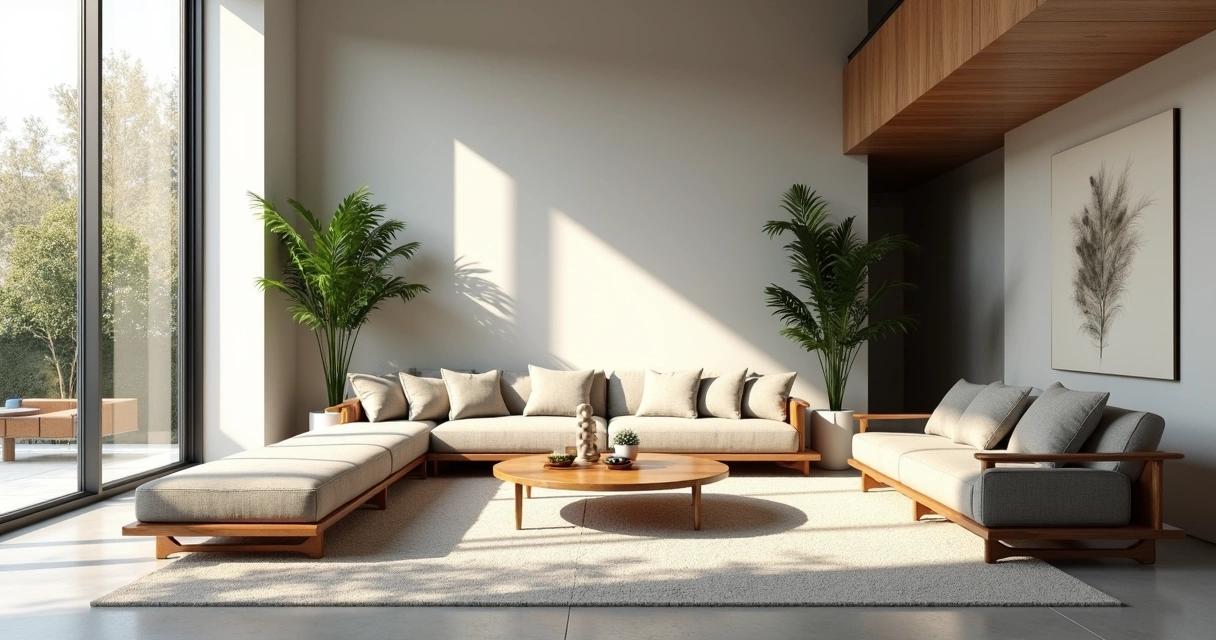
That one professional rendering with AI What used to take the whole weekend is now ready for the coffee break. Platforms such as Redraw deliver a hyper-realistic view in a few seconds, straight from the browser. 3D projects, automatic texturing and painlessly adjusted lighting: can you imagine that presentation to the client happening without a crisis?
IA para criar projetos de arquitetura

Optimization of layouts and plans

Have you ever considered asking the AI to reorganize a layout to gain more natural lighting or adjust circulatory flows? Well, today that's real. AI tools for creating architectural projects analyze and propose changes to plans, optimizing the use of space and functionality. It's almost like having a super-powered intern (except he never complains about cold coffee).

Automation of repetitive tasks

Nobody deserves to waste time adjusting basic details, applying textures, or rearranging furniture. With AI, boring routines become automatic. He was left with more time to dedicate to creation and to the details that matter. And, here among us, your time is worth gold!

Top AI tools for architects in 2025

International tools (Midjourney, DALL-E, Stable Diffusion)

Around the world, several AI solutions are already helping architects to develop conceptual arts and images in record time. They transform text into images, bring quick inspiration, and are great for brainstorming. But not all of them speak Portuguese, they are not always in tune with the reality of Brazilian offices, and sometimes the result is so surreal that... well, it's better to laugh than to cry.

Specialized architectural solutions

When it comes to automation of construction processes, volume generation and plant adaptation, some platforms have emerged in recent years thinking directly about the pain of architects. From the sketch to the final result, the goal is to always deliver more with less effort with the help of AI to create architectural projects. The difference lies in how much the tool understands the daily life of the Brazilian office, which is not always the case with imported solutions.

Redraw: the Brazilian solution that is changing the game

In this scenario, Redraw stands out as an AI platform for creating architectural projects designed for the national public. All accessible directly from the browser, without installing anything, and with support in Portuguese. Here, you transform scrawled drawings into realistic images, improve the quality of presentations, and generate animated videos using only a static rendering. The learning curve? Smooth, almost as easy as ordering a coffee with sugar (although someone always gets the point wrong...).

How to use AI in practice: from concept to final project

Conceptualization phase (ideation with AI)

The starting point is now more interesting: you type what you imagine, mix some references and let the AI generate visual suggestions. This feeds the creative process and allows quick presentations of concepts to the client, without having to explain using incomprehensible gestures or doodles.

Project development (refinement)

Based on initial proposals, you use AI tools to adjust proportions, test material combinations, or even identify layout problems. It's that part where the customer asks for “just a little bit more light” or “an extra wall”. Adjustments like this are no longer traumatic, since the repetition is the responsibility of the robots.

Presentation to the customer (professional rendering)

The time has come to shine. Hyper-realistic renders can be made in seconds, showing material textures, natural lighting, surrounding scenery, and even animation along the project. Redraw allows you to convert simple sketches into this type of final delivery, reducing the gap between expectation and reality. The customer sees, understands, and approves faster. (Hey, are you still spending nights messing with post-production?)

Optimized workflow with Redraw

  • Quickly import your files, drawings, or sketches
  • Choose the type of visualization: 3D, realistic, animated, etc.
  • Review and adjust settings in a few clicks, right in the cloud
  • Share the result with clients, colleagues, or in the portfolio

In the end, the workflow is so light that you're even surprised.

Redraw vs traditional tools: the Brazilian revolution

Comparing Redraw with conventional methods is almost unfair. We're talking about days versus seconds for a rendering. The computer doesn't have to be a supermachine. And the best thing: the price does not require selling a kidney.

  • Time: Rendering that took 1 to 4 days is ready in less than a minute
  • Cost: Goodbye to expensive outsourcing and reliance on high-performance equipment
  • Quality: Result ready for professional presentation, even if you only know the basics of AI or 3D
  • Support: The service in Portuguese and the active community in Brazil make a difference when it comes to tightening
Comparação de renderização rápida com tradicional

Success stories: architects who adopted AI

It sounds like sales pitch, but the results speak for themselves. Professionals and companies that started to include AI in the workflow report better deliveries and, above all, more free time. And you know the value of that in times of insane deadlines.

  • Time and resources: Projects delivered in much shorter time frames, without sacrificing nights and weekends
  • Productivity: Those who adopt AI start to absorb more demands, grow their portfolio and delight customers
  • Presentation: Impactful visual proposals help to close more contracts and avoid discussions about “that's not really what I wanted”
  • Real ROI: The investment pays off long before any traditional software subscription. Or rather, if it pays in time, money and reputation

Those who don't update end up being left behind. It's not terrorism, it's a fact.

The future of AI architecture

Artificial intelligence in architecture is just beginning. The next trends point to more autonomous virtual assistants, integration with BIM, budget automation, and even constructive suggestions based on technical standards.

  • Increasingly intuitive tools: just ask and see it happen
  • Collaborative, real-time projects with colleagues from anywhere
  • AI helping to avoid design errors before the work begins (and you saving yourself future rework and headaches)

The role of the architect changes. Creativity remains sovereign, but the job has become to create with artificial intelligence, never just automated. Your choices will define the value of the project, and AI will be behind the scenes, accelerating without stealing credit.

It's not a replacement tool, it's an evolution tool.

How to start using AI in your projects today

If curiosity struck, here's a recipe with almost no secrets:

  • First step: List the tasks that take the most time in your workflow
  • Look for easy-to-use platforms, such as Redraw, to test without obligation
  • Integrate little by little: Start with the most repetitive steps, move forward with the concepts and you will soon be using AI in every phase of the project
  • Final tip: Take advantage of tutorials, webinars, and support in Portuguese so you don't get lost in the learning curve

Experimenting is the best way. Take a free test, simulate a project, and see for yourself. Redraw is there to prove that sometimes it only takes one click to change everything.

Faq - frequently asked questions about AI in architecture

What is AI in architecture?

AI in architecture refers to the use of artificial intelligence to aid in the creation, enhancement, and presentation of architectural projects. This includes everything from automatic idea generation, plant optimization, and even hyper-realistic rendering of images and videos, all in a much faster and more accessible way than traditional methods.

How to use AI for architectural projects?

You can use AI by writing text commands to generate conceptual images, automating repetitive workflow tasks, improving visual presentations, and refining layouts based on intelligent analysis. Tools like Redraw allow you to transform sketches into professional renders with a few clicks.

What are the benefits of AI in architecture?

The main benefits are quick delivery, reduced costs, improved presentation quality, and openness to new ideas. AI also democratizes access to technology, allowing offices of all sizes to have access to resources previously restricted to large companies.

Are there free AI tools for architecture?

Some international tools offer limited free versions, but for professional and continuous use, the ideal is to look for platforms that offer quality, support, and advanced features, such as Redraw. It's worth trying for free and then deciding which plan best suits your needs.

Would it replace architects in projects?

No, not at all. AI acts as an assistant that accelerates steps and suggests possibilities, but the final decision and creativity remain with the architect. The professional's role evolves to use technology to their advantage, never being replaced by it.

Conclusion: Your Smart Choice for the Future

At the end of the day, using AI to create architectural projects is no longer a matter of fashion or luxury, it's an inevitable trend. Professionals who have already opened up to this technology are reaping the fruits in the form of time, quality and differentiation in the market. So why not try Redraw, learn more about how artificial intelligence can transform your projects and take that leap in your workflow? Take a test, challenge yourself to break the routine, and discover how AI can be your most valuable ally going forward.

Contact us from Redraw.

Share this article
Summary of the content
[

Blog

]

Related articles

Access Blog
Entrevista com Alexandre Kuhn, cofundador do Redraw
Redraw
21.05.2026

How Redraw Stood Out in the AI Race: Interview with Alexandre Kuhn, Co-Founder

Sergio Santos
5 min of reading

Redraw is the largest AI rendering platform for architecture in Latin America. Over 200,000 registered professionals, more than 500,000 renders generated per month, winner of South Summit 2026 in the Digital & Tech Solutions category. And it all started in Brazil.

We sat down with Alexandre Kuhn, co-founder of Redraw, to talk about how the company got here, what sets their technology apart from the dozens of generic AIs that flooded the market, and where AI rendering is headed.

About Redraw's origins

How did the idea for Redraw come about?

In 2022, my partner Sergio Santos came to me showing some architecture images he was generating with AI. I was an architect, a marketer, and obsessed with building a SaaS company — so I wanted to launch this product with Sergio. We started developing the prototype. Early on it genuinely wasn't great, but AI was just getting started and everyone's output was rough. ChatGPT only knew how to complete words. Nano Banana didn't even exist.

After 5 months we managed to launch Redraw to a closed group of early users. 112 people signed up on launch day. We closed for a month, reopened, and sure enough: we ended the first month with 300 customers, the second with 600, the third with 1,200, the fourth with 2,500 — and kept going from there. Redraw kept growing, taking shape. Our product evolved, we launched new models, and we learned our customers' real pain points.

Most architects were using rendering software only superficially because they didn't have time to master it. When we saw the potential of generative AI for images, it was obvious this problem could be solved. It wasn't about building "yet another AI image tool." It was about building the AI that architects actually needed.

And a bit of background on me and Sergio: I'm from Cascavel, Paraná, Brasil, and he's from Paragominas, Pará, Brasil. How did we meet? Around age 15, we ended up in the same Counter-Strike match.

Why focus on architecture instead of generic AI?

It's simple. I graduated in architecture in early 2022. I was an architect living the architect's life. I saw an opportunity to make a difference in the field I studied. And Sergio knew me well enough to know we could launch a product in that space, since he was already working in marketing.

The beginning is always the beginning. That first year of Redraw was a crash course in business for us. We learned that what we think doesn't matter — what the client thinks does. We weren't starting in a competitive landscape, but we had a clear focus and a target audience. That's what led us to what Redraw is today.

We understood that the differentiator wasn't making beautiful images. It was making faithful images. And to do that, we had to train models specifically for architecture, engineering, and interior design. You can't adapt generic AI for that. You have to build from scratch.

About the technology

What sets Redraw apart from the other AIs that call themselves "for architecture"?

Proprietary models. That's the short answer.

What happened over the last two years is this: a wave of tools appeared that take the ChatGPT or Gemini API, put an interface on top, and sell it as "AI for architecture." No proprietary model. No investment in training. They're reselling generic AI with a markup. Some charge R$ 100 for 10 renders — R$ 10 per image that someone could generate directly in ChatGPT.

Redraw has a team of AI specialists working daily to develop and refine models trained exclusively for architecture. Millions of images of real projects. When these models go through benchmarks, they outperform any generic AI on project fidelity. Because that's what they were built for.

But you also integrate ChatGPT and other models inside Redraw. What's the difference?

The difference is we don't resell. We optimize.

ChatGPT inside Redraw is not the same ChatGPT you use on the OpenAI website. Our team prepared and tuned it to deliver results directed at architecture. Same with Nano Banana. Same engines, but tuned for our context.

And on top of all that, we have Redraw's own proprietary models, which outperform each of those when it comes to project rendering. Professionals can compare right inside the platform and see for themselves.

The idea is for Redraw to be a hub. You come in, you have access to the best AIs on the market, all optimized for architecture, and you also have our models, which are the most advanced for the sector. No need for 5 different subscriptions.

Redraw goes beyond static rendering. What else does the platform do?

Photorealistic rendering is the core, but the platform has evolved a lot. Today Redraw has its own video generation tool for architecture, plus integrations with Veo 3 and Kling AI. You render the image, like the result, and turn it into a video — all within the same platform.

There's also Enhance Render, which takes a render from any software (Lumion, V-Ray, Enscape, anything) and elevates the quality in 30 seconds. A lot of professionals use this as a complement to the workflow they already have.

And more recently: a proprietary 3D object generation model for SketchUp. Need a piece of furniture, a light fixture, or vegetation that's not in your library? Generate it in Redraw and import it into your model.

The vision is for Redraw to be the complete AI platform for design professionals. Not a tool that does one thing. Beyond being a complete platform, we want to be an ecosystem for architecture.

About the market and competition

The AI-for-architecture market has grown a lot. How do you see the competition?

Real competition is small. Most of the tools that appeared are API resellers, like I said. They don't invest in proprietary technology. When the API changes its pricing or policy, they break.

The "competitors" we actually respect are the traditional software providers: V-Ray, Lumion, Enscape. They built the rendering market. They did important work. But their model is becoming obsolete. Local rendering, heavy GPU, hours of configuration. In 2026, that's unsustainable when AI delivers results in 30 seconds.

Chaos Group itself — which owns V-Ray, Corona, and Enscape — noticed this. They acquired Veras trying to enter the AI space. But buying a weak-quality tool doesn't solve the underlying problem.

We do have good competitors in the market, but by staying focused and talking to our clients every day, we manage to stand out. On the market side, we have a strong global focus. Redraw is currently the largest AI software for architecture in Latin America, and we want to reach the global stage too.

In the end, after the launch of many AIs on the market, Redraw only grew. The main profile we see is the client who has already tried everything, thought they could manage on their own, and ended up at Redraw. Because Redraw is easy and built for architects.

What about generic AIs? ChatGPT, ComfyUI, Stable Diffusion?

They're great tools for other purposes. ChatGPT is incredible for text, code, and analysis. ComfyUI is powerful for developers who want full customization. But none of them were built to render architecture projects.

The architect who tries to use ChatGPT for rendering quickly finds out: the image looks good but it's not their project. The AI invents everything. And then they enter a prompt engineering loop that takes more time than configuring V-Ray.

We see a lot of professionals arriving at Redraw frustrated with generic AI. They tried ChatGPT, tried ComfyUI, spent hours on it, and the result wasn't fit to present to a client. On Redraw, in 30 seconds, with the first render, the reaction is completely different.

About South Summit and expansion

Redraw won South Summit 2026 in Porto Alegre. What did that mean?

Over 2,000 companies entered from around the world, 50 finalists across 5 categories. Winning in the Digital & Tech Solutions category was recognition that the problem we're solving has global relevance. We were alongside incredible companies that are becoming world references. Being able to present Redraw at that level was an honor.

But the most important part was what came after: international visibility, contact with investors and strategic partners, and validation that what we're building has the potential to scale globally. We're also heading to South Summit in Spain. We were invited to attend as guests — we didn't enter the competition, but the invitation came and now we're going.

Redraw is Brazilian. What's it like competing globally from Latin America?

We were born in a market where professionals work with limited resources. A laptop instead of a workstation. A tight budget. Deliverables needed yesterday. Building a tool that works in that context forced us to be efficient. Accessible pricing, lightweight platform, fast results.

When we take that to markets like the US and Europe, where professionals have more resources, Redraw makes an even stronger impression. Because if it works on an architect's laptop in Minas Gerais, it works anywhere in the world.

Today we have over 200,000 users, most in Brazil, but with growing presence in Mexico, Colombia, Argentina, Chile, the US, Canada, and Europe. The platform operates in Portuguese, English, and Spanish, with native support in each language.

We also noticed that international users are more open to AI. We feel the drive to innovate from that audience. They're more plugged in and push AI all the way.

Where does Redraw go from here?

AI for architecture is just getting started. In 2 years, what we deliver today will seem basic. Models will get more precise, video generation will evolve, and 3D generation will integrate directly into modeling software.

Redraw will keep leading that. With our own AI team, our own models, and listening daily to the 200,000 professionals who use the platform. Every piece of feedback, every render, every use case helps us improve.

The goal hasn't changed since day one: give architects time back to design. The render is not the final product. The project is. We take care of the image so the professional can focus on what matters.

We are becoming an ecosystem for architects. It's not just a tool that fits into the rendering process. In Redraw, the professional can execute everything from start to finish.

About those just starting out

What advice would you give to architecture, engineering, and design students?

Tough one. Actually, I'll leave a reflection — for newcomers and veterans alike.

Think about the student entering university this year. It'll take 4 to 5 years to graduate. How much will AI technology have evolved by then? It's almost scary. The generation entering school right now will graduate into a market they can't predict. Everything might have changed. AI might have replaced 90% of the architectural process. Where will those professionals fit in?

We don't know what the future looks like. But we do know this: the professionals entering university today won't need to render, generate videos, or even model. They'll need to be smart enough to do their work with AI.

And that's a wake-up call. If you're thinking right now that AI won't reach your work — you're wrong. We need to adapt, to deliver the best and fastest results for our clients. And AI is how many professionals will do that.

What advice would you give to an architect who still isn't using AI?

Try it. Create a free account on Redraw, upload a screenshot of one of your projects, and see the result. It's 10 credits, no credit card, no commitment. The whole process takes 2 minutes.

Most people who try it don't go back to the old workflow. Not because we convinced them with an argument. Because the result speaks for itself. 30 seconds, a professional render, in the browser. When you compare that to 4 hours in V-Ray or 2 hours in Lumion, the decision is obvious.

And you don't need to abandon what you already use. A lot of people start with Enhance Render to elevate what they already produce with Lumion or Enscape. Then they start testing direct rendering in Redraw. And at some point they realize they don't need the traditional software anymore.

Every professional moves at their own pace. The important thing is not to stand still while the market moves forward.

Create a free Redraw account →

Redraw
12.05.2026

Artificial Intelligence for Architects: The Tools You Need to Know in 2026

Alexandre Kuhn
5 min of reading

Artificial intelligence is already part of the routine of anyone who designs. It isn't novelty, it isn't experimental anymore. In 2026, the question isn't “should I use AI?”, but “which tools and what for?”.

The problem is most online guides mix everything together. They drop 30 tools in a list and leave you to figure it out. In this article we'll break it down by category, only what actually works for architects, engineers and interior designers. No filler, no useless tools, only what will change your workflow.

AI rendering: where the revolution began

Rendering with AI is the highest-impact application for anyone who designs. What used to take hours with V-Ray, Lumion or Enscape now takes seconds. But not every image AI works for architecture. Let's break it down.

ChatGPT (GPT-4o)

ChatGPT generates incredible images. Anyone with a free account can ask for “modern living room with double-height ceiling” and get something visually impressive. The catch is that this isn't a render of your project. ChatGPT invents everything: proportions, materials, geometry, layout. Each generation is a different project. You don't control any of it.

For brainstorming and visual references, it works. To show a client what their project will look like, it doesn't.

Gemini (Google)

Similar pitch to ChatGPT. It generates images from text. Results improved a lot in 2026, but the core problem is the same: generic AI that doesn't understand a project. It doesn't accept 3D models, doesn't preserve fidelity, invents elements. Useful to explore ideas, not to deliver a render.

ComfyUI / Stable Diffusion

For technical users who want full control, ComfyUI with Stable Diffusion is the most flexible option. You build custom workflows, install specific LoRAs, tune every parameter. Results can be impressive.

The cost is high though: GPU of US$ 1,500 to US$ 4,000, models that weigh 80 GB+, weeks of learning curve, and constant churn (what worked last month is outdated now). For developers or AI enthusiasts, it makes sense. For the architect who wants fast day-to-day results, it isn't realistic.

Redraw: all of this inside one platform

Redraw solves what none of those tools solves alone. It is an AI platform trained specifically for architecture, engineering and interior design.

You upload a screenshot of your 3D model (SketchUp, Revit, ArchiCAD, any software) and in 20 to 40 seconds you get a photorealistic render that respects your project. No prompt. No setup. No expensive GPU. Straight from the browser.

Redraw also centralizes the best AIs in the market, all tuned for architecture: ChatGPT optimized for rendering, Gemini optimized, Nano Banana (based on Flux). Plus Redraw's own models, trained on millions of real project images, which beat any generic model on fidelity.

It doesn't stop at still renders. Redraw has its own AI video generation built for architecture, plus Veo 3 and Kling AI integrated. And its own 3D object generator for SketchUp.

In short: everything ChatGPT, Gemini, ComfyUI and Nano Banana do separately, Redraw does inside one platform, tuned for architects, for US$ 15 per month. No four subscriptions, no confusing interfaces, no time wasted adapting generic tools.

Create a free Redraw account →

Documentation and writing: Claude as your assistant

Architects don't live off renders alone. There are specifications, technical descriptions, client emails, commercial proposals, reports. All of it eats time and almost no one enjoys writing it.

Claude (by Anthropic) is the best AI for that kind of work. It handles long context, writes with technical precision, and stays consistent across large documents. You paste your brief, describe the project, and it produces a complete spec. Or reviews a technical report. Or structures a commercial proposal.

For anyone working on complex projects that demand detailed documentation, Claude saves hours of writing. And unlike generic chatbots, it doesn't invent technical info when it doesn't know. If it isn't sure, it says so.

Works on claude.ai or the desktop app. Free tier with usage limits, paid plans from US$ 20 per month.

Pricing: Limify for proposals backed by real data

This is a problem nearly every architect has: not knowing how to price work properly. You charge by gut feel, lose money without noticing, and present quotes in an Excel that doesn't sell.

Limify is a platform built to solve exactly that. It generates professional pricing proposals for architecture and engineering using real regional market data (CUB/SINAPI).

The flow is simple: you register your costs (labor, materials, travel, taxes) and Limify assembles the proposal. Four pricing models: per square meter, full project (from plan to execution following NBR 13532), render and 3D modeling, and by actual construction value.

What changes in practice:

Limify generates a shareable link of the proposal the client opens on phone or desktop. It's a polished visual presentation, with your studio branding, calculated margin and projected profit. Not a 47-tab spreadsheet. A proposal that sells.

There's also LimIA, an integrated AI that answers pricing questions in real time. “How much should I charge for an 80m² renovation in São Paulo?”, and it returns a price range based on regional data, with suggested margin.

Over 2,300 studios already use it. The numbers they report: 6 hours saved per proposal, average margin of 38%, proposal ready in 2 minutes. For anyone who has to guess pricing, it changes the game.

Free account, no credit card.

Create a free Limify account →

Social and posts: Canva

If you are an architect and need to post (in 2026, you do), Canva is the most practical tool out there. No graphic design background required. No Photoshop.

Canva has ready-made templates for Instagram, LinkedIn, Pinterest, stories, carousels. You swap images for your renders, tweak text, publish. Ten minutes to a professional post.

The free tier handles the basics. Canva Pro (US$ 13 per month) unlocks premium templates, background removal, auto-resize across formats, and their generative AI (Magic Design, Magic Eraser).

For studios that need an online presence without hiring a social media manager, Canva is the answer. Simple, fast, good output.

Video editing: CapCut and Captions

Video became mandatory for architects who want to stand out. Virtual tour of the project, before-and-after reels, concept explainer. Editing video usually eats too much time.

Two tools solve it with AI:

CapCut

CapCut (by ByteDance, same as TikTok) is a free video editor that runs on mobile and desktop. Auto-subtitles, ready templates, transitions, beginner-friendly. The free version is generous. Pro is US$ 8 per month.

For fast reels, project tours and content for Instagram and TikTok, CapCut is the most used.

Captions

Captions goes one step further: it edits the video for you. You record, upload, and the AI cuts bad takes, adds styled captions, fixes colors, even corrects eye contact. Almost like having a video editor working for you.

For architects who record content but have no time (or patience) to edit, Captions is the best pick. Plans from US$ 10 per month.

The complete architect's kit in 2026

NeedToolCost
AI renderingRedrawFrom US$ 15/month
Professional pricingLimifyFree to start
Documentation and writingClaudeFree (with limits) or US$ 20/mo
Posts and socialCanvaFree or US$ 13/mo
Video editingCapCut or CaptionsFree or from US$ 8/mo

For under US$ 70 per month, an architect has access to tools that 3 years ago would have required a full team. Renders, pricing, documentation, marketing and video. All with AI. All affordable.

Frequently asked questions

What is the best AI for architecture rendering?
Redraw is the 2026 reference. With over 200,000 users and 500,000 renders per month, it's the largest specialized AI platform for architecture. Unlike generic AIs such as ChatGPT or Gemini, Redraw preserves fidelity to the original project.

Is ChatGPT good for rendering projects?
For generating visual ideas, yes. For renders that represent the project faithfully, no. ChatGPT doesn't take a 3D model and invents elements every generation.

How can architects price work with AI?
Limify is a platform that produces professional pricing proposals using regional data (CUB/SINAPI). Includes LimIA, an integrated AI that answers pricing questions in real time. Free account at limify.pro.

What is the best AI for technical specifications?
Claude (Anthropic) is the best option for technical documentation. Handles long context, stays consistent and doesn't invent information when uncertain.

Do I need all these tools?
Not necessarily. Each solves a specific problem. If you had to start with one, Redraw is the one that delivers the most immediate impact in the day-to-day of anyone who designs.

Redraw
12.05.2026

Cloud Rendering vs Local Rendering: Why Architects Are Migrating in 2026

Alexandre Kuhn
5 min of reading

Rendering a project has always meant waiting. Hours of setup, a frozen machine, and that quiet prayer that nothing breaks halfway through. If you work in architecture, engineering or interior design, you've lived it.

The scene changed. There's now a real alternative to local rendering, and it isn't only “send it to a farm”. AI cloud rendering is changing how professionals deliver projects. Faster, cheaper, and without needing a US$ 3,000 workstation.

In this article we compare local rendering and cloud rendering for real. With numbers, actual costs, and what makes sense in your day-to-day.

What local rendering is, and why it is getting expensive

Local rendering is the traditional path. You model in SketchUp, Revit or ArchiCAD, configure materials, lighting, camera, and hit render on your machine using V-Ray, Lumion, Enscape, Twinmotion or Corona.

Does it work? It does. But it carries a cost most people don't sit down to calculate.

First, the hardware. To run Lumion fluently, the vendor itself recommends a high-performance dedicated GPU. In practice that means a PC between US$ 1,500 and US$ 5,000. And it needs replacing every 2 to 3 years because the software gets heavier each release.

Second, the software. A V-Ray license costs around US$ 540 a year. Lumion Pro is US$ 1,149 a year. Enscape is about US$ 575 a year. Twinmotion is US$ 445 a year for companies over US$ 1 million in revenue. Per seat.

Third, time. An interior render in V-Ray takes from 20 minutes to 4 hours depending on complexity and your machine. While rendering, the machine is unusable. Need 5 angles? Multiply by 5.

For a studio doing 3 projects a week, this becomes the bottleneck. It isn't a quality question. It's a productivity question.

What cloud rendering is

Cloud rendering means the processing leaves your computer and runs on remote servers. This happens in two very different ways.

The first is render farms. Services like Fox Render Farm and GarageFarm rent processing power by the hour. You export the file, upload, configure, and wait. The render runs on powerful machines and you download the result.

Render farms solve one problem: you don't need a strong machine. They create others. You pay per hour of use, you still configure everything as you would locally, and there's upload and download time. The real upside is freeing your computer and getting raw processing speed.

The second is AI cloud rendering. And here it changes completely.

With AI, you don't configure materials. You don't tweak lighting manually. You don't need a heavily optimized file. You upload a screenshot of your 3D model and in 20 to 40 seconds you get a photorealistic render. Work that took hours now takes seconds, with results that impress even V-Ray power users.

That's the difference that matters. Render farm is the same process on someone else's machine. AI rendering is a new process.

Real comparison: Local vs Cloud vs AI

Numbers side by side, for a solo architect running about 50 renders a month:

Local (V-Ray)Render FarmAI Cloud (Redraw)
Hardware costUS$ 2,500+ (amortized)NoneNone
Software cost~US$ 540/year (V-Ray)~US$ 10-40/mo (usage)~US$ 15/mo (Basic)
Time per render30 min to 4 hours15 min to 2 hours20 to 40 seconds
Setup requiredHigh (materials, light, camera)High (same as local)Minimal (upload + generate)
Technical knowledgeHighHighLow
Computer locked up?YesNoNo
Works on a laptop?BarelyYesYes

Now look at total cost. With local rendering, between hardware and software, a solo architect spends US$ 3,000 easily in year one. With Redraw, the Basic plan is US$ 15/month and delivers roughly 300 renders. That's under US$ 200 a year for capacity that traditional setups would need 15x more to match.

And the quality?

That's the question everyone asks. Fair one.

Two years ago, AI rendering was experimental. Results were generic, textures came out weird, and project geometry was lost entirely. Anyone who tested ChatGPT, ComfyUI or other generic AIs for rendering knows this. The image looks nice but has nothing to do with the actual project. The AI invents windows, changes proportions, adds elements that don't exist.

The issue with those tools is that they weren't built for architecture. ChatGPT generates great images, but it doesn't respect your project. ComfyUI gives technical control, but demands hours of workflow setup. Nano Banana produces interesting results, but doesn't keep fidelity to the original model.

Architecture-specific AI tools solved that. Redraw, for example, was trained specifically to understand architectural projects. It doesn't invent geometry. It respects lines, proportions, and the project's intent. And it does that in seconds, no complex prompt required.

It hasn't completely replaced V-Ray for every case. A render for an international competition with extreme detail still calls for traditional software. But for 90% of a studio's day-to-day, client presentations, facade studies, interior variations, AI delivers professional output at a fraction of the time and cost.

Why the market is migrating to the cloud

It isn't hype. It's math.

A 3-person studio with Lumion Pro spends US$ 3,447 a year on software alone. Add hardware and you blow past US$ 10,000 easily. With AI cloud rendering, the same studio spends under US$ 1,000 a year and delivers faster.

There's another factor people rarely mention: mobility. Local rendering ties you to a machine. On site, in a meeting, traveling, you don't render. With cloud rendering, you open the browser anywhere, upload the image, and in 30 seconds you have the result. It works on a laptop, tablet, even mobile.

The trend is clear. Traditional software is chasing it. Lumion launched cloud rendering. Twinmotion integrated with Unreal Cloud. V-Ray has Chaos Cloud. They know the future is cloud. The difference is those solutions still charge per processing hour and still require the same manual setup. It's render farm with a pretty brand.

AI changed the game because it killed the most expensive step: setup. It isn't only running on the cloud. It's not having to configure.

How Redraw works in practice

The process is simple. You take a screenshot of your 3D model (SketchUp, Revit, ArchiCAD, any software), upload to Redraw, and in up to 40 seconds you get a photorealistic render.

Nothing to install. No powerful GPU. No configuring material by material.

Redraw runs 100% in the browser. That means any machine, any OS. And because it's based on AI trained for architecture, it reads the image context: it tells interior from exterior, identifies materials, adjusts lighting automatically.

For those already using render software, Redraw also works as an enhancer. You can upload a V-Ray, Lumion or Enscape render and boost textures, lighting and realism in seconds. An extra quality layer without redoing the work.

How much you actually save

Let's run the math for a small studio (2 architects, ~100 renders/month):

Scenario 1: Local with V-Ray
Two V-Ray licenses: US$ 1,080/year
Two adequate workstations: ~US$ 4,000 (amortized over 3 years = ~US$ 1,333/year)
Time spent rendering: ~50 hours/month
Annual total: ~US$ 2,413 + opportunity cost of time

Scenario 2: AI Cloud with Redraw
Expert plan (2 users): US$ 32/month = US$ 384/year
Required hardware: any laptop
Time spent rendering: ~3 hours/month
Annual total: US$ 384

Direct savings of over US$ 2,000 a year. But the real win is time. 47 hours a month that come back to design, meet clients, or just live.

Frequently asked questions

Does cloud rendering need fast internet?
It needs internet, but it doesn't have to be ultra fast. Because you upload images (not heavy 3D files), a 10 Mbps connection already works well.

Does AI rendering replace V-Ray?
For most day-to-day studio use, yes. For projects that demand absolute technical control (complex animations, engineering detailing), V-Ray still has a place. But a shrinking one.

Does cloud rendering preserve project fidelity?
Depends on the tool. Generic AI like ChatGPT and ComfyUI invent elements and alter the project. Specialized tools like Redraw were trained to preserve proportions, geometry and materials.

Can I use cloud rendering for client presentations?
Yes. The quality from specialized AI renderers is already professional enough for presentations, social posts and portfolios.

Are render farms and AI rendering the same thing?
No. A render farm is remote processing of the traditional process. AI rendering is a different process, where artificial intelligence generates the image directly, with no manual material or lighting setup.

How much does AI rendering cost?
On Redraw, the entry plan costs US$ 15 a month and includes around 300 renders. A fraction of traditional software license costs.

Try Redraw now →