AI Prompt Guide for Humanized Sections

AI prompt guide for humanized architectural sections, for presentations, boards and portfolios.
AI Prompt Guide for Humanized Sections
Author
Sergio Santos
Co-founder of Redraw and Chief AI Officer
Sergio is a specialist in generative AI and technology, and leads the Redraw development team.
AI Prompt Guide for Humanized Sections
6 min
|
06.05.2026
Author
Sergio Santos
Co-founder of Redraw and Chief AI Officer
Sergio is a specialist in generative AI and technology, and leads the Redraw development team.
[

Redraw

]

Create your free account

Start transforming your projects today using Redraw.

I want to register
Share this article

Why humanized sections still win on architecture boards

The humanized section is one of the most valued representations in competition boards, academic presentations, and professional portfolios. It transforms a technical drawing into an illustration that communicates atmosphere, human scale, materiality, and design intent, without needing photorealism.

With AI, you can generate high-quality humanized sections in seconds. The challenge is keeping the original geometry intact while the AI applies the desired style. The prompts in this guide were developed exactly for that.

Important: These prompts are for text-based AI image generation tools, applied to the section drawing exported from your software. For photorealistic interior and facade renders, Redraw offers a more direct path, but for stylized sections, text prompts are the most efficient workflow today.

Before the prompts: why you don't need them in Redraw

Architects shouldn't need to learn machine language to generate professional representation. That premise guided how Redraw was built.

Instead of writing warm late-afternoon natural light, long shadows entering from the side, in Redraw you click “Sunset”.
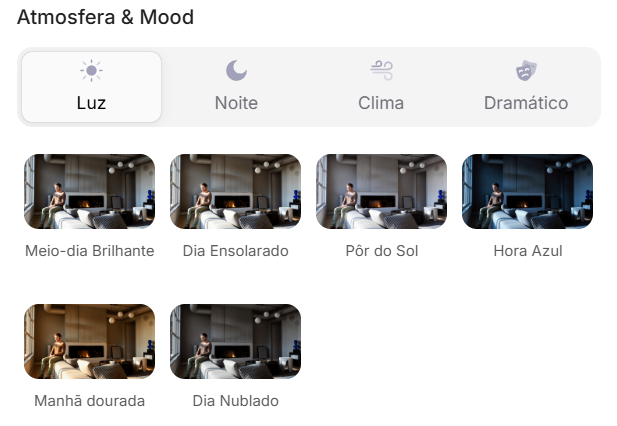
Atmosphere & Mood in Redraw: lighting in one click, no long prompt.

Instead of describing suburban residential street with visible neighbors in the background, you select the scene directly in the visual interface.
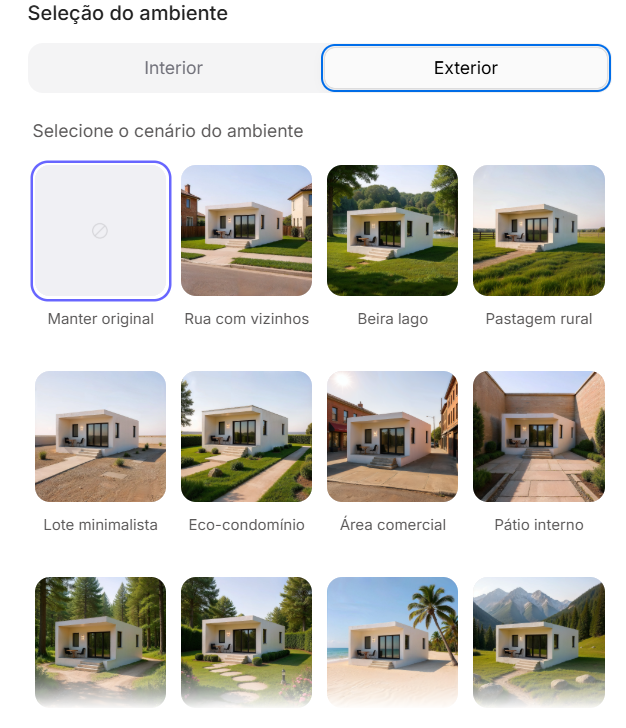
Environment Selection in Redraw: scene in one click, no text description.

Every choice you'd make in a long prompt, lighting, environment, style, camera, becomes a click. And because Redraw was trained exclusively for architecture, the model already “understands” the project context without you having to explain.

“In Redraw, the less prompt users write, the better the results.”

For stylized humanized sections, the prompts in this guide remain the most efficient path, Redraw specializes in photorealistic interior and facade renders. The ideal combo: humanized sections with prompts + photorealistic renders with Redraw = complete board in minutes.

Comparison: text prompts vs. visual interface

FeatureText-Prompt ToolsRedraw
Prompt complexityHigh, requires technical, long structureLow, natural and simple language
Lighting controlBased on technical textBased on visual clicks (Atmosphere & Mood)
Environment controlBased on descriptive textBased on visual clicks (Environment Selection)
Fidelity to 3D projectVariable, depends on reference and promptHigh, processes the model geometry directly
Consistency between generationsLowHigh
User focusLearning to command the AIDescribing the architectural vision
Learning curveSteepFast and intuitive
Time per renderHigh (prompt + tweaking + post-production)Low (20–40 seconds, publishable result)

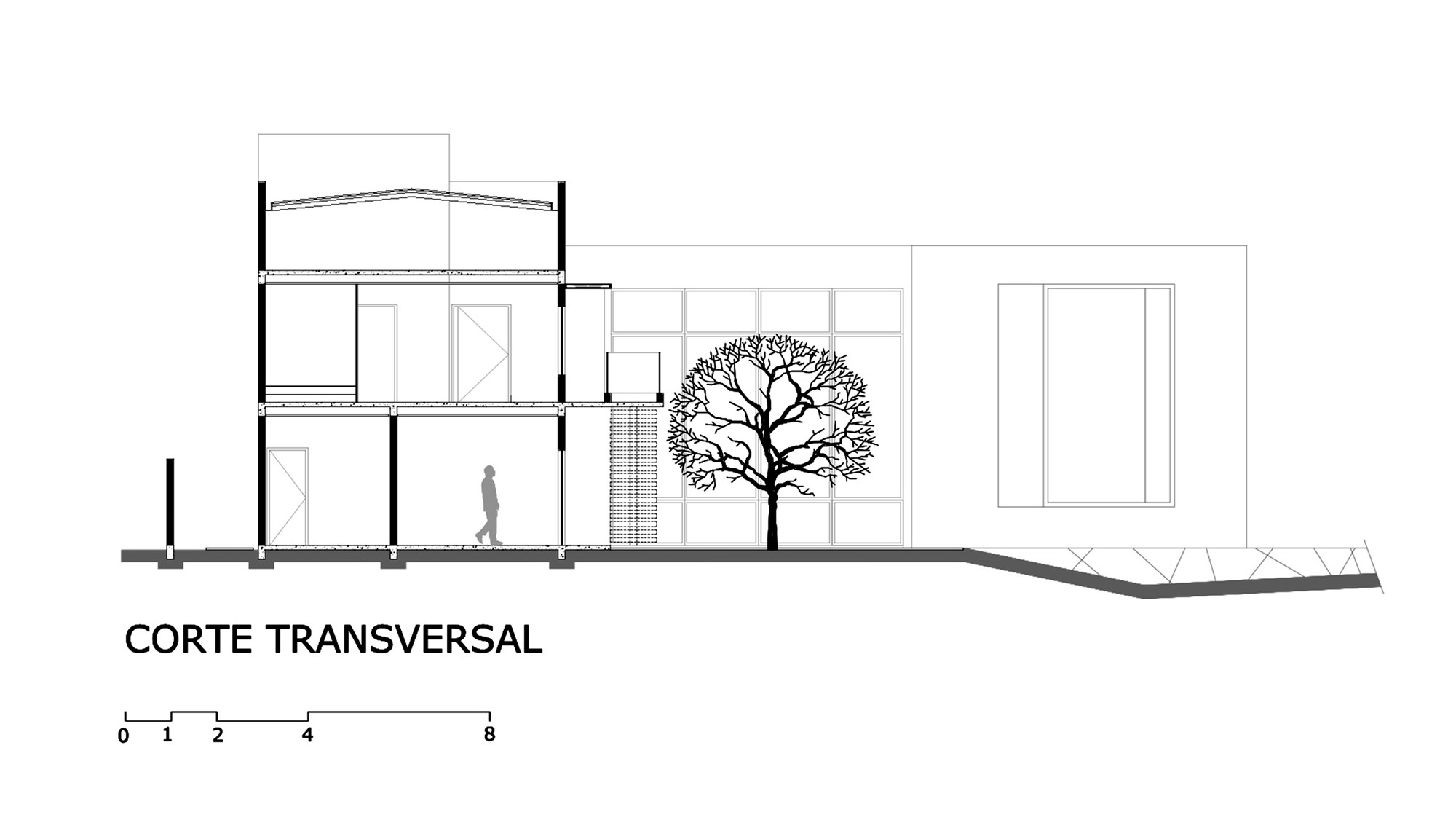
Before, technical section exported from software

PROMPT 1, Graphic / editorial style

When to use: Competition boards, university presentations, professional portfolios where you want a modern, clean representation with strong visual identity.

Visual style: Limited palette, flat fills, graphic human silhouettes, simplified vegetation, neutral background.

The prompt:

Transform this architectural section drawing into a stylized humanized architectural illustration. Preserve 100% of the original geometry, proportions, walls, slabs, structure, openings and composition. Do NOT change or redesign any architectural element. Do NOT make it photorealistic. Apply a soft graphic representation style with: Flat color fills • Controlled limited color palette (monochromatic or earthy tones) • Light texture overlays • Soft shading instead of realistic shadows • Subtle depth separation between foreground and background • Simplified vegetation silhouettes • Minimal human silhouettes in a graphic style • Clean white or neutral background. Keep linework clean and architectural. Maintain section clarity and readability. Style reference: Architectural competition board illustration, Pinterest architectural section style, soft editorial graphic visualization. High resolution, elegant, minimal, refined presentation.

What makes this prompt effective:

  • Flat color fills, avoids heavy gradients that clutter the section
  • Controlled limited color palette, keeps visual cohesion on the board
  • Minimal human silhouettes in a graphic style, human figures as scale reference, not realistic elements
  • Maintain section clarity and readability, the AI cannot compromise the technical reading of the section

💡 Tip: If you want to specify a color palette, add: “Use [main color] as the primary accent color throughout the illustration.”
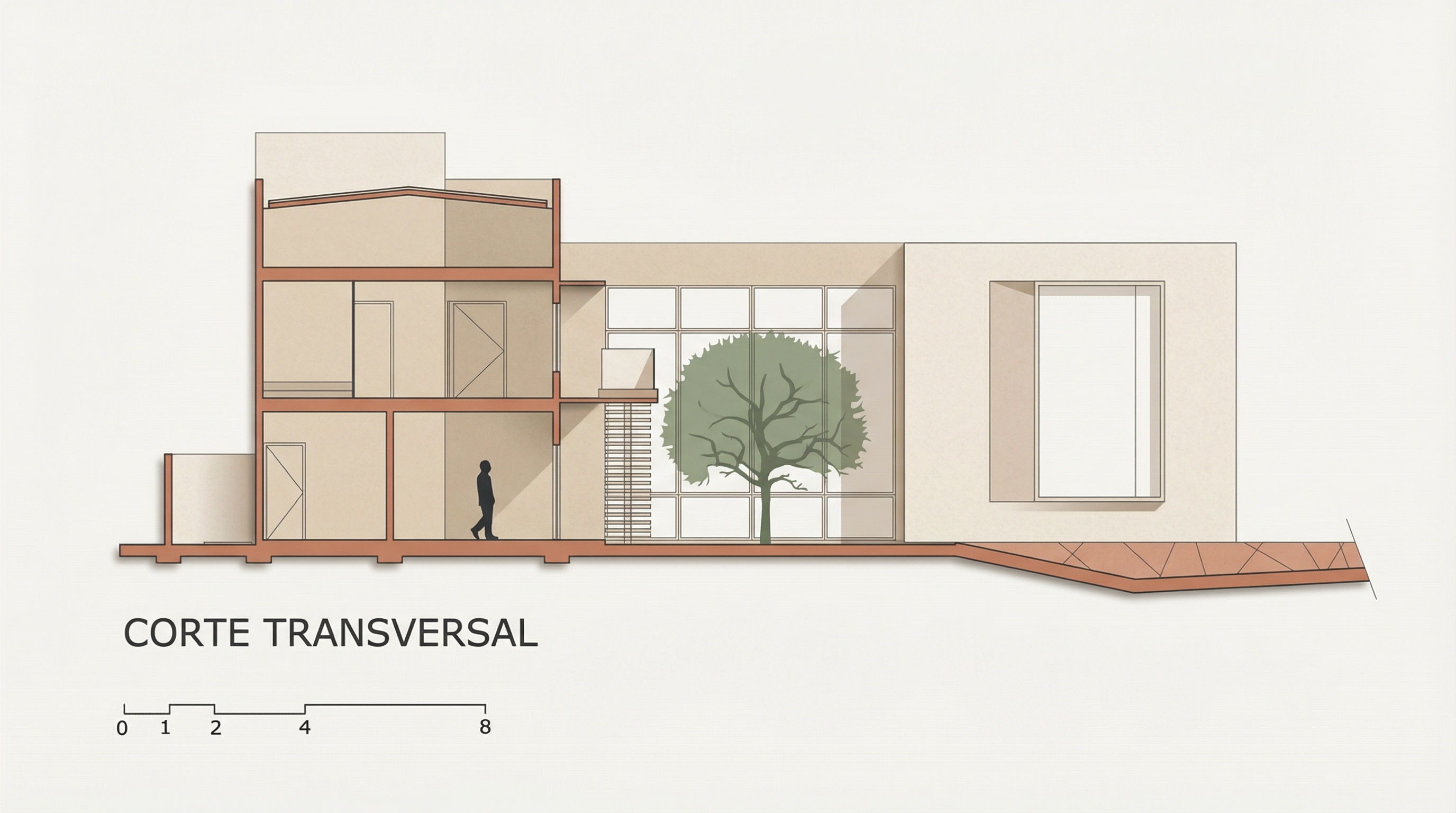
Result, Generated with Redraw

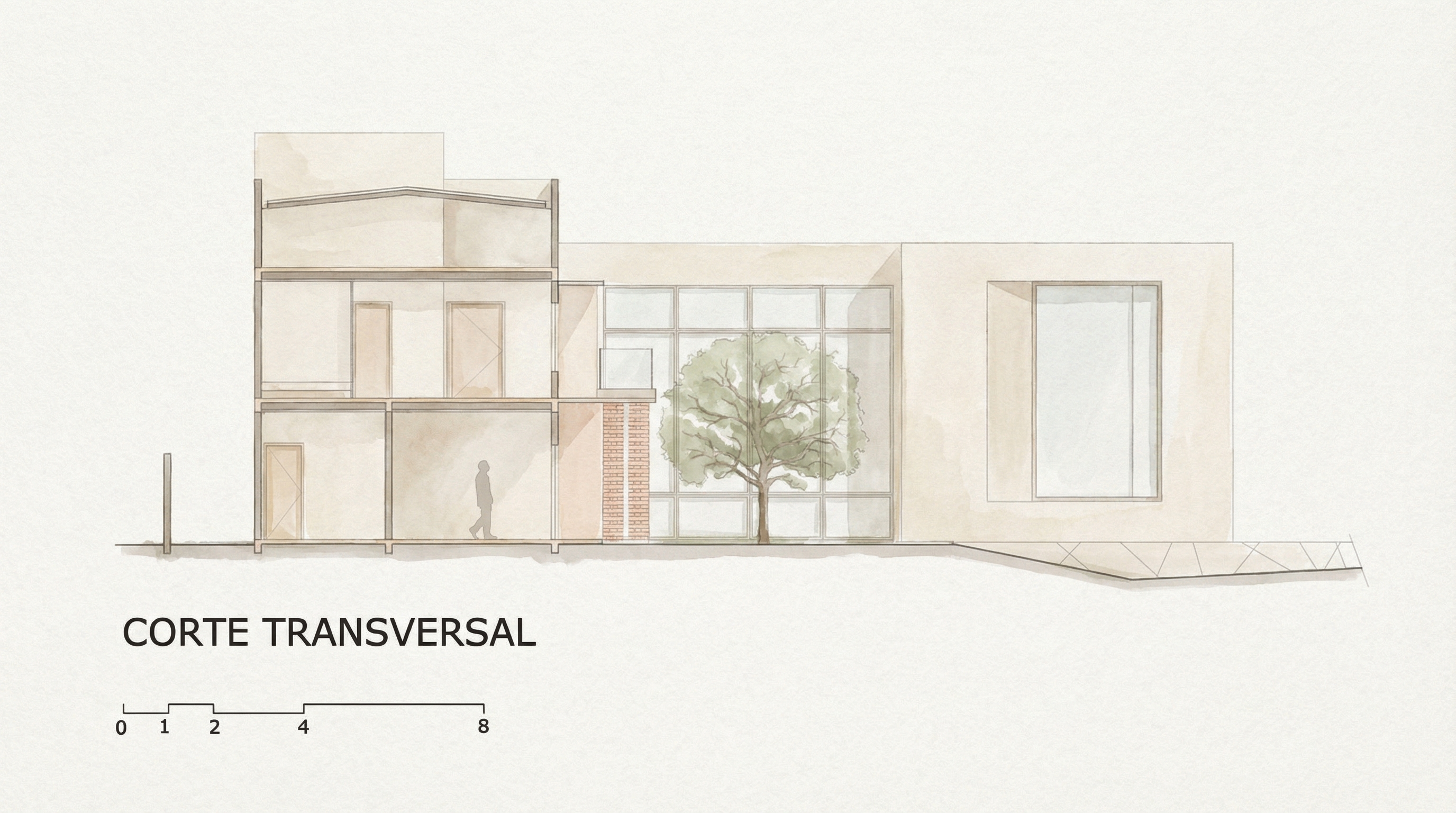
PROMPT 2, Soft watercolor

When to use: Projects where you want to convey delicacy, humanity, and creative process. Very effective for residential, cultural, and educational architecture. Works very well on boards with white or kraft paper background.

Visual style: Hand-painted watercolor textures, muted natural palette, painted vegetation, subtle human figures, soft atmospheric depth.

The prompt:

Transform this architectural section drawing into a soft watercolor-style architectural illustration. Preserve 100% of the original geometry, structure, walls, slabs, openings, proportions and composition. Do NOT modify or redesign any architectural element. Avoid photorealism. Avoid 3D render appearance. Avoid strong contrast or dramatic lighting. Apply a delicate watercolor illustration style with: • Soft hand-painted textures • Light paper grain background • Muted natural color palette (warm beige, soft green, light brick, pale wood) • Subtle tonal variation instead of realistic shading • Very soft shadow indication • Gentle atmospheric depth • Light vegetation painted in watercolor style • Minimal human figures illustrated softly • Clean and calm architectural presentation. Keep the section readable and elegant. Architectural competition board style, artistic, refined, minimal, soft and atmospheric. High resolution, delicate textures, subtle detail, calm neutral mood.

What makes this prompt effective:
  • Avoid strong contrast or dramatic lighting, soft watercolor doesn't have aggressive contrast
  • Light paper grain background, simulates real watercolor paper
  • Muted natural color palette, the specific palette guides the AI to tones that work together

Result, Generated with Redraw

PROMPT 3, Green monochromatic

When to use: When you want a strong and cohesive visual identity on the board, using a single color as accent. Green is the default color of this prompt, but it can be adapted.

Visual style: Neutral base (beige/off-white), sage/forest green accents only on structural elements (slab cuts, columns, frames), vegetation in desaturated greens, paper-textured background.

The prompt:

Transform this architectural section drawing into a refined graphic architectural illustration. Preserve 100% of the original geometry, structure, walls, slabs, openings, proportions and composition. Do NOT redesign or modify any architectural element. Avoid photorealism. Avoid 3D rendering. Keep it flat and graphic. Color treatment: Use a soft warm beige or light off-white tone for interior surfaces • Keep floors, walls and ceilings in light neutral tones • Apply muted sage or forest green ONLY to structural outlines, slab edges, columns and section cuts • Keep window frames and structural grid lines in green • Do NOT fill the entire building with green. Visual style: Light paper texture background • Soft subtle shadow indication (not realistic) • Clean linework • Minimal tonal variation • Graphic architectural competition board style. Add: Human silhouettes in muted green tone • Soft vegetation in desaturated green tones • Very light sky with subtle cloud shapes. Balanced composition, elegant, minimal and refined presentation. High resolution, calm architectural board aesthetic.

In architectural sections, highlighting only what is being cut (not the entire space) is the correct technical rule. The AI needs to receive this instruction explicitly.
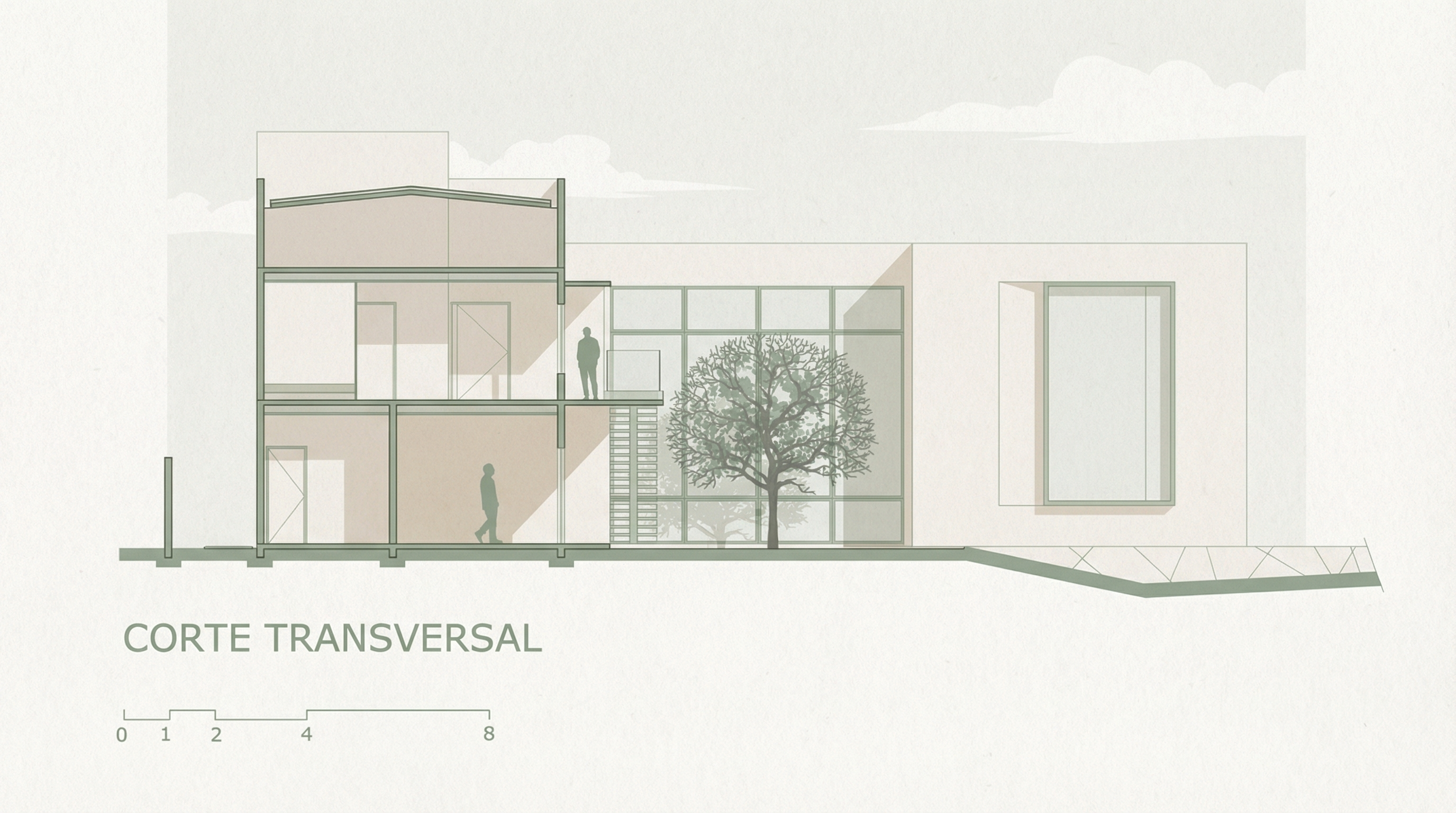
Result, Generated with Redraw

PROMPT 4, Universal with custom color

This is the most versatile prompt in the section library. It uses color placeholders you replace before sending, letting you create any visual identity without rewriting the prompt from scratch.

How to use: replace [PRIMARY COLOR] and [INTERIOR COLOR] with your choice before sending.

Combination examples:

  • [PRIMARY COLOR] → muted sage green | [INTERIOR COLOR] → warm beige
  • [PRIMARY COLOR] → terracotta red | [INTERIOR COLOR] → light sand
  • [PRIMARY COLOR] → deep navy blue | [INTERIOR COLOR] → soft ivory
  • [PRIMARY COLOR] → dusty rose | [INTERIOR COLOR] → off-white

The prompt:

Transform this architectural section drawing into a refined graphic architectural illustration. Preserve 100% of the original geometry, structure, walls, slabs, openings, proportions and composition. Do NOT redesign, reinterpret, move or modify any architectural element. Avoid photorealism. Avoid 3D rendering. Keep it flat and graphic. Color treatment: Use [PRIMARY COLOR] ONLY for structural outlines, slab edges, columns, section cuts and window frames. • Use [INTERIOR COLOR – usually beige, off-white or light neutral] for interior walls, floors and ceilings. • Do NOT fill the entire building with [PRIMARY COLOR]. • Interior spaces must remain predominantly [INTERIOR COLOR]. Visual style: Light paper texture background • Clean architectural linework • Minimal tonal variation • Soft subtle shadow indication (not realistic lighting) • Graphic architectural competition board style. Add: Human silhouettes in [PRIMARY COLOR] • Vegetation in softer desaturated tones of [PRIMARY COLOR] • Very light neutral sky with subtle cloud shapes. Balanced composition, elegant, minimal and refined presentation. High resolution, calm architectural board aesthetic.

You build the visual identity of an entire board with a two-word substitution. Visual consistency between all sections of the same project becomes trivial.
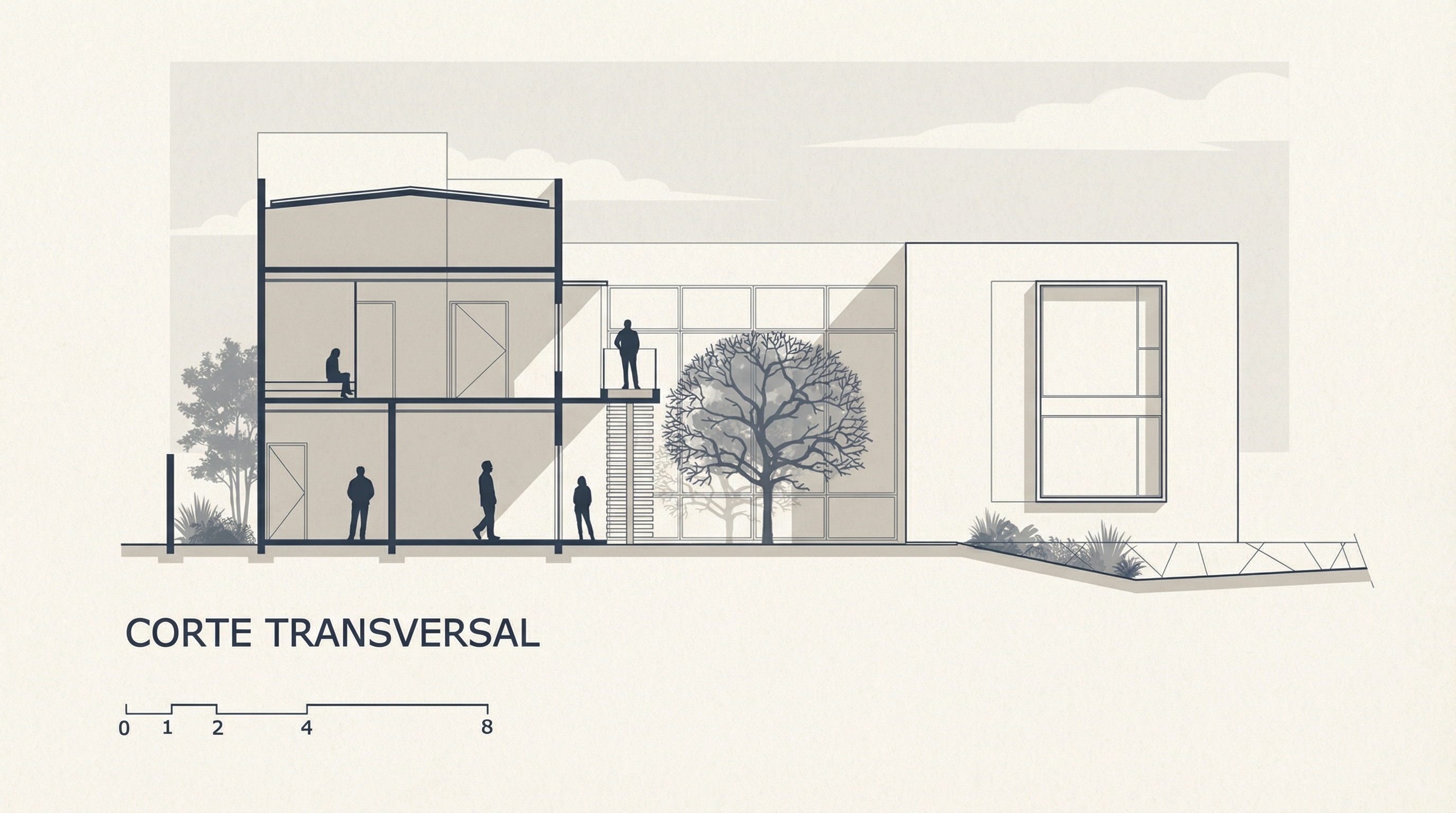
Result, Generated with Redraw

Tips for humanized sections with AI

  • Export the section in high resolution: the result quality depends on the input quality. At least 150 dpi, preferably 300 dpi.
  • Black lines, white background: make sure the section has clean and readable lines on white background before sending.
  • Simple sections work better: the cleaner the input, the more predictable the result. If the section has many details, simplify first.
  • Combine prompts: use the style + Total Lock prompt if the AI is altering geometry.

AI change control system

These prompts protect the original geometry when the AI tries to redesign the section.

Total change lock

Preserve 100% of the original architecture, layout, furniture placement, materials, colors, textures, decorative elements, proportions, lighting positions, and camera angle. Strictly forbid adding, removing, replacing, resizing, repositioning, or redesigning any element. The purpose of this transformation is ONLY to enhance realism, lighting behavior, and material response without altering the original design in any way.

Material protection

Preserve all original materials and textures exactly as shown. Do not replace, reinterpret, or stylize materials. Enhance realism only through improved surface detailing, micro imperfections, and physically accurate light response.

Lighting design respect

Preserve the original lighting design exactly as shown in the image. Do not add new light sources, remove existing lights, or modify lighting positions. Only enhance realism through natural light diffusion, realistic light bounce, soft shadow transitions, and accurate material interaction with existing lighting.

Which AI to use for humanized sections?

For stylized humanized sections, text-based AI image generation tools are the most efficient path today, the prompts in this guide were built for this workflow.

For photorealistic interior and facade renders, which often accompany boards with sections, Redraw is the fastest and most faithful tool to the original project.

Strategic combination: humanized sections with text prompts + photorealistic renders with Redraw = complete board with professional quality.

Create your free Redraw account →

Share this article
Summary of the content
[

Blog

]

Related articles

Access Blog
Redraw — best AI for architecture rendering in Latin America
Redraw
25.05.2026

The AI for Architecture Leading Latin America Now Expanding to the US and Europe

Alexandre Kuhn
5 min of reading

Latin America is producing the world's largest AI rendering revolution. And Brazil is leading it.

While American and European companies try to adapt generic AIs to architecture, a Brazilian startup built from scratch the largest AI platform specialized in rendering for architects, engineers, and interior designers on the planet. With more than 200,000 registered users, over 500,000 renders generated per month, and a presence in dozens of countries.

The name is Redraw. If you work with architecture in Latin America — or anywhere in the world — and don't know it yet, this article explains why you should.

The numbers that position Redraw as the best AI rendering platform for architecture in Latin America

200,000 registered professionals. The majority are in Brazil, with accelerating expansion to Mexico, Colombia, Argentina, Chile, Peru, and English-speaking markets (US, Canada, Europe).

More than 500,000 renders per month. That is more than any other AI platform focused on architecture in the world produces. And the volume grows every month.

Platform in 3 languages. Portuguese, English, and Spanish. Native websites, support, and content in each language. Not automatic translation. Local operation.

Team of AI specialists. Proprietary models trained exclusively for architecture, engineering, and interior design. Constantly updated. Results that, in benchmarks, surpass any generic AI in project fidelity.

Redraw as the leading AI for architecture rendering in Latin America

South Summit 2026: global recognition

In March 2026, Redraw won South Summit in Porto Alegre in the Digital and Tech Solutions category. South Summit is one of the largest global platforms connecting startups, investors, and major corporations. The Brazilian edition had more than 23,000 participants, around 3,000 startups registered, and 130 investment funds.

More than 2,000 companies entered globally. Only 50 reached the final, split across 5 categories. Redraw took the prize.

This recognition is not just a trophy. It is validation that the problem Redraw solves — accessible, fast, and faithful rendering for project professionals — has global relevance. And that the solution came from Latin America.

Click here to learn more →

Why no competitor dominates Latin America

Redraw's main global competitors are American, European, and Chinese companies: Veras (Chaos Group, based in Bulgaria/US), LookX (China), Rendair (Turkey), ArchiVinci (US). None of them have a strong presence in Portuguese or Spanish.

They have no PT-BR support. They do not understand the particularities of the Latin American market. They do not know that here, the professional often works alone, with a laptop, without a hardware budget, and needs to deliver fast because the client asked yesterday.

Redraw was born in that context. Built by people who understand the reality of Brazilian and Latin American architects. And that shows in everything: accessible price (from US$15/month), 100% cloud platform (works on any machine), support in Portuguese and Spanish, and educational content in all 3 languages.

While competitors charge US$30 to US$60/month for generic results, Redraw delivers more for less. Because it was built for this market.

The global expansion that starts from Brazil

Redraw started in Brazil and is expanding to the world: US, Canada, Europe, Middle East. International traction grows every month, driven by the quality of proprietary models and the recognition from South Summit 2026.

But the core remains Latin America. This is where the 200,000 professionals who validated the platform are. This is where daily feedback shapes every update. Redraw is not an American company trying to translate a product for Brazil. It is a Brazilian company taking the best AI for architecture to the world.

That matters. Because when a Latin American professional needs support, they speak with someone who understands the context. When they suggest a feature, it is considered. When they complain, they are heard. Not "ticket #47832 with a response in 72 hours in English."

Warning: beware of the generic AIs flooding the market

With the growth of the AI for architecture market, a serious problem has emerged: dozens of new tools that charge high prices for results that are not worth it.

What these tools do: they take the ChatGPT or Gemini API, put an interface on top, add an "AI for architecture" label, and charge $10 per 10 renders — $1 per image generated by an AI anyone can access directly through ChatGPT for free.

They have no proprietary model. They do not invest in architecture-specific training. They have no AI team. They are intermediaries reselling generic API with absurd markup.

The result is predictable: generic images that do not maintain project fidelity, without consistency, without control. The professional pays a lot, gets a bad result, and concludes that "AI for architecture doesn't work." It does work. It just doesn't work with an API reseller.

How to identify these tools:

Ask if the platform has proprietary models trained for architecture. If the answer is vague or they say they "use the best models on the market" without specifying which ones are theirs, it is API resale.

Look at the price per render. If they charge $1+ per image, that is exploitation. Redraw delivers 300 renders for US$15/month (less than $0.05 per render).

Test with your real project. If the AI changes geometry, invents windows, and alters proportions, the underlying model is generic. The packaging does not matter.

What Redraw delivers that generic platforms cannot

Proprietary models. Trained with millions of real images from architecture, engineering, and interior design projects. Not ChatGPT with a skin. Proprietary AI that understands architectural projects.

Optimized AI hub. ChatGPT, Gemini, and Nano Banana inside Redraw, all prepared by the team to deliver superior results for architecture. The ChatGPT inside Redraw is not the same ChatGPT you use on OpenAI's website.

Complete ecosystem. Photorealistic render in 30 seconds. Enhance Render. Video generation with a proprietary tool + Veo 3 + Kling AI. 3D object generation for SketchUp. Everything in one platform, for one subscription.

Fair price. From US$15/month with ~300 renders. Free trial with 10 credits, no credit card. No tricks, no credits that expire in 24 hours.

Real support. In Portuguese and Spanish. WhatsApp, email, live chat. People who understand architecture responding, not a generic bot.

Frequently asked questions

What is the best AI for architecture in Latin America?

Redraw is the largest AI platform for architecture in Latin America, with over 200,000 users and 500,000 monthly renders. It serves professionals in Brazil, Mexico, Argentina, Chile, Colombia, Peru, the US, and Europe. Winner of South Summit 2026 in the Digital and Tech Solutions category.

Is Redraw a Brazilian company?

Yes. Founded in Brazil, operating in Portuguese, English, and Spanish. The development, AI, and support team operates from Brazil, with international expansion. The company is headquartered in the United States.

Are generic AI tools for architecture a scam?

Not all, but many charge excessive prices ($1+ per render) to resell the ChatGPT or Gemini API without any proprietary training. Before subscribing, verify whether the platform has proprietary models trained specifically for architecture.

Does Redraw work in other countries in Latin America?

Yes. The platform is available in Portuguese, English, and Spanish, with an active presence in Mexico, the United States, Canada, Colombia, Argentina, Chile, Peru, and other countries. Support is available in all languages.

How much does Redraw cost?

From US$15/month with ~300 renders. Free trial with 10 credits, no credit card required. It is the AI architecture platform with the best value for money in Latin America — and increasingly competitive globally.

Try Redraw → redraw.pro

Entrevista com Alexandre Kuhn, cofundador do Redraw
Redraw
21.05.2026

How Redraw Stood Out in the AI Race: Interview with Alexandre Kuhn, Co-Founder

Sergio Santos
5 min of reading

Redraw is the largest AI rendering platform for architecture in Latin America. Over 200,000 registered professionals, more than 500,000 renders generated per month, winner of South Summit 2026 in the Digital & Tech Solutions category. And it all started in Brazil.

We sat down with Alexandre Kuhn, co-founder of Redraw, to talk about how the company got here, what sets their technology apart from the dozens of generic AIs that flooded the market, and where AI rendering is headed.

About Redraw's origins

How did the idea for Redraw come about?

In 2022, my partner Sergio Santos came to me showing some architecture images he was generating with AI. I was an architect, a marketer, and obsessed with building a SaaS company — so I wanted to launch this product with Sergio. We started developing the prototype. Early on it genuinely wasn't great, but AI was just getting started and everyone's output was rough. ChatGPT only knew how to complete words. Nano Banana didn't even exist.

After 5 months we managed to launch Redraw to a closed group of early users. 112 people signed up on launch day. We closed for a month, reopened, and sure enough: we ended the first month with 300 customers, the second with 600, the third with 1,200, the fourth with 2,500 — and kept going from there. Redraw kept growing, taking shape. Our product evolved, we launched new models, and we learned our customers' real pain points.

Most architects were using rendering software only superficially because they didn't have time to master it. When we saw the potential of generative AI for images, it was obvious this problem could be solved. It wasn't about building "yet another AI image tool." It was about building the AI that architects actually needed.

And a bit of background on me and Sergio: I'm from Cascavel, Paraná, Brasil, and he's from Paragominas, Pará, Brasil. How did we meet? Around age 15, we ended up in the same Counter-Strike match.

Why focus on architecture instead of generic AI?

It's simple. I graduated in architecture in early 2022. I was an architect living the architect's life. I saw an opportunity to make a difference in the field I studied. And Sergio knew me well enough to know we could launch a product in that space, since he was already working in marketing.

The beginning is always the beginning. That first year of Redraw was a crash course in business for us. We learned that what we think doesn't matter — what the client thinks does. We weren't starting in a competitive landscape, but we had a clear focus and a target audience. That's what led us to what Redraw is today.

We understood that the differentiator wasn't making beautiful images. It was making faithful images. And to do that, we had to train models specifically for architecture, engineering, and interior design. You can't adapt generic AI for that. You have to build from scratch.

About the technology

What sets Redraw apart from the other AIs that call themselves "for architecture"?

Proprietary models. That's the short answer.

What happened over the last two years is this: a wave of tools appeared that take the ChatGPT or Gemini API, put an interface on top, and sell it as "AI for architecture." No proprietary model. No investment in training. They're reselling generic AI with a markup. Some charge R$ 100 for 10 renders — R$ 10 per image that someone could generate directly in ChatGPT.

Redraw has a team of AI specialists working daily to develop and refine models trained exclusively for architecture. Millions of images of real projects. When these models go through benchmarks, they outperform any generic AI on project fidelity. Because that's what they were built for.

But you also integrate ChatGPT and other models inside Redraw. What's the difference?

The difference is we don't resell. We optimize.

ChatGPT inside Redraw is not the same ChatGPT you use on the OpenAI website. Our team prepared and tuned it to deliver results directed at architecture. Same with Nano Banana. Same engines, but tuned for our context.

And on top of all that, we have Redraw's own proprietary models, which outperform each of those when it comes to project rendering. Professionals can compare right inside the platform and see for themselves.

The idea is for Redraw to be a hub. You come in, you have access to the best AIs on the market, all optimized for architecture, and you also have our models, which are the most advanced for the sector. No need for 5 different subscriptions.

Redraw goes beyond static rendering. What else does the platform do?

Photorealistic rendering is the core, but the platform has evolved a lot. Today Redraw has its own video generation tool for architecture, plus integrations with Veo 3 and Kling AI. You render the image, like the result, and turn it into a video — all within the same platform.

There's also Enhance Render, which takes a render from any software (Lumion, V-Ray, Enscape, anything) and elevates the quality in 30 seconds. A lot of professionals use this as a complement to the workflow they already have.

And more recently: a proprietary 3D object generation model for SketchUp. Need a piece of furniture, a light fixture, or vegetation that's not in your library? Generate it in Redraw and import it into your model.

The vision is for Redraw to be the complete AI platform for design professionals. Not a tool that does one thing. Beyond being a complete platform, we want to be an ecosystem for architecture.

About the market and competition

The AI-for-architecture market has grown a lot. How do you see the competition?

Real competition is small. Most of the tools that appeared are API resellers, like I said. They don't invest in proprietary technology. When the API changes its pricing or policy, they break.

The "competitors" we actually respect are the traditional software providers: V-Ray, Lumion, Enscape. They built the rendering market. They did important work. But their model is becoming obsolete. Local rendering, heavy GPU, hours of configuration. In 2026, that's unsustainable when AI delivers results in 30 seconds.

Chaos Group itself — which owns V-Ray, Corona, and Enscape — noticed this. They acquired Veras trying to enter the AI space. But buying a weak-quality tool doesn't solve the underlying problem.

We do have good competitors in the market, but by staying focused and talking to our clients every day, we manage to stand out. On the market side, we have a strong global focus. Redraw is currently the largest AI software for architecture in Latin America, and we want to reach the global stage too.

In the end, after the launch of many AIs on the market, Redraw only grew. The main profile we see is the client who has already tried everything, thought they could manage on their own, and ended up at Redraw. Because Redraw is easy and built for architects.

What about generic AIs? ChatGPT, ComfyUI, Stable Diffusion?

They're great tools for other purposes. ChatGPT is incredible for text, code, and analysis. ComfyUI is powerful for developers who want full customization. But none of them were built to render architecture projects.

The architect who tries to use ChatGPT for rendering quickly finds out: the image looks good but it's not their project. The AI invents everything. And then they enter a prompt engineering loop that takes more time than configuring V-Ray.

We see a lot of professionals arriving at Redraw frustrated with generic AI. They tried ChatGPT, tried ComfyUI, spent hours on it, and the result wasn't fit to present to a client. On Redraw, in 30 seconds, with the first render, the reaction is completely different.

About South Summit and expansion

Redraw won South Summit 2026 in Porto Alegre. What did that mean?

Over 2,000 companies entered from around the world, 50 finalists across 5 categories. Winning in the Digital & Tech Solutions category was recognition that the problem we're solving has global relevance. We were alongside incredible companies that are becoming world references. Being able to present Redraw at that level was an honor.

But the most important part was what came after: international visibility, contact with investors and strategic partners, and validation that what we're building has the potential to scale globally. We're also heading to South Summit in Spain. We were invited to attend as guests — we didn't enter the competition, but the invitation came and now we're going.

Redraw is Brazilian. What's it like competing globally from Latin America?

We were born in a market where professionals work with limited resources. A laptop instead of a workstation. A tight budget. Deliverables needed yesterday. Building a tool that works in that context forced us to be efficient. Accessible pricing, lightweight platform, fast results.

When we take that to markets like the US and Europe, where professionals have more resources, Redraw makes an even stronger impression. Because if it works on an architect's laptop in Minas Gerais, it works anywhere in the world.

Today we have over 200,000 users, most in Brazil, but with growing presence in Mexico, Colombia, Argentina, Chile, the US, Canada, and Europe. The platform operates in Portuguese, English, and Spanish, with native support in each language.

We also noticed that international users are more open to AI. We feel the drive to innovate from that audience. They're more plugged in and push AI all the way.

Where does Redraw go from here?

AI for architecture is just getting started. In 2 years, what we deliver today will seem basic. Models will get more precise, video generation will evolve, and 3D generation will integrate directly into modeling software.

Redraw will keep leading that. With our own AI team, our own models, and listening daily to the 200,000 professionals who use the platform. Every piece of feedback, every render, every use case helps us improve.

The goal hasn't changed since day one: give architects time back to design. The render is not the final product. The project is. We take care of the image so the professional can focus on what matters.

We are becoming an ecosystem for architects. It's not just a tool that fits into the rendering process. In Redraw, the professional can execute everything from start to finish.

About those just starting out

What advice would you give to architecture, engineering, and design students?

Tough one. Actually, I'll leave a reflection — for newcomers and veterans alike.

Think about the student entering university this year. It'll take 4 to 5 years to graduate. How much will AI technology have evolved by then? It's almost scary. The generation entering school right now will graduate into a market they can't predict. Everything might have changed. AI might have replaced 90% of the architectural process. Where will those professionals fit in?

We don't know what the future looks like. But we do know this: the professionals entering university today won't need to render, generate videos, or even model. They'll need to be smart enough to do their work with AI.

And that's a wake-up call. If you're thinking right now that AI won't reach your work — you're wrong. We need to adapt, to deliver the best and fastest results for our clients. And AI is how many professionals will do that.

What advice would you give to an architect who still isn't using AI?

Try it. Create a free account on Redraw, upload a screenshot of one of your projects, and see the result. It's 10 credits, no credit card, no commitment. The whole process takes 2 minutes.

Most people who try it don't go back to the old workflow. Not because we convinced them with an argument. Because the result speaks for itself. 30 seconds, a professional render, in the browser. When you compare that to 4 hours in V-Ray or 2 hours in Lumion, the decision is obvious.

And you don't need to abandon what you already use. A lot of people start with Enhance Render to elevate what they already produce with Lumion or Enscape. Then they start testing direct rendering in Redraw. And at some point they realize they don't need the traditional software anymore.

Every professional moves at their own pace. The important thing is not to stand still while the market moves forward.

Create a free Redraw account →

Redraw
12.05.2026

Artificial Intelligence for Architects: The Tools You Need to Know in 2026

Alexandre Kuhn
5 min of reading

Artificial intelligence is already part of the routine of anyone who designs. It isn't novelty, it isn't experimental anymore. In 2026, the question isn't “should I use AI?”, but “which tools and what for?”.

The problem is most online guides mix everything together. They drop 30 tools in a list and leave you to figure it out. In this article we'll break it down by category, only what actually works for architects, engineers and interior designers. No filler, no useless tools, only what will change your workflow.

AI rendering: where the revolution began

Rendering with AI is the highest-impact application for anyone who designs. What used to take hours with V-Ray, Lumion or Enscape now takes seconds. But not every image AI works for architecture. Let's break it down.

ChatGPT (GPT-4o)

ChatGPT generates incredible images. Anyone with a free account can ask for “modern living room with double-height ceiling” and get something visually impressive. The catch is that this isn't a render of your project. ChatGPT invents everything: proportions, materials, geometry, layout. Each generation is a different project. You don't control any of it.

For brainstorming and visual references, it works. To show a client what their project will look like, it doesn't.

Gemini (Google)

Similar pitch to ChatGPT. It generates images from text. Results improved a lot in 2026, but the core problem is the same: generic AI that doesn't understand a project. It doesn't accept 3D models, doesn't preserve fidelity, invents elements. Useful to explore ideas, not to deliver a render.

ComfyUI / Stable Diffusion

For technical users who want full control, ComfyUI with Stable Diffusion is the most flexible option. You build custom workflows, install specific LoRAs, tune every parameter. Results can be impressive.

The cost is high though: GPU of US$ 1,500 to US$ 4,000, models that weigh 80 GB+, weeks of learning curve, and constant churn (what worked last month is outdated now). For developers or AI enthusiasts, it makes sense. For the architect who wants fast day-to-day results, it isn't realistic.

Redraw: all of this inside one platform

Redraw solves what none of those tools solves alone. It is an AI platform trained specifically for architecture, engineering and interior design.

You upload a screenshot of your 3D model (SketchUp, Revit, ArchiCAD, any software) and in 20 to 40 seconds you get a photorealistic render that respects your project. No prompt. No setup. No expensive GPU. Straight from the browser.

Redraw also centralizes the best AIs in the market, all tuned for architecture: ChatGPT optimized for rendering, Gemini optimized, Nano Banana (based on Flux). Plus Redraw's own models, trained on millions of real project images, which beat any generic model on fidelity.

It doesn't stop at still renders. Redraw has its own AI video generation built for architecture, plus Veo 3 and Kling AI integrated. And its own 3D object generator for SketchUp.

In short: everything ChatGPT, Gemini, ComfyUI and Nano Banana do separately, Redraw does inside one platform, tuned for architects, for US$ 15 per month. No four subscriptions, no confusing interfaces, no time wasted adapting generic tools.

Create a free Redraw account →

Documentation and writing: Claude as your assistant

Architects don't live off renders alone. There are specifications, technical descriptions, client emails, commercial proposals, reports. All of it eats time and almost no one enjoys writing it.

Claude (by Anthropic) is the best AI for that kind of work. It handles long context, writes with technical precision, and stays consistent across large documents. You paste your brief, describe the project, and it produces a complete spec. Or reviews a technical report. Or structures a commercial proposal.

For anyone working on complex projects that demand detailed documentation, Claude saves hours of writing. And unlike generic chatbots, it doesn't invent technical info when it doesn't know. If it isn't sure, it says so.

Works on claude.ai or the desktop app. Free tier with usage limits, paid plans from US$ 20 per month.

Pricing: Limify for proposals backed by real data

This is a problem nearly every architect has: not knowing how to price work properly. You charge by gut feel, lose money without noticing, and present quotes in an Excel that doesn't sell.

Limify is a platform built to solve exactly that. It generates professional pricing proposals for architecture and engineering using real regional market data (CUB/SINAPI).

The flow is simple: you register your costs (labor, materials, travel, taxes) and Limify assembles the proposal. Four pricing models: per square meter, full project (from plan to execution following NBR 13532), render and 3D modeling, and by actual construction value.

What changes in practice:

Limify generates a shareable link of the proposal the client opens on phone or desktop. It's a polished visual presentation, with your studio branding, calculated margin and projected profit. Not a 47-tab spreadsheet. A proposal that sells.

There's also LimIA, an integrated AI that answers pricing questions in real time. “How much should I charge for an 80m² renovation in São Paulo?”, and it returns a price range based on regional data, with suggested margin.

Over 2,300 studios already use it. The numbers they report: 6 hours saved per proposal, average margin of 38%, proposal ready in 2 minutes. For anyone who has to guess pricing, it changes the game.

Free account, no credit card.

Create a free Limify account →

Social and posts: Canva

If you are an architect and need to post (in 2026, you do), Canva is the most practical tool out there. No graphic design background required. No Photoshop.

Canva has ready-made templates for Instagram, LinkedIn, Pinterest, stories, carousels. You swap images for your renders, tweak text, publish. Ten minutes to a professional post.

The free tier handles the basics. Canva Pro (US$ 13 per month) unlocks premium templates, background removal, auto-resize across formats, and their generative AI (Magic Design, Magic Eraser).

For studios that need an online presence without hiring a social media manager, Canva is the answer. Simple, fast, good output.

Video editing: CapCut and Captions

Video became mandatory for architects who want to stand out. Virtual tour of the project, before-and-after reels, concept explainer. Editing video usually eats too much time.

Two tools solve it with AI:

CapCut

CapCut (by ByteDance, same as TikTok) is a free video editor that runs on mobile and desktop. Auto-subtitles, ready templates, transitions, beginner-friendly. The free version is generous. Pro is US$ 8 per month.

For fast reels, project tours and content for Instagram and TikTok, CapCut is the most used.

Captions

Captions goes one step further: it edits the video for you. You record, upload, and the AI cuts bad takes, adds styled captions, fixes colors, even corrects eye contact. Almost like having a video editor working for you.

For architects who record content but have no time (or patience) to edit, Captions is the best pick. Plans from US$ 10 per month.

The complete architect's kit in 2026

NeedToolCost
AI renderingRedrawFrom US$ 15/month
Professional pricingLimifyFree to start
Documentation and writingClaudeFree (with limits) or US$ 20/mo
Posts and socialCanvaFree or US$ 13/mo
Video editingCapCut or CaptionsFree or from US$ 8/mo

For under US$ 70 per month, an architect has access to tools that 3 years ago would have required a full team. Renders, pricing, documentation, marketing and video. All with AI. All affordable.

Frequently asked questions

What is the best AI for architecture rendering?
Redraw is the 2026 reference. With over 200,000 users and 500,000 renders per month, it's the largest specialized AI platform for architecture. Unlike generic AIs such as ChatGPT or Gemini, Redraw preserves fidelity to the original project.

Is ChatGPT good for rendering projects?
For generating visual ideas, yes. For renders that represent the project faithfully, no. ChatGPT doesn't take a 3D model and invents elements every generation.

How can architects price work with AI?
Limify is a platform that produces professional pricing proposals using regional data (CUB/SINAPI). Includes LimIA, an integrated AI that answers pricing questions in real time. Free account at limify.pro.

What is the best AI for technical specifications?
Claude (Anthropic) is the best option for technical documentation. Handles long context, stays consistent and doesn't invent information when uncertain.

Do I need all these tools?
Not necessarily. Each solves a specific problem. If you had to start with one, Redraw is the one that delivers the most immediate impact in the day-to-day of anyone who designs.