Sergio is a specialist in generative AI and technology, and leads the Redraw development team.
Prompts de IA para diagramas de partido, análise solar, diagramas urbanos e layouts de pranchas A1.

Redraw
Comece hoje mesmo a transformar os seus projeto usando o Redraw.



Diagramas de partido e pranchas arquitetônicas são as representações que demonstram o raciocínio por trás do projeto, não apenas o resultado. São os elementos que fazem a diferença em concursos, bancas, apresentações acadêmicas e portfólios profissionais de alto nível.
Com IA, é possível gerar diagramas de partido, análises solares e de ventilação, diagramas urbanos e até layouts completos de pranchas em minutos. Os prompts deste guia cobrem todos esses casos com precisão e controle.
O arquiteto não deveria precisar aprender linguagem de máquina para gerar uma representação profissional. Foi essa premissa que guiou a construção do Redraw.
Em vez de escrever luz natural quente de fim de tarde, sombras alongadas, entrando lateralmente, no Redraw você clica em “Pôr do Sol”.
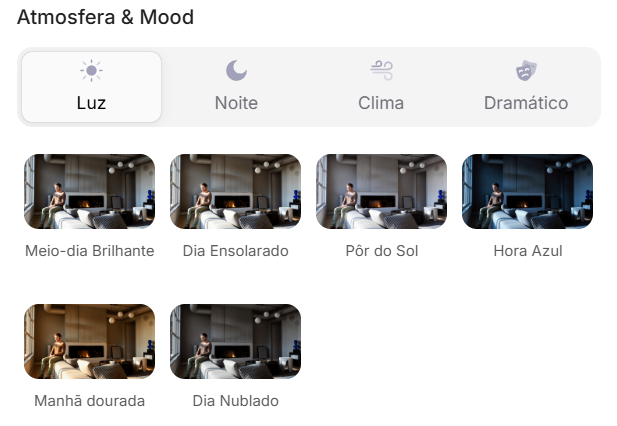
Atmosfera & Mood no Redraw: iluminação por clique, sem prompt longo.
Em vez de descrever rua residencial suburbana com vizinhos visíveis ao fundo, você seleciona o cenário diretamente na interface visual.
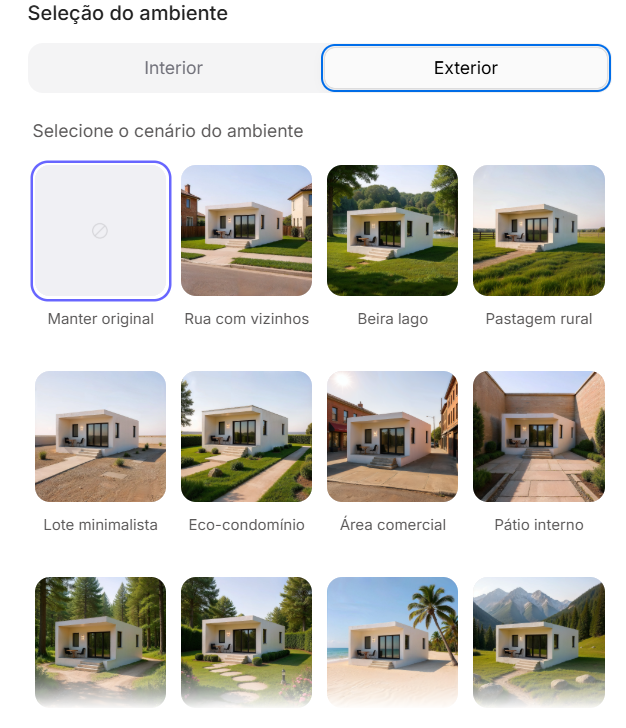
Seleção do Ambiente no Redraw: cenário em clique, sem descrição textual.
Cada escolha que você faria em um prompt longo, iluminação, ambiente, estilo, câmera, vira um clique. E como o Redraw foi treinado exclusivamente para arquitetura, o modelo já “entende” o contexto do projeto sem que você precise explicar.
“No Redraw, quanto menos prompt os usuários colocam, melhores são os resultados.”
Para diagramas e layouts de prancha, os prompts deste guia continuam sendo o caminho mais eficiente, o Redraw é especializado em renders fotorrealistas que vão dentro da prancha. A combinação ideal: diagramas e pranchas com prompts + renders e perspectivas com Redraw = apresentação completa em minutos.
| Característica | Ferramentas com Prompt Textual | Redraw |
|---|---|---|
| Complexidade do prompt | Alta, requer estrutura técnica e longa | Baixa, linguagem natural e simples |
| Controle de iluminação | Baseado em texto técnico | Baseado em cliques visuais (Atmosfera & Mood) |
| Controle de ambiente | Baseado em texto descritivo | Baseado em cliques visuais (Seleção do Ambiente) |
| Fidelidade ao projeto 3D | Variável, depende da referência e do prompt | Alta, processa a geometria do modelo diretamente |
| Consistência entre gerações | Baixa | Alta |
| Foco do usuário | Aprender a comandar a IA | Descrever a visão arquitetônica |
| Curva de aprendizado | Íngreme | Rápida e intuitiva |
| Tempo por render | Alto (prompt + ajustes + pós-produção) | Baixo (20–40 segundos, resultado publicável) |
Este é um dos prompts mais sofisticados da biblioteca. Ele instrui a IA a analisar a volumetria final do projeto e derivar automaticamente uma sequência lógica de diagramas que explica como aquela forma foi gerada.
O que ele produz: Uma sequência de 5 a 7 diagramas em estilo isométrico/axonométrico mostrando a evolução formal do projeto, da massa inicial às subtrações, adições e configuração final.
Quando usar: Pranchas de concurso, apresentações de bancas, portfólios com rigor conceitual. O diagrama de partido é obrigatório em qualquer apresentação que precisa explicar por que o projeto tem a forma que tem.
Pré-requisito: ter uma imagem da volumetria 3D final do projeto (pode ser um render simples, SketchUp, maquete física fotografada).
O prompt:
Use the uploaded image strictly as the FINAL architectural massing reference. You must perform a geometric and spatial analysis of the final volumetry before generating any diagrams. Do NOT redesign, reinterpret, modify proportions, change geometry, adjust scale, or alter the architectural language of the final form. The final stage must be an EXACT volumetric match of the uploaded massing. STEP 1, MORPHOLOGICAL ANALYSIS (internal reasoning): Analyze the final massing and identify: Primary geometric primitive (rectangular block, L-shape, U-shape, courtyard block, fragmented bars, rotated volume, etc.) • Volumetric operations: Subtractions, Additions, Extrusions, Rotations, Offsets, Hierarchy, Fragmentation • Presence of: Setbacks, Internal voids, Courtyards, Overhangs, Directional elongation, Axial alignment. Derive a logical and architecturally coherent transformation sequence that plausibly generates the final form. All intermediate steps must geometrically and causally lead to the final configuration. STEP 2, GENERATE DIAGRAM SEQUENCE: Create 5 to 7 clean conceptual architectural diagrams explaining the formal evolution of the project. The sequence must include: Site + Initial Pure Mass • Solar Strategy • Ventilation Strategy • Volumetric Subtractions • Articulation / Fragmentation • Final Configuration. LANGUAGE REQUIREMENT (MANDATORY): All visible text inside the generated image MUST be written in Brazilian Portuguese. This includes: Titles, Subtitles, Diagram captions, Labels, Explanatory text, Step numbers descriptions. Do NOT use English in any visible graphic text. Use proper Brazilian architectural terminology (e.g., Implantação, Estratégia Solar, Ventilação Cruzada, Subtrações Volumétricas, Configuração Final, etc.). RULES: The final configuration must exactly match the uploaded volumetry. Do not invent architectural elements that are not present. Maintain proportional consistency between all stages. VISUAL STYLE: Isometric or axonometric projection • Pure diagrammatic style • No textures • No photorealism • Soft neutral pastel palette • Light background • Thin line weights • Minimal soft shadows only for volumetric clarity • Professional architectural competition board aesthetic • Balanced composition with white margins. GRAPHIC LANGUAGE: Sun path represented by a soft arc diagram • Wind shown with subtle curved directional arrows • Subtractions represented by dashed or transparent ghost volumes • Final massing in solid tone • Base platform indicating the site. OUTPUT REQUIREMENT: High resolution. Clean layout. Clear diagram hierarchy. Minimalist architectural presentation.
O que diferencia este prompt:
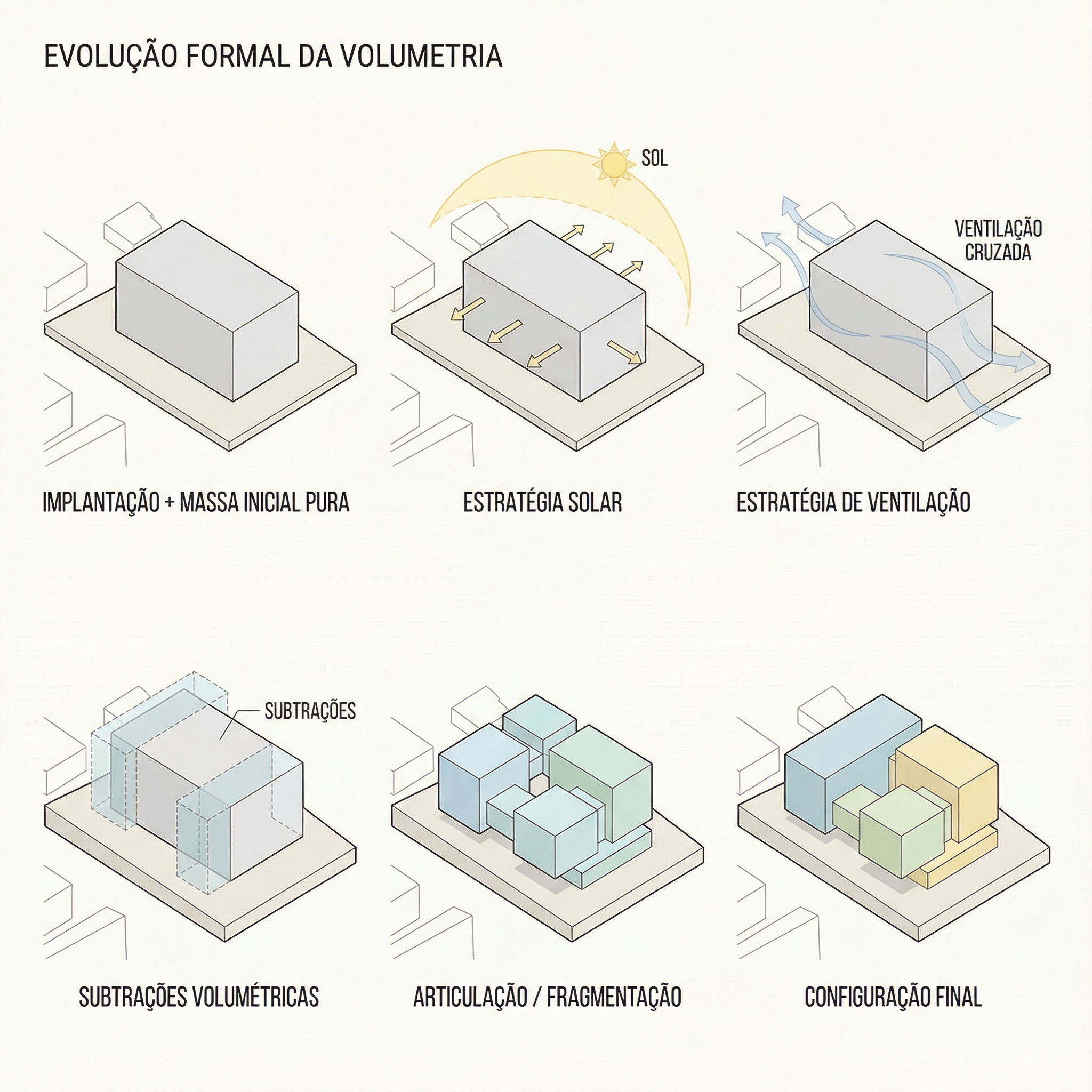
Resultado, Gerado com Redraw
Quando usar: Complemento ao diagrama de partido. Enquanto o Prompt 1 mostra a evolução formal, este mostra as estratégias ambientais que justificam as decisões formais.
O prompt:
Use the attached image as base reference. Create an architectural environmental analysis diagram based strictly on the provided volumetric model. Preserve 100% of the original architecture, geometry, proportions, openings, roof shape and perspective. Do NOT modify, redesign, reinterpret, simplify or alter any element of the project. The building must remain exactly as provided. Generate a clean conceptual diagram illustrating: Solar incidence (ensolação) • Sun path direction • Light exposure areas • Prevailing wind direction • Natural ventilation flow. Representation guidelines: Use soft translucent overlays to indicate sunlight • Use subtle warm gradient tones (yellow / orange) for solar impact • Use smooth curved arrows for wind flow (blue tones) • Maintain a minimal and elegant architectural diagram style • Keep a light neutral background • Do not exaggerate graphic elements • The architecture must remain the main focus. Text and labels must be written in Brazilian Portuguese only. Include labels such as: • Insolação • Ventos predominantes • Ventilação natural • Incidência solar • Norte. High-resolution architectural presentation quality. Clean, competition-level diagram aesthetic.
O que diferencia este prompt:
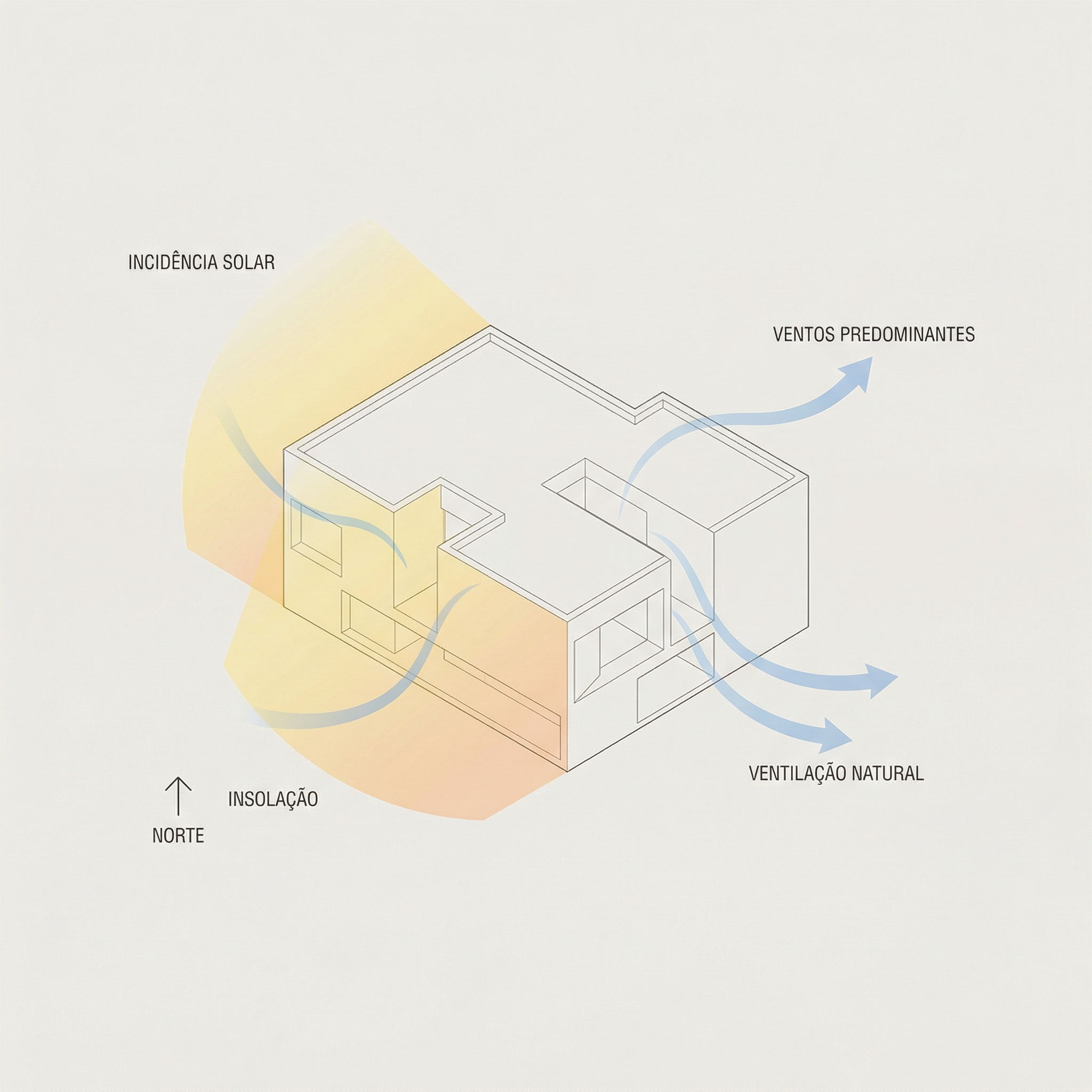
Resultado, Gerado com Redraw
Quando usar: Projetos em contexto urbano onde você precisa mostrar fluxos de circulação, acessos, áreas verdes e conexões urbanas ao redor do lote/quadra. Muito usado em pranchas de implantação e projetos de urbanismo.
O prompt:
Use the uploaded image strictly as the base volumetric reference. The uploaded model contains only the white architectural massing. You must preserve 100% of the original building volumes, geometry, proportions, scale and perspective. Do NOT modify, redesign, reinterpret, subtract, add or distort the architectural masses in any way. The buildings must remain exactly as provided. OBJECTIVE: Transform the simple white volumetry into a complete conceptual urban architectural diagram. ADD THE FOLLOWING ELEMENTS: Urban Context: Surrounding streets around the block • Sidewalks • Street names (in Brazilian Portuguese) • Subtle lot demarcations • Clean urban grid indication. Central Landscape / Open Space: Organic pedestrian paths crossing the site • Green areas with soft shapes • Trees distributed naturally • Small plazas or gathering areas. Circulation and Flow Diagrams: Add conceptual arrows indicating: Pedestrian flow • Main access points • Secondary access • Urban connections • Possible vehicular flow. Use: Warm orange arrows for main flows • Thinner arrows for secondary paths • Soft shadows under arrows for depth • Slight transparency. Graphic Style: Architectural conceptual diagram aesthetic • White buildings (clean, no texture) • Soft pastel ground tones • Minimal color palette • Thin linework • Subtle shadows for depth • Light neutral background • Slight isometric or axonometric perspective • Professional competition board style. TEXT (MANDATORY: BRAZILIAN PORTUGUESE): Include subtle labels such as: Fluxo principal • Fluxo secundário • Acesso principal • Acesso de serviço • Área verde • Conexão urbana • Rua. IMPORTANT RULES: Architecture must remain the visual anchor. Do not exaggerate graphic elements. Vegetation must be simplified and diagrammatic. Maintain visual hierarchy.
💡 Como adaptar: O prompt usa a volumetria como referência fixa. Você pode enviar um modelo simples de SketchUp exportado como imagem, não precisa ser um render final.
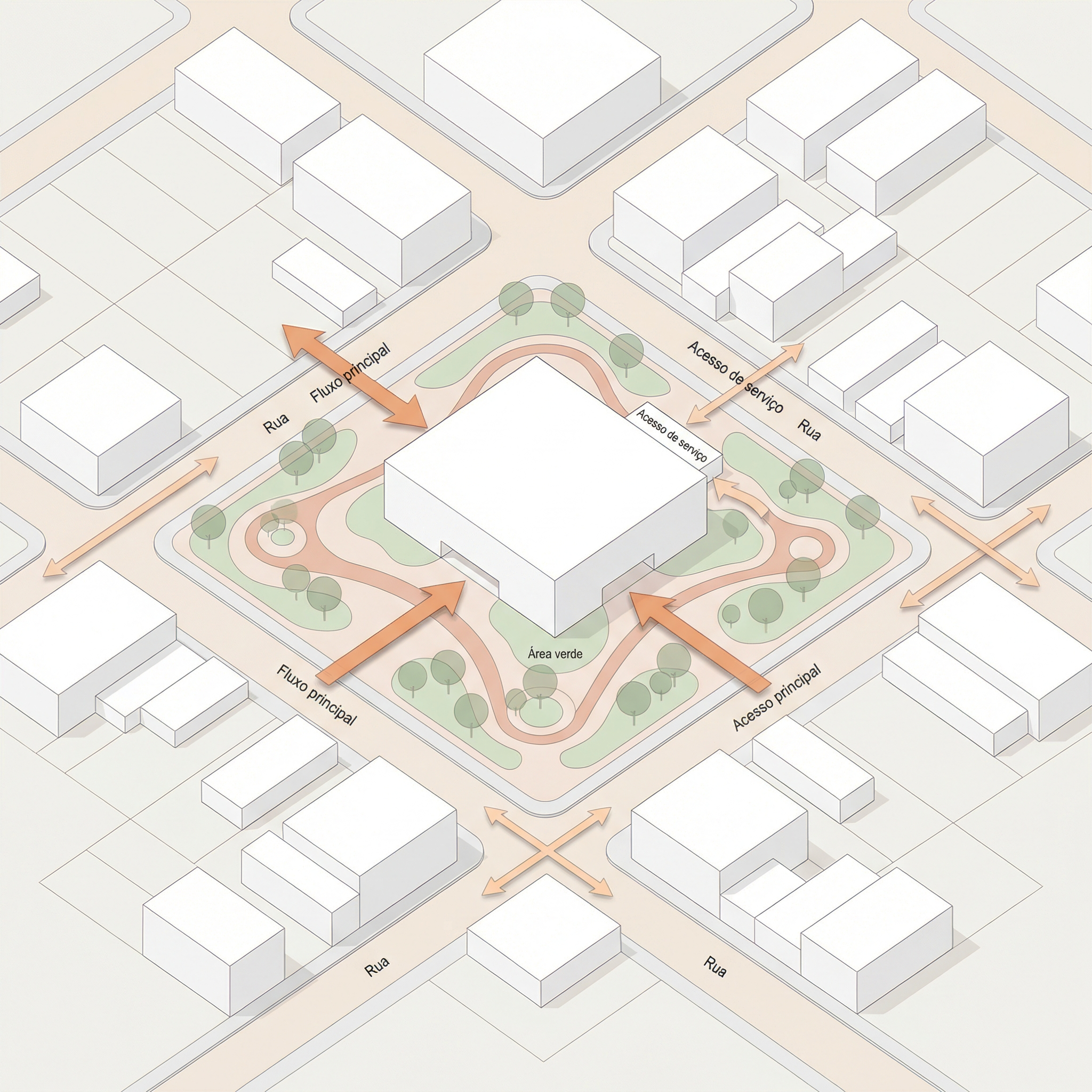
Resultado, Gerado com Redraw
Quando usar: Variação do diagrama urbano para quando o foco é a relação do projeto com as ruas à frente, esquinas, acessos principais, conexão com o espaço público frontal.
O prompt:
Use the uploaded image strictly as the base volumetric reference. The uploaded image contains only the white architectural massing. You must preserve 100% of the original volumes, geometry, proportions, scale and perspective. Do NOT modify, redesign, reinterpret, subtract, add or distort any architectural element. The buildings must remain exactly as provided. OBJECTIVE: Transform the white volumetry into a clean conceptual urban diagram by adding only frontal street context and landscape organization. URBAN CONTEXT RULE, Very Important: Add streets ONLY in the FRONT portion of the composition. Create two perpendicular streets crossing in front of the site (forming a corner or cross intersection). Do NOT add any streets behind the buildings. The back portion must remain clean and minimal. The frontal streets must feel integrated and proportional to the building scale. ADD THE FOLLOWING ELEMENTS: Front Urban Streets: Two perpendicular streets crossing in front of the site • Sidewalks • Subtle curbs • Optional crosswalk markings (minimal) • Street names in Brazilian Portuguese. Central Landscape / Open Space: Organic pedestrian paths within the site • Trees in diagrammatic style • Soft green areas • Small plaza or gathering node if balanced. Circulation and Flow: Add conceptual arrows indicating: Fluxo principal • Fluxo secundário • Acesso principal • Conexão urbana. Use: Warm orange arrows for main flows • Thinner arrows for secondary flows • Soft drop shadows • Slight transparency. GRAPHIC STYLE: Architectural competition diagram aesthetic • White massing volumes (no texture) • Soft pastel ground tones • Thin linework • Minimal color palette • Light neutral background • Slight axonometric or isometric perspective. TEXT (MANDATORY: BRAZILIAN PORTUGUESE): Include: Fluxo principal • Fluxo secundário • Acesso principal • Área verde • Rua • Conexão urbana. Modern, clean sans-serif typography.
Diferença para o Prompt 3: enquanto o diagrama urbano completo mostra o entorno todo da quadra, este foca apenas na relação frontal, mais limpo e direto para projetos onde o acesso principal é o elemento mais relevante da implantação.
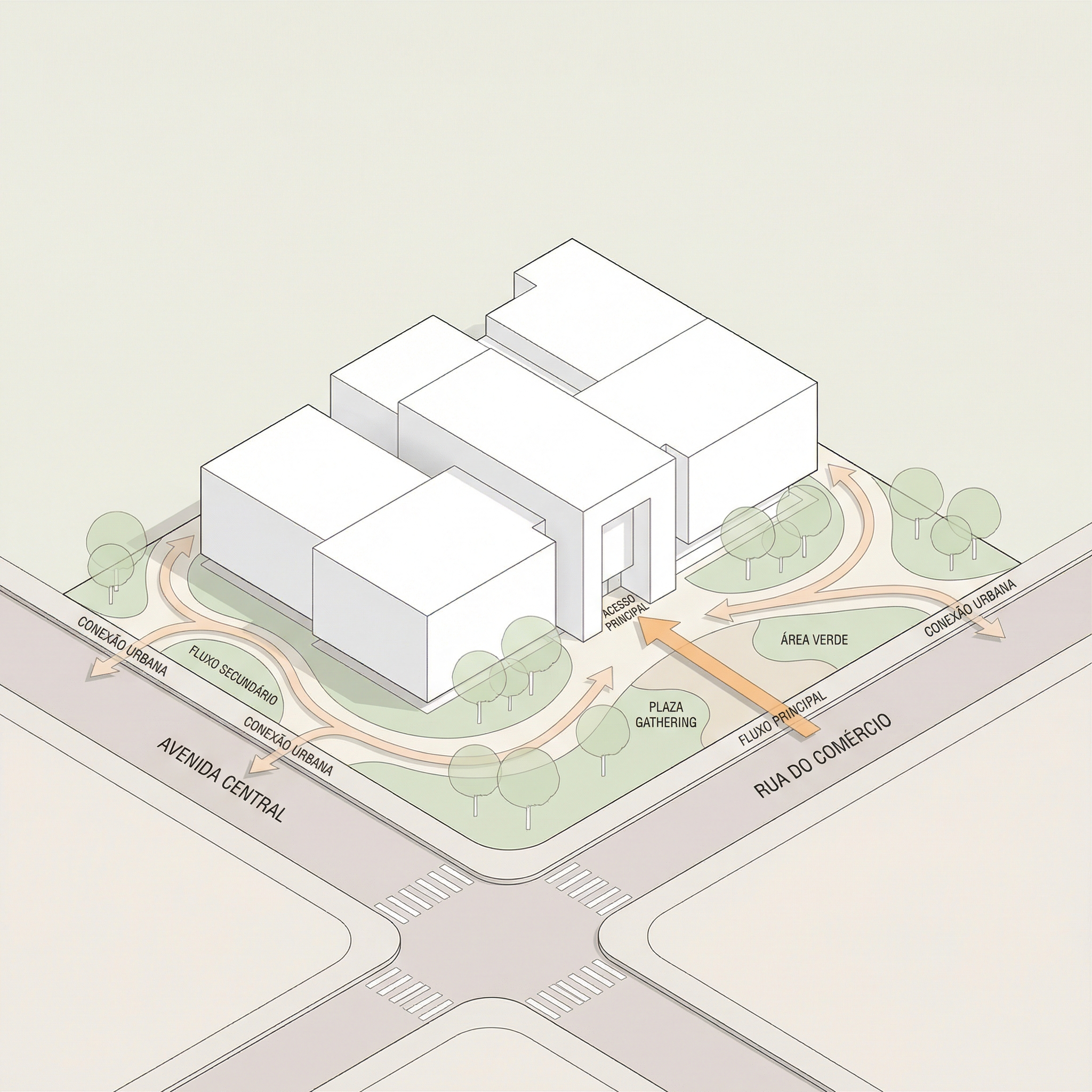
Resultado, Gerado com Redraw
Quando usar: Pranchas de concurso ou portfólio com layout limpo e hierarquia clara, render principal no topo, plantas e cortes no meio, seções na base.
O que ele gera: layout completo de prancha A1 vertical com hierarquia tipográfica, grid organizado e paleta de tons neutros/quentes.
Como usar: envie as imagens do seu projeto junto com o prompt. A IA vai montar o layout usando os elementos fornecidos.
O prompt:
Create a professional architectural presentation board layout in A1 vertical format (portrait orientation). Background: clean white or very soft warm off-white. TOP SECTION (upper 50% of the board): Large hero architectural render (provided image) centered and occupying the full width. Maintain clean margins around the image. TITLE AREA: Large elegant serif typography for the project name at the top center. Subtitle in small uppercase sans-serif below it. Refined and minimal typographic hierarchy. MIDDLE SECTION (organized grid layout): Left side: project description text block with justified alignment. Center: site plan and masterplan drawings aligned symmetrically. Include light lineweights and minimal annotations. Right side: secondary perspective render. Add minimal technical diagrams in thin olive-green line style. BOTTOM SECTION: Long horizontal architectural sections spanning the width of the board. Light grayscale linework with subtle shadows. Small human scale figures in soft neutral tones. GRAPHIC STYLE: Architectural competition board aesthetic. Soft muted color palette inspired by warm neutrals, beige concrete tones, and subtle olive green accents. Thin grid-based layout structure. Balanced white space. Clean margins. Professional composition. Refined minimal contemporary presentation. Print-ready, high resolution, 300 dpi, architectural board layout.
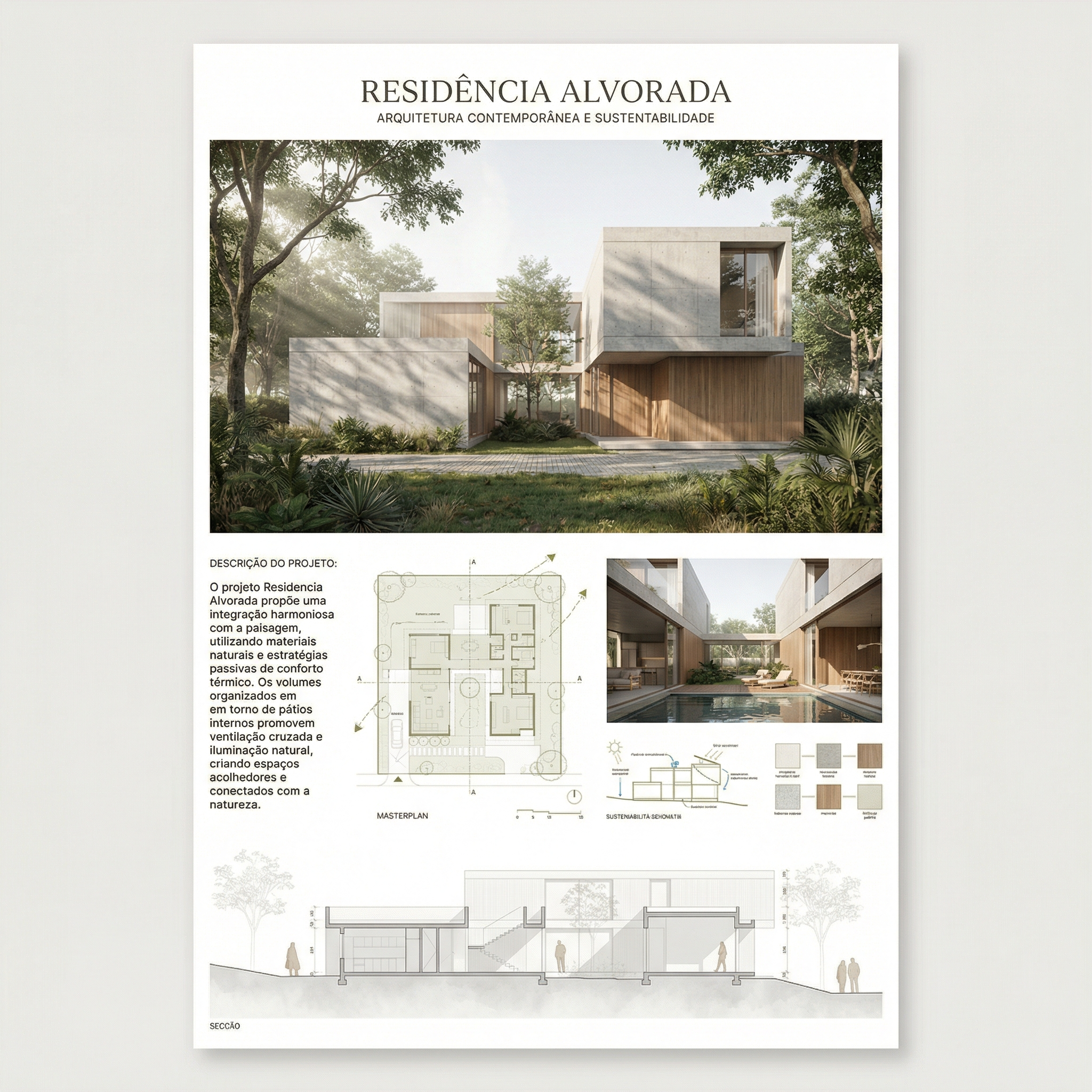
Resultado, Gerado com Redraw
Quando usar: Pranchas com estética de concurso europeu, composição mais editorial, espaçamento generoso, diagramas conceituais integrados ao layout, materiais e plantas juntos.
O prompt:
Create a professional architectural presentation board in A1 vertical format (portrait orientation), inspired by European competition boards and editorial architectural publications. Background: Soft warm off-white with very subtle paper texture, minimal grain, natural matte finish. Overall layout: Balanced but slightly organic composition. Elegant editorial spacing. Thin grid alignment but not rigid. Generous white margins. Clear hierarchy between text, diagrams, plans, and renders. TOP SECTION: Large project title in elegant serif typography. Subtitle in small uppercase sans-serif. Below the title: conceptual text block aligned to the left. Include: Small conceptual diagrams in thin light-gray linework. Minimal iconography in circular outline style. Concept evolution diagrams (old vs new, massing progression, relationships). UPPER RIGHT AREA: Large atmospheric perspective render. Soft daylight, diffused lighting. Natural vegetation. Subtle shadows. Editorial architectural visualization style. MIDDLE SECTION: Large humanized site plan with muted vegetation tones. Soft green landscaping. Desaturated palette. Light shadows under trees. Thin annotations. Include: Material palette circles (concrete, brick, wood, gravel). Small diagrammatic plans (ground floor, upper floor). Scale indication (1:500, 1:200). LOWER SECTION: Horizontal architectural sections across the width. Light grayscale linework. Subtle poche. Small neutral human silhouettes. BOTTOM STRIP: 2 to 4 smaller renders aligned in a clean grid. Soft atmospheric perspective. Balanced exposure. Natural color grading. GRAPHIC STYLE: Architectural competition aesthetic. Editorial European layout. Muted neutral palette: warm beige, soft olive green, dusty brick, light concrete gray. No saturated colors. No harsh contrast. No heavy black lines. Drawing style: Thin lineweights. Soft shadows. Subtle depth layering. Minimal annotations. Mood: Calm, refined, sophisticated, contemporary. Print-ready. 300 dpi. High resolution.
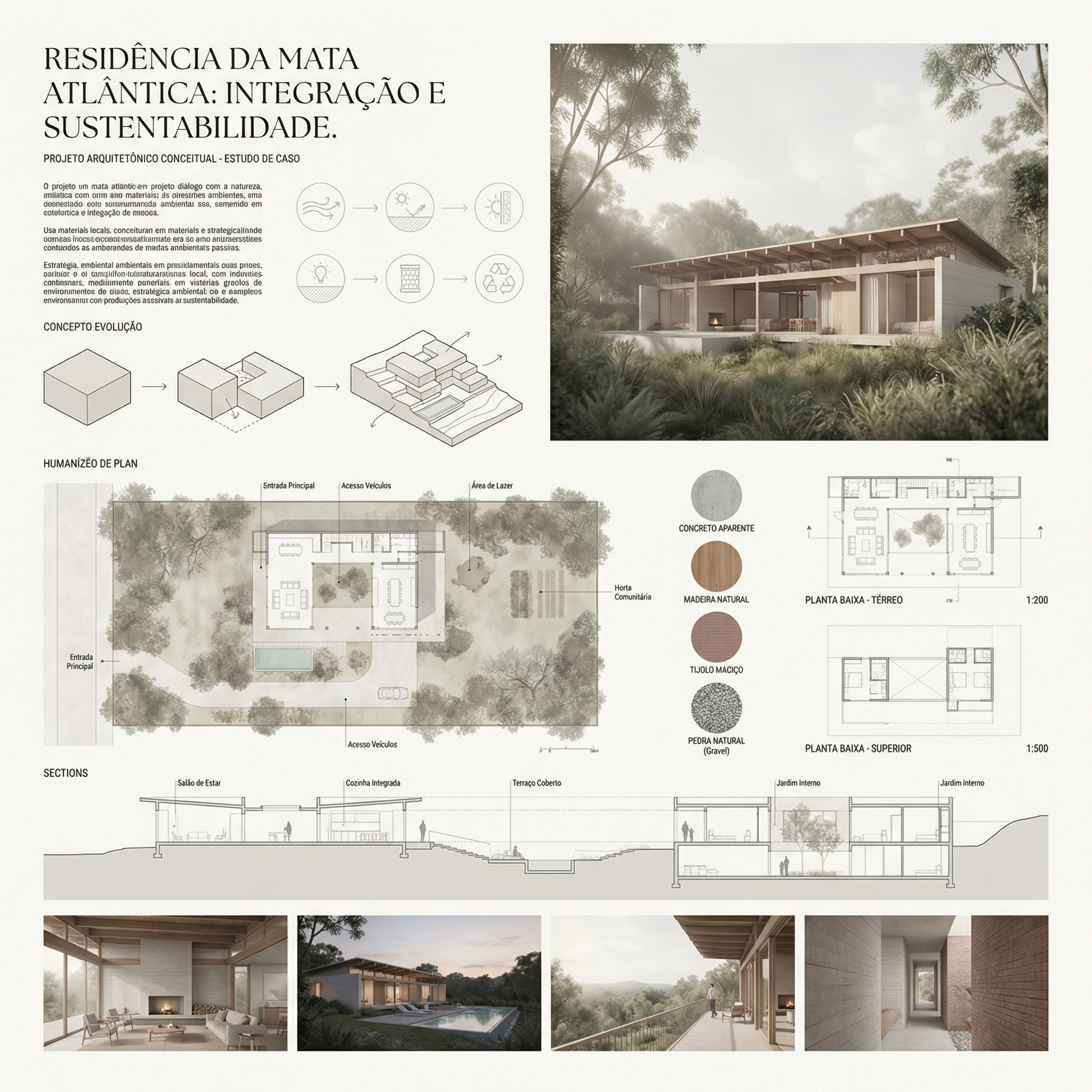
Resultado, Gerado com Redraw
Envie os elementos separados: A IA monta melhor quando recebe renders, plantas e cortes como imagens separadas que ela organiza no layout, em vez de tentar extrair elementos de uma imagem composta.
Especifique o nome do projeto: Adicione ao prompt: “Project name: [nome do projeto]. Subtitle: [tipo/localização].”
Paleta personalizada: Se o seu projeto tem uma identidade visual definida, adicione: “Use [cor] as the primary accent color throughout the board.”
Formato de saída: A IA vai gerar uma imagem do layout. Para edição posterior no Illustrator ou InDesign, você pode usar a imagem como referência de composição e recriar o layout com os arquivos originais.
Use estes prompts complementares quando a IA alterar elementos que não deveria nos seus diagramas ou pranchas.
Preserve 100% of the original architecture, layout, furniture placement, materials, colors, textures, decorative elements, proportions, lighting positions, and camera angle. Strictly forbid adding, removing, replacing, resizing, repositioning, or redesigning any element. The purpose of this transformation is ONLY to enhance realism, lighting behavior, and material response without altering the original design in any way.
Preserve the original lighting design exactly as shown in the image. Do not add new light sources, remove existing lights, or modify lighting positions. Only enhance realism through natural light diffusion, realistic light bounce, soft shadow transitions, and accurate material interaction with existing lighting.
Preserve all original materials and textures exactly as shown. Do not replace, reinterpret, or stylize materials. Enhance realism only through improved surface detailing, micro imperfections, and physically accurate light response.
Use the uploaded image strictly as the ONLY architectural reference. The architecture and scene composition are completely locked. Preserve 100% of the original: Architecture • Walls and openings • Furniture placement • Materials and colors • Textures • Layout and proportions. Enhance the scene by making natural daylight more predominant and realistic. The project must remain 100% identical to the original image. Only the lighting quality and natural daylight intensity may be improved. Ultra realistic architectural photography, high dynamic range, 8K detail.
Para diagramas de partido, análises ambientais e layouts de pranchas, ferramentas de geração de imagem por texto com os prompts deste guia são o workflow mais eficiente disponível, a IA lê a volumetria e gera o diagrama em minutos.
Para os renders que compõem a prancha, perspectivas externas, renders de interiores, fachadas, o Redraw é a ferramenta mais direta e fiel ao projeto. Você não precisa de prompts longos: faz upload do modelo (SketchUp, Archicad, Revit, Rhino, 3DS), escolhe o estilo e o ambiente em cliques, e o render sai em 20 a 40 segundos.
Dentro do Redraw você também acessa ChatGPT para escrever o texto conceitual da prancha e Nano Banana para gerar vídeos de apresentação do projeto, tudo em um único hub, sem múltiplas assinaturas.
Blog