Sergio is a specialist in generative AI and technology, and leads the Redraw development team.
Guia de prompts para plantas humanizadas com IA, ultra realista, clean editorial, monocromática e luxo.
Redraw
Comece hoje mesmo a transformar os seus projeto usando o Redraw.



A planta humanizada é uma das representações mais solicitadas em apresentações residenciais, portfólios e materiais de venda imobiliária. Ela transforma a planta baixa técnica, cheia de cotas, hachuras e símbolos, em uma visualização que o cliente leigo consegue entender e se imaginar habitando.
Com IA, é possível humanizar uma planta em segundos. Mas o desafio é sempre o mesmo: a IA não pode alterar o layout, mover paredes, redimensionar cômodos ou mudar a planta original de nenhuma forma. Os prompts deste guia foram desenvolvidos com essa premissa central.
Atenção prática: antes de processar qualquer planta com IA, exporte-a limpa, sem cotas, sem textos de legenda e sem hachuras pesadas. O prompt já instrui a IA a ignorar textos e anotações, mas quanto mais limpa for a entrada, mais preciso é o resultado. Se você quer pular essa etapa toda, o Redraw processa o modelo 3D direto.
O arquiteto não deveria precisar aprender linguagem de máquina para gerar uma representação profissional. Foi essa premissa que guiou a construção do Redraw.
Em vez de escrever luz natural quente de fim de tarde, sombras alongadas, entrando lateralmente, no Redraw você clica em “Pôr do Sol”.
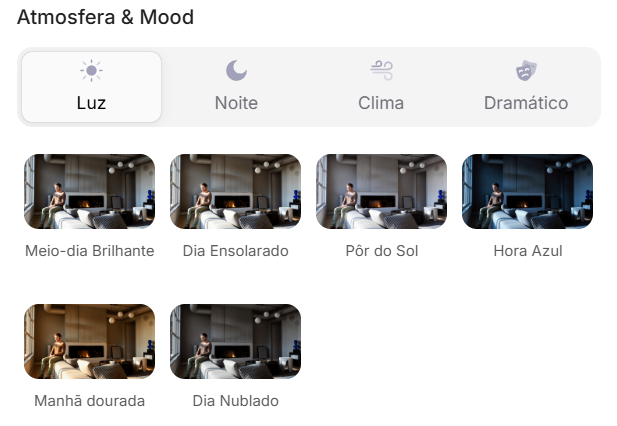
Atmosfera & Mood no Redraw: iluminação por clique, sem prompt longo.
Em vez de descrever rua residencial suburbana com vizinhos visíveis ao fundo, você seleciona o cenário diretamente na interface visual.
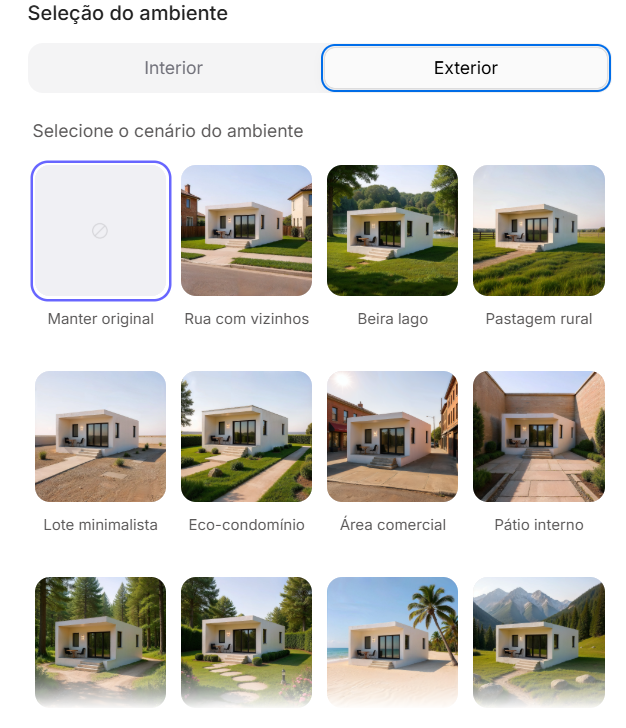
Seleção do Ambiente no Redraw: cenário em clique, sem descrição textual.
Cada escolha que você faria em um prompt longo, iluminação, ambiente, estilo, câmera, vira um clique. E como o Redraw foi treinado exclusivamente para arquitetura, o modelo já “entende” o contexto do projeto sem que você precise explicar.
“No Redraw, quanto menos prompt os usuários colocam, melhores são os resultados.”
Para plantas humanizadas, os prompts deste guia continuam sendo o caminho mais eficiente, o Redraw é especializado em renders fotorrealistas de interiores e fachadas. A combinação ideal: plantas humanizadas com prompts + renders e perspectivas com Redraw = apresentação completa em minutos.
| Característica | Ferramentas com Prompt Textual | Redraw |
|---|---|---|
| Complexidade do prompt | Alta, requer estrutura técnica e longa | Baixa, linguagem natural e simples |
| Controle de iluminação | Baseado em texto técnico | Baseado em cliques visuais (Atmosfera & Mood) |
| Controle de ambiente | Baseado em texto descritivo | Baseado em cliques visuais (Seleção do Ambiente) |
| Fidelidade ao projeto 3D | Variável, depende da referência e do prompt | Alta, processa a geometria do modelo diretamente |
| Consistência entre gerações | Baixa | Alta |
| Foco do usuário | Aprender a comandar a IA | Descrever a visão arquitetônica |
| Curva de aprendizado | Íngreme | Rápida e intuitiva |
| Tempo por render | Alto (prompt + ajustes + pós-produção) | Baixo (20–40 segundos, resultado publicável) |
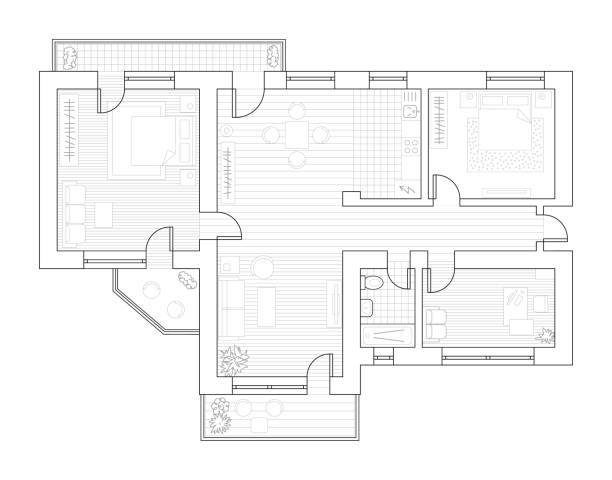
Antes, planta técnica exportada do software
Quando usar: Apresentações de alto padrão, materiais de vendas imobiliárias, portfólios onde o cliente quer ver a planta com textura real de materiais, madeira, tecido, cerâmica, tapete.
Estilo visual: Vista de cima ortográfica, materiais fotorrealistas, sombras sutis de profundidade, iluminação natural simulada.
O prompt:
Transform this architectural floor plan into a highly realistic humanized floor plan. Preserve 100% of the original layout, wall positions, openings, structure thickness, furniture placement, circulation areas, proportions and dimensions. Do NOT redesign, reinterpret, move, resize or modify any architectural element. Do NOT change the scale. Ignore all texts, annotations and dimension numbers. Focus only on the architectural geometry. Apply realistic top-view materials and textures: Natural wood flooring with subtle grain variation • Soft fabric texture on bed and sofa with visible folds • Realistic bedding layers and pillows with natural volume • Matte painted walls with slight tonal variation • Subtle shadowing under furniture for depth • Realistic rugs with soft texture • Desk surface with light reflection and material response • Accurate perspective strictly in orthographic top view (no camera distortion). Lighting: Soft ambient daylight simulation • Gentle global illumination • Soft contact shadows • Subtle depth separation between spaces. Enhance realism with micro-details: Slight fabric wrinkles • Wood grain variation • Soft shadow gradients • Minimal surface imperfections • Natural color balance. Style: Professional architectural presentation • High-end real estate humanized floor plan • Clean, elegant and realistic • Ultra high resolution • Balanced color grading • Sharp but natural finish. Maintain strict architectural accuracy and original proportions.
O que diferencia este prompt:
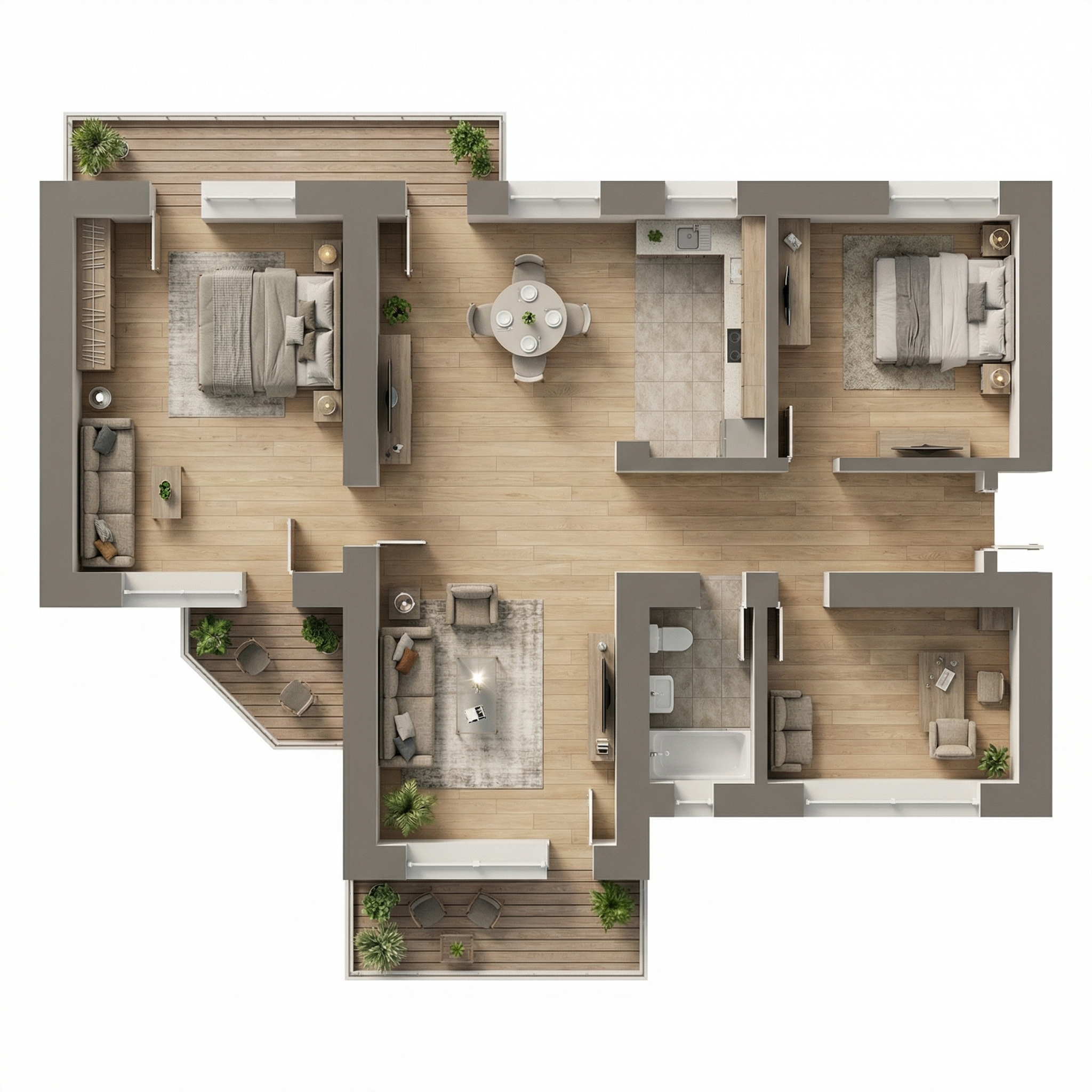
Resultado, Gerado com Redraw
Quando usar: Pranchas de apresentação com estética Scandinavian/Japandi, portfólios modernos, materiais de venda imobiliária de médio-alto padrão. É o estilo “Pinterest de planta”, o mais compartilhável visualmente.
Estilo visual: Paleta neutra e dessaturada, madeira clara, tecidos em bege suave, sombras quase imperceptíveis, sensação de leveza e clareza.
O prompt:
Transform this architectural floor plan into a soft, clean and refined humanized floor plan visualization. Preserve 100% of the original layout, walls, openings, structure thickness, furniture placement, circulation areas, proportions and dimensions. Do NOT redesign, reinterpret, move, resize or modify any architectural element. Do NOT change scale. Maintain strict orthographic top view (no perspective distortion). Ignore all texts, labels and dimension numbers. Focus only on architectural geometry. VISUAL STYLE: Create a light, neutral and calm presentation style, similar to modern editorial architectural boards. Avoid dramatic realism. Avoid strong shadows. Avoid high contrast. Avoid overly saturated wood tones. MATERIAL APPLICATION: Light natural oak wood flooring with very subtle grain • Neutral beige fabric upholstery • Soft linen bedding with delicate folds • Low-contrast rugs with minimal pattern • Matte off-white painted walls • Light natural wood furniture with minimal texture contrast • Soft ceramic surfaces in bathrooms • Minimal reflections. LIGHTING: Diffused ambient daylight • Very soft contact shadows • Subtle depth separation • No dramatic directional light • Balanced exposure • Clean brightness. The lighting should feel airy and evenly distributed. FINAL MOOD: Scandinavian-inspired softness • Pinterest-style clean floor plan • Calm neutral palette • Elegant and minimal • High resolution • Refined but not hyper-realistic. Maintain architectural precision and original proportions at all times.
A instrução de mood final, “Scandinavian-inspired softness • Pinterest-style clean floor plan”, comunica à IA uma referência estética coesa que resulta em uma paleta muito específica e comercialmente eficiente.
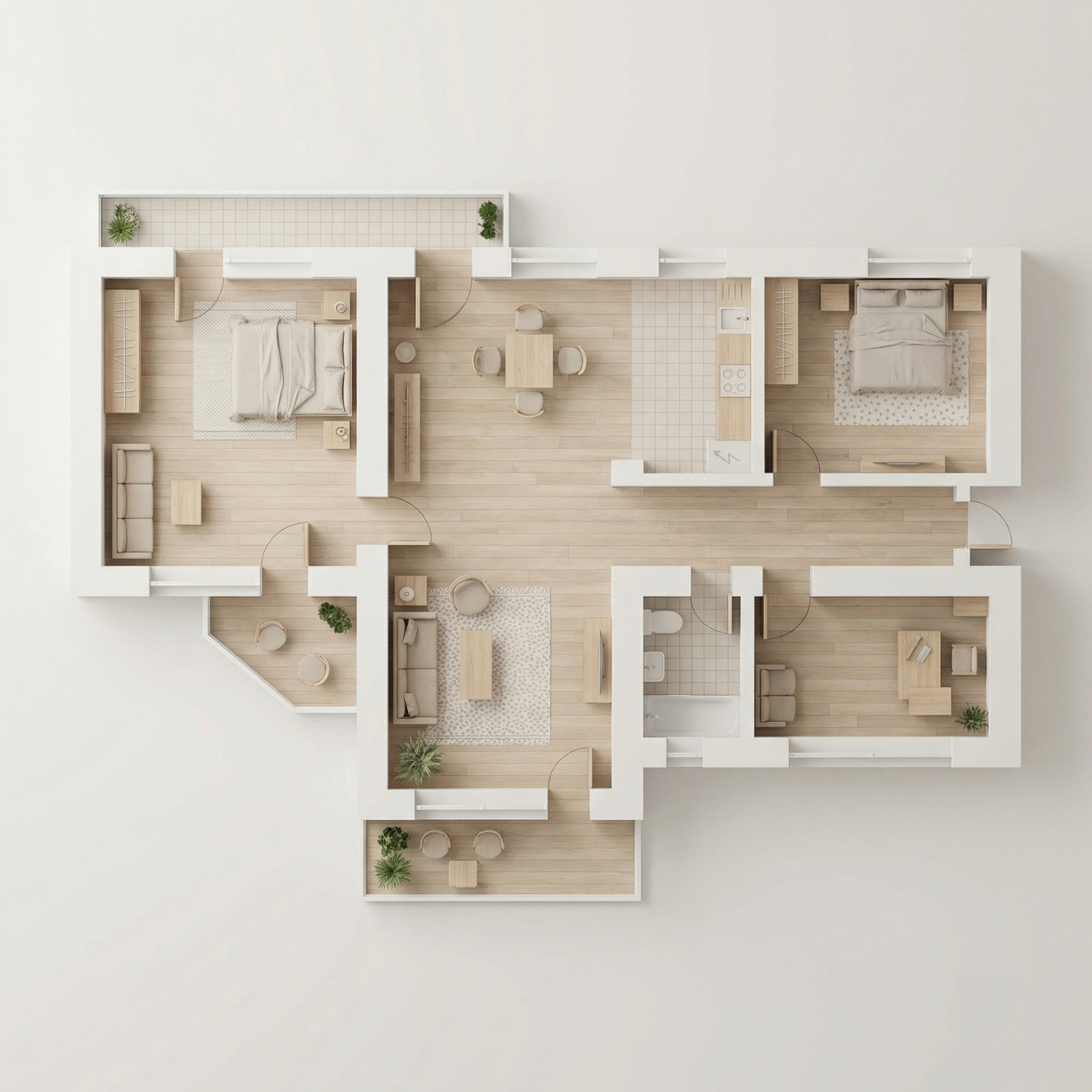
Resultado, Gerado com Redraw
Quando usar: Pranchas de concurso, apresentações acadêmicas, portfólios com identidade visual forte onde o preto e branco é uma escolha estética intencional.
Estilo visual: Paredes em preto sólido, móveis em branco/cinza claro, piso com opção de herringbone sutil ou cinza plano, sombras delicadas.
O prompt:
Transform this architectural floor plan into a refined monochromatic humanized floor plan with strong graphic contrast. Preserve 100% of the original layout, wall thickness, openings, structure, furniture placement, circulation areas, proportions and scale. Do NOT redesign, reinterpret, move, resize or modify any architectural element. Maintain strict orthographic top view (no perspective distortion). Ignore all texts, annotations and dimension numbers. Focus only on architectural geometry. WALL TREATMENT: Render all structural walls in solid matte black or very dark charcoal • Maintain accurate wall thickness • Clean crisp edges • No texture on walls (flat graphic fill). FURNITURE STYLE: All furniture in matte white or very light grey • Soft subtle contour lines in light grey • Minimal line weight • No heavy outlines • No realistic textures • No strong material detailing. SHADOW & DEPTH: Apply very soft and diffused shadows • Subtle ambient occlusion near walls • Gentle drop shadow beneath furniture • No dramatic lighting • No strong directional light • Balanced soft contrast. FLOOR TREATMENT (Option A – more minimal): Light grey flat floor. (Option B): Very subtle light wood herringbone pattern • Low contrast • Desaturated tones. STYLE DIRECTION: Minimalist architectural board style • High contrast black and white composition • Scandinavian graphic layout • Clean negative space • Elegant presentation • Modern editorial aesthetic • Ultra high resolution. Maintain architectural precision and proportional accuracy at all times.
💡 Dica: Especifique no seu prompt qual opção de piso você quer (A ou B) adicionando: “Use floor treatment Option A” ou “Use floor treatment Option B”.
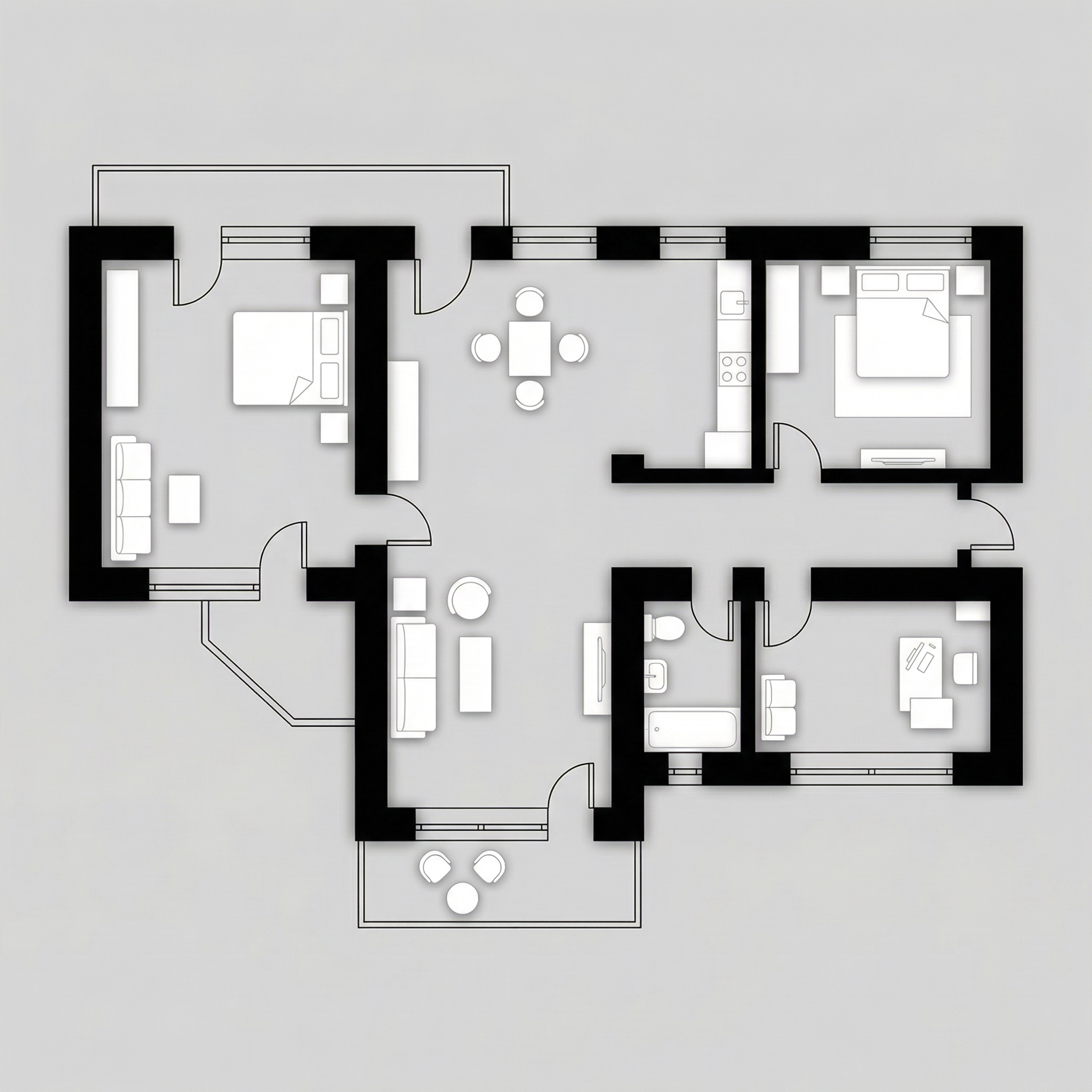
Resultado, Gerado com Redraw
Quando usar: Projetos de alto padrão, penthouses, casas de luxo, materiais de vendas premium. O prompt usa uma paleta específica de dourado/champagne para paredes e cinza elegante para piso.
Estilo visual: Piso cinza médio matte, interiores em bege/areia quente, paredes estruturais em dourado/champagne suave metálico, móveis em tons neutros.
O prompt:
Transform this architectural floor plan into a refined luxury editorial humanized floor plan. Preserve 100% of the original layout, walls, openings, structure thickness, furniture placement, circulation areas, proportions and scale. Do NOT redesign, reinterpret, move, resize or modify any architectural element. Maintain strict orthographic top view (no perspective distortion). Ignore all texts, annotations and dimension numbers. Focus strictly on architectural geometry. FLOOR TREATMENT: Apply a smooth matte medium-light grey floor • Very subtle concrete or plaster texture • Soft tonal variation • No strong pattern • Elegant neutral base. LAYOUT BASE: Render interior surfaces in warm beige / sand tones • Soft monochromatic palette • Matte finish • Very subtle texture • Gentle depth variation between rooms. WALL TREATMENT (Golden Accent): Render structural walls in soft metallic gold or brushed champagne tone • Matte metallic finish (not glossy) • Subtle light reflection on edges • Clean crisp wall geometry • Maintain accurate wall thickness. SHADOW & DEPTH: Soft diffused ambient lighting • Gentle shadow gradients • Subtle ambient occlusion along walls • Light drop shadow beneath walls to create floating effect • No dramatic lighting. FURNITURE STYLE: Soft beige / light neutral tones • Minimal texture realism • Clean simplified forms • Subtle shadow grounding • No high contrast. STYLE DIRECTION: Luxury architectural board aesthetic • Conceptual physical model feeling • Editorial presentation style • Warm neutral sophistication • Calm and balanced composition • High resolution • Refined and minimal. Maintain architectural precision and original proportions at all times.
“Matte metallic finish (not glossy)” para as paredes douradas, é a distinção entre resultado elegante e resultado vulgar. A IA precisa dessa instrução para não exagerar no brilho.
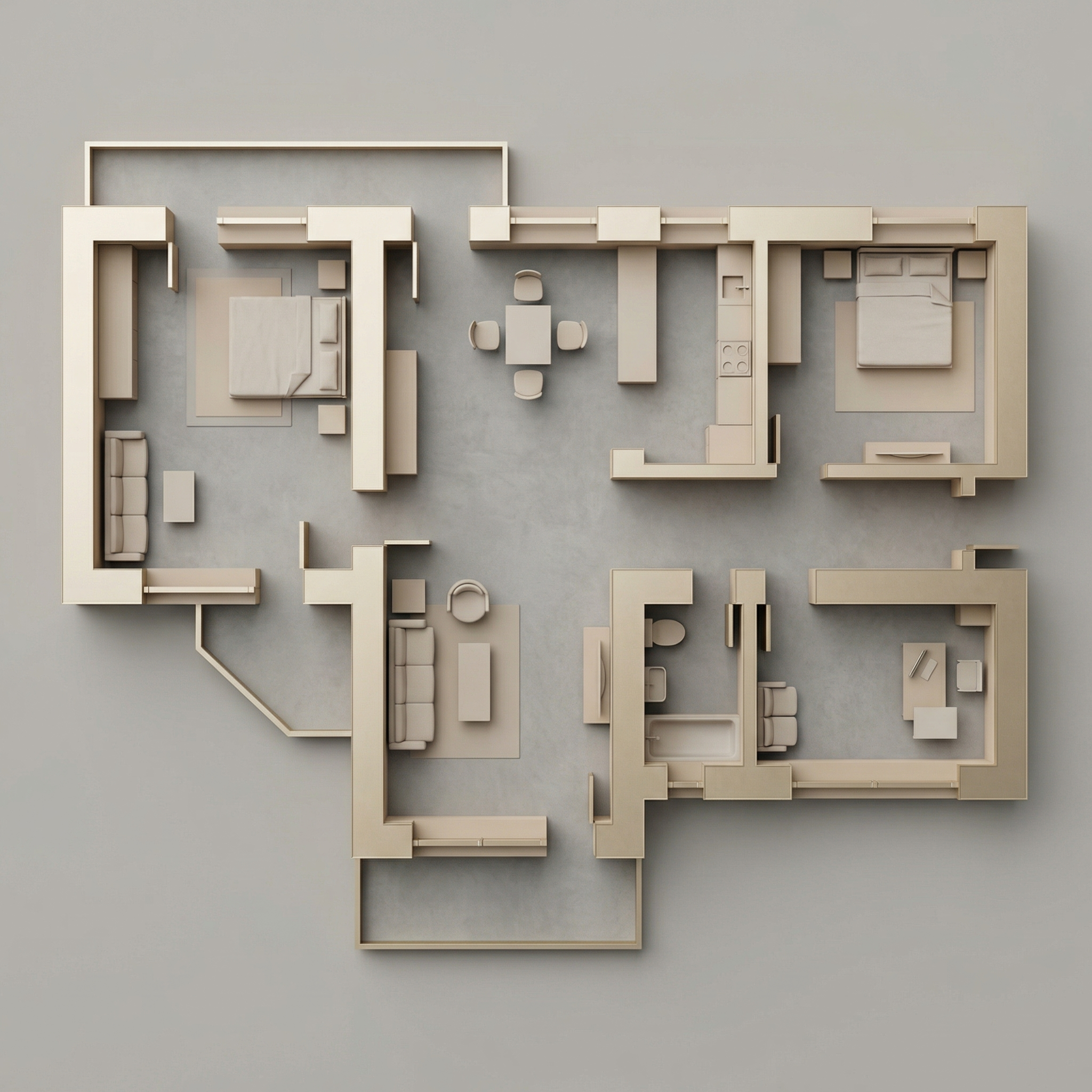
Resultado, Gerado com Redraw
Quando usar: Você tem a planta técnica em preto e branco (AutoCAD, Revit) e quer adicionar apenas o contexto de paisagismo ao redor, sem humanizar o interior.
O prompt:
Use the uploaded floor plan image as the absolute base reference. Preserve 100% of the original drawing, including: • All walls • Openings • Lineweights • Furniture • Text • Layout • Proportions • Scale • Orientation • Colors • Shadows • Graphic style. Do NOT modify, redesign, reinterpret, crop, rotate, resize, or alter any element of the architectural drawing. The project must remain EXACTLY as provided. Your task is ONLY to add a natural green surrounding context around the perimeter of the floor plan, similar to a soft landscape presentation style. Add: Soft green ground texture surrounding the project • Subtle grass texture variations • Light watercolor-style vegetation shadows • Natural irregular lawn tones (olive, sage, muted greens) • Soft edge fading into white background • Realistic but subtle tree canopies around the perimeter • Some semi-transparent tree crowns (top view) • Organic shadow projections from trees • Low-opacity garden textures • Light dirt / soil transitions if compositionally balanced. Guidelines: The landscape must stay OUTSIDE the built area • Do NOT overlap or cover the architecture • Maintain clean visibility of the entire floor plan • Keep architecture as the main focus • Avoid exaggerated saturation • Avoid hyperrealistic grass blades • Use soft, elegant, architectural presentation aesthetic. Lighting and mood: Soft ambient shadowing • Subtle tree cast shadows • Natural daylight tone • Professional architectural board aesthetic.
Quando NÃO usar: Se a sua planta já está humanizada internamente, use o Prompt 6.
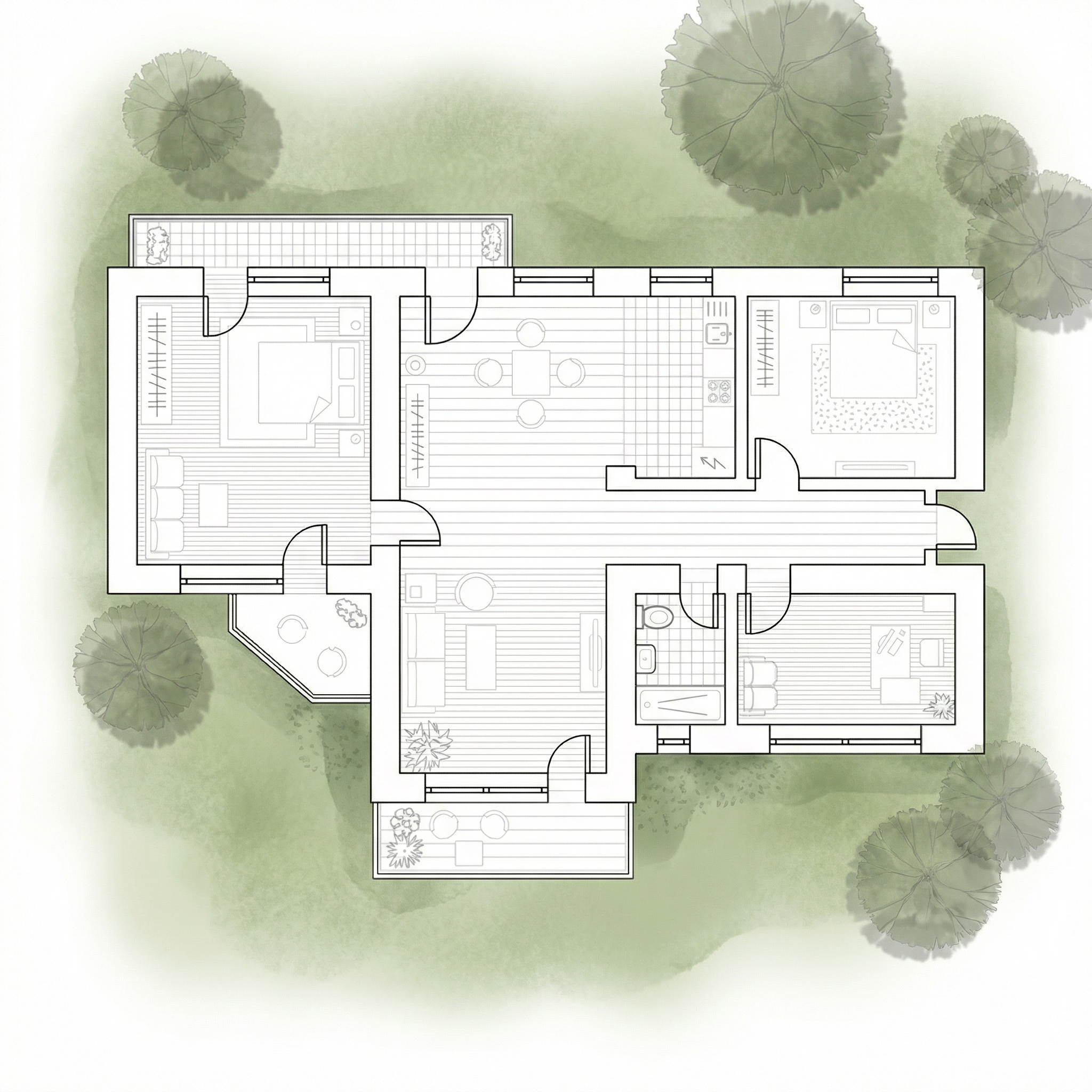
Resultado, Gerado com Redraw
Quando usar: Você já humanizou a planta internamente (com os prompts 1–4) e agora quer adicionar o contexto de paisagismo ao redor, sem a IA reinterpretar o interior.
O prompt:
Use the uploaded image as a FINAL, FLATTENED architectural board. This image is already finished and humanized. You must treat the floor plan as a locked image layer. DO NOT redraw. DO NOT reinterpret. DO NOT convert to black and white. DO NOT restyle. DO NOT enhance. DO NOT relight. DO NOT change materials. DO NOT change shadows. DO NOT adjust colors. DO NOT increase or reduce contrast. DO NOT modify texture. DO NOT modify saturation. The floor plan must remain PIXEL-PERFECT identical to the uploaded image. No internal changes are allowed. OBJECTIVE: Add soft natural vegetation context ONLY around the external perimeter of the existing image. This is an additive background operation only. WHAT YOU CAN ADD (OUTSIDE ONLY): Soft green watercolor ground texture • Light grass tonal variation (olive, sage, muted green) • Semi-transparent tree canopies (top view) • Soft organic tree shadows • Slight edge fading into white background • Subtle natural landscape blending. STRICT LIMITATIONS: Do NOT overlap the building footprint • Do NOT cover walls, furniture or internal patios • Do NOT modify linework • Do NOT modify rendering style • Do NOT change perspective • Do NOT touch the interior. STYLE: Soft architectural presentation style • Competition board aesthetic • Subtle, elegant, low saturation • Top-view orthographic • Natural daylight tone.
A IA tende a “melhorar” a imagem quando não recebe restrições claras, reprocessa cores, aumenta contraste, muda materiais. As instruções de “DO NOT” em caps bloqueiam cada um desses comportamentos indesejados.
Use estes prompts complementares quando a IA estiver movendo paredes, trocando materiais ou alterando a planta original.
Preserve 100% of the original architecture, layout, furniture placement, materials, colors, textures, decorative elements, proportions, lighting positions, and camera angle. Strictly forbid adding, removing, replacing, resizing, repositioning, or redesigning any element. The purpose of this transformation is ONLY to enhance realism, lighting behavior, and material response without altering the original design in any way.
Preserve the original lighting design exactly as shown in the image. Do not add new light sources, remove existing lights, or modify lighting positions. Only enhance realism through natural light diffusion, realistic light bounce, soft shadow transitions, and accurate material interaction with existing lighting.
Preserve all original materials and textures exactly as shown. Do not replace, reinterpret, or stylize materials. Enhance realism only through improved surface detailing, micro imperfections, and physically accurate light response.
Para plantas humanizadas, ferramentas de geração de imagem por texto com os prompts deste guia são o workflow mais eficiente disponível.
Para todo o restante do projeto, renders de interiores, fachadas e perspectivas, o Redraw é a ferramenta mais direta: faz upload do modelo 3D, preserva a geometria e gera o resultado em segundos sem precisar de prompts longos.
A estratégia completa: plantas humanizadas com prompts textuais + renders e vídeos com o Redraw = apresentação completa e profissional.
Blog