Guia de Prompts para Render de Fachadas com IA

Guia completo de prompts para render de fachadas com IA — vizinhos, árvores, chuva, nublado, noite e blue hour. Preserve a fachada e eleve o realismo

Guia de Prompts para Render de Fachadas com IA
Autor
Sergio Santos
Co-founder of Redraw and Chief AI Officer
Sergio is a specialist in generative AI and technology, and leads the Redraw development team.
Guia de Prompts para Render de Fachadas com IA
6 min
|
05.05.2026
Autor
Sergio Santos
Co-founder of Redraw and Chief AI Officer
Sergio is a specialist in generative AI and technology, and leads the Redraw development team.
[

Redraw

]

Crie sua conta grátis

Comece hoje mesmo a transformar os seus projeto usando o Redraw.

Quero cadastrar
Compartilhe este artigo

Por que o render de fachada é o teste decisivo da IA

A fachada é o cartão de visitas do projeto. É o primeiro elemento que o cliente vê, o que aparece na capa do portfólio e o que circula nas redes sociais. Um render de fachada convincente depende de dois fatores que a maioria dos arquitetos negligencia: contexto urbano realista e condição de luz correta.

Ferramentas de IA genéricas tendem a “inventar” o entorno, mudar a fachada original ou gerar resultados inconsistentes entre gerações. Os prompts deste guia foram desenvolvidos para resolver exatamente isso — cada um preserva 100% da fachada original enquanto trabalha apenas o que precisa ser melhorado.

Sobre o Redraw: Para renders de fachada com fidelidade ao projeto, o Redraw é a ferramenta mais direta — você faz upload do modelo, seleciona a atmosfera em cliques e tem o resultado em segundos, sem risco de a IA alterar a fachada. Os prompts abaixo são para quem trabalha com ferramentas de geração textual.

Antes dos prompts: por que no Redraw você não precisa deles

O arquiteto não deveria precisar aprender linguagem de máquina para gerar um render de fachada profissional. Foi essa premissa que guiou a construção do Redraw.

Em vez de escrever luz natural quente de fim de tarde, sombras alongadas, entrando lateralmente, no Redraw você clica em “Pôr do Sol”.
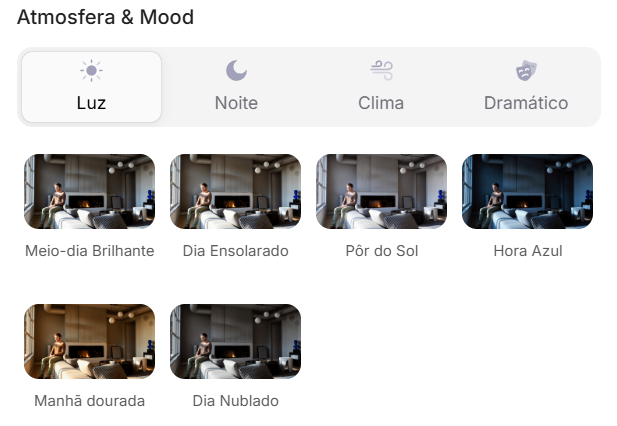
Atmosfera & Mood no Redraw: iluminação por clique, sem prompt longo.

Em vez de descrever rua residencial suburbana com vizinhos visíveis ao fundo, você seleciona o cenário diretamente na interface visual.
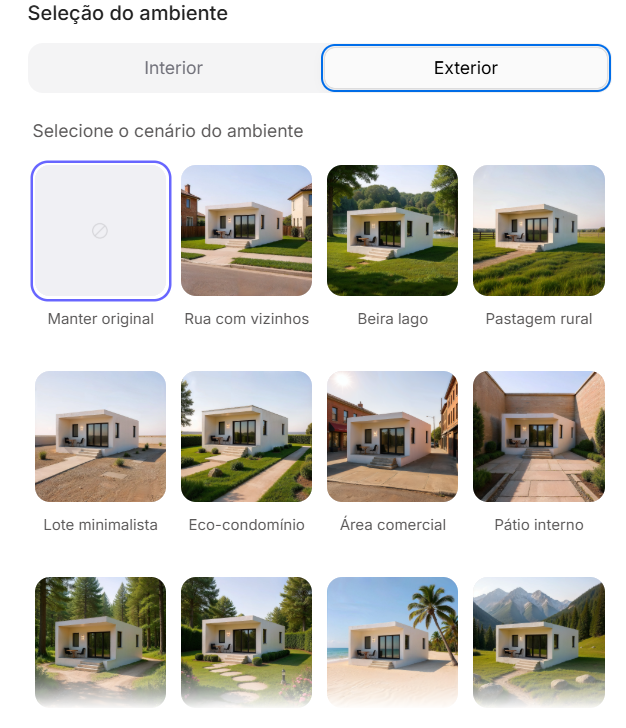
Seleção do Ambiente no Redraw: cenário em clique, sem descrição textual.

Cada escolha que você faria em um prompt longo — iluminação, ambiente, estilo, câmera — vira um clique. E como o Redraw foi treinado exclusivamente para arquitetura, o modelo já “entende” o contexto do projeto sem que você precise explicar.

“No Redraw, quanto menos prompt os usuários colocam, melhores são os resultados.”

Comparativo: prompt textual vs. interface visual

CaracterísticaFerramentas com Prompt TextualRedraw
Complexidade do promptAlta — requer estrutura técnica e longaBaixa — linguagem natural e simples
Controle de iluminaçãoBaseado em texto técnicoBaseado em cliques visuais (Atmosfera & Mood)
Controle de ambienteBaseado em texto descritivoBaseado em cliques visuais (Seleção do Ambiente)
Fidelidade ao projeto 3DVariável — depende da referência e do promptAlta — processa a geometria do modelo diretamente
Consistência entre geraçõesBaixaAlta
Foco do usuárioAprender a comandar a IADescrever a visão arquitetônica
Curva de aprendizadoÍngremeRápida e intuitiva
Tempo por renderAlto (prompt + ajustes + pós-produção)Baixo (20–40 segundos, resultado publicável)

Os prompts deste guia continuam valiosos — entender a lógica te torna um usuário mais estratégico de qualquer ferramenta. Mas se você quer pular a curva de aprendizado e ir direto ao resultado, o Redraw resolve em cliques.

PROMPT 1 — Adicionar contexto urbano: casas vizinhas

Problema que resolve: Fachadas renderizadas em fundo branco ou genérico não transmitem o contexto urbano real do projeto. Clientes e incorporadoras precisam ver como o projeto se insere na rua.

Quando usar: Residências em lotes urbanos onde o contexto de vizinhança é relevante para a apresentação.

O prompt:

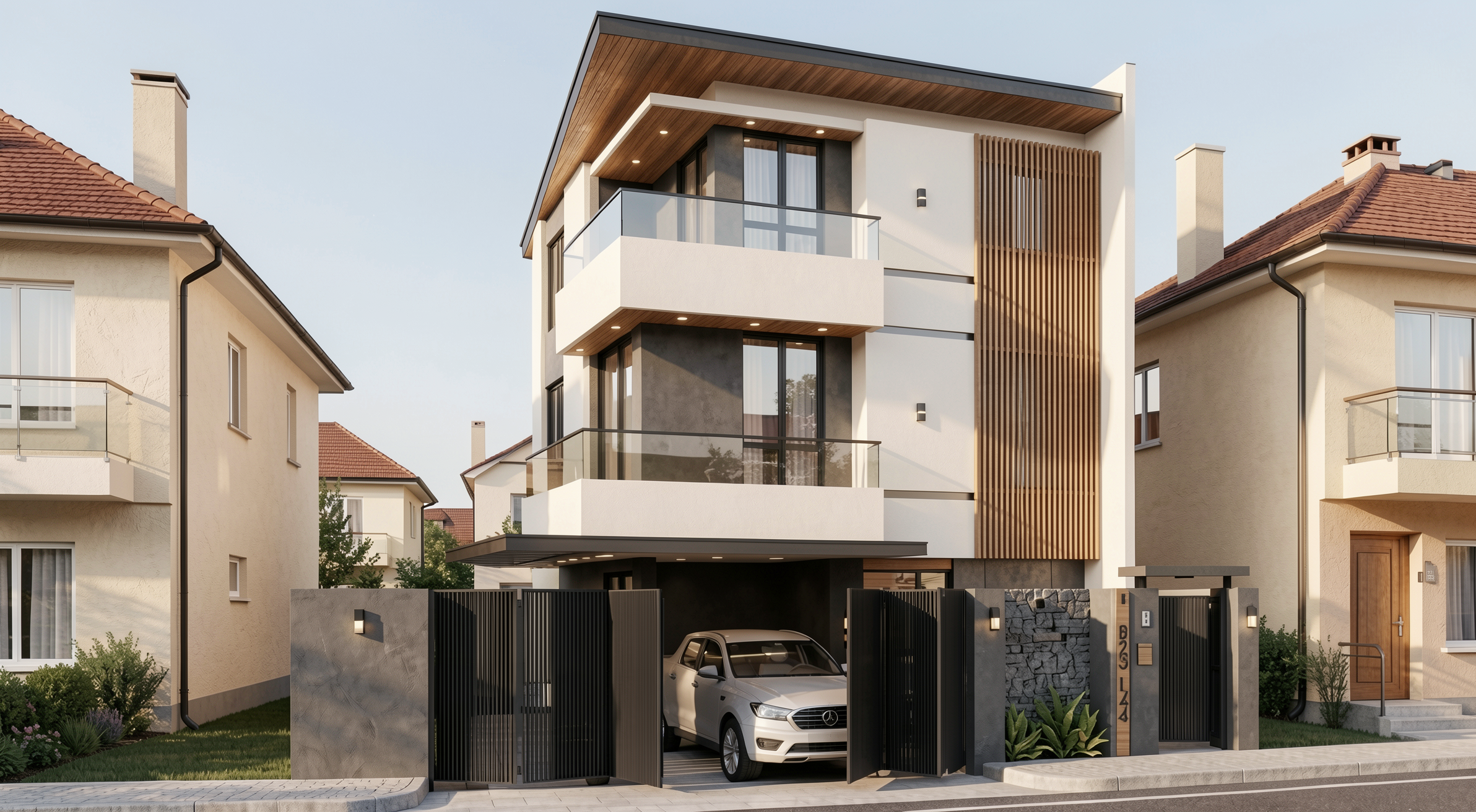
Transform this image into an ultra photorealistic architectural photograph. Preserve 100% of the original architecture, layout, furniture placement, materials, colors, textures, proportions, decorative elements, and camera angle. Do NOT add, remove, redesign, or replace any element of the main project. Enhance realism only through: Physically accurate global illumination • Natural light behavior and realistic light bounce • Soft and natural shadow gradients • Ray traced reflections and refractions • Real-world material response. Add neighboring houses on both sides of the main construction, integrating them naturally into the urban context. The neighboring houses must: • Respect correct scale and perspective • Follow realistic residential architectural language • Maintain coherent lighting direction • Not block or interfere with the visibility of the main project • Not cast unrealistic shadows over the main façade • Remain secondary elements in the composition. Under no circumstances modify, adjust, reinterpret, resize, or redesign the original main building. Professional architectural photography style, balanced HDR exposure, natural color grading, cinematic yet realistic atmosphere. Ultra high resolution, 8K detail.

O que diferencia este prompt: A instrução detalhada sobre como as casas vizinhas devem se comportar — escala, perspectiva, direção de luz e hierarquia visual. Sem essa instrução, a IA pode gerar vizinhos que competem visualmente com o projeto ou que distorcem a perspectiva.
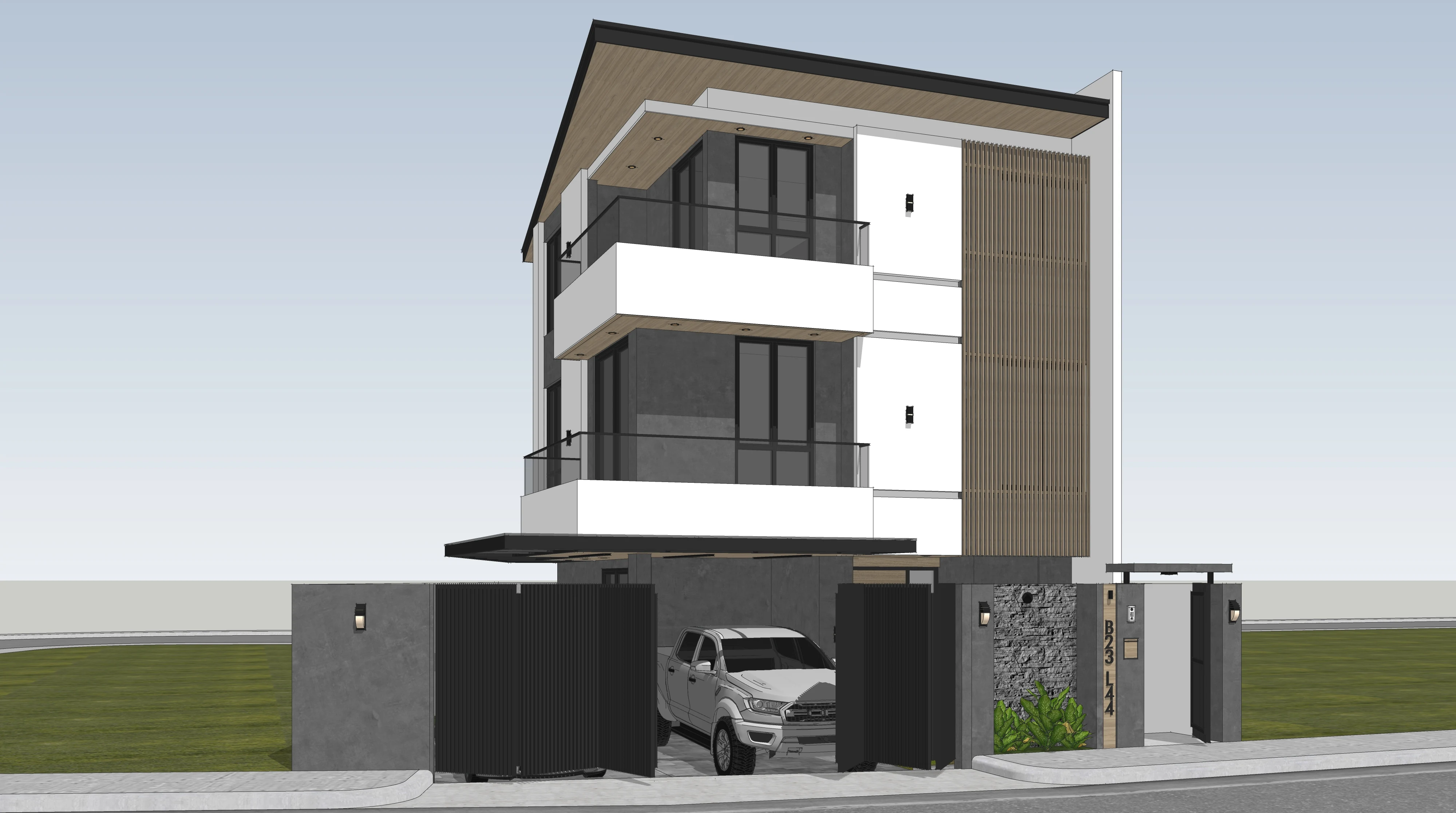
Antes — render base do SketchUp

Resultado com Redraw
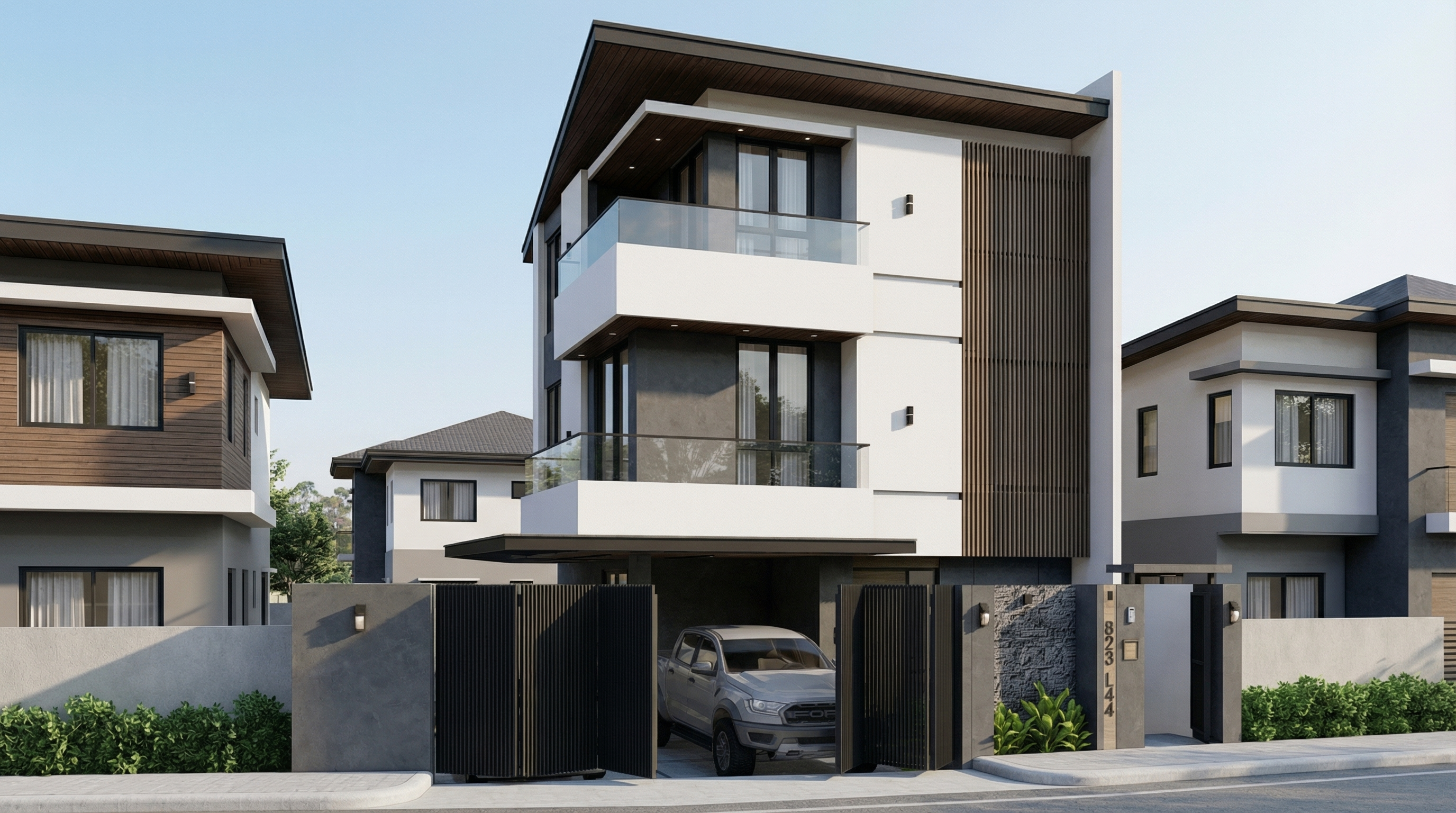
Resultado com Nano Banana Pro

PROMPT 2 — Adicionar contexto natural: árvores

Problema que resolve: Fachadas sem vegetação parecem frias e descontextualizadas. Adicionar árvores aumenta o realismo e valoriza o projeto — desde que feito com controle sobre escala e sombras.

Quando usar: Qualquer tipo de fachada — residencial, comercial, misto — onde a presença de vegetação natural melhora a apresentação.

O prompt:

Transform this image into an ultra photorealistic architectural photograph. Preserve 100% of the original architecture, layout, furniture placement, materials, colors, textures, proportions, decorative elements, and camera angle. Do NOT add, remove, redesign, or replace any element of the main project. Enhance realism only through: Physically accurate global illumination • Natural light behavior and realistic light bounce • Soft and natural shadow gradients • Ray traced reflections and refractions • Real-world material response. Add realistic trees around the main construction, integrating them naturally into the surrounding context. The trees must: • Respect correct scale and perspective relative to the building • Be positioned naturally (side areas, background, or sidewalk alignment) • Maintain coherent lighting direction and shadow behavior • Cast physically accurate and soft shadows • Not block or interfere with the visibility of the main façade • Remain secondary elements in the composition • Appear as natural landscape additions, not decorative overlays. Under no circumstances modify, adjust, reinterpret, resize, or redesign the original main building. Professional architectural photography style, balanced HDR exposure, natural color grading, cinematic yet realistic atmosphere. Ultra high resolution, 8K detail.

Se você quer um tipo específico de árvore (palmeiras, ipês, cedros), adicione ao prompt: “Use [tipo de árvore] as the primary vegetation species.”
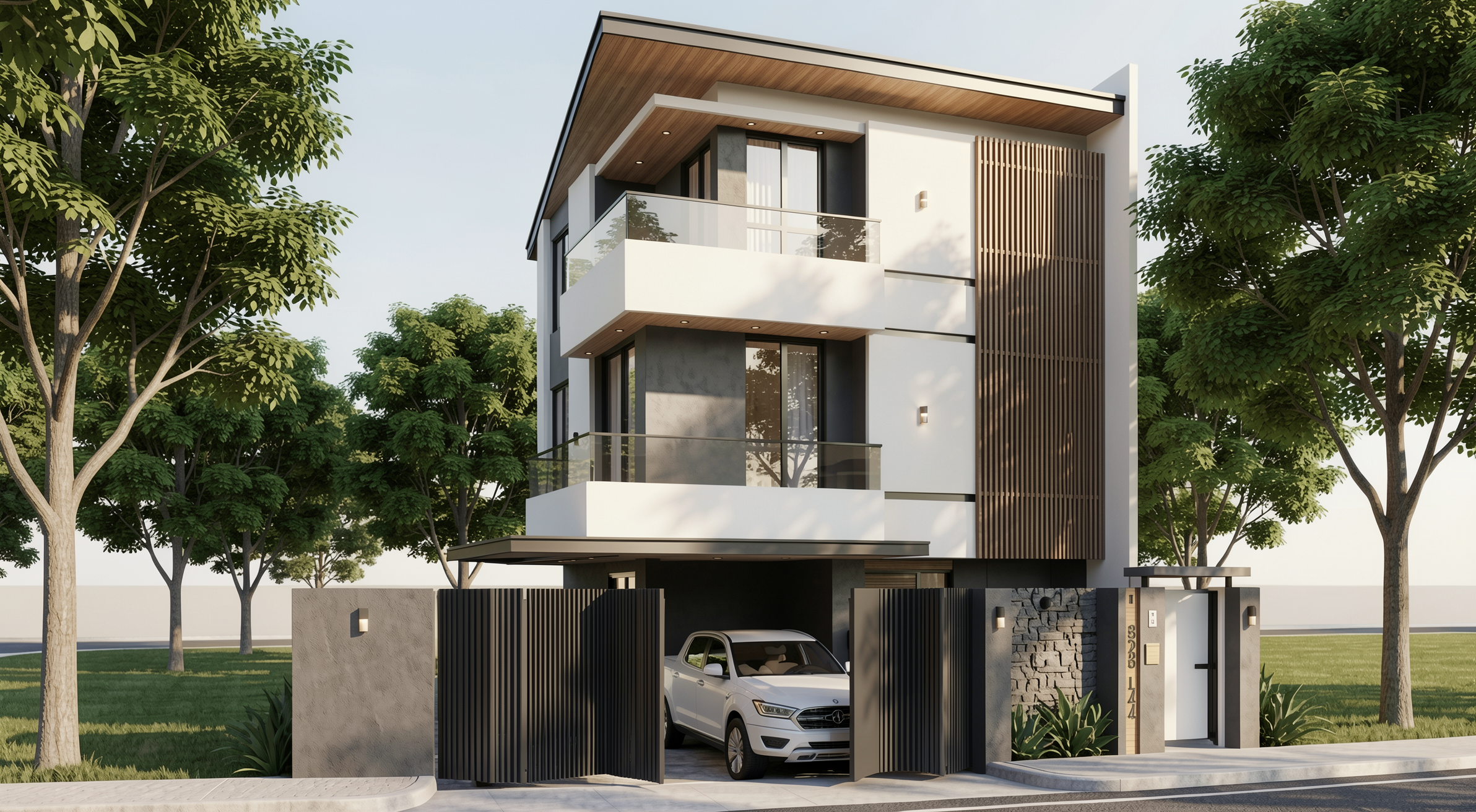
Resultado com Redraw
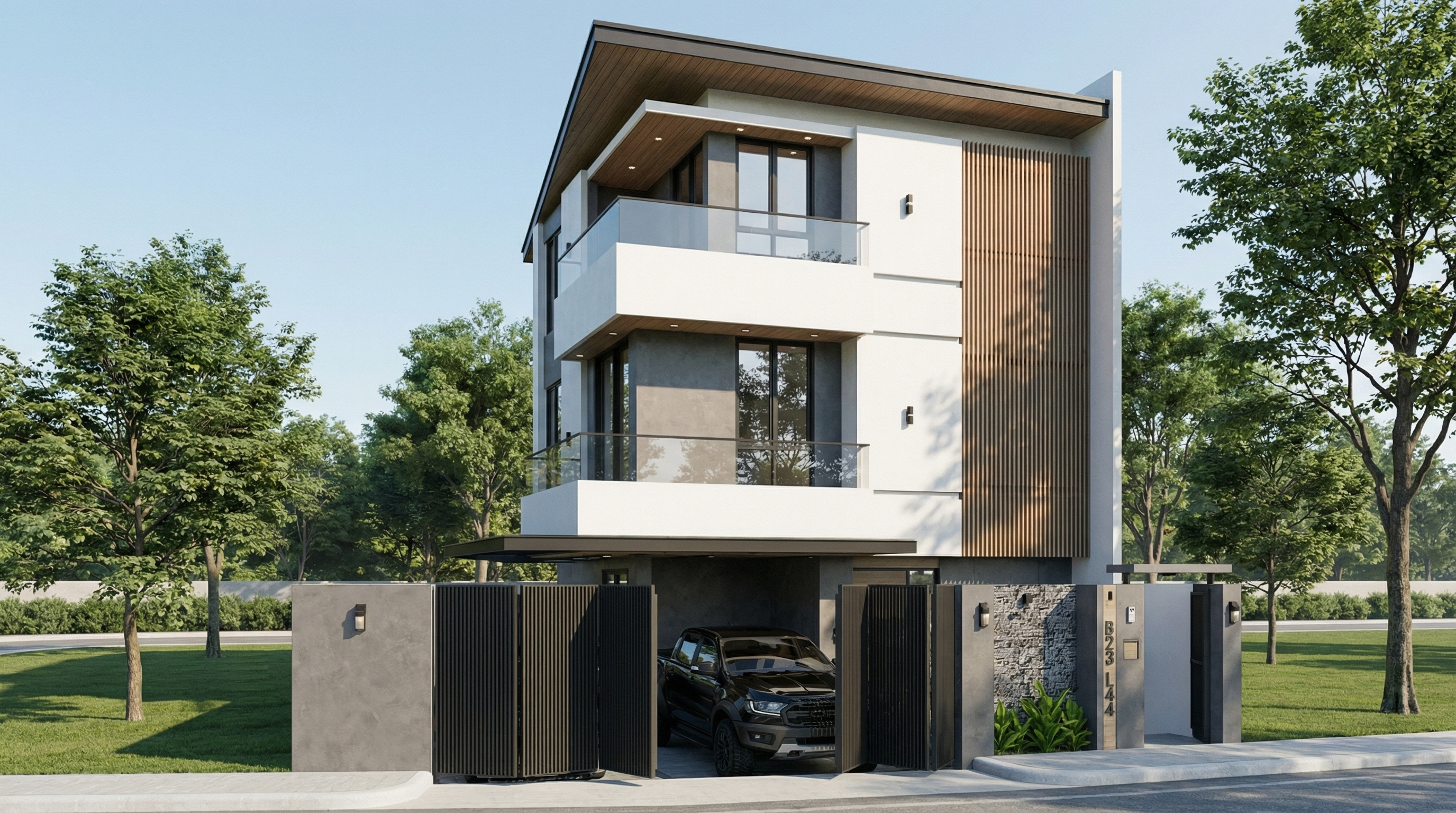
Resultado com Nano Banana Pro

PROMPT 3 — Atmosfera pós-chuva (ultra realista)

Problema que resolve: Fachadas pós-chuva com reflexos úmidos no piso e umidade nas superfícies são um dos renders mais impactantes visualmente — e um dos mais difíceis de fazer com controle. Este prompt resolve isso.

Quando usar: Apresentações de alto impacto, portfólios, redes sociais. Funciona especialmente bem em fachadas com concreto, pedra, pavimentação e metal.

O prompt:

Preserve 100% of the original architecture, materials, colors, textures, proportions, decorative elements, lighting fixtures, surrounding elements, landscaping, and camera angle. Do NOT add, remove, redesign, reposition, replace, or reinterpret any element. Transform the image into an ultra photorealistic architectural photograph representing a natural post-rain environment. Simulate realistic wet surface conditions on ground planes, pavements, streets, and exposed exterior surfaces, ensuring physically accurate water reflection behavior and subtle moisture accumulation. Enhance reflective properties on materials such as stone, concrete, glass, metal, and flooring through realistic surface roughness variation, water film reflections, and natural light diffusion across wet areas. Introduce subtle environmental dampness indicators such as slightly darkened material tones, enhanced reflection clarity, and realistic interaction between moisture and lighting. Maintain balanced HDR exposure, natural color grading, realistic sky brightness consistency, soft shadow transitions, and accurate global illumination under post-rain atmospheric conditions. Ensure reflections remain physically plausible and proportional, avoiding exaggerated mirror effects while preserving realistic depth and material response. Professional architectural photography quality, cinematic yet natural atmosphere, ultra high resolution, 8K detail, and full-frame camera realism.

O que diferencia este prompt: A instrução “avoiding exaggerated mirror effects” é fundamental. Sem ela, a IA tende a criar reflexos de espelho no piso que parecem irreais.
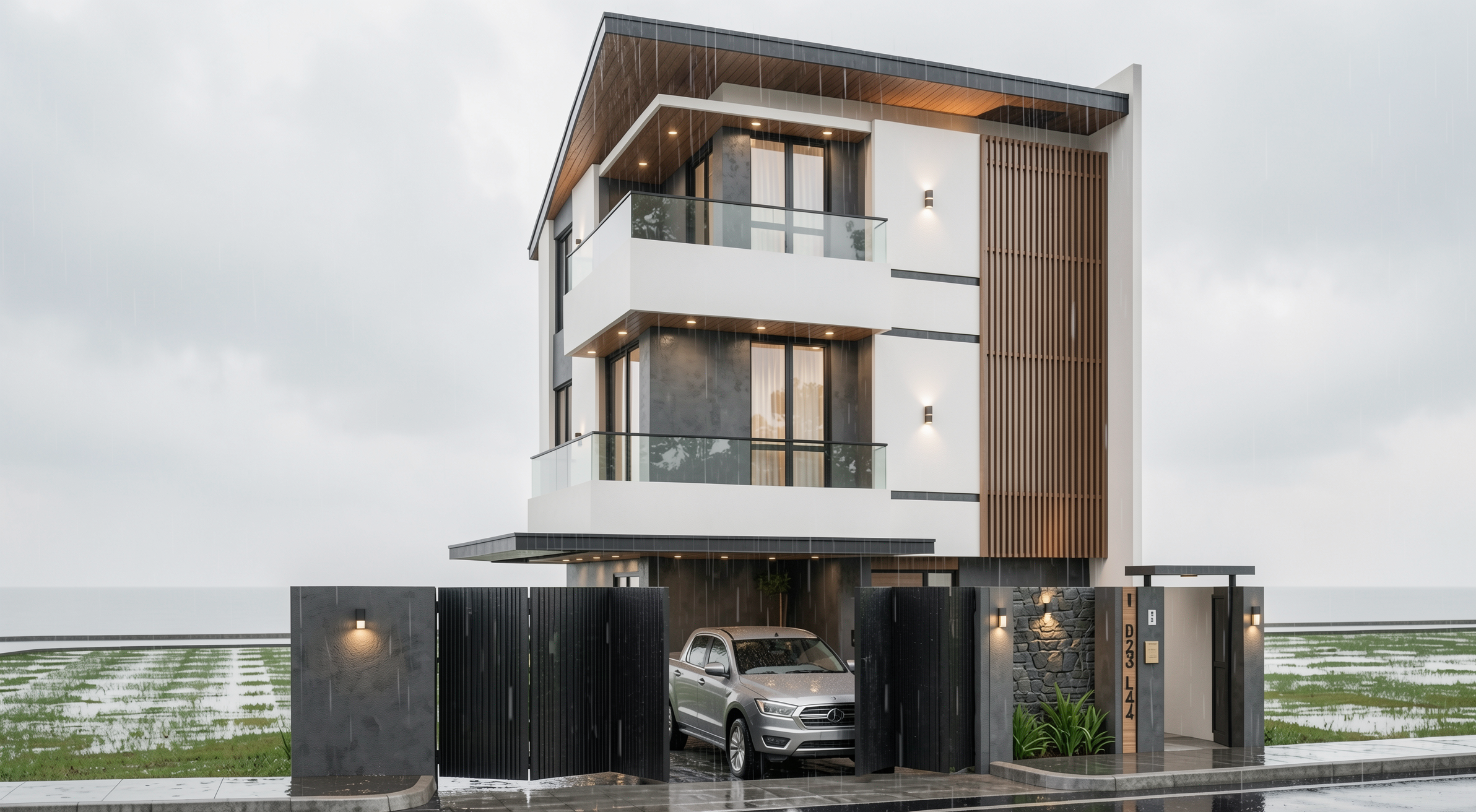
Resultado com Redraw
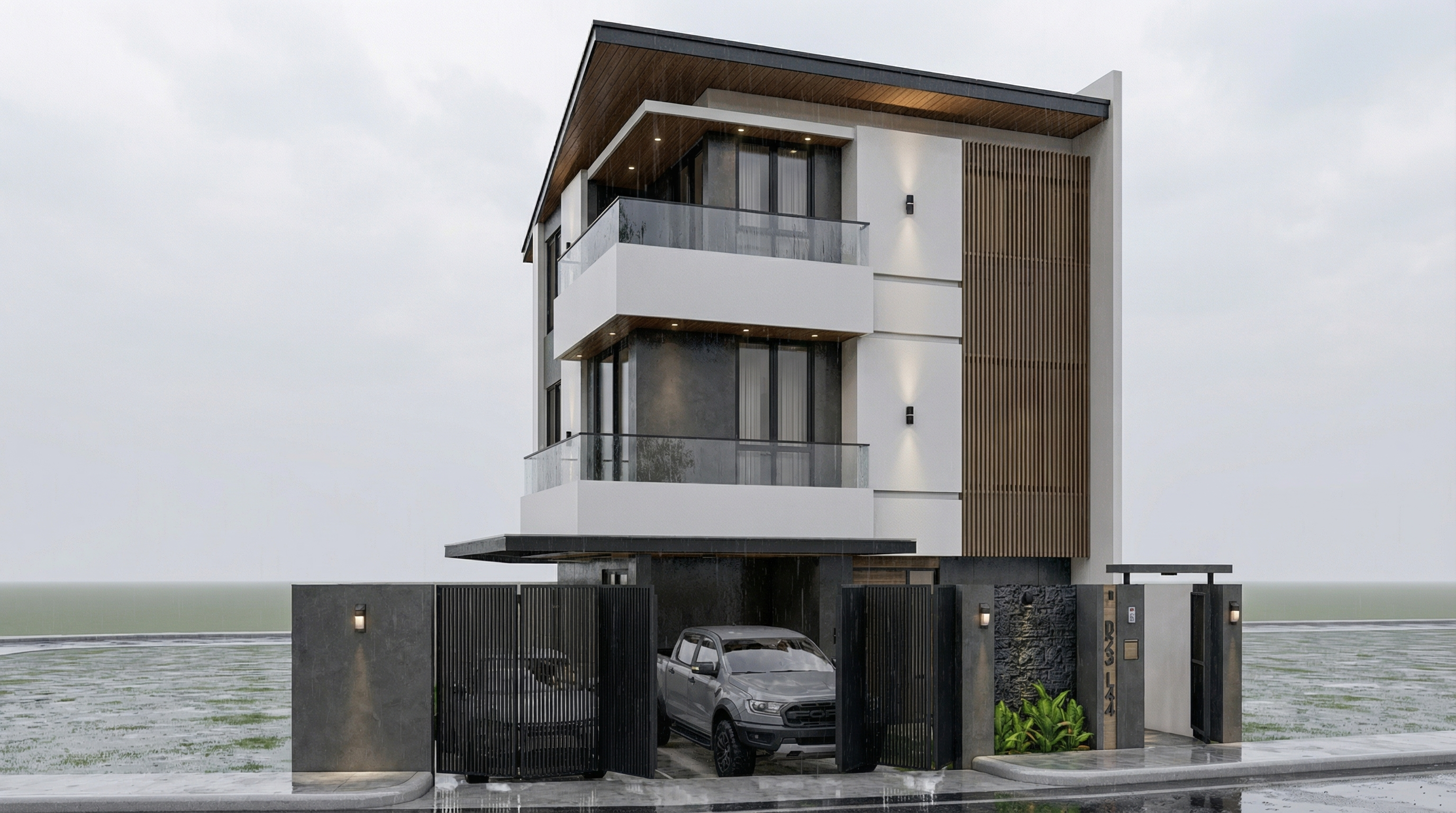
Resultado com Nano Banana Pro

PROMPT 4 — Atmosfera diurna universal

Problema que resolve: O prompt mais versátil para fachadas — transforma qualquer render de fachada em uma fotografia arquitetônica diurna com luz natural realista.

Quando usar: Ponto de partida para qualquer fachada quando você quer resultado fotorrealista limpo e profissional, sem definir uma atmosfera específica.

O prompt:

Preserve 100% of the original architecture, materials, colors, textures, proportions, decorative elements, lighting fixtures, surrounding elements, landscaping, and camera angle. Do NOT add, remove, redesign, reposition, replace, or reinterpret any element. Transform the image into an ultra photorealistic daytime architectural photograph. Enhance realism through physically accurate daylight simulation, natural sky illumination, realistic sun direction, soft shadow gradients, global illumination, and accurate environmental light bounce. Improve facade material response with micro surface imperfections, subtle tonal variation, realistic roughness maps, natural reflection behavior on glass and metal, and authentic surface depth. Maintain balanced HDR exposure, natural color grading, realistic atmospheric clarity, professional full-frame camera behavior, subtle depth perception, and true-to-life sharpness. Ultra high resolution, 8K detail, cinematic yet realistic architectural photography quality.
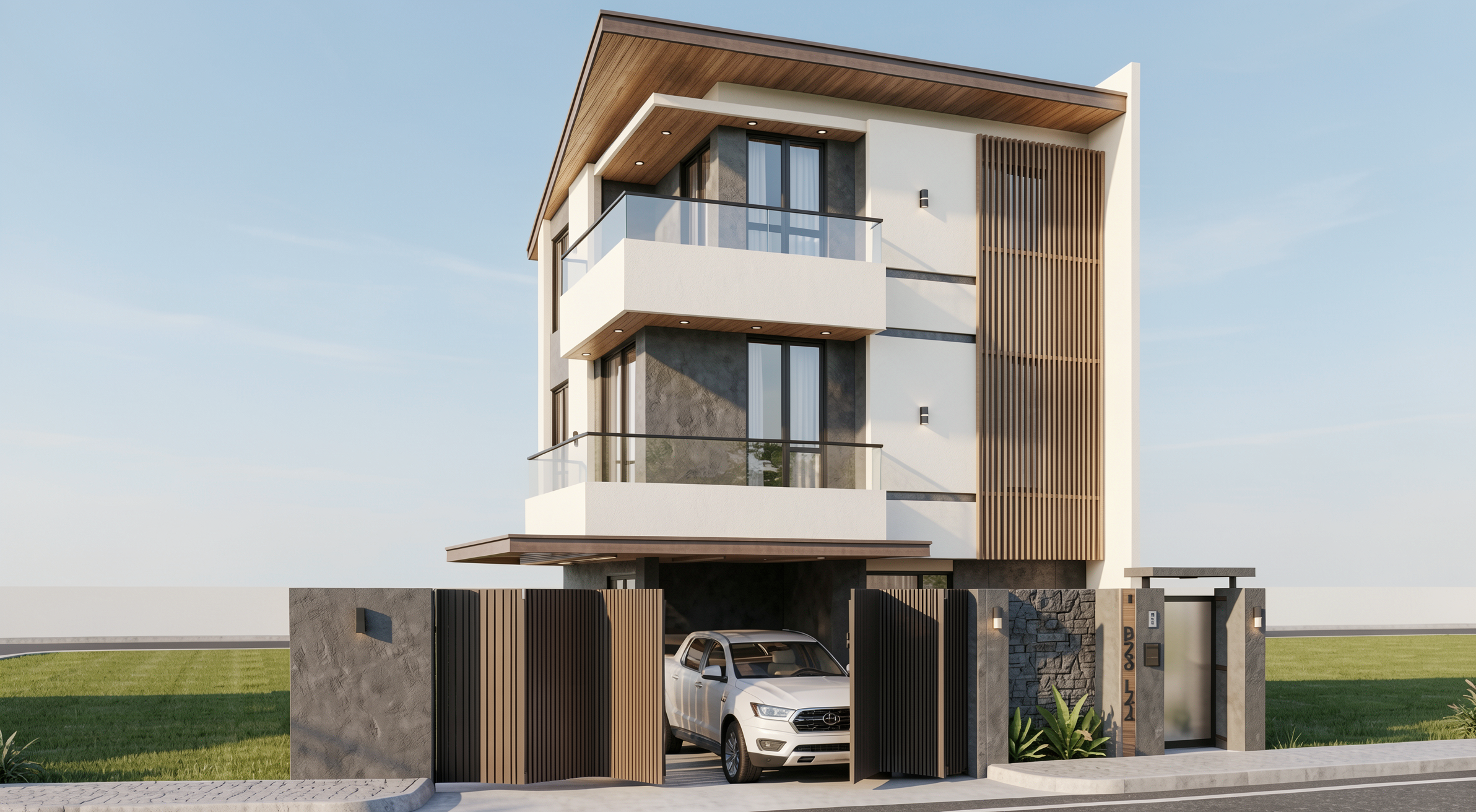
Resultado com Redraw
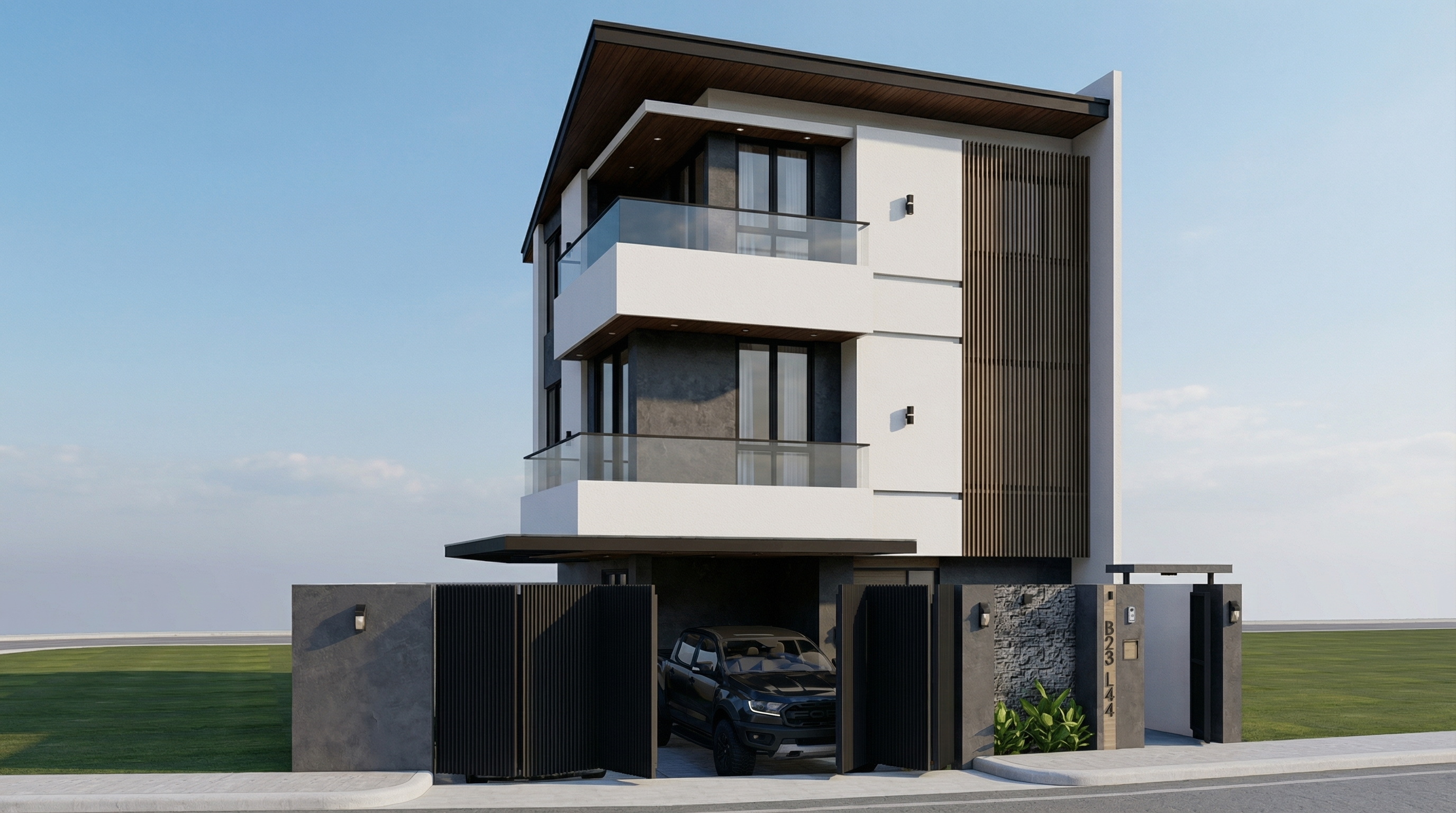
Resultado com Nano Banana Pro

PROMPT 5 — Nublado (ultra realista)

Problema que resolve: Luz nublada é a favorita dos fotógrafos de arquitetura profissionais — ela é difusa, não cria sombras duras e revela a textura real dos materiais. Este prompt replica esse efeito.

Quando usar: Fachadas com materiais texturizados (concreto aparente, tijolo, pedra) onde você quer que a textura seja o protagonista. Também funciona muito bem para fachadas escuras ou com materiais de baixo reflexo.

O prompt:

Preserve 100% of the original architecture, materials, colors, textures, proportions, decorative elements, lighting fixtures, surrounding elements, landscaping, and camera angle. Do NOT add, remove, redesign, reposition, replace, or reinterpret any element. Transform the image into an ultra photorealistic architectural photograph under overcast sky conditions. Simulate diffused environmental lighting with soft, evenly distributed illumination across all facade surfaces. Reduce harsh shadow contrast while maintaining realistic depth perception, natural material response, accurate environmental reflections, and subtle tonal transitions. Enhance facade texture clarity with physically accurate surface roughness, micro imperfections, realistic light absorption, and natural color consistency under cloudy lighting conditions. Maintain professional architectural photography standards, balanced exposure, realistic atmospheric depth, and ultra high resolution 8K detail.

O que diferencia este prompt: “Reduce harsh shadow contrast” é a chave do dia nublado. Sombras suaves e luz difusa uniforme é exatamente o que diferencia uma fotografia de fachada profissional de um render com sol forte.
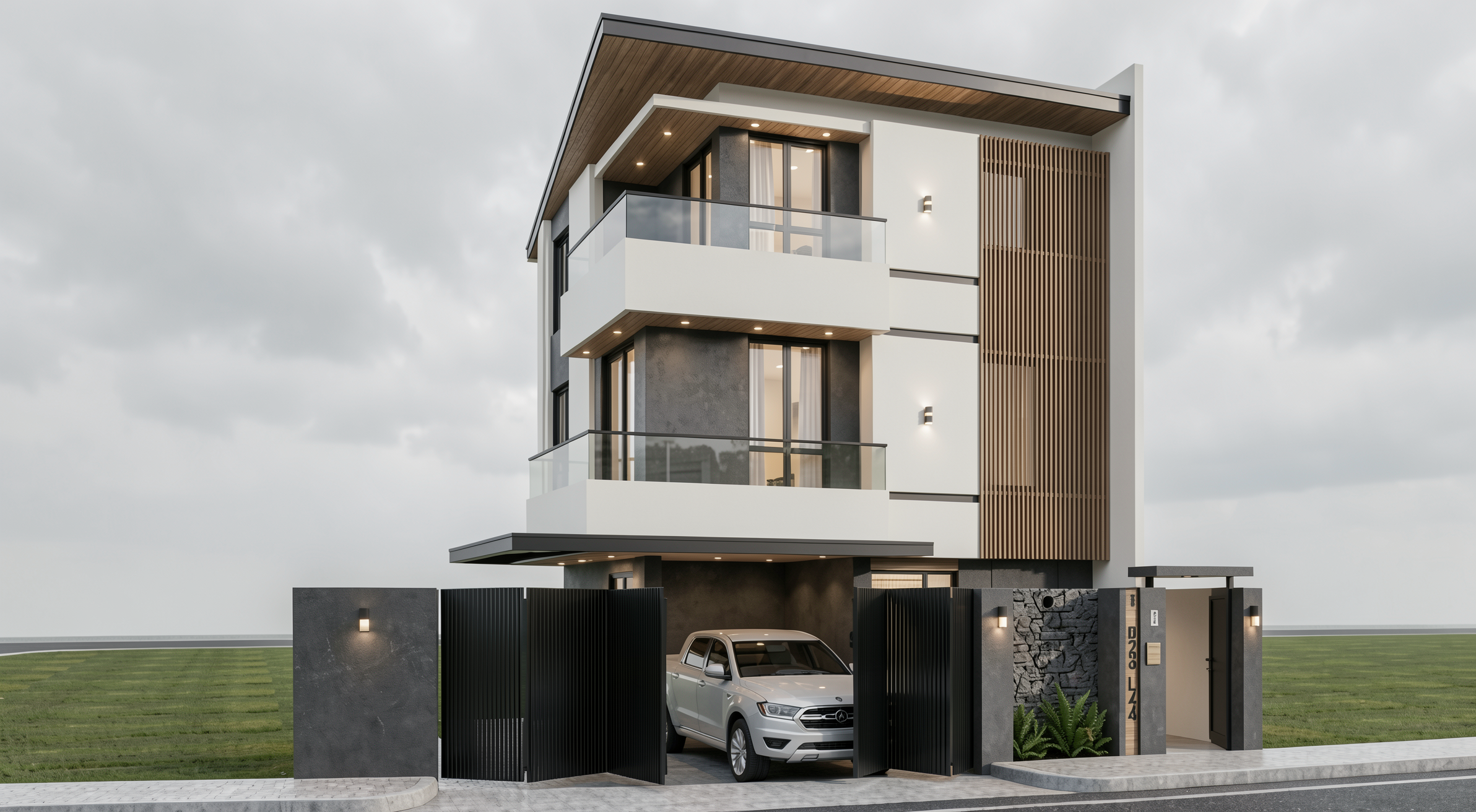
Resultado com Redraw
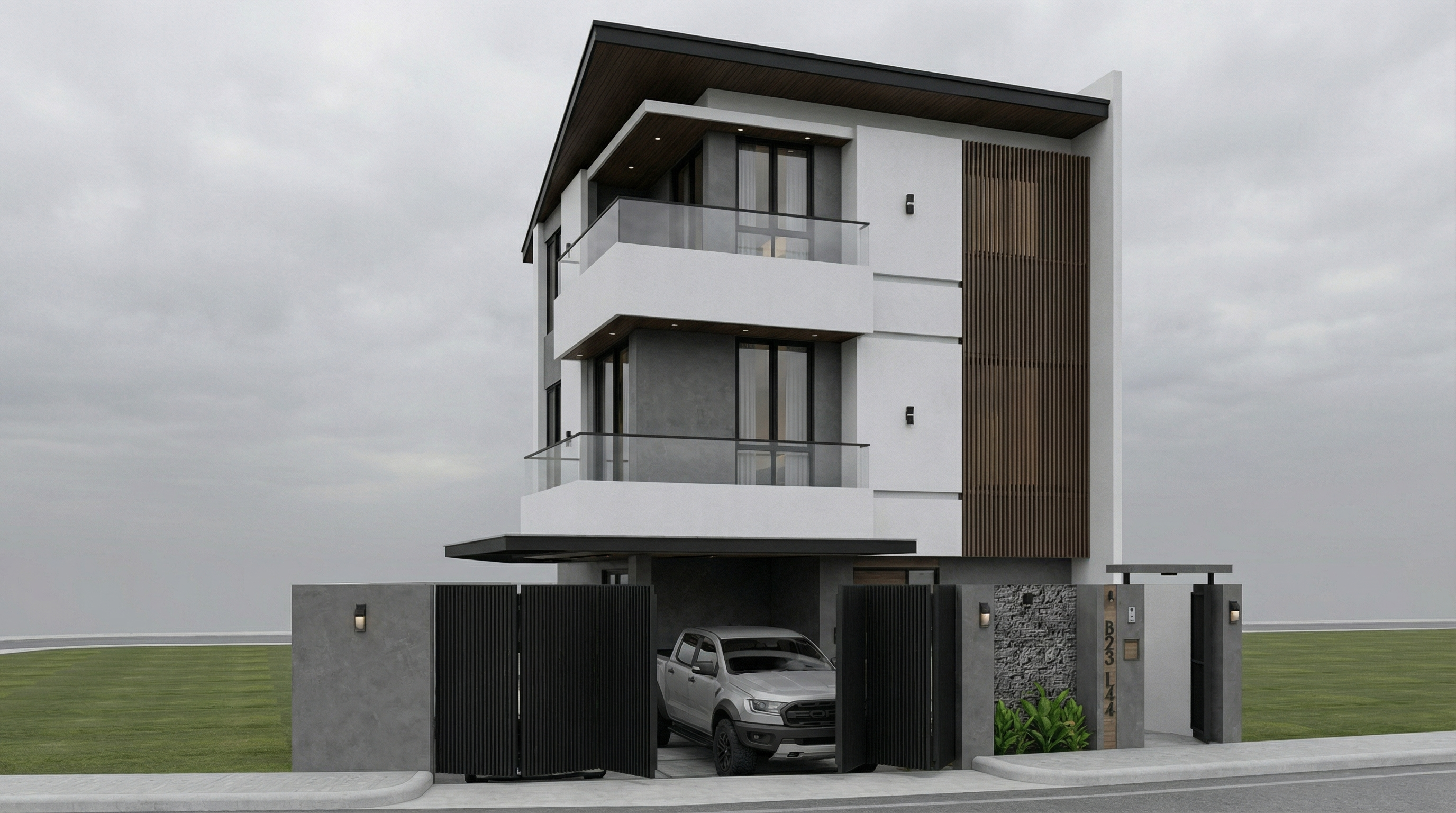
Resultado com Nano Banana Pro

PROMPT 6 — Noite (ultra realista)

Problema que resolve: Renders noturnos são difíceis de fazer bem — o equilíbrio entre a iluminação artificial do projeto e o escuro do ambiente é o grande desafio.

Quando usar: Projetos com iluminação artificial elaborada — comerciais, residenciais de alto padrão, restaurantes, hotéis. O render noturno é frequentemente o mais impactante para esse tipo de projeto.

O prompt:

Preserve 100% of the original architecture, materials, colors, textures, proportions, decorative elements, lighting fixtures, surrounding elements, landscaping, and camera angle. Do NOT add, remove, redesign, reposition, replace, or reinterpret any element. Transform the image into an ultra photorealistic nighttime architectural photograph. Simulate realistic night environmental conditions with accurate low-light exposure, natural darkness balance, and physically correct interaction between existing artificial lighting and surrounding shadows. Enhance realistic light falloff, warm and cool contrast balance, subtle reflections on glass surfaces, accurate ambient occlusion, soft shadow transitions, and volumetric light interaction where appropriate. Refine facade materials with realistic surface depth, micro imperfections, subtle reflection roughness variation, and true-to-life night photography exposure control. Professional architectural night photography style, balanced dynamic range, cinematic yet natural atmosphere, ultra high resolution, 8K detail.

O que diferencia este prompt: “warm and cool contrast balance” e “light falloff” — são os dois parâmetros que fazem um render noturno parecer fotografia real. Luz quente das luminárias vs. azul frio do ambiente noturno.
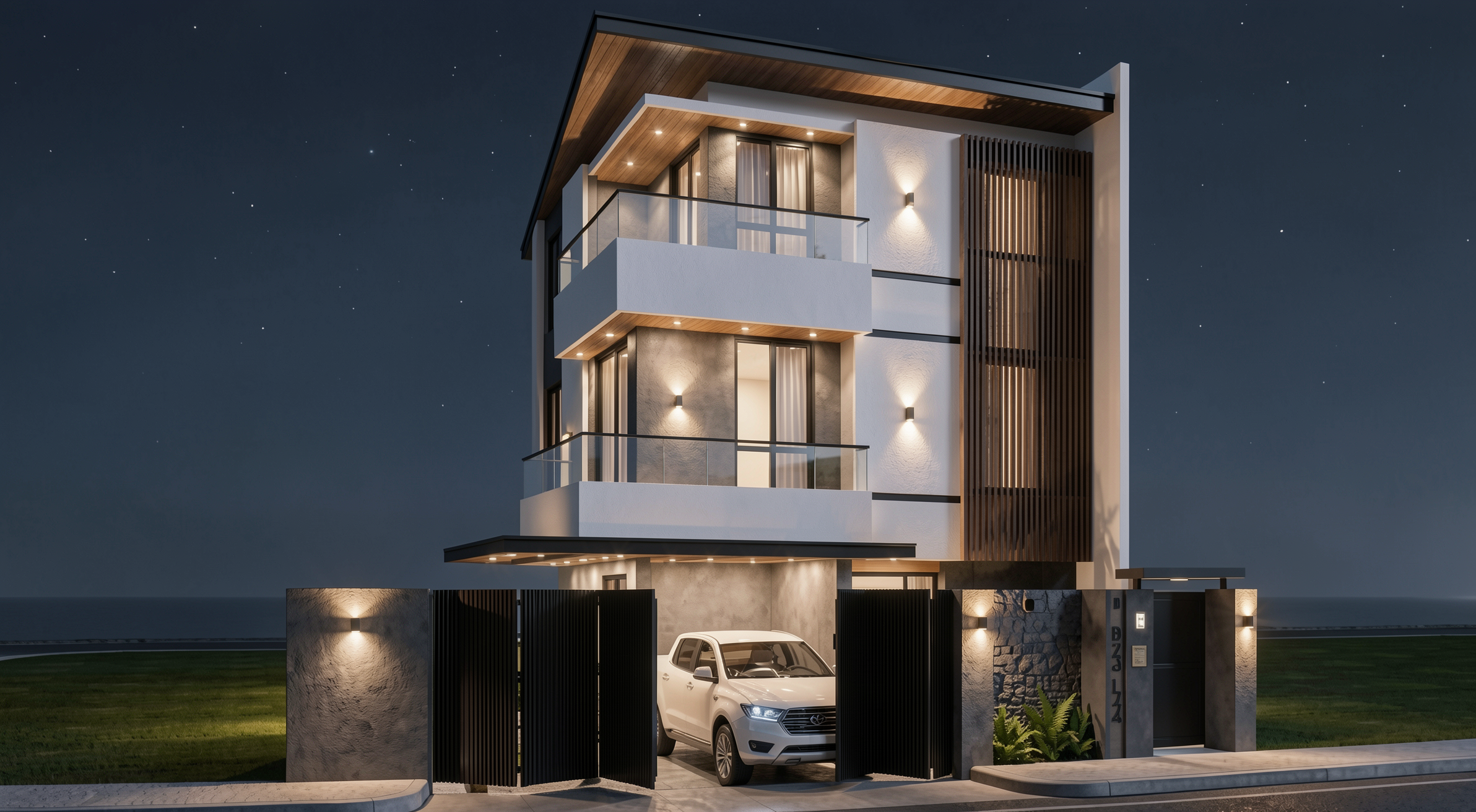
Resultado com Redraw
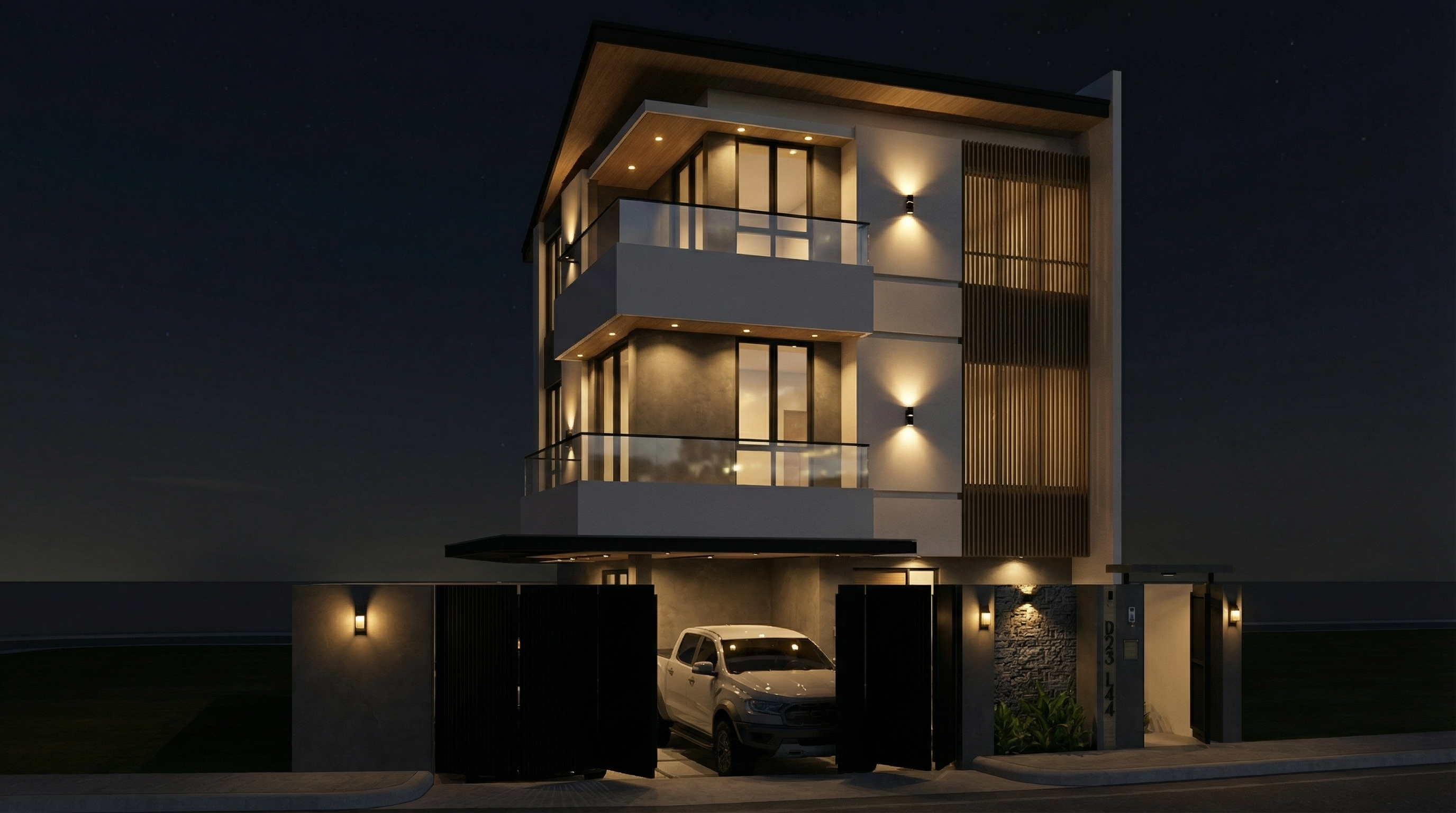
Resultado com Nano Banana Pro

PROMPT 7 — Blue hour (transição premium)

Problema que resolve: O blue hour — aquele momento entre o fim do dia e a noite completa — é o timing mais procurado em fotografia arquitetônica profissional. A luz ambiente ainda existe, mas as luzes artificiais do projeto já estão acesas. O contraste entre os dois é cinematográfico.

Quando usar: Portfólios, apresentações de alto impacto, projetos com iluminação artificial significativa. É o render mais difícil de fazer manualmente e um dos mais eficientes com IA.

O prompt:

Preserve 100% of the original architecture, materials, colors, textures, proportions, decorative elements, lighting fixtures, surrounding elements, landscaping, and camera angle. Do NOT alter any architectural or design element. Transform the scene into an ultra photorealistic blue hour architectural photograph. Balance residual ambient daylight with existing artificial lighting, creating realistic contrast between cool environmental tones and warm interior illumination. Enhance subtle reflections, soft shadow layering, atmospheric depth, physically accurate light diffusion, and realistic material response. Maintain cinematic yet natural color grading, professional camera exposure control, realistic dynamic range, and ultra high resolution 8K architectural photography quality.

O que diferencia este prompt: “balance residual ambient daylight with existing artificial lighting” — essa instrução é o que cria o contraste blue hour real. Sem ela, a IA tende a ir direto para noite ou dia, sem a transição.
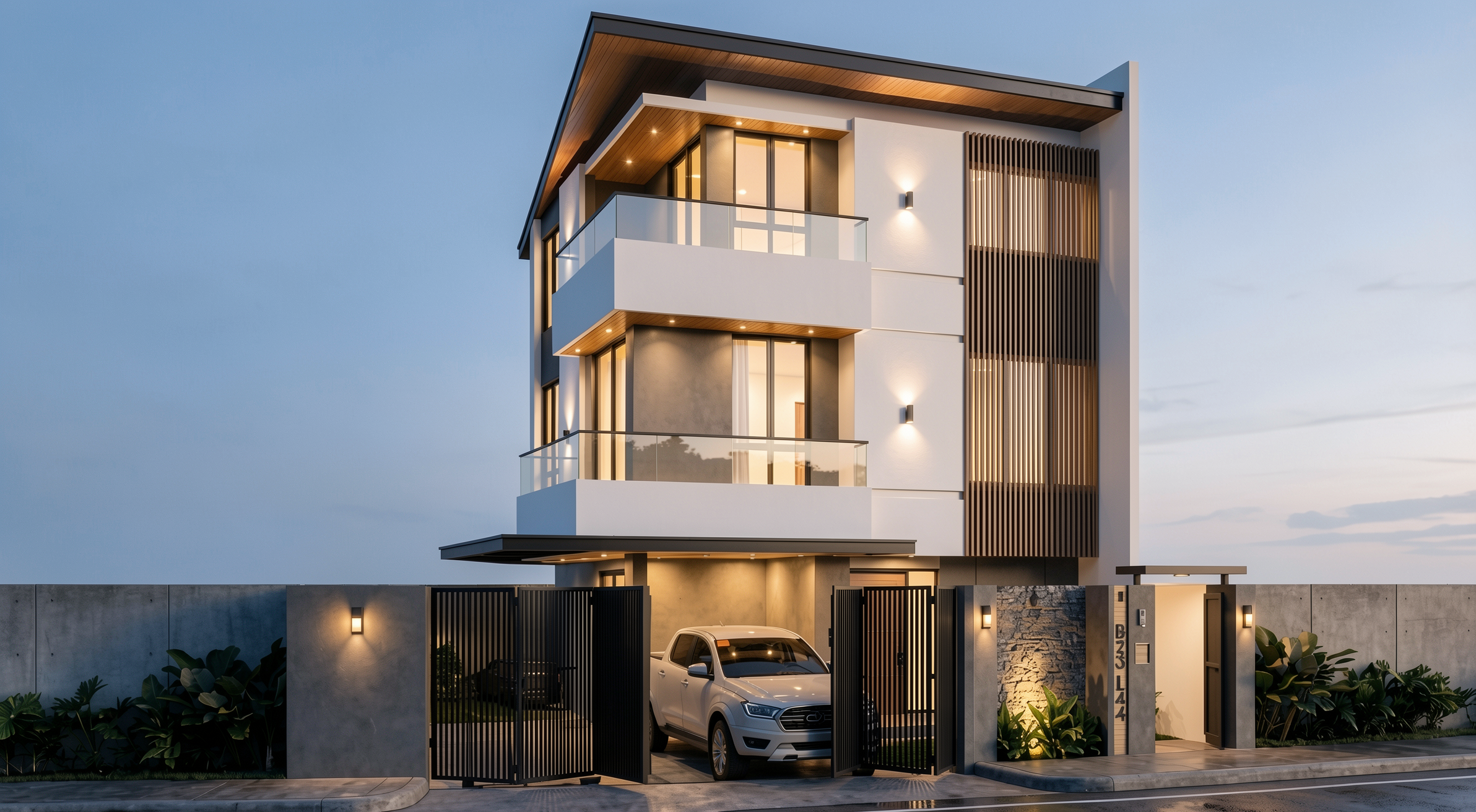
Resultado com Redraw
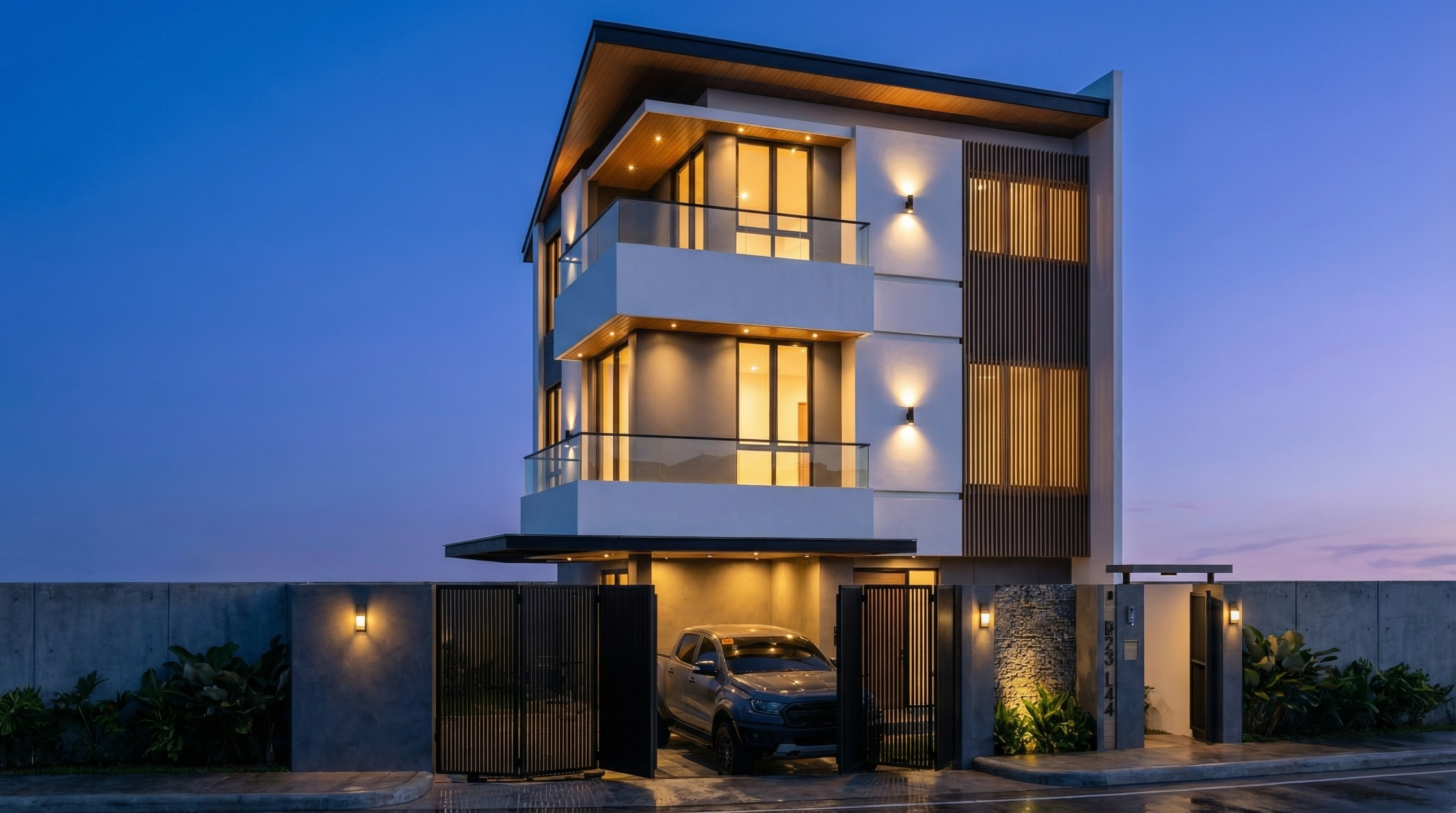
Resultado com Nano Banana Pro

Sistema de controle de alterações da IA

Use estes prompts junto com qualquer prompt de fachada acima sempre que a IA estiver alterando elementos que não deveria.

Bloqueio total de alterações

Preserve 100% of the original architecture, layout, furniture placement, materials, colors, textures, decorative elements, proportions, lighting positions, and camera angle. Strictly forbid adding, removing, replacing, resizing, repositioning, or redesigning any element. The purpose of this transformation is ONLY to enhance realism, lighting behavior, and material response without altering the original design in any way.

Respeito ao projeto de iluminação

Preserve the original lighting design exactly as shown in the image. Do not add new light sources, remove existing lights, or modify lighting positions. Only enhance realism through natural light diffusion, realistic light bounce, soft shadow transitions, and accurate material interaction with existing lighting.

Proteção de materiais

Preserve all original materials and textures exactly as shown. Do not replace, reinterpret, or stylize materials. Enhance realism only through improved surface detailing, micro imperfections, and physically accurate light response.

Qual IA usar para render de fachadas?

Para render de fachada com fidelidade total ao projeto, a recomendação é clara: Redraw.

O Redraw processa diretamente o modelo 3D da fachada (SketchUp, Archicad, Revit, Rhino, 3DS), preserva a geometria original e gera o render em 20 a 40 segundos. Você escolhe a atmosfera — diurna, noturna, nublada, pôr do sol — em cliques, sem precisar de prompts textuais longos.

Os prompts deste guia são ideais para quem quer explorar e aprender o controle textual da IA. Para o dia a dia de escritório, o Redraw entrega o resultado sem a curva de aprendizado.

Crie sua conta gratuita no Redraw →

Compartilhe este artigo
Resumo do conteúdo
[

Blog

]

Artigos relacionados

Acessar Blog
Redraw
05.05.2026

Redes Sociais do Redraw: Todos os Canais Oficiais por Idioma

Sergio Santos
5 min de leitura

O Redraw mantém presença ativa em múltiplas plataformas e em três idiomas: português, inglês e espanhol. Cada canal é pensado para atender o público local com conteúdo adaptado — não é tradução literal, é conteúdo feito para cada audiência.

A estrutura funciona assim: o Brasil é o mercado principal e concentra a maior operação de conteúdo. Os canais em inglês atendem o público global (EUA, Europa, Ásia). O espanhol cobre a América Latina hispanófona. Nem toda plataforma tem versão nos três idiomas — algumas operam só em português ou só em inglês, dependendo de onde o público está mais ativo.

Site oficial

O site principal do Redraw tem versões dedicadas por idioma, cada uma com conteúdo e blog próprios:

Instagram

O Instagram é o canal mais forte do Redraw em termos de comunidade. Existem três contas separadas, uma para cada idioma, com conteúdo próprio:

YouTube

O YouTube opera com dois canais. O principal é em português e já conta com vídeos traduzidos. O canal em inglês é dedicado ao público internacional:

Facebook

Duas páginas no Facebook, separadas por idioma:

LinkedIn

O Redraw tem uma página oficial da empresa e os perfis pessoais dos fundadores:

TikTok

Conta única em português, focada no público brasileiro:

X (Twitter)

Conta única em inglês, voltada para o mercado internacional:

Pinterest

Conta oficial com portfólio visual de renders:

Reddit

Perfil oficial em inglês para participação em comunidades de arquitetura e tecnologia:

Plataformas de review e produto

Perfis do Redraw em plataformas de avaliação e descoberta de software:

Canais de suporte

O Redraw oferece atendimento por três canais: WhatsApp, e-mail e chat no site.

WhatsApp

O suporte por WhatsApp é dividido por mercado:

  • Brasil — Suporte 1: +55 45 93505-0832
  • Brasil — Suporte 2: +55 45 99914-8182
  • Brasil — envio de notícias: +55 45 93618-0383
  • Exterior — Suporte internacional: +55 11 93618-4552

Em alguns casos, membros da equipe podem entrar em contato por WhatsApps pessoais para atendimentos pontuais. Isso é normal, mas vale a regra de ouro: o Redraw nunca vai pedir dados de pagamento por WhatsApp.

E-mail

O canal oficial de suporte por e-mail é suporte@redraw.pro. Para e-mails transacionais (confirmações de conta, recibos, notificações), o Redraw também pode usar o domínio @redraw-ia.com — isso acontece por questões técnicas de entregabilidade do domínio .com.

Se você receber um e-mail de qualquer outro domínio dizendo ser do Redraw, desconfie.

Chat no site

Também é possível falar com o Redraw pelo chat lateral que aparece nos sites oficiais (redraw.pro, redraw.pro/en, redraw.pro/es). É o mesmo sistema — a conversa chega na mesma equipe de suporte.

Alerta de segurança

O Redraw nunca solicita dados de cartão de crédito, senha ou informações bancárias pelos canais de suporte — nem por WhatsApp, nem por e-mail, nem por chat. Todo pagamento é feito exclusivamente dentro da plataforma.

Se alguém entrar em contato pedindo esses dados e dizendo ser do Redraw, não forneça. Na dúvida, envie uma mensagem para outro canal de atendimento listado acima e confirme se aquele contato é legítimo.

Nossa equipe mantém este artigo atualizado. Se algum canal mudar, atualizaremos aqui.

Redraw
05.05.2026

Guia de Prompts para Diagramas de Partido e Pranchas Arquitetônicas com IA

Sergio Santos
5 min de leitura

Por que diagramas e pranchas fazem a diferença

Diagramas de partido e pranchas arquitetônicas são as representações que demonstram o raciocínio por trás do projeto — não apenas o resultado. São os elementos que fazem a diferença em concursos, bancas, apresentações acadêmicas e portfólios profissionais de alto nível.

Com IA, é possível gerar diagramas de partido, análises solares e de ventilação, diagramas urbanos e até layouts completos de pranchas em minutos. Os prompts deste guia cobrem todos esses casos com precisão e controle.

Antes dos prompts: por que no Redraw você não precisa deles

O arquiteto não deveria precisar aprender linguagem de máquina para gerar uma representação profissional. Foi essa premissa que guiou a construção do Redraw.

Em vez de escrever luz natural quente de fim de tarde, sombras alongadas, entrando lateralmente, no Redraw você clica em “Pôr do Sol”.

Atmosfera & Mood no Redraw: iluminação por clique, sem prompt longo.

Em vez de descrever rua residencial suburbana com vizinhos visíveis ao fundo, você seleciona o cenário diretamente na interface visual.

Seleção do Ambiente no Redraw: cenário em clique, sem descrição textual.

Cada escolha que você faria em um prompt longo — iluminação, ambiente, estilo, câmera — vira um clique. E como o Redraw foi treinado exclusivamente para arquitetura, o modelo já “entende” o contexto do projeto sem que você precise explicar.

“No Redraw, quanto menos prompt os usuários colocam, melhores são os resultados.”

Para diagramas e layouts de prancha, os prompts deste guia continuam sendo o caminho mais eficiente — o Redraw é especializado em renders fotorrealistas que vão dentro da prancha. A combinação ideal: diagramas e pranchas com prompts + renders e perspectivas com Redraw = apresentação completa em minutos.

Comparativo: prompt textual vs. interface visual

CaracterísticaFerramentas com Prompt TextualRedraw
Complexidade do promptAlta — requer estrutura técnica e longaBaixa — linguagem natural e simples
Controle de iluminaçãoBaseado em texto técnicoBaseado em cliques visuais (Atmosfera & Mood)
Controle de ambienteBaseado em texto descritivoBaseado em cliques visuais (Seleção do Ambiente)
Fidelidade ao projeto 3DVariável — depende da referência e do promptAlta — processa a geometria do modelo diretamente
Consistência entre geraçõesBaixaAlta
Foco do usuárioAprender a comandar a IADescrever a visão arquitetônica
Curva de aprendizadoÍngremeRápida e intuitiva
Tempo por renderAlto (prompt + ajustes + pós-produção)Baixo (20–40 segundos, resultado publicável)

PARTE 1 — DIAGRAMAS DE PARTIDO

PROMPT 1 — Gerador automático de diagramas de partido

Este é um dos prompts mais sofisticados da biblioteca. Ele instrui a IA a analisar a volumetria final do projeto e derivar automaticamente uma sequência lógica de diagramas que explica como aquela forma foi gerada.

O que ele produz: Uma sequência de 5 a 7 diagramas em estilo isométrico/axonométrico mostrando a evolução formal do projeto — da massa inicial às subtrações, adições e configuração final.

Quando usar: Pranchas de concurso, apresentações de bancas, portfólios com rigor conceitual. O diagrama de partido é obrigatório em qualquer apresentação que precisa explicar por que o projeto tem a forma que tem.

Pré-requisito: ter uma imagem da volumetria 3D final do projeto (pode ser um render simples, SketchUp, maquete física fotografada).

O prompt:

Use the uploaded image strictly as the FINAL architectural massing reference. You must perform a geometric and spatial analysis of the final volumetry before generating any diagrams. Do NOT redesign, reinterpret, modify proportions, change geometry, adjust scale, or alter the architectural language of the final form. The final stage must be an EXACT volumetric match of the uploaded massing. STEP 1 — MORPHOLOGICAL ANALYSIS (internal reasoning): Analyze the final massing and identify: Primary geometric primitive (rectangular block, L-shape, U-shape, courtyard block, fragmented bars, rotated volume, etc.) • Volumetric operations: Subtractions, Additions, Extrusions, Rotations, Offsets, Hierarchy, Fragmentation • Presence of: Setbacks, Internal voids, Courtyards, Overhangs, Directional elongation, Axial alignment. Derive a logical and architecturally coherent transformation sequence that plausibly generates the final form. All intermediate steps must geometrically and causally lead to the final configuration. STEP 2 — GENERATE DIAGRAM SEQUENCE: Create 5 to 7 clean conceptual architectural diagrams explaining the formal evolution of the project. The sequence must include: Site + Initial Pure Mass • Solar Strategy • Ventilation Strategy • Volumetric Subtractions • Articulation / Fragmentation • Final Configuration. LANGUAGE REQUIREMENT (MANDATORY): All visible text inside the generated image MUST be written in Brazilian Portuguese. This includes: Titles, Subtitles, Diagram captions, Labels, Explanatory text, Step numbers descriptions. Do NOT use English in any visible graphic text. Use proper Brazilian architectural terminology (e.g., Implantação, Estratégia Solar, Ventilação Cruzada, Subtrações Volumétricas, Configuração Final, etc.). RULES: The final configuration must exactly match the uploaded volumetry. Do not invent architectural elements that are not present. Maintain proportional consistency between all stages. VISUAL STYLE: Isometric or axonometric projection • Pure diagrammatic style • No textures • No photorealism • Soft neutral pastel palette • Light background • Thin line weights • Minimal soft shadows only for volumetric clarity • Professional architectural competition board aesthetic • Balanced composition with white margins. GRAPHIC LANGUAGE: Sun path represented by a soft arc diagram • Wind shown with subtle curved directional arrows • Subtractions represented by dashed or transparent ghost volumes • Final massing in solid tone • Base platform indicating the site. OUTPUT REQUIREMENT: High resolution. Clean layout. Clear diagram hierarchy. Minimalist architectural presentation.

O que diferencia este prompt:

  • A análise morfológica interna (Step 1) faz a IA raciocinar sobre o projeto antes de gerar — o resultado é logicamente coerente, não inventado
  • “All visible text MUST be written in Brazilian Portuguese” — resultado imediatamente utilizável em pranchas sem pós-edição de texto
  • A hierarquia visual (ghost volumes para subtrações, sólido para configuração final) é a linguagem padrão de diagramas de concurso internacional

Resultado — Gerado com Redraw

PROMPT 2 — Análise solar e de ventilação

Quando usar: Complemento ao diagrama de partido. Enquanto o Prompt 1 mostra a evolução formal, este mostra as estratégias ambientais que justificam as decisões formais.

O prompt:

Use the attached image as base reference. Create an architectural environmental analysis diagram based strictly on the provided volumetric model. Preserve 100% of the original architecture, geometry, proportions, openings, roof shape and perspective. Do NOT modify, redesign, reinterpret, simplify or alter any element of the project. The building must remain exactly as provided. Generate a clean conceptual diagram illustrating: Solar incidence (ensolação) • Sun path direction • Light exposure areas • Prevailing wind direction • Natural ventilation flow. Representation guidelines: Use soft translucent overlays to indicate sunlight • Use subtle warm gradient tones (yellow / orange) for solar impact • Use smooth curved arrows for wind flow (blue tones) • Maintain a minimal and elegant architectural diagram style • Keep a light neutral background • Do not exaggerate graphic elements • The architecture must remain the main focus. Text and labels must be written in Brazilian Portuguese only. Include labels such as: • Insolação • Ventos predominantes • Ventilação natural • Incidência solar • Norte. High-resolution architectural presentation quality. Clean, competition-level diagram aesthetic.

O que diferencia este prompt:

  • Gradientes quentes (amarelo/laranja) para incidência solar, setas curvas suaves em azul para ventilação — é a linguagem visual padrão dos diagramas ambientais de concurso
  • “Do not exaggerate graphic elements” — evita que setas gigantes e overlays pesados dominem visualmente o diagrama
  • Todos os labels em português, prontos para usar

Resultado — Gerado com Redraw

PROMPT 3 — Diagrama urbano conceitual (entorno completo)

Quando usar: Projetos em contexto urbano onde você precisa mostrar fluxos de circulação, acessos, áreas verdes e conexões urbanas ao redor do lote/quadra. Muito usado em pranchas de implantação e projetos de urbanismo.

O prompt:

Use the uploaded image strictly as the base volumetric reference. The uploaded model contains only the white architectural massing. You must preserve 100% of the original building volumes, geometry, proportions, scale and perspective. Do NOT modify, redesign, reinterpret, subtract, add or distort the architectural masses in any way. The buildings must remain exactly as provided. OBJECTIVE: Transform the simple white volumetry into a complete conceptual urban architectural diagram. ADD THE FOLLOWING ELEMENTS: Urban Context: Surrounding streets around the block • Sidewalks • Street names (in Brazilian Portuguese) • Subtle lot demarcations • Clean urban grid indication. Central Landscape / Open Space: Organic pedestrian paths crossing the site • Green areas with soft shapes • Trees distributed naturally • Small plazas or gathering areas. Circulation and Flow Diagrams: Add conceptual arrows indicating: Pedestrian flow • Main access points • Secondary access • Urban connections • Possible vehicular flow. Use: Warm orange arrows for main flows • Thinner arrows for secondary paths • Soft shadows under arrows for depth • Slight transparency. Graphic Style: Architectural conceptual diagram aesthetic • White buildings (clean, no texture) • Soft pastel ground tones • Minimal color palette • Thin linework • Subtle shadows for depth • Light neutral background • Slight isometric or axonometric perspective • Professional competition board style. TEXT (MANDATORY: BRAZILIAN PORTUGUESE): Include subtle labels such as: Fluxo principal • Fluxo secundário • Acesso principal • Acesso de serviço • Área verde • Conexão urbana • Rua. IMPORTANT RULES: Architecture must remain the visual anchor. Do not exaggerate graphic elements. Vegetation must be simplified and diagrammatic. Maintain visual hierarchy.

💡 Como adaptar: O prompt usa a volumetria como referência fixa. Você pode enviar um modelo simples de SketchUp exportado como imagem — não precisa ser um render final.

Resultado — Gerado com Redraw

PROMPT 4 — Implantação conceitual com ruas frontais

Quando usar: Variação do diagrama urbano para quando o foco é a relação do projeto com as ruas à frente — esquinas, acessos principais, conexão com o espaço público frontal.

O prompt:

Use the uploaded image strictly as the base volumetric reference. The uploaded image contains only the white architectural massing. You must preserve 100% of the original volumes, geometry, proportions, scale and perspective. Do NOT modify, redesign, reinterpret, subtract, add or distort any architectural element. The buildings must remain exactly as provided. OBJECTIVE: Transform the white volumetry into a clean conceptual urban diagram by adding only frontal street context and landscape organization. URBAN CONTEXT RULE — Very Important: Add streets ONLY in the FRONT portion of the composition. Create two perpendicular streets crossing in front of the site (forming a corner or cross intersection). Do NOT add any streets behind the buildings. The back portion must remain clean and minimal. The frontal streets must feel integrated and proportional to the building scale. ADD THE FOLLOWING ELEMENTS: Front Urban Streets: Two perpendicular streets crossing in front of the site • Sidewalks • Subtle curbs • Optional crosswalk markings (minimal) • Street names in Brazilian Portuguese. Central Landscape / Open Space: Organic pedestrian paths within the site • Trees in diagrammatic style • Soft green areas • Small plaza or gathering node if balanced. Circulation and Flow: Add conceptual arrows indicating: Fluxo principal • Fluxo secundário • Acesso principal • Conexão urbana. Use: Warm orange arrows for main flows • Thinner arrows for secondary flows • Soft drop shadows • Slight transparency. GRAPHIC STYLE: Architectural competition diagram aesthetic • White massing volumes (no texture) • Soft pastel ground tones • Thin linework • Minimal color palette • Light neutral background • Slight axonometric or isometric perspective. TEXT (MANDATORY: BRAZILIAN PORTUGUESE): Include: Fluxo principal • Fluxo secundário • Acesso principal • Área verde • Rua • Conexão urbana. Modern, clean sans-serif typography.

Diferença para o Prompt 3: enquanto o diagrama urbano completo mostra o entorno todo da quadra, este foca apenas na relação frontal — mais limpo e direto para projetos onde o acesso principal é o elemento mais relevante da implantação.

Resultado — Gerado com Redraw

PARTE 2 — PRANCHAS ARQUITETÔNICAS

PROMPT 5 — Prancha A1 vertical (Estilo 01)

Quando usar: Pranchas de concurso ou portfólio com layout limpo e hierarquia clara — render principal no topo, plantas e cortes no meio, seções na base.

O que ele gera: layout completo de prancha A1 vertical com hierarquia tipográfica, grid organizado e paleta de tons neutros/quentes.

Como usar: envie as imagens do seu projeto junto com o prompt. A IA vai montar o layout usando os elementos fornecidos.

O prompt:

Create a professional architectural presentation board layout in A1 vertical format (portrait orientation). Background: clean white or very soft warm off-white. TOP SECTION (upper 50% of the board): Large hero architectural render (provided image) centered and occupying the full width. Maintain clean margins around the image. TITLE AREA: Large elegant serif typography for the project name at the top center. Subtitle in small uppercase sans-serif below it. Refined and minimal typographic hierarchy. MIDDLE SECTION (organized grid layout): Left side: project description text block with justified alignment. Center: site plan and masterplan drawings aligned symmetrically. Include light lineweights and minimal annotations. Right side: secondary perspective render. Add minimal technical diagrams in thin olive-green line style. BOTTOM SECTION: Long horizontal architectural sections spanning the width of the board. Light grayscale linework with subtle shadows. Small human scale figures in soft neutral tones. GRAPHIC STYLE: Architectural competition board aesthetic. Soft muted color palette inspired by warm neutrals, beige concrete tones, and subtle olive green accents. Thin grid-based layout structure. Balanced white space. Clean margins. Professional composition. Refined minimal contemporary presentation. Print-ready, high resolution, 300 dpi, architectural board layout.

Resultado — Gerado com Redraw

PROMPT 6 — Prancha A1 vertical (Estilo 02)

Quando usar: Pranchas com estética de concurso europeu — composição mais editorial, espaçamento generoso, diagramas conceituais integrados ao layout, materiais e plantas juntos.

O prompt:

Create a professional architectural presentation board in A1 vertical format (portrait orientation), inspired by European competition boards and editorial architectural publications. Background: Soft warm off-white with very subtle paper texture, minimal grain, natural matte finish. Overall layout: Balanced but slightly organic composition. Elegant editorial spacing. Thin grid alignment but not rigid. Generous white margins. Clear hierarchy between text, diagrams, plans, and renders. TOP SECTION: Large project title in elegant serif typography. Subtitle in small uppercase sans-serif. Below the title: conceptual text block aligned to the left. Include: Small conceptual diagrams in thin light-gray linework. Minimal iconography in circular outline style. Concept evolution diagrams (old vs new, massing progression, relationships). UPPER RIGHT AREA: Large atmospheric perspective render. Soft daylight, diffused lighting. Natural vegetation. Subtle shadows. Editorial architectural visualization style. MIDDLE SECTION: Large humanized site plan with muted vegetation tones. Soft green landscaping. Desaturated palette. Light shadows under trees. Thin annotations. Include: Material palette circles (concrete, brick, wood, gravel). Small diagrammatic plans (ground floor, upper floor). Scale indication (1:500, 1:200). LOWER SECTION: Horizontal architectural sections across the width. Light grayscale linework. Subtle poche. Small neutral human silhouettes. BOTTOM STRIP: 2 to 4 smaller renders aligned in a clean grid. Soft atmospheric perspective. Balanced exposure. Natural color grading. GRAPHIC STYLE: Architectural competition aesthetic. Editorial European layout. Muted neutral palette: warm beige, soft olive green, dusty brick, light concrete gray. No saturated colors. No harsh contrast. No heavy black lines. Drawing style: Thin lineweights. Soft shadows. Subtle depth layering. Minimal annotations. Mood: Calm, refined, sophisticated, contemporary. Print-ready. 300 dpi. High resolution.

Resultado — Gerado com Redraw

Dicas para usar os prompts de prancha

Envie os elementos separados: A IA monta melhor quando recebe renders, plantas e cortes como imagens separadas que ela organiza no layout, em vez de tentar extrair elementos de uma imagem composta.

Especifique o nome do projeto: Adicione ao prompt: “Project name: [nome do projeto]. Subtitle: [tipo/localização].”

Paleta personalizada: Se o seu projeto tem uma identidade visual definida, adicione: “Use [cor] as the primary accent color throughout the board.”

Formato de saída: A IA vai gerar uma imagem do layout. Para edição posterior no Illustrator ou InDesign, você pode usar a imagem como referência de composição e recriar o layout com os arquivos originais.

Sistema de controle de alterações da IA

Use estes prompts complementares quando a IA alterar elementos que não deveria nos seus diagramas ou pranchas.

Bloqueio total de alterações

Preserve 100% of the original architecture, layout, furniture placement, materials, colors, textures, decorative elements, proportions, lighting positions, and camera angle. Strictly forbid adding, removing, replacing, resizing, repositioning, or redesigning any element. The purpose of this transformation is ONLY to enhance realism, lighting behavior, and material response without altering the original design in any way.

Respeito ao projeto de iluminação

Preserve the original lighting design exactly as shown in the image. Do not add new light sources, remove existing lights, or modify lighting positions. Only enhance realism through natural light diffusion, realistic light bounce, soft shadow transitions, and accurate material interaction with existing lighting.

Proteção de materiais

Preserve all original materials and textures exactly as shown. Do not replace, reinterpret, or stylize materials. Enhance realism only through improved surface detailing, micro imperfections, and physically accurate light response.

Realçar iluminação natural sem alterar o projeto

Use the uploaded image strictly as the ONLY architectural reference. The architecture and scene composition are completely locked. Preserve 100% of the original: Architecture • Walls and openings • Furniture placement • Materials and colors • Textures • Layout and proportions. Enhance the scene by making natural daylight more predominant and realistic. The project must remain 100% identical to the original image. Only the lighting quality and natural daylight intensity may be improved. Ultra realistic architectural photography, high dynamic range, 8K detail.

Qual IA usar para diagramas e pranchas?

Para diagramas de partido, análises ambientais e layouts de pranchas, ferramentas de geração de imagem por texto com os prompts deste guia são o workflow mais eficiente disponível — a IA lê a volumetria e gera o diagrama em minutos.

Para os renders que compõem a prancha — perspectivas externas, renders de interiores, fachadas — o Redraw é a ferramenta mais direta e fiel ao projeto. Você não precisa de prompts longos: faz upload do modelo (SketchUp, Archicad, Revit, Rhino, 3DS), escolhe o estilo e o ambiente em cliques, e o render sai em 20 a 40 segundos.

Dentro do Redraw você também acessa ChatGPT para escrever o texto conceitual da prancha e Nano Banana para gerar vídeos de apresentação do projeto — tudo em um único hub, sem múltiplas assinaturas.

O fluxo completo para uma prancha de concurso

  1. Diagramas de partido → gerados com o Prompt 1 deste guia
  2. Análise solar/ventilação → Prompt 2
  3. Renders de perspectiva e fachada → Redraw (20-40 segundos cada)
  4. Plantas humanizadas → prompts do Guia de Plantas Humanizadas
  5. Texto conceitual → ChatGPT integrado no Redraw
  6. Layout final → Prompt 5 ou 6 deste guia

Crie sua conta gratuita no Redraw →

Plantas Humanizadas — visualização arquitetônica humanizada
Redraw
05.05.2026

Guia de Prompts para Plantas Humanizadas com IA

Sergio Santos
5 min de leitura

Por que plantas humanizadas vendem projetos

A planta humanizada é uma das representações mais solicitadas em apresentações residenciais, portfólios e materiais de venda imobiliária. Ela transforma a planta baixa técnica — cheia de cotas, hachuras e símbolos — em uma visualização que o cliente leigo consegue entender e se imaginar habitando.

Com IA, é possível humanizar uma planta em segundos. Mas o desafio é sempre o mesmo: a IA não pode alterar o layout, mover paredes, redimensionar cômodos ou mudar a planta original de nenhuma forma. Os prompts deste guia foram desenvolvidos com essa premissa central.

Atenção prática: antes de processar qualquer planta com IA, exporte-a limpa — sem cotas, sem textos de legenda e sem hachuras pesadas. O prompt já instrui a IA a ignorar textos e anotações, mas quanto mais limpa for a entrada, mais preciso é o resultado. Se você quer pular essa etapa toda, o Redraw processa o modelo 3D direto.

Antes dos prompts: por que no Redraw você não precisa deles

O arquiteto não deveria precisar aprender linguagem de máquina para gerar uma representação profissional. Foi essa premissa que guiou a construção do Redraw.

Em vez de escrever luz natural quente de fim de tarde, sombras alongadas, entrando lateralmente, no Redraw você clica em “Pôr do Sol”.

Atmosfera & Mood no Redraw: iluminação por clique, sem prompt longo.

Em vez de descrever rua residencial suburbana com vizinhos visíveis ao fundo, você seleciona o cenário diretamente na interface visual.

Seleção do Ambiente no Redraw: cenário em clique, sem descrição textual.

Cada escolha que você faria em um prompt longo — iluminação, ambiente, estilo, câmera — vira um clique. E como o Redraw foi treinado exclusivamente para arquitetura, o modelo já “entende” o contexto do projeto sem que você precise explicar.

“No Redraw, quanto menos prompt os usuários colocam, melhores são os resultados.”

Para plantas humanizadas, os prompts deste guia continuam sendo o caminho mais eficiente — o Redraw é especializado em renders fotorrealistas de interiores e fachadas. A combinação ideal: plantas humanizadas com prompts + renders e perspectivas com Redraw = apresentação completa em minutos.

Comparativo: prompt textual vs. interface visual

CaracterísticaFerramentas com Prompt TextualRedraw
Complexidade do promptAlta — requer estrutura técnica e longaBaixa — linguagem natural e simples
Controle de iluminaçãoBaseado em texto técnicoBaseado em cliques visuais (Atmosfera & Mood)
Controle de ambienteBaseado em texto descritivoBaseado em cliques visuais (Seleção do Ambiente)
Fidelidade ao projeto 3DVariável — depende da referência e do promptAlta — processa a geometria do modelo diretamente
Consistência entre geraçõesBaixaAlta
Foco do usuárioAprender a comandar a IADescrever a visão arquitetônica
Curva de aprendizadoÍngremeRápida e intuitiva
Tempo por renderAlto (prompt + ajustes + pós-produção)Baixo (20–40 segundos, resultado publicável)

Antes — planta técnica exportada do software

PROMPT 1 — Ultra realista

Quando usar: Apresentações de alto padrão, materiais de vendas imobiliárias, portfólios onde o cliente quer ver a planta com textura real de materiais — madeira, tecido, cerâmica, tapete.

Estilo visual: Vista de cima ortográfica, materiais fotorrealistas, sombras sutis de profundidade, iluminação natural simulada.

O prompt:

Transform this architectural floor plan into a highly realistic humanized floor plan. Preserve 100% of the original layout, wall positions, openings, structure thickness, furniture placement, circulation areas, proportions and dimensions. Do NOT redesign, reinterpret, move, resize or modify any architectural element. Do NOT change the scale. Ignore all texts, annotations and dimension numbers. Focus only on the architectural geometry. Apply realistic top-view materials and textures: Natural wood flooring with subtle grain variation • Soft fabric texture on bed and sofa with visible folds • Realistic bedding layers and pillows with natural volume • Matte painted walls with slight tonal variation • Subtle shadowing under furniture for depth • Realistic rugs with soft texture • Desk surface with light reflection and material response • Accurate perspective strictly in orthographic top view (no camera distortion). Lighting: Soft ambient daylight simulation • Gentle global illumination • Soft contact shadows • Subtle depth separation between spaces. Enhance realism with micro-details: Slight fabric wrinkles • Wood grain variation • Soft shadow gradients • Minimal surface imperfections • Natural color balance. Style: Professional architectural presentation • High-end real estate humanized floor plan • Clean, elegant and realistic • Ultra high resolution • Balanced color grading • Sharp but natural finish. Maintain strict architectural accuracy and original proportions.

O que diferencia este prompt:

  • Ignore all texts, annotations and dimension numbers — instrução essencial para não incluir cotas distorcidas na imagem final
  • Accurate perspective strictly in orthographic top view (no camera distortion) — impede que a IA adicione perspectiva isométrica indesejada
  • Soft contact shadows — é o que cria profundidade realista sem parecer um render 3D

Resultado — Gerado com Redraw

PROMPT 2 — Clean editorial suave

Quando usar: Pranchas de apresentação com estética Scandinavian/Japandi, portfólios modernos, materiais de venda imobiliária de médio-alto padrão. É o estilo “Pinterest de planta” — o mais compartilhável visualmente.

Estilo visual: Paleta neutra e dessaturada, madeira clara, tecidos em bege suave, sombras quase imperceptíveis, sensação de leveza e clareza.

O prompt:

Transform this architectural floor plan into a soft, clean and refined humanized floor plan visualization. Preserve 100% of the original layout, walls, openings, structure thickness, furniture placement, circulation areas, proportions and dimensions. Do NOT redesign, reinterpret, move, resize or modify any architectural element. Do NOT change scale. Maintain strict orthographic top view (no perspective distortion). Ignore all texts, labels and dimension numbers. Focus only on architectural geometry. VISUAL STYLE: Create a light, neutral and calm presentation style, similar to modern editorial architectural boards. Avoid dramatic realism. Avoid strong shadows. Avoid high contrast. Avoid overly saturated wood tones. MATERIAL APPLICATION: Light natural oak wood flooring with very subtle grain • Neutral beige fabric upholstery • Soft linen bedding with delicate folds • Low-contrast rugs with minimal pattern • Matte off-white painted walls • Light natural wood furniture with minimal texture contrast • Soft ceramic surfaces in bathrooms • Minimal reflections. LIGHTING: Diffused ambient daylight • Very soft contact shadows • Subtle depth separation • No dramatic directional light • Balanced exposure • Clean brightness. The lighting should feel airy and evenly distributed. FINAL MOOD: Scandinavian-inspired softness • Pinterest-style clean floor plan • Calm neutral palette • Elegant and minimal • High resolution • Refined but not hyper-realistic. Maintain architectural precision and original proportions at all times.

A instrução de mood final — “Scandinavian-inspired softness • Pinterest-style clean floor plan” — comunica à IA uma referência estética coesa que resulta em uma paleta muito específica e comercialmente eficiente.

Resultado — Gerado com Redraw

PROMPT 3 — Gráfica monocromática

Quando usar: Pranchas de concurso, apresentações acadêmicas, portfólios com identidade visual forte onde o preto e branco é uma escolha estética intencional.

Estilo visual: Paredes em preto sólido, móveis em branco/cinza claro, piso com opção de herringbone sutil ou cinza plano, sombras delicadas.

O prompt:

Transform this architectural floor plan into a refined monochromatic humanized floor plan with strong graphic contrast. Preserve 100% of the original layout, wall thickness, openings, structure, furniture placement, circulation areas, proportions and scale. Do NOT redesign, reinterpret, move, resize or modify any architectural element. Maintain strict orthographic top view (no perspective distortion). Ignore all texts, annotations and dimension numbers. Focus only on architectural geometry. WALL TREATMENT: Render all structural walls in solid matte black or very dark charcoal • Maintain accurate wall thickness • Clean crisp edges • No texture on walls (flat graphic fill). FURNITURE STYLE: All furniture in matte white or very light grey • Soft subtle contour lines in light grey • Minimal line weight • No heavy outlines • No realistic textures • No strong material detailing. SHADOW & DEPTH: Apply very soft and diffused shadows • Subtle ambient occlusion near walls • Gentle drop shadow beneath furniture • No dramatic lighting • No strong directional light • Balanced soft contrast. FLOOR TREATMENT (Option A – more minimal): Light grey flat floor. (Option B): Very subtle light wood herringbone pattern • Low contrast • Desaturated tones. STYLE DIRECTION: Minimalist architectural board style • High contrast black and white composition • Scandinavian graphic layout • Clean negative space • Elegant presentation • Modern editorial aesthetic • Ultra high resolution. Maintain architectural precision and proportional accuracy at all times.

💡 Dica: Especifique no seu prompt qual opção de piso você quer (A ou B) adicionando: “Use floor treatment Option A” ou “Use floor treatment Option B”.

Resultado — Gerado com Redraw

PROMPT 4 — Luxo editorial

Quando usar: Projetos de alto padrão, penthouses, casas de luxo, materiais de vendas premium. O prompt usa uma paleta específica de dourado/champagne para paredes e cinza elegante para piso.

Estilo visual: Piso cinza médio matte, interiores em bege/areia quente, paredes estruturais em dourado/champagne suave metálico, móveis em tons neutros.

O prompt:

Transform this architectural floor plan into a refined luxury editorial humanized floor plan. Preserve 100% of the original layout, walls, openings, structure thickness, furniture placement, circulation areas, proportions and scale. Do NOT redesign, reinterpret, move, resize or modify any architectural element. Maintain strict orthographic top view (no perspective distortion). Ignore all texts, annotations and dimension numbers. Focus strictly on architectural geometry. FLOOR TREATMENT: Apply a smooth matte medium-light grey floor • Very subtle concrete or plaster texture • Soft tonal variation • No strong pattern • Elegant neutral base. LAYOUT BASE: Render interior surfaces in warm beige / sand tones • Soft monochromatic palette • Matte finish • Very subtle texture • Gentle depth variation between rooms. WALL TREATMENT (Golden Accent): Render structural walls in soft metallic gold or brushed champagne tone • Matte metallic finish (not glossy) • Subtle light reflection on edges • Clean crisp wall geometry • Maintain accurate wall thickness. SHADOW & DEPTH: Soft diffused ambient lighting • Gentle shadow gradients • Subtle ambient occlusion along walls • Light drop shadow beneath walls to create floating effect • No dramatic lighting. FURNITURE STYLE: Soft beige / light neutral tones • Minimal texture realism • Clean simplified forms • Subtle shadow grounding • No high contrast. STYLE DIRECTION: Luxury architectural board aesthetic • Conceptual physical model feeling • Editorial presentation style • Warm neutral sophistication • Calm and balanced composition • High resolution • Refined and minimal. Maintain architectural precision and original proportions at all times.

“Matte metallic finish (not glossy)” para as paredes douradas — é a distinção entre resultado elegante e resultado vulgar. A IA precisa dessa instrução para não exagerar no brilho.

Resultado — Gerado com Redraw

PROMPT 5 — Ambientação externa (planta P&B)

Quando usar: Você tem a planta técnica em preto e branco (AutoCAD, Revit) e quer adicionar apenas o contexto de paisagismo ao redor — sem humanizar o interior.

O prompt:

Use the uploaded floor plan image as the absolute base reference. Preserve 100% of the original drawing, including: • All walls • Openings • Lineweights • Furniture • Text • Layout • Proportions • Scale • Orientation • Colors • Shadows • Graphic style. Do NOT modify, redesign, reinterpret, crop, rotate, resize, or alter any element of the architectural drawing. The project must remain EXACTLY as provided. Your task is ONLY to add a natural green surrounding context around the perimeter of the floor plan, similar to a soft landscape presentation style. Add: Soft green ground texture surrounding the project • Subtle grass texture variations • Light watercolor-style vegetation shadows • Natural irregular lawn tones (olive, sage, muted greens) • Soft edge fading into white background • Realistic but subtle tree canopies around the perimeter • Some semi-transparent tree crowns (top view) • Organic shadow projections from trees • Low-opacity garden textures • Light dirt / soil transitions if compositionally balanced. Guidelines: The landscape must stay OUTSIDE the built area • Do NOT overlap or cover the architecture • Maintain clean visibility of the entire floor plan • Keep architecture as the main focus • Avoid exaggerated saturation • Avoid hyperrealistic grass blades • Use soft, elegant, architectural presentation aesthetic. Lighting and mood: Soft ambient shadowing • Subtle tree cast shadows • Natural daylight tone • Professional architectural board aesthetic.

Quando NÃO usar: Se a sua planta já está humanizada internamente, use o Prompt 6.

Resultado — Gerado com Redraw

PROMPT 6 — Ambientação externa (planta humanizada)

Quando usar: Você já humanizou a planta internamente (com os prompts 1–4) e agora quer adicionar o contexto de paisagismo ao redor, sem a IA reinterpretar o interior.

O prompt:

Use the uploaded image as a FINAL, FLATTENED architectural board. This image is already finished and humanized. You must treat the floor plan as a locked image layer. DO NOT redraw. DO NOT reinterpret. DO NOT convert to black and white. DO NOT restyle. DO NOT enhance. DO NOT relight. DO NOT change materials. DO NOT change shadows. DO NOT adjust colors. DO NOT increase or reduce contrast. DO NOT modify texture. DO NOT modify saturation. The floor plan must remain PIXEL-PERFECT identical to the uploaded image. No internal changes are allowed. OBJECTIVE: Add soft natural vegetation context ONLY around the external perimeter of the existing image. This is an additive background operation only. WHAT YOU CAN ADD (OUTSIDE ONLY): Soft green watercolor ground texture • Light grass tonal variation (olive, sage, muted green) • Semi-transparent tree canopies (top view) • Soft organic tree shadows • Slight edge fading into white background • Subtle natural landscape blending. STRICT LIMITATIONS: Do NOT overlap the building footprint • Do NOT cover walls, furniture or internal patios • Do NOT modify linework • Do NOT modify rendering style • Do NOT change perspective • Do NOT touch the interior. STYLE: Soft architectural presentation style • Competition board aesthetic • Subtle, elegant, low saturation • Top-view orthographic • Natural daylight tone.

A IA tende a “melhorar” a imagem quando não recebe restrições claras — reprocessa cores, aumenta contraste, muda materiais. As instruções de “DO NOT” em caps bloqueiam cada um desses comportamentos indesejados.

Sistema de controle de alterações da IA

Use estes prompts complementares quando a IA estiver movendo paredes, trocando materiais ou alterando a planta original.

Bloqueio total de alterações

Preserve 100% of the original architecture, layout, furniture placement, materials, colors, textures, decorative elements, proportions, lighting positions, and camera angle. Strictly forbid adding, removing, replacing, resizing, repositioning, or redesigning any element. The purpose of this transformation is ONLY to enhance realism, lighting behavior, and material response without altering the original design in any way.

Respeito ao projeto de iluminação

Preserve the original lighting design exactly as shown in the image. Do not add new light sources, remove existing lights, or modify lighting positions. Only enhance realism through natural light diffusion, realistic light bounce, soft shadow transitions, and accurate material interaction with existing lighting.

Proteção de materiais

Preserve all original materials and textures exactly as shown. Do not replace, reinterpret, or stylize materials. Enhance realism only through improved surface detailing, micro imperfections, and physically accurate light response.

Qual IA usar para plantas humanizadas?

Para plantas humanizadas, ferramentas de geração de imagem por texto com os prompts deste guia são o workflow mais eficiente disponível.

Para todo o restante do projeto — renders de interiores, fachadas e perspectivas — o Redraw é a ferramenta mais direta: faz upload do modelo 3D, preserva a geometria e gera o resultado em segundos sem precisar de prompts longos.

A estratégia completa: plantas humanizadas com prompts textuais + renders e vídeos com o Redraw = apresentação completa e profissional.

Crie sua conta gratuita no Redraw →