AI Rendering vs Traditional Software: Complete 2026 Comparison

AI rendering vs traditional software: time, cost, quality. The real numbers and whether it makes sense to migrate in 2026.

AI Rendering vs Traditional Software: Complete 2026 Comparison
Author
Alexandre Kuhn
Co-founder and marketing director
Alexandre is currently the marketing director, but he previously worked as an architect specializing in BIM.

AI Rendering vs Traditional Software: Complete 2026 Comparison
6 min
|
25.05.2026
Author
Alexandre Kuhn
Co-founder and marketing director
Alexandre is currently the marketing director, but he previously worked as an architect specializing in BIM.
[

Redraw

]

Create your free account

Start transforming your projects today using Redraw.

I want to register
Share this article

On one side: V-Ray, Lumion, Enscape, Corona, Twinmotion, D5 Render. Software that built the architecture rendering industry. On the other: artificial intelligence. Trained models that generate photorealistic renders in seconds, with no setup, no expensive hardware.

The question every architect is asking in 2026: is it worth switching?

This article compares both worlds with real numbers. Time, cost, quality, practicality. No romanticizing either side.

The traditional model: what works and what no longer does

Traditional rendering software works by simulating physics. It traces light rays, calculates how each surface reflects, and generates the image pixel by pixel. The result can be spectacular. But the process is slow, expensive, and demanding.

Real time spent per image: it is not just the render time. It is the full cycle. Import the model, resolve compatibility issues, configure materials one by one, adjust lighting, position the camera, add vegetation and people, render, notice something looks off, adjust, render again. This cycle consumes 2 to 8 hours per final image in V-Ray or Corona. 1 to 4 hours in Lumion, Enscape, or D5. And when the client requests a variation, most of the cycle starts over.

Hardware: all require a powerful dedicated GPU or multi-core CPU. A machine capable of running V-Ray or Lumion with quality costs between R$8,000 and R$30,000. And it needs to be updated every 2-3 years because the software gets heavier with each version. Does not run on Mac with Apple Silicon (except Twinmotion with limitations). Does not run on a laptop (except Enscape with reduced performance).

Annual cost: V-Ray Solo: US$540. Lumion Pro: US$1,149. Enscape Solo: US$575. D5 Pro: US$360. Corona Solo: US$395. Twinmotion: US$445 (free below US$1M revenue). Add amortized hardware and none of these cost less than R$5,000/year. For an office with 3 licenses, multiply that.

Learning curve: V-Ray and Corona require months of study to deliver professional quality. There are 1,000+ parameters that need to be right. Lumion is simpler but still takes weeks. Enscape and Twinmotion are accessible but results tend to look generic. D5 tries to balance both but the curve is steep.

The real problem: most professionals do not master the software they use. Not for lack of talent — for lack of time. The office has projects to deliver, the client wants to see something tomorrow, and spending 6 hours adjusting render parameters is not an option. The result: expensive software used superficially, delivering mediocre results.

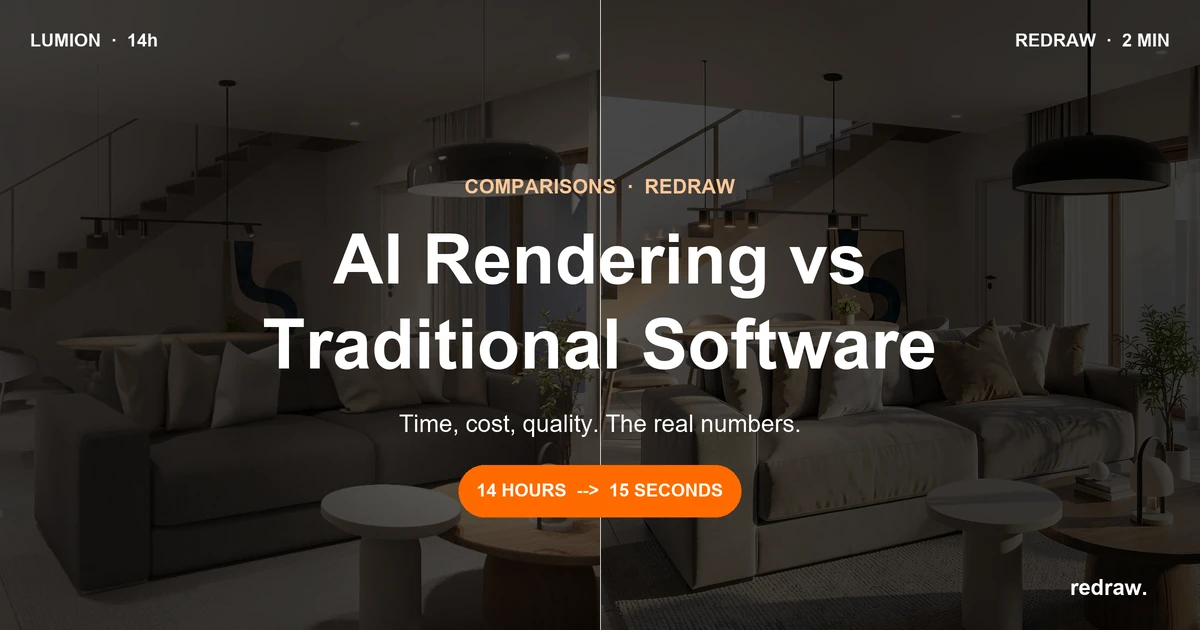
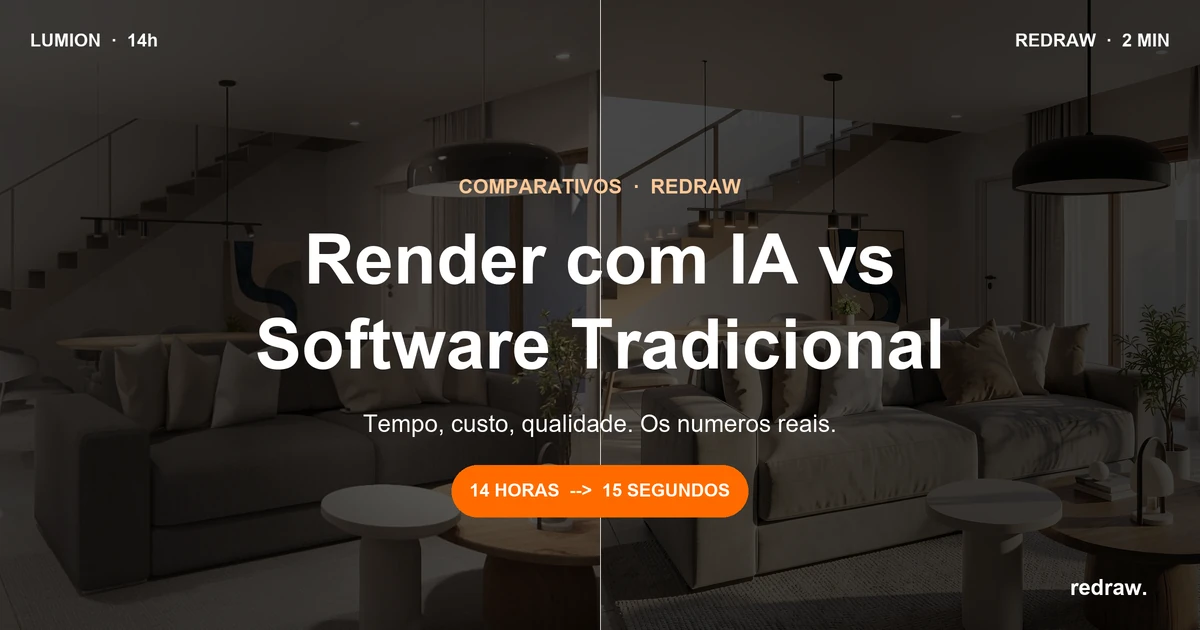
Comparison: same scene in Lumion vs Redraw

Lumion · 14 hours of production · 2 hours rendering
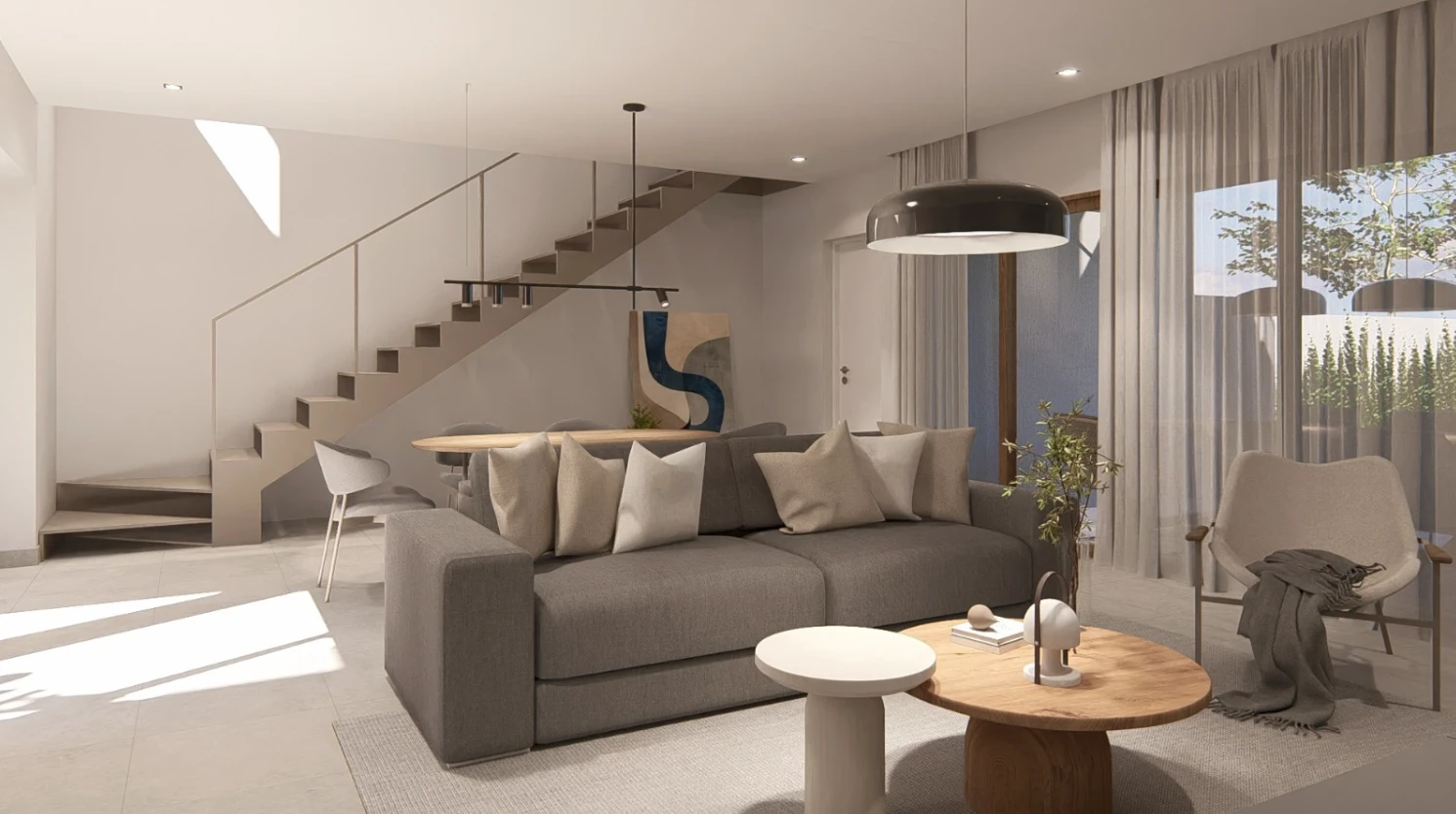
Render in Lumion after 14 hours of production

Redraw · 2 minutes of production · 15 seconds rendering with AI
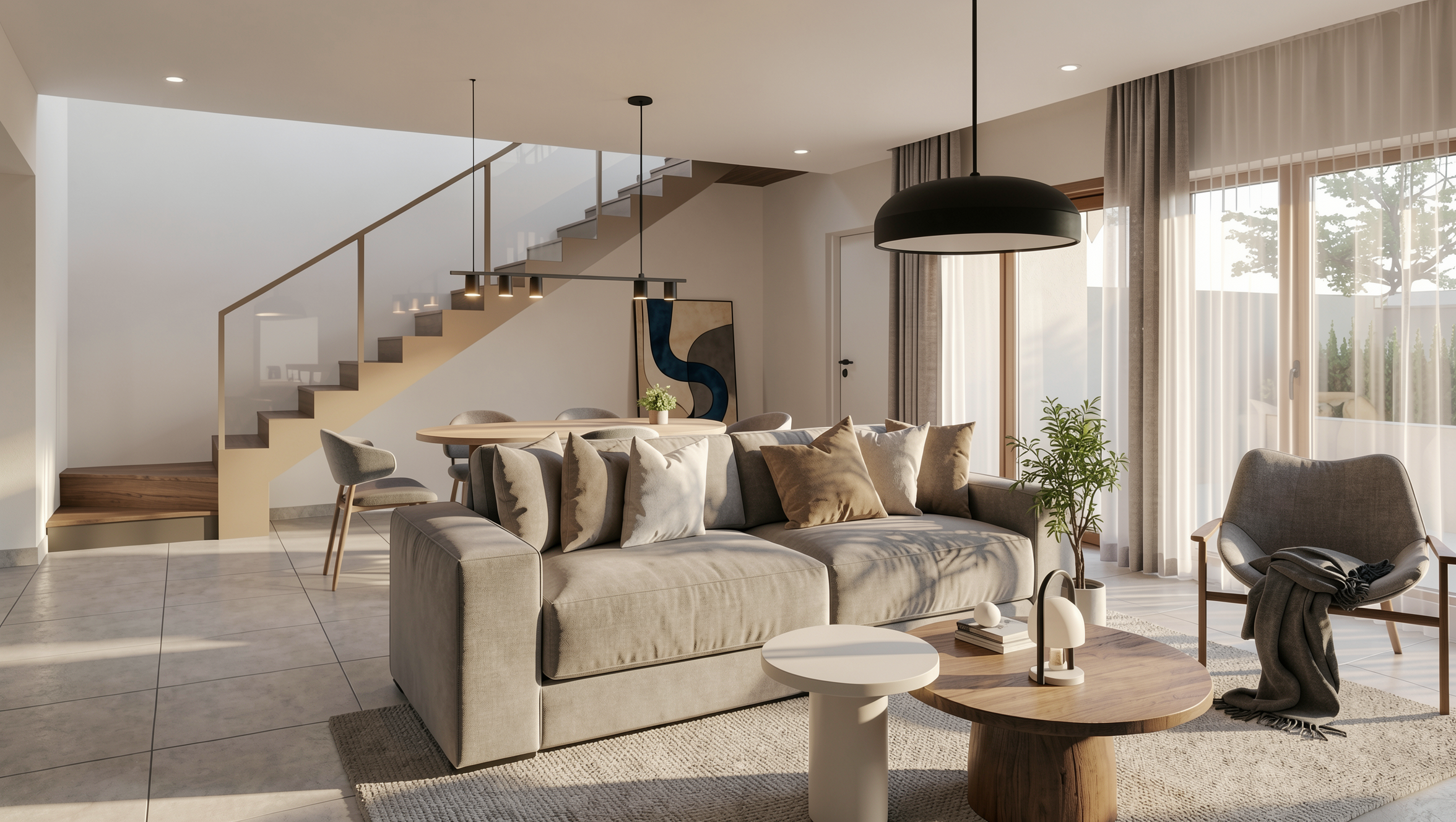
Render in Redraw in 2 minutes with AI

The AI model: what changed

AI rendering works differently. Instead of simulating physics, the AI learned what architecture scenes look like when rendered. It was trained on millions of real images. When it receives a screenshot of your 3D model, it understands the context and generates the image directly.

Real time spent per image: 20 to 40 seconds. From upload to result. No setup. A variation? 30 more seconds. 10 angles? Less than 7 minutes. The "adjust and re-render" cycle disappears because the result comes out good on the first generation.

Hardware: any PC with internet. Entry-level laptop, Mac, tablet, phone. Processing happens in the cloud. Your machine only needs to open a browser.

Annual cost: Redraw (the largest AI platform for architecture, 200k+ users) starts at US$180/year. No extra hardware. For an office with 3 people, the Expert plan costs US$384/year. Compare that to R$15,000+ for the traditional model for the same office.

Learning curve: zero. Upload the image, click generate, receive the render. If you know how to use Instagram, you know how to use it.

Direct comparison

CriterionTraditional SoftwareAI Rendering (Redraw)
Total time per image1 to 8 hours20 to 40 seconds
Setup/configuration1 to 4 hours per sceneNone
Minimum hardwareDedicated GPU + 16-32 GB RAMBrowser
Annual cost (1 person)R$5,000 to R$15,000~R$1,000
Annual cost (3 people)R$15,000 to R$45,000~R$2,300
Learning curveWeeks to monthsMinutes
Quality with full masteryExcellentExcellent
Quality without masteryAverageHigh (consistent)
Works on Mac?Partially (Twinmotion, Enscape)Yes
Works on mobile?NoYes
Quick variations30 min to 2 hours each30 seconds each
Video generationLumion and Twinmotion (limited)Own model + Veo 3 + Kling
3D object generationNoYes (for SketchUp)
Enhance existing rendersNo (starts from scratch)Yes (Enhance Render in 30 sec)

The comparison that matters: real quality vs theoretical quality

Advocates of traditional rendering always argue that V-Ray delivers superior photorealism. And that is true, in theory. A V-Ray render made by a specialist with 10 years of experience, in 8 hours of work, is impeccable.

But how many of your renders are made that way?

In practice, most renders delivered by architecture firms are made in a hurry, with partial configuration, with whatever time was left between projects. And the result shows: flat lighting, generic materials, repetitive textures.

AI eliminates that variable. Quality is consistent. Every render comes out at a high level, regardless of who clicked the button. It does not depend on technical mastery. It does not depend on how much time was left. It is professional 100% of the time.

That is more valuable than the theoretical maximum quality that no one achieves in their daily workflow.

Where traditional rendering still wins

To be fair: there are scenarios where traditional software still makes sense.

Cinematic animations with frame-by-frame control. If you need a 2-minute animation where every camera movement, every light transition, and every detail is controlled manually, Lumion or V-Ray still offer more control.

Projects with extreme technical specification. If the render needs to be technically verifiable (e.g., natural light simulation for LEED certification), software with a real physics engine is more appropriate.

Visualization studios with a dedicated technical team. If the core business is rendering (not design), and the team has spent years mastering V-Ray, the transition can be gradual.

These scenarios represent less than 10% of the rendering volume in the architecture market. For the other 90%, AI is already better on every criterion.

Migration in practice

It does not have to be all or nothing. The smartest path is in phases:

Phase 1: Test Redraw with your current projects. 10 free credits, no card required. Compare the result with what your software delivers.

Phase 2: Use Enhance Render to elevate your current renders. Already rendered in Lumion or V-Ray? Drop it into Redraw and in 30 seconds you gain quality. Minimal cost, immediate gain.

Phase 3: For new projects, go straight to Redraw. Screenshot of the model, upload, render in 30 seconds. Traditional software becomes a backup for specific cases.

Phase 4: Cancel the traditional software license and redirect the investment. R$15,000 in savings per year that becomes profit, equipment, or free time.

Most of the 200,000 professionals on Redraw followed this path. Tested it, compared, and never went back.

Frequently asked questions

Is AI rendering better than V-Ray?

For the day-to-day of an architecture firm, yes. Faster, cheaper, consistently professional results. V-Ray still has an advantage in scenarios that require absolute control over every parameter, but that need is increasingly rare.

Does AI rendering replace Lumion?

For image rendering and quick variations, yes. For real-time interactive walkthroughs, Lumion still offers something different. But for client presentations, portfolios, and social media, AI already surpasses it.

Is AI render quality professional?

Yes. Platforms with models trained for architecture, like Redraw, deliver photorealism that impresses even those who work with V-Ray. And with consistency: 100% of renders come out at a high level.

How much do you save by migrating to AI?

On average, R$5,000 to R$14,000 per year per professional (between licenses and hardware). Plus 40 to 100 hours per month returned. The math works out in the first month.

Can I use AI rendering and traditional software together?

Yes. Redraw's Enhance Render accepts images from any software. Many professionals use Lumion or V-Ray for the model and Redraw to elevate the final quality and generate quick variations.

Try Redraw → redraw.pro

Share this article
Summary of the content
[

Blog

]

Related articles

Access Blog
Redraw vs Flux AI, Leonardo AI e Adobe Firefly: comparativo de IA para arquitetura 2026
Comparisons
21.05.2026

Redraw vs Flux AI, Leonardo AI and Adobe Firefly: Which Is Best for Architecture?

Alexandre Kuhn
5 min of reading

Flux AI became the most talked-about image model of 2025. Leonardo AI accumulated millions of users with an accessible platform. Adobe Firefly integrated into Photoshop and won over everyone already living in the Adobe ecosystem. All three are powerful generative AI tools.

And all three fail when it comes to rendering architecture projects.

Not because of a lack of visual quality. The images look great. The problem is something else: none of them understand what a project is. They generate images from text. Not from what you designed. And when an architect needs to show a client how the project will look once built, a beautiful image that doesn't represent the project is useless.

This article compares each one against Redraw directly. No marketing spin. Just what works and what doesn't for people who design.

Flux AI: the most powerful engine with zero understanding of architecture

Flux AI (from Black Forest Labs, the same team behind the original Stable Diffusion) is probably the most advanced image generation model available today. The visual quality is impressive. Texture detail, lighting, composition — everything at a level that makes other models look outdated.

The problem is that Flux doesn't know what a floor plan is, doesn't understand ceiling height, and has no idea that the window you designed is 1.20m x 2.10m. You describe an interior through a prompt and it generates something beautiful. But it's not your interior. It's the interior it imagined.

For concept art and visual exploration, Flux is excellent. For rendering a real project, it doesn't work. The geometry changes with every generation, materials are invented, and consistency across images is zero. Ask for 5 angles of the same space and you get 5 different spaces.

Flux is also not accessible as a platform. It's a model, not a product. To use it, you need to run it through ComfyUI, Replicate, or third-party platforms — each with its own interface, credit system, and learning curve. There's no workflow designed for architects.

Worth noting: Nano Banana, one of the Flux-based models most used by architects, is already available inside Redraw. You get the best of Flux without configuring anything.

Leonardo AI: the user-friendly platform that doesn't deliver for designers

Leonardo AI carved out space with a simple pitch: a platform with multiple AI models, category presets, and an intuitive visual interface. It has presets for photography, game art, illustration — and even "architecture." Sounds perfect.

In practice, Leonardo's architecture preset is shallow. It steers the visual style toward something that looks architectural, but the underlying model stays generic. It doesn't take your 3D model. It generates from text or a reference image and interprets freely. Project fidelity is low.

Leonardo also struggles with consistency. Generating variations of the same space is nearly impossible. Every generation is a fresh interpretation. For a firm that needs to deliver 5 angles of the same project to a client, that doesn't work.

Pricing: the free plan is limited (150 tokens/day). The Apprentice plan is $12/month (8,500 tokens), Artisan $30/month (25,000 tokens), Maestro $60/month (60,000 tokens). For architecture, the cost-to-value ratio doesn't add up compared to Redraw at $15/month with unlimited renders within your quota.

Adobe Firefly: legally safe, weak on rendering

Adobe Firefly takes a different approach: "commercially safe" AI. All models were trained on licensed data, so generated images are safe for commercial use without copyright risk. For agencies and brands, that matters a lot.

For architects, it matters very little. What matters is whether the render represents the project. And Firefly doesn't render projects.

Firefly works as a generative fill tool (inside Photoshop), text-to-image generator, and variation engine. It's good for retouching, compositing, and quick mockups. But it has no understanding of architectural geometry, doesn't accept a 3D model, and results for interiors and facades are generic.

Pricing is also different: Firefly comes bundled with Adobe Creative Cloud plans. If you already pay for Photoshop ($23/month), you have access. If you don't, adding Firefly just for rendering makes no sense.

And the level of detail Firefly delivers in architecture is below both Flux and Leonardo. It's conservative by design (to avoid copyright issues), which results in more generic, less photorealistic images.

Why none of them work for project rendering

The problem is the same across all three: they're generic AIs trying to do specialized work.

When you ask Flux, Leonardo, or Firefly to "render" a living room, they don't render. They create a new image based on what they've learned about what living rooms look like. That means every detail is decided by the AI: window proportions, floor type, furniture placement, ceiling height. None of that comes from your project. It comes from the training dataset.

For an architect, that's a serious problem. Your client hired you to design that specific space, with that floor plan, those materials, that lighting. Showing a beautiful image that has nothing to do with what will be built is worse than showing nothing at all. It creates the wrong expectations.

Redraw solves this because it doesn't generate from scratch. It takes your 3D model (via a screenshot from SketchUp, Revit, or ArchiCAD) and renders from it. The AI respects the geometry, the proportions, the materials. It doesn't invent. It renders what exists.

Comparison: Flux AI vs Leonardo AI vs Adobe Firefly vs Redraw

CriteriaFlux AILeonardo AIAdobe FireflyRedraw
TypeAI model (requires a platform)Generic platformTool within the Adobe ecosystemArchitecture-specialized platform
Accepts 3D model?NoNoNoYes (via screenshot)
Project fidelityNoneLowNoneHigh
Consistency across rendersVery lowLowLowHigh
Visual qualityExcellent (generic)GoodMedium-goodExcellent (architectural)
Proprietary architecture modelsNoNoNoYes
Prompt requiredDetailedMedium-detailedMediumMinimal or none
Monthly priceVaries$12 to $60/month$23/month (via Photoshop)From $15/month
Enhance existing rendersNoPartialYes (generic)Yes (trained for arch.)
Video generationNoYes (generic)Yes (generic)Yes (for architecture)
Available inside RedrawYes (via Nano Banana)NoNoNative

What Redraw does that none of them do

Three things that separate Redraw from any generic AI for architecture rendering:

1. It starts from your project, not a prompt. You upload the 3D model screenshot. The AI reads the geometry, identifies materials, understands the lighting of the context. The result is your project rendered — not a generic image inspired by the theme "modern living room."

2. Proprietary models trained for architecture. Redraw has models fed with millions of images of real projects. They understand how natural light behaves in an interior, how porcelain tile reflects differently than marble, how vegetation casts shadow on a facade. Generic AIs don't have that training.

3. A curated AI hub. Inside Redraw, you access ChatGPT optimized for rendering, optimized Gemini, Nano Banana (Flux-based), and the proprietary models — all curated by the team to ensure only what truly works for professionals makes it in.

When to use each one

Flux AI: If you're a developer or AI enthusiast who wants to build custom image generation workflows. For concept art and style exploration — not for project rendering.

Leonardo AI: If you do graphic design, game art, or illustration and want an accessible platform with multiple models. Has serious limitations for architecture.

Adobe Firefly: If you already live inside Photoshop and need generative fill and quick mockups. Doesn't replace project rendering.

Redraw: If you're an architect, engineer, or interior designer who needs to render real projects with fidelity, speed, and accessible pricing. It's the only one on this list built for your work.

Try Redraw → redraw.pro

Render em nuvem vs render local para arquitetos em 2026
Comparisons
20.05.2026

Cloud Rendering vs Local Rendering: Why Architects Are Migrating in 2026

Sergio Santos
5 min of reading

Rendering a project has always meant waiting. Hours of configuration, computer locked, hoping it wouldn't crash mid-process. If you work in architecture, engineering or interior design, you know this feeling.

But things have changed. There's now a real alternative to local rendering, and it's not just “sending to a farm.” AI cloud rendering is changing how professionals deliver projects. Faster, cheaper, and without needing a $5,000 workstation.

In this article we compare local rendering and cloud rendering for real. With numbers, actual costs and what makes sense for your day-to-day work.

What is local rendering, and why is it getting expensive

Local rendering is the traditional process. You model in SketchUp, Revit or ArchiCAD, configure materials, lighting, camera, and render on your computer using software like V-Ray, Lumion, Enscape, Twinmotion or Corona Render.

Does it work? It does. But it has a cost that most people never stop to calculate.

First, the hardware. To run Lumion smoothly, the manufacturer recommends a high-performance dedicated GPU. In practice, that means a machine between $3,000 and $8,000. And that machine needs updating every 2 or 3 years, because software gets heavier with every version.

Second, the software. A V-Ray license costs around $540 per year. Lumion Pro runs $1,149 per year. Enscape is around $575 per year. Twinmotion charges $445 per year for companies with revenue above $1 million. And that's per user.

Third, the time. An interior render with V-Ray can take 20 minutes to 4 hours depending on complexity and your machine. While it renders, your computer is unusable. If you need 5 different angles, multiply that time by 5.

For an office doing 3 projects a week, this becomes a bottleneck. It's not a question of quality. It's a question of productivity.

What is cloud rendering

Cloud rendering is when the processing leaves your computer and goes to remote servers. This can happen in two very different ways.

The first is render farms. Services like Fox Render Farm and GarageFarm rent processing power by the hour. You export your file, upload it, configure it, and wait. The render runs on powerful machines and you download the result.

Render farms solve one problem: you don't need a good machine. But they create others. You pay per hour of use, you need to configure everything the same as locally, and you still have upload and download time. In the end, the complexity of the work can even increase. The real advantage is freeing your computer and having raw processing speed.

The second form is AI cloud rendering. And here everything changes completely.

With AI, you don't configure materials. You don't manually adjust lighting. You don't need a super optimized file. You upload a screenshot of your 3D model, and in 20 to 40 seconds you have a photorealistic render. The work that used to take hours now takes seconds, with results that impress even those used to V-Ray.

That's the difference that matters. A render farm is the same process, just on another computer. AI rendering is a new process entirely.

Real comparison: Local Rendering vs Farm vs AI

Let's put numbers side by side. For a freelance architect doing about 50 renders per month:

Local Rendering (V-Ray)Render FarmAI Cloud Rendering (Redraw)
Hardware cost$4,000+ (amortized)Not neededNot needed
Software cost~$540/year (V-Ray)~$20-80/month (per use)~$15/month (Basic)
Time per render30 min to 4 hours15 min to 2 hours20 to 40 seconds
Setup requiredHigh (materials, light, camera)High (same as local)Minimal (upload + generate)
Technical knowledgeHighHighLow
Computer locked?YesNoNo
Works on laptop?RarelyYesYes

Now think about total cost. With local rendering, between hardware and software, an architect easily spends $5,000 in the first year. With Redraw, the Basic plan costs $15 per month and delivers around 300 renders. That's less than $200 per year for a capacity that in the traditional model would require an investment 25 times greater.

But what about quality?

That's the question everyone asks. And it's fair.

2 years ago, AI rendering was experimental. Results were generic, textures looked strange, and the project geometry was completely lost. Anyone who tried ChatGPT, ComfyUI or other generic AIs for rendering knows this. The image looks nice, but has nothing to do with the real project. The AI invents windows, changes proportions, adds elements that don't exist.

The problem with those tools is that they weren't built for architecture. ChatGPT generates incredible images, but doesn't respect your project. ComfyUI gives technical control, but requires hours of workflow configuration. Nano Banana produces interesting results, but doesn't maintain fidelity to the original model.

AI tools specialized in architecture solved this. Redraw, for example, was trained specifically to understand architectural projects. It doesn't invent geometry. It respects lines, proportions, and the project intent. And it does this in seconds, without complex prompts.

I'm not saying it completely replaced V-Ray for all cases. A render for an international competition with extreme detail may still need traditional software. But for 90% of an office's day-to-day work — client presentations, facade studies, interior variations — AI delivers professional results in a fraction of the time and cost.

Why the market is migrating to the cloud

It's not hype. It's math.

A 3-person office with Lumion Pro spends $3,447 per year on software alone. Add hardware and it easily passes $10,000. With AI cloud rendering, the same office spends less than $1,000 per year and delivers faster.

There's another factor few people talk about: mobility. Local rendering ties you to a machine. If you're on-site, in a meeting, or traveling, you can't render. With cloud rendering, you open a browser anywhere, upload the image and in 30 seconds you have the result. It works on laptop, tablet, even on phone.

The trend is clear. Traditional software is catching up. Lumion launched cloud rendering. Twinmotion integrated with Unreal Cloud. V-Ray has Chaos Cloud. They know the future is cloud. The difference is these solutions still charge by processing hour and require the same manual configuration. It's a render farm with a nice brand.

AI changed the game because it eliminated the most expensive step: setup. It's not just processing in the cloud. It's not needing to configure.

How Redraw works in practice

The process is simple. You take a screenshot of your 3D model (SketchUp, Revit, ArchiCAD, any software), upload it to Redraw, and in up to 40 seconds you receive a photorealistic render.

No installation. No powerful GPU. No configuring material by material.

Redraw works 100% in the browser. That means it runs on any machine, any operating system. And since it's based on AI trained for architecture, it understands the image context: it knows how to differentiate interior from exterior, identifies materials, adjusts lighting automatically.

For those who already use other render software, Redraw also works as an optimizer. You can upload a render from V-Ray, Lumion or Enscape and improve textures, lighting and realism in seconds. It's an extra layer of quality without redoing the work.

How much you save: the real math

Let's do the math for a small office (2 architects, ~100 renders per month):

Scenario 1: Local Rendering with V-Ray
Two V-Ray licenses: $1,080/year
Two adequate computers: ~$4,000 (amortized over 3 years = ~$1,333/year)
Time spent rendering: ~50 hours/month
Annual total: ~$2,413 + opportunity cost of time

Scenario 2: Cloud Rendering with Redraw
Expert plan (2 users): $32/month = $384/year
Hardware required: any laptop
Time spent rendering: ~3 hours/month
Annual total: $384

The savings are over $2,000 per year in direct costs. But the real gain is in time. That's 47 hours per month returned to design, client service, or simply life.

Frequently Asked Questions

Does cloud rendering need fast internet?

It needs internet, but not ultra-fast. Since you upload images (not heavy 3D files), a 10 Mbps connection works fine. AI cloud rendering, like Redraw, processes everything on the remote server.

Does AI rendering replace V-Ray?

For most day-to-day office uses, yes. Client presentations, facade studies and interior variations are ready in seconds. For projects that require absolute technical control (complex animations, engineering detailing), V-Ray still has space, but increasingly less.

Does cloud rendering maintain the fidelity of my project?

It depends on the tool. Generic AIs like ChatGPT, Nano Banana and ComfyUI invent elements and alter the project. Specialized tools like Redraw were trained to maintain proportions, geometry and materiality of the original model.

How much does it cost to render with AI in the cloud?

At Redraw, the most accessible plan costs $15 per month and includes about 300 renders. That's a fraction of the cost of licenses like V-Ray ($540/year) or Lumion Pro ($1,149/year), and requires no expensive hardware.

Try Redraw now →

Redraw vs V-Ray - comparativo de ferramentas de renderização para arquitetura
Comparisons
20.05.2026

Redraw vs V-Ray: Comparison for Architects 2026

Alexandre Kuhn
5 min of reading

V-Ray dominated rendering for years. Together with Corona Render, they were the only options for anyone who wanted hyper-realistic results. No other render engine came close. Those working with high-end architecture, competitions or commercial visualization had no choice: it was V-Ray or nothing.

But all of this had a price. And I'm not just talking about the license.

The V-Ray reign (and its real cost)

To master V-Ray, a professional needed years of study. There are over 1,000 parameters that, combined correctly, deliver that level of photorealism everyone recognizes. Materials, global illumination, caustics, GI, sampling. Each render is an engineering feat.

Render time has always been a problem too. A V-Ray render can take 1 to 8 hours depending on the scene, resolution and hardware. That's 3 times longer than software like Lumion or Enscape. And during that time, your computer is locked.

Speaking of hardware: to run V-Ray with quality, you need a serious machine. Powerful multi-core CPU, 32 GB+ RAM, dedicated GPU. An adequate setup costs between $3,000 and $8,000.

The V-Ray Solo license costs $540/year. That seems "ok" until you add that V-Ray is a plugin. It doesn't run on its own. It needs SketchUp, 3DS Max, Rhino or Revit underneath. So you pay the V-Ray license plus the host software license. That's two subscriptions.

Chaos Group itself realized this model was losing ground. Simpler software like Lumion and Twinmotion were stealing market share, even while delivering inferior results. Their response? They bought Enscape. They tried to apply Chaos technology to something faster. They acknowledged the problem without saying it out loud.

AI changed what "rendering" means

The turning point came when AI tools started delivering satisfying results in seconds. Redraw was a pioneer in this movement: AI rendering trained specifically for architecture.

At first, AI quality didn't come close to V-Ray. That's true. But it evolved fast. Today, the results are hyper-realistic and maintain fidelity to the original project. Proportions, geometry, materials. The AI doesn't invent. It renders what you designed.

And it does this in 20 to 40 seconds. No configuration. No expensive hardware. No years-long learning curve.

Work that used to take a week between modeling, setting up materials, adjusting lighting and rendering is now done in under 10 minutes with AI. That's not an exaggeration. It's the real workflow of those who use it.

Comparison: V-Ray vs Redraw

CriteriaV-RayRedraw
Time per render1 to 8 hours20 to 40 seconds
Required hardwarePowerful CPU, 32 GB+ RAM, dedicated GPUAny PC with internet
Annual cost (software)~$540 (V-Ray) + host license (SketchUp/3DS Max)From $180/year ($15/month)
Hardware cost$3,000 to $8,000Zero (runs in browser)
Learning curveHigh (years to master 1,000+ parameters)Very low (upload + generate)
Configuration per renderManual: materials, light, camera, samplingAutomatic: AI identifies context
Works on laptop?Only if it's a workstationYes, any laptop
Remote accessNo (Chaos Cloud charges per hour)Yes, 100% cloud
Project fidelityHigh (you configure everything manually)High (AI trained for architecture)

The math nobody does

Take an architect who delivers 8 projects per month, with 4 renders each. With V-Ray, each render takes an average of 2 hours including setup and processing. That's 64 hours per month just rendering.

With Redraw, the same 32 renders take under 20 minutes total. That's 63 hours given back per month.

In cost:

V-Ray: $540/year (V-Ray) + $349/year (SketchUp) + amortized hardware (~$1,000/year) = ~$1,889/year

Redraw: $384/year (Expert plan) + zero hardware = $384/year

Difference: over $1,500 per year. And 63 hours per month.

For those still using V-Ray

If you've invested years learning V-Ray and have projects that require absolute control of every parameter, no one is saying throw it away. For highly complex animations or projects where every detail of sub-surface scattering matters, V-Ray still has its place.

But honest question: how many of your projects actually need that level? In most offices, 90% of renders are for client presentations, facade studies, interior variations. You don't need an 8-hour render for that.

And even when you use V-Ray, Redraw works as a complement. Rendered with V-Ray? Drop it into Redraw's Enhance Render. In 30 seconds, textures and lighting reach another level without re-rendering the scene.

Frequently Asked Questions

Does Redraw replace V-Ray in architecture projects?

For the vast majority of day-to-day projects, yes. Redraw delivers photorealistic renders in 20 to 40 seconds versus 1 to 8 hours with V-Ray, without requiring powerful hardware or a host software license. V-Ray remains relevant in niches that require extreme technical control, such as complex animations, sub-surface scattering and cinema visualizations. For presentations, portfolios and residential and commercial project deliverables, Redraw delivers professional results in seconds.

How much does V-Ray cost per year compared to Redraw?

The V-Ray Solo license costs $540/year, not counting the mandatory host software (SketchUp Pro at $349/year, or 3DS Max at $2,820/year) and the necessary hardware ($3,000 to $8,000 amortized). The total annual cost of a V-Ray setup easily exceeds $1,800/year. Redraw starts at $15/month ($180/year), runs in the browser without dedicated hardware and requires no host software. Annual savings exceed $1,500 per workstation.

Can I enhance my V-Ray renders using Redraw?

Yes. Redraw's Enhance Render feature accepts images from any software, including V-Ray, Corona, Lumion and Enscape. You upload the existing render and in about 30 seconds receive a version with enhanced textures, lighting and sharpness, without re-rendering the scene. It's the fastest path for those who already have investment in a V-Ray pipeline but want to gain speed in material, lighting and ambiance variations.

Does V-Ray work standalone or does it need other software?

V-Ray is a plugin and does not work on its own. It requires an active license for SketchUp, 3DS Max, Rhino or Revit to run, adding two subscriptions to the budget. Redraw, on the other hand, is an autonomous platform that runs directly in the browser, with no installation and no dependency on host software, which drastically reduces total cost and setup time for solo architects and offices of 1 to 10 people.

What is the best alternative to V-Ray in 2026 for architects?

The best alternative to V-Ray in 2026 for architects is Redraw, an AI platform trained specifically in architecture, engineering and interior design, with support in English and integration with SketchUp, Revit and Archicad workflows. Redraw delivers photorealistic renders in 30 seconds instead of 1 to 8 hours, without powerful hardware or host software license, and is the path most solo offices and small studios have taken to scale deliveries.

Is Redraw quality comparable to V-Ray for the end client?

Yes. The latest generations of Redraw produce images indistinguishable from V-Ray renders for the vast majority of cases: residential, commercial, hospitality, retail and high-end interiors. The end client decides by emotion before reason, and what matters is the visual narrative of light, texture and ambiance — all delivered in seconds by Redraw. V-Ray renders are reserved only for architecture competitions, real estate catalogs and highly technically demanding animations.

Try Redraw → redraw.pro