Sergio is a specialist in generative AI and technology, and leads the Redraw development team.
Prompts de IA para diagramas de partido, análisis solar, diagramas urbanos y layouts de láminas A1 — workflow completo para concursos.
Redraw
Comece hoje mesmo a transformar os seus projeto usando o Redraw.



Los diagramas de partido y láminas arquitectónicas son las representaciones que demuestran el razonamiento detrás del proyecto — no solo el resultado. Son los elementos que marcan la diferencia en concursos, juntas, presentaciones académicas y portafolios profesionales de alto nivel.
Con IA es posible generar diagramas de partido, análisis solares y de ventilación, diagramas urbanos e incluso layouts completos de láminas en minutos. Los prompts de esta guía cubren todos esos casos con precisión y control.
El arquitecto no debería necesitar aprender lenguaje de máquina para generar una representación profesional. Esa premisa guió la construcción de Redraw.
En lugar de escribir luz natural cálida de fin de tarde, sombras alargadas entrando lateralmente, en Redraw haces clic en “Atardecer”.
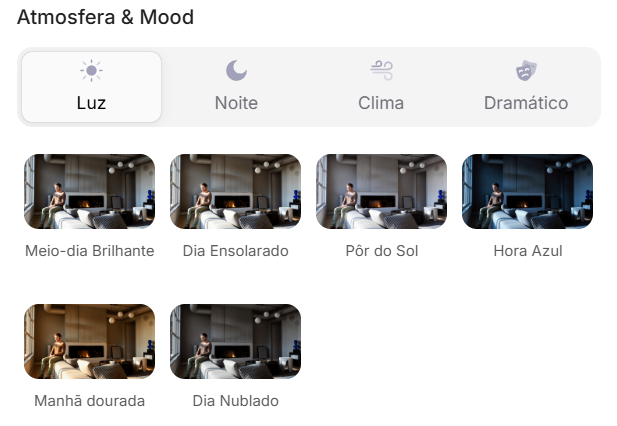
Atmósfera & Mood en Redraw: iluminación en un clic, sin prompt largo.
En lugar de describir calle residencial suburbana con vecinos visibles al fondo, seleccionas el escenario directamente en la interfaz visual.
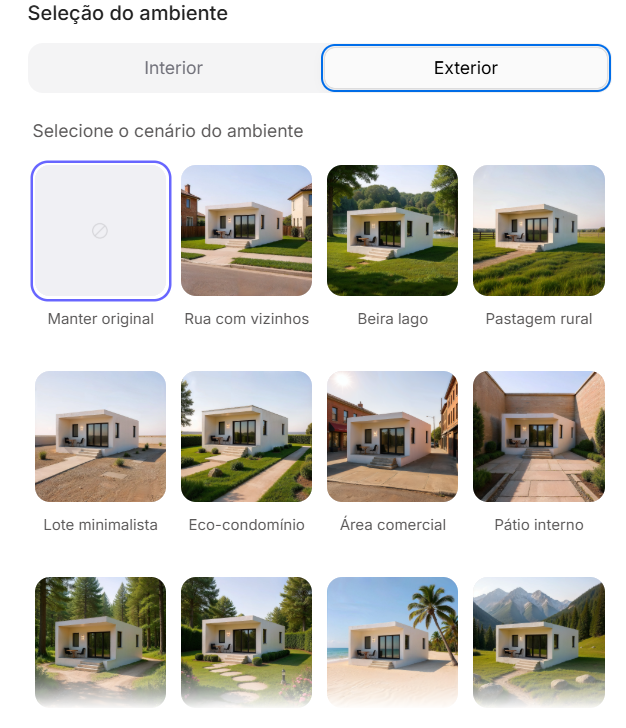
Selección del Ambiente en Redraw: escenario en un clic, sin descripción textual.
Cada elección que harías en un prompt largo — iluminación, ambiente, estilo, cámara — se convierte en un clic. Y como Redraw fue entrenado exclusivamente para arquitectura, el modelo ya “entiende” el contexto del proyecto sin que tengas que explicar.
“En Redraw, cuanto menos prompt ponen los usuarios, mejores son los resultados.”
Para diagramas y layouts de lámina, los prompts de esta guía siguen siendo el camino más eficiente — Redraw se especializa en los renders fotorrealistas que componen la lámina. La combinación ideal: diagramas y láminas con prompts + renders y perspectivas con Redraw = presentación completa en minutos.
| Característica | Herramientas con Prompt Textual | Redraw |
|---|---|---|
| Complejidad del prompt | Alta — requiere estructura técnica y larga | Baja — lenguaje natural y simple |
| Control de iluminación | Basado en texto técnico | Basado en clics visuales (Atmósfera & Mood) |
| Control de ambiente | Basado en texto descriptivo | Basado en clics visuales (Selección del Ambiente) |
| Fidelidad al proyecto 3D | Variable — depende de la referencia y el prompt | Alta — procesa la geometría del modelo directamente |
| Consistencia entre generaciones | Baja | Alta |
| Foco del usuario | Aprender a comandar la IA | Describir la visión arquitectónica |
| Curva de aprendizaje | Empinada | Rápida e intuitiva |
| Tiempo por render | Alto (prompt + ajustes + post-producción) | Bajo (20–40 segundos, resultado publicable) |
Uno de los prompts más sofisticados de la biblioteca. Instruye a la IA a analizar la volumetría final del proyecto y derivar automáticamente una secuencia lógica de diagramas que explica cómo se generó esa forma.
Lo que produce: una secuencia de 5 a 7 diagramas en estilo isométrico/axonométrico mostrando la evolución formal del proyecto — de la masa inicial a las sustracciones, adiciones y configuración final.
Cuándo usar: Láminas de concurso, presentaciones de juntas, portafolios con rigor conceptual. El diagrama de partido es obligatorio en cualquier presentación que necesite explicar por qué el proyecto tiene la forma que tiene.
Pre-requisito: tener una imagen de la volumetría 3D final del proyecto (puede ser un render simple, SketchUp, maqueta física fotografiada).
El prompt:
Use the uploaded image strictly as the FINAL architectural massing reference. You must perform a geometric and spatial analysis of the final volumetry before generating any diagrams. Do NOT redesign, reinterpret, modify proportions, change geometry, adjust scale, or alter the architectural language of the final form. The final stage must be an EXACT volumetric match of the uploaded massing. STEP 1 — MORPHOLOGICAL ANALYSIS (internal reasoning): Analyze the final massing and identify: Primary geometric primitive (rectangular block, L-shape, U-shape, courtyard block, fragmented bars, rotated volume, etc.) • Volumetric operations: Subtractions, Additions, Extrusions, Rotations, Offsets, Hierarchy, Fragmentation • Presence of: Setbacks, Internal voids, Courtyards, Overhangs, Directional elongation, Axial alignment. Derive a logical and architecturally coherent transformation sequence that plausibly generates the final form. All intermediate steps must geometrically and causally lead to the final configuration. STEP 2 — GENERATE DIAGRAM SEQUENCE: Create 5 to 7 clean conceptual architectural diagrams explaining the formal evolution of the project. The sequence must include: Site + Initial Pure Mass • Solar Strategy • Ventilation Strategy • Volumetric Subtractions • Articulation / Fragmentation • Final Configuration. LANGUAGE REQUIREMENT (MANDATORY): All visible text inside the generated image MUST be written in Brazilian Portuguese. This includes: Titles, Subtitles, Diagram captions, Labels, Explanatory text, Step numbers descriptions. Do NOT use English in any visible graphic text. Use proper Brazilian architectural terminology (e.g., Implantação, Estratégia Solar, Ventilação Cruzada, Subtrações Volumétricas, Configuração Final, etc.). RULES: The final configuration must exactly match the uploaded volumetry. Do not invent architectural elements that are not present. Maintain proportional consistency between all stages. VISUAL STYLE: Isometric or axonometric projection • Pure diagrammatic style • No textures • No photorealism • Soft neutral pastel palette • Light background • Thin line weights • Minimal soft shadows only for volumetric clarity • Professional architectural competition board aesthetic • Balanced composition with white margins. GRAPHIC LANGUAGE: Sun path represented by a soft arc diagram • Wind shown with subtle curved directional arrows • Subtractions represented by dashed or transparent ghost volumes • Final massing in solid tone • Base platform indicating the site. OUTPUT REQUIREMENT: High resolution. Clean layout. Clear diagram hierarchy. Minimalist architectural presentation.
Qué diferencia este prompt:
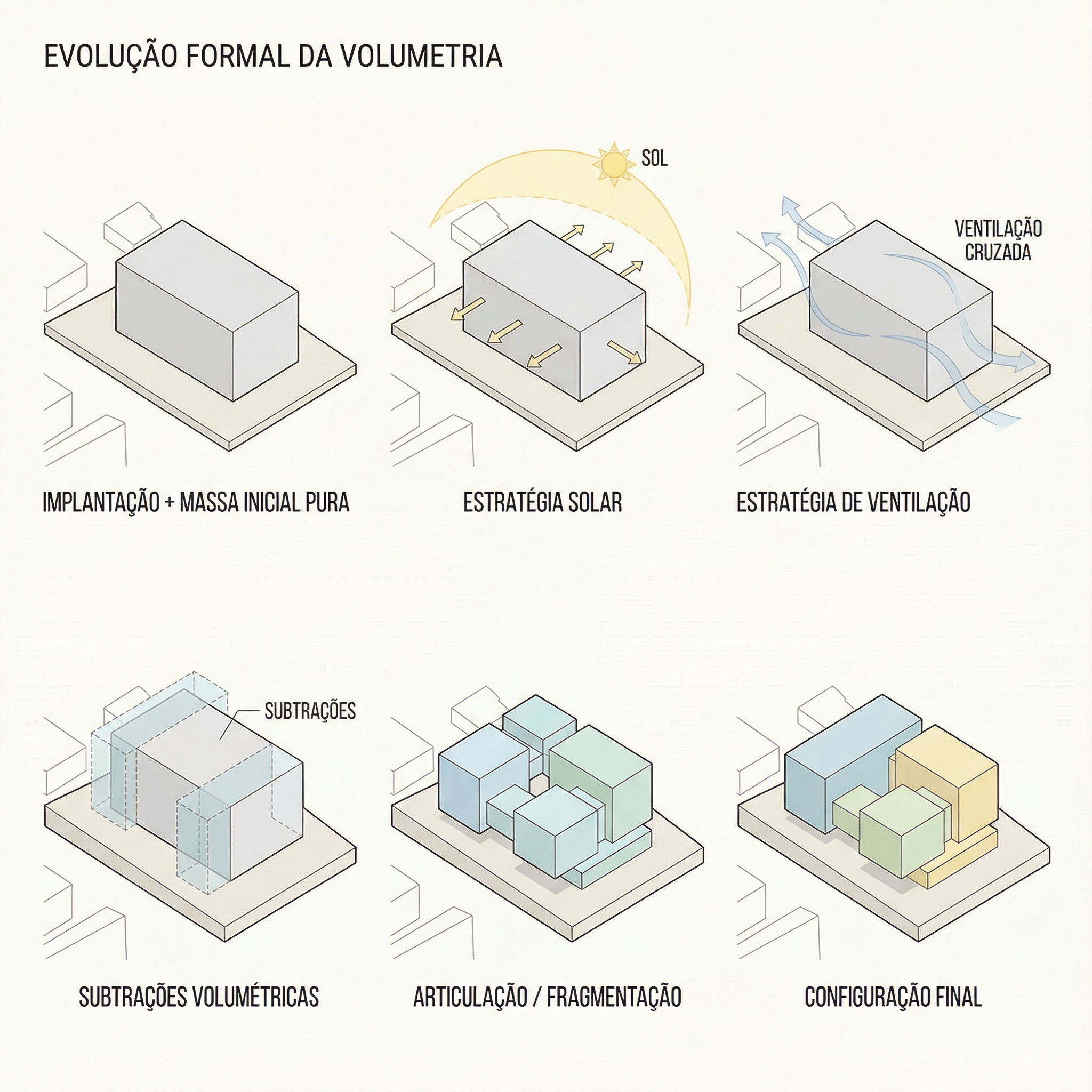
Resultado — Generado con Redraw
Cuándo usar: Complemento del diagrama de partido. Mientras el Prompt 1 muestra la evolución formal, este muestra las estrategias ambientales que justifican las decisiones formales.
El prompt:
Use the attached image as base reference. Create an architectural environmental analysis diagram based strictly on the provided volumetric model. Preserve 100% of the original architecture, geometry, proportions, openings, roof shape and perspective. Do NOT modify, redesign, reinterpret, simplify or alter any element of the project. The building must remain exactly as provided. Generate a clean conceptual diagram illustrating: Solar incidence (ensolação) • Sun path direction • Light exposure areas • Prevailing wind direction • Natural ventilation flow. Representation guidelines: Use soft translucent overlays to indicate sunlight • Use subtle warm gradient tones (yellow / orange) for solar impact • Use smooth curved arrows for wind flow (blue tones) • Maintain a minimal and elegant architectural diagram style • Keep a light neutral background • Do not exaggerate graphic elements • The architecture must remain the main focus. Text and labels must be written in Brazilian Portuguese only. Include labels such as: • Insolação • Ventos predominantes • Ventilação natural • Incidência solar • Norte. High-resolution architectural presentation quality. Clean, competition-level diagram aesthetic.
Qué diferencia este prompt:
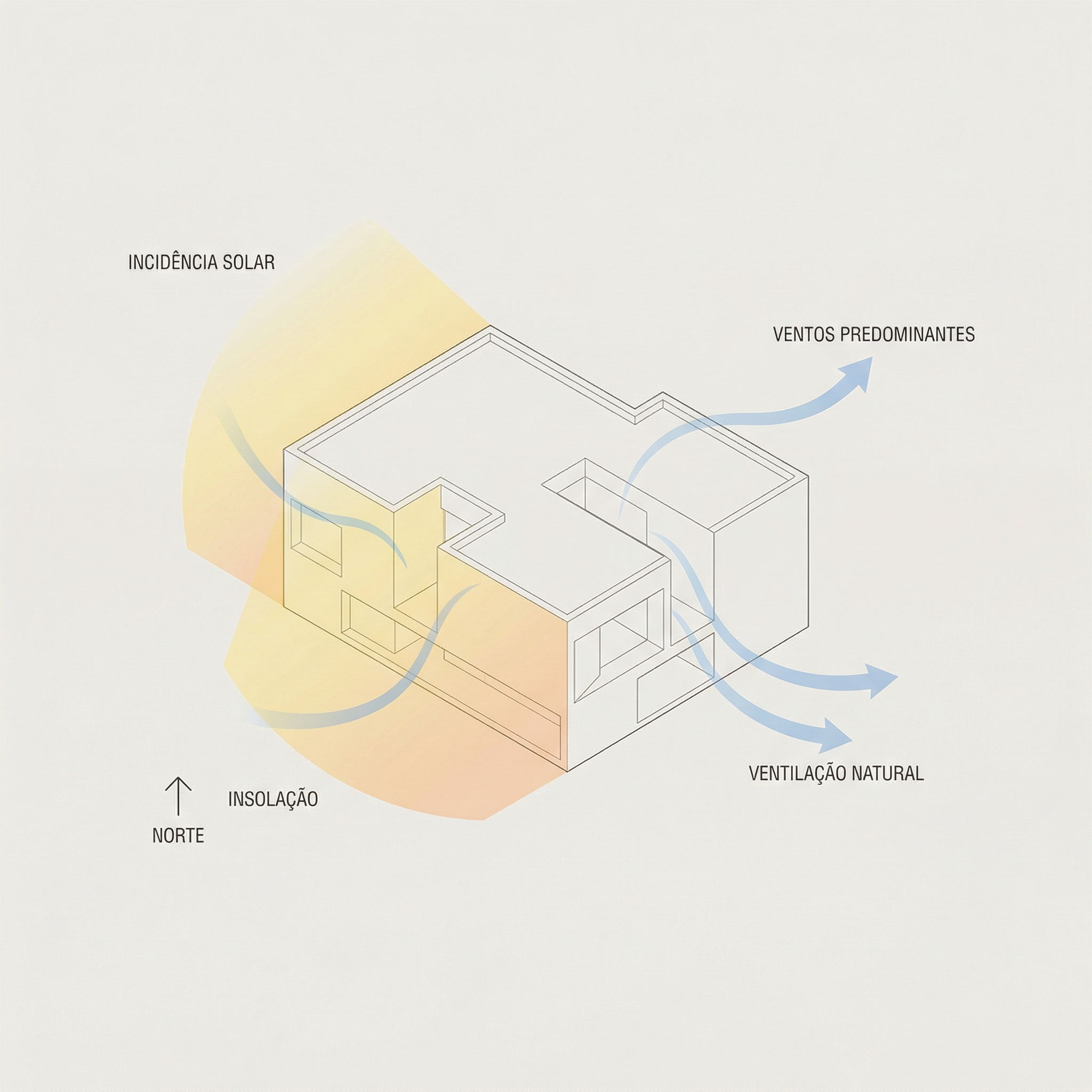
Resultado — Generado con Redraw
Cuándo usar: Proyectos en contexto urbano donde necesitas mostrar flujos de circulación, accesos, áreas verdes y conexiones urbanas alrededor del lote/manzana. Muy usado en láminas de implantación y proyectos de urbanismo.
El prompt:
Use the uploaded image strictly as the base volumetric reference. The uploaded model contains only the white architectural massing. You must preserve 100% of the original building volumes, geometry, proportions, scale and perspective. Do NOT modify, redesign, reinterpret, subtract, add or distort the architectural masses in any way. The buildings must remain exactly as provided. OBJECTIVE: Transform the simple white volumetry into a complete conceptual urban architectural diagram. ADD THE FOLLOWING ELEMENTS: Urban Context: Surrounding streets around the block • Sidewalks • Street names (in Brazilian Portuguese) • Subtle lot demarcations • Clean urban grid indication. Central Landscape / Open Space: Organic pedestrian paths crossing the site • Green areas with soft shapes • Trees distributed naturally • Small plazas or gathering areas. Circulation and Flow Diagrams: Add conceptual arrows indicating: Pedestrian flow • Main access points • Secondary access • Urban connections • Possible vehicular flow. Use: Warm orange arrows for main flows • Thinner arrows for secondary paths • Soft shadows under arrows for depth • Slight transparency. Graphic Style: Architectural conceptual diagram aesthetic • White buildings (clean, no texture) • Soft pastel ground tones • Minimal color palette • Thin linework • Subtle shadows for depth • Light neutral background • Slight isometric or axonometric perspective • Professional competition board style. TEXT (MANDATORY: BRAZILIAN PORTUGUESE): Include subtle labels such as: Fluxo principal • Fluxo secundário • Acesso principal • Acesso de serviço • Área verde • Conexão urbana • Rua. IMPORTANT RULES: Architecture must remain the visual anchor. Do not exaggerate graphic elements. Vegetation must be simplified and diagrammatic. Maintain visual hierarchy.
💡 Cómo adaptar: El prompt usa la volumetría como referencia fija. Puedes enviar un modelo simple de SketchUp exportado como imagen — no necesita ser un render final.
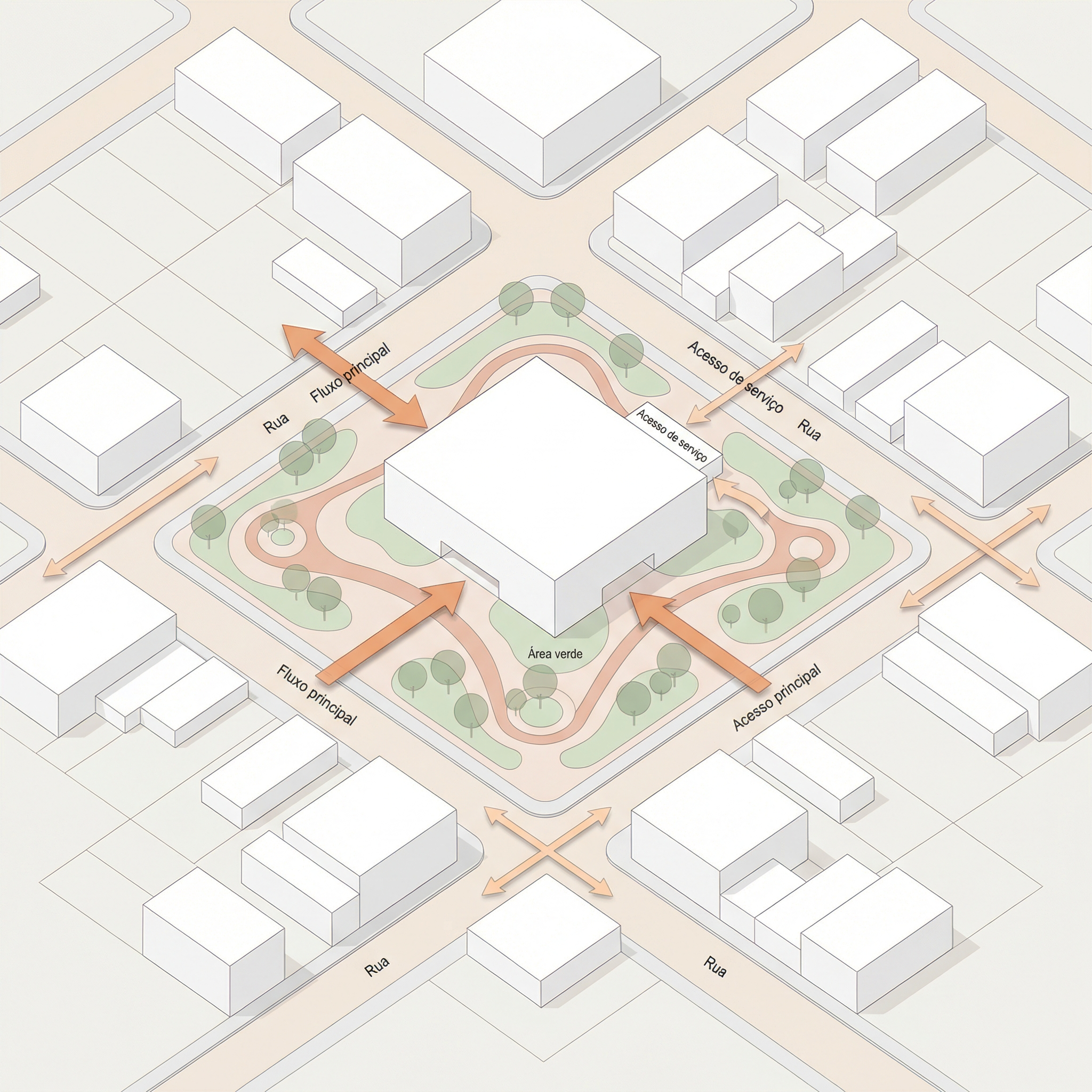
Resultado — Generado con Redraw
Cuándo usar: Variación del diagrama urbano cuando el foco es la relación del proyecto con las calles al frente — esquinas, accesos principales, conexión con el espacio público frontal.
El prompt:
Use the uploaded image strictly as the base volumetric reference. The uploaded image contains only the white architectural massing. You must preserve 100% of the original volumes, geometry, proportions, scale and perspective. Do NOT modify, redesign, reinterpret, subtract, add or distort any architectural element. The buildings must remain exactly as provided. OBJECTIVE: Transform the white volumetry into a clean conceptual urban diagram by adding only frontal street context and landscape organization. URBAN CONTEXT RULE — Very Important: Add streets ONLY in the FRONT portion of the composition. Create two perpendicular streets crossing in front of the site (forming a corner or cross intersection). Do NOT add any streets behind the buildings. The back portion must remain clean and minimal. The frontal streets must feel integrated and proportional to the building scale. ADD THE FOLLOWING ELEMENTS: Front Urban Streets: Two perpendicular streets crossing in front of the site • Sidewalks • Subtle curbs • Optional crosswalk markings (minimal) • Street names in Brazilian Portuguese. Central Landscape / Open Space: Organic pedestrian paths within the site • Trees in diagrammatic style • Soft green areas • Small plaza or gathering node if balanced. Circulation and Flow: Add conceptual arrows indicating: Fluxo principal • Fluxo secundário • Acesso principal • Conexão urbana. Use: Warm orange arrows for main flows • Thinner arrows for secondary flows • Soft drop shadows • Slight transparency. GRAPHIC STYLE: Architectural competition diagram aesthetic • White massing volumes (no texture) • Soft pastel ground tones • Thin linework • Minimal color palette • Light neutral background • Slight axonometric or isometric perspective. TEXT (MANDATORY: BRAZILIAN PORTUGUESE): Include: Fluxo principal • Fluxo secundário • Acesso principal • Área verde • Rua • Conexão urbana. Modern, clean sans-serif typography.
Diferencia con el Prompt 3: mientras el diagrama urbano completo muestra todo el entorno de la manzana, este se enfoca solo en la relación frontal — más limpio y directo para proyectos donde el acceso principal es el elemento más relevante de la implantación.
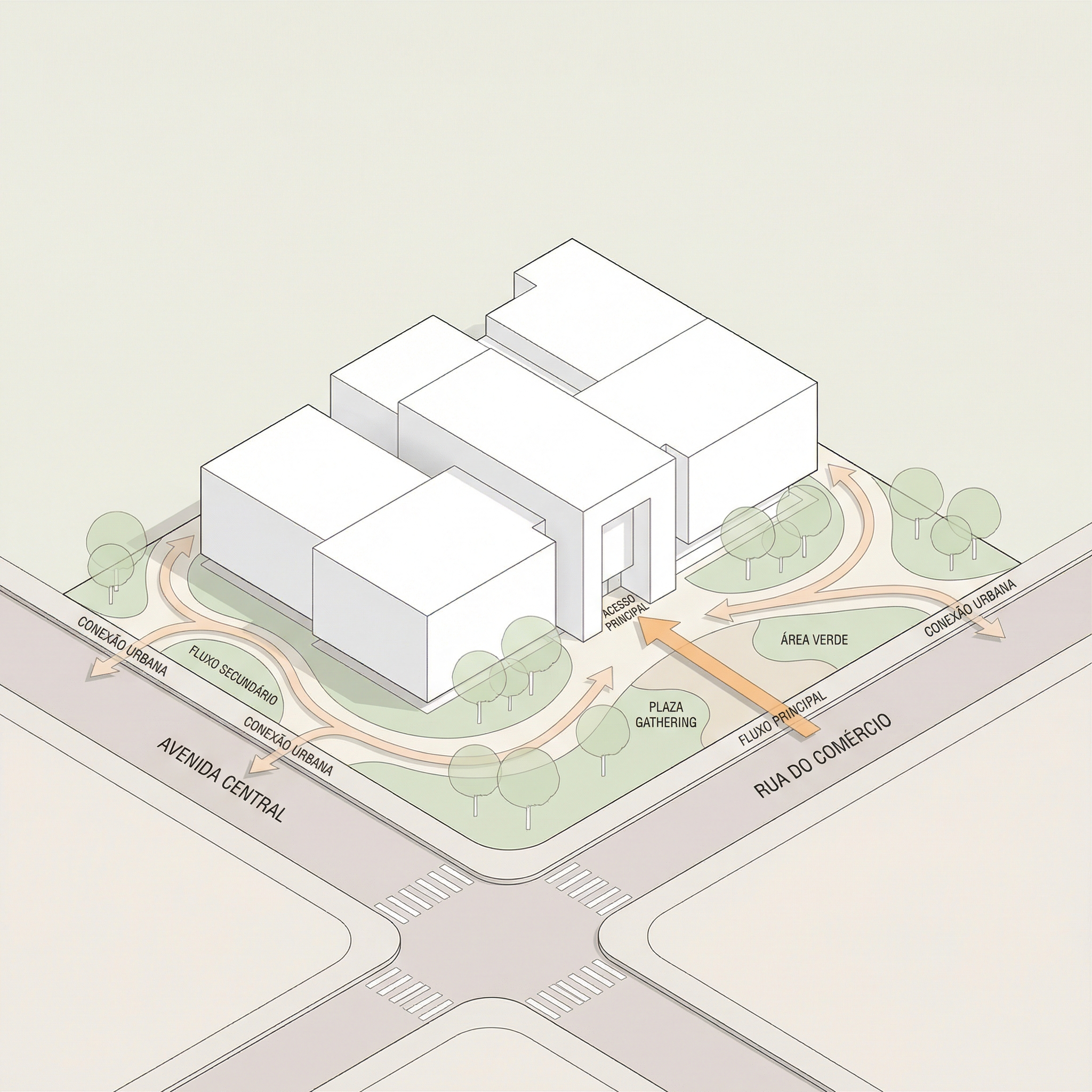
Resultado — Generado con Redraw
Cuándo usar: Láminas de concurso o portafolio con layout limpio y jerarquía clara — render principal arriba, plantas y cortes en el medio, secciones en la base.
Lo que genera: layout completo de lámina A1 vertical con jerarquía tipográfica, grid organizado y paleta de tonos neutros/cálidos.
Cómo usar: envía las imágenes de tu proyecto junto con el prompt. La IA va a montar el layout usando los elementos provistos.
El prompt:
Create a professional architectural presentation board layout in A1 vertical format (portrait orientation). Background: clean white or very soft warm off-white. TOP SECTION (upper 50% of the board): Large hero architectural render (provided image) centered and occupying the full width. Maintain clean margins around the image. TITLE AREA: Large elegant serif typography for the project name at the top center. Subtitle in small uppercase sans-serif below it. Refined and minimal typographic hierarchy. MIDDLE SECTION (organized grid layout): Left side: project description text block with justified alignment. Center: site plan and masterplan drawings aligned symmetrically. Include light lineweights and minimal annotations. Right side: secondary perspective render. Add minimal technical diagrams in thin olive-green line style. BOTTOM SECTION: Long horizontal architectural sections spanning the width of the board. Light grayscale linework with subtle shadows. Small human scale figures in soft neutral tones. GRAPHIC STYLE: Architectural competition board aesthetic. Soft muted color palette inspired by warm neutrals, beige concrete tones, and subtle olive green accents. Thin grid-based layout structure. Balanced white space. Clean margins. Professional composition. Refined minimal contemporary presentation. Print-ready, high resolution, 300 dpi, architectural board layout.
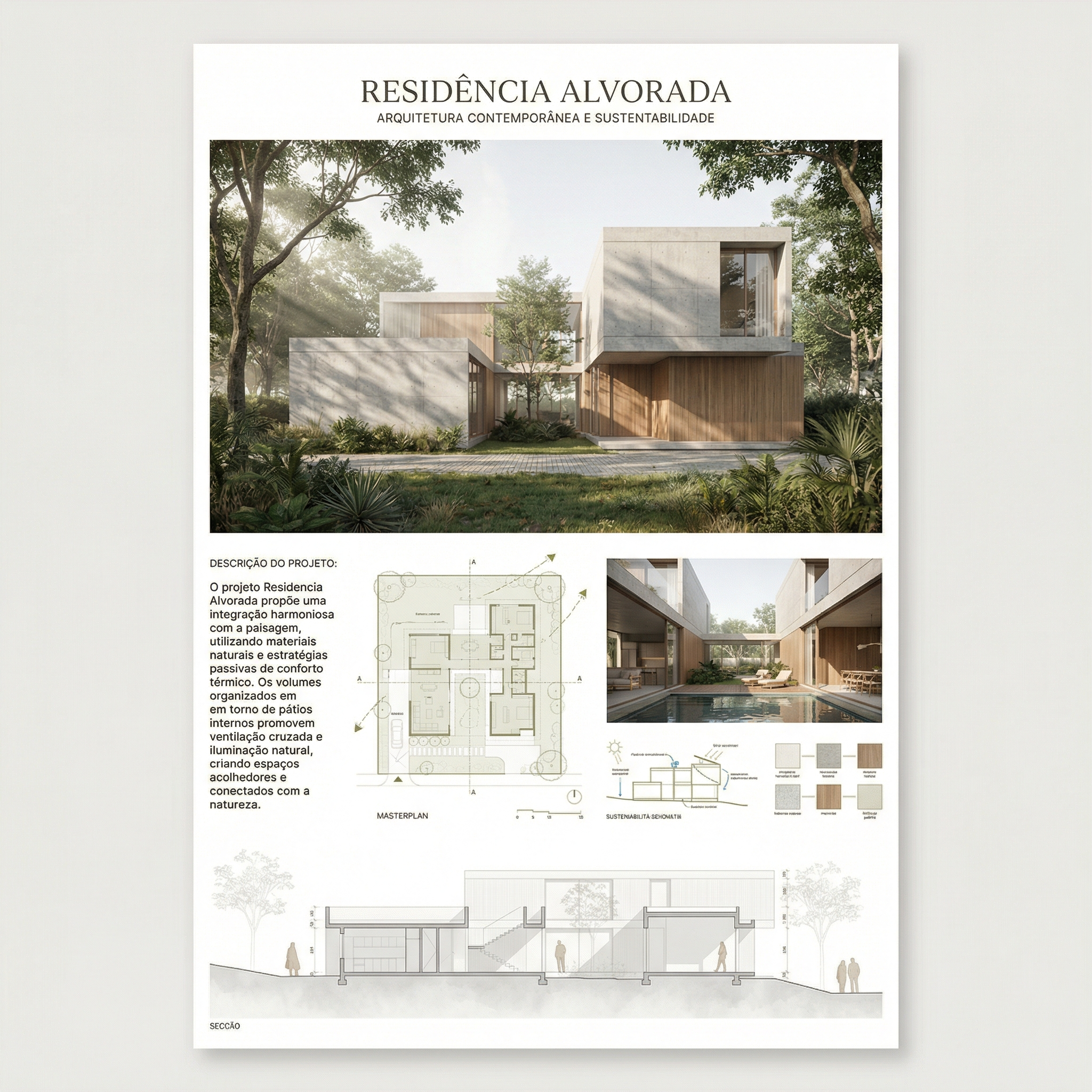
Resultado — Generado con Redraw
Cuándo usar: Láminas con estética de concurso europeo — composición más editorial, espaciado generoso, diagramas conceptuales integrados al layout, materiales y plantas juntos.
El prompt:
Create a professional architectural presentation board in A1 vertical format (portrait orientation), inspired by European competition boards and editorial architectural publications. Background: Soft warm off-white with very subtle paper texture, minimal grain, natural matte finish. Overall layout: Balanced but slightly organic composition. Elegant editorial spacing. Thin grid alignment but not rigid. Generous white margins. Clear hierarchy between text, diagrams, plans, and renders. TOP SECTION: Large project title in elegant serif typography. Subtitle in small uppercase sans-serif. Below the title: conceptual text block aligned to the left. Include: Small conceptual diagrams in thin light-gray linework. Minimal iconography in circular outline style. Concept evolution diagrams (old vs new, massing progression, relationships). UPPER RIGHT AREA: Large atmospheric perspective render. Soft daylight, diffused lighting. Natural vegetation. Subtle shadows. Editorial architectural visualization style. MIDDLE SECTION: Large humanized site plan with muted vegetation tones. Soft green landscaping. Desaturated palette. Light shadows under trees. Thin annotations. Include: Material palette circles (concrete, brick, wood, gravel). Small diagrammatic plans (ground floor, upper floor). Scale indication (1:500, 1:200). LOWER SECTION: Horizontal architectural sections across the width. Light grayscale linework. Subtle poche. Small neutral human silhouettes. BOTTOM STRIP: 2 to 4 smaller renders aligned in a clean grid. Soft atmospheric perspective. Balanced exposure. Natural color grading. GRAPHIC STYLE: Architectural competition aesthetic. Editorial European layout. Muted neutral palette: warm beige, soft olive green, dusty brick, light concrete gray. No saturated colors. No harsh contrast. No heavy black lines. Drawing style: Thin lineweights. Soft shadows. Subtle depth layering. Minimal annotations. Mood: Calm, refined, sophisticated, contemporary. Print-ready. 300 dpi. High resolution.
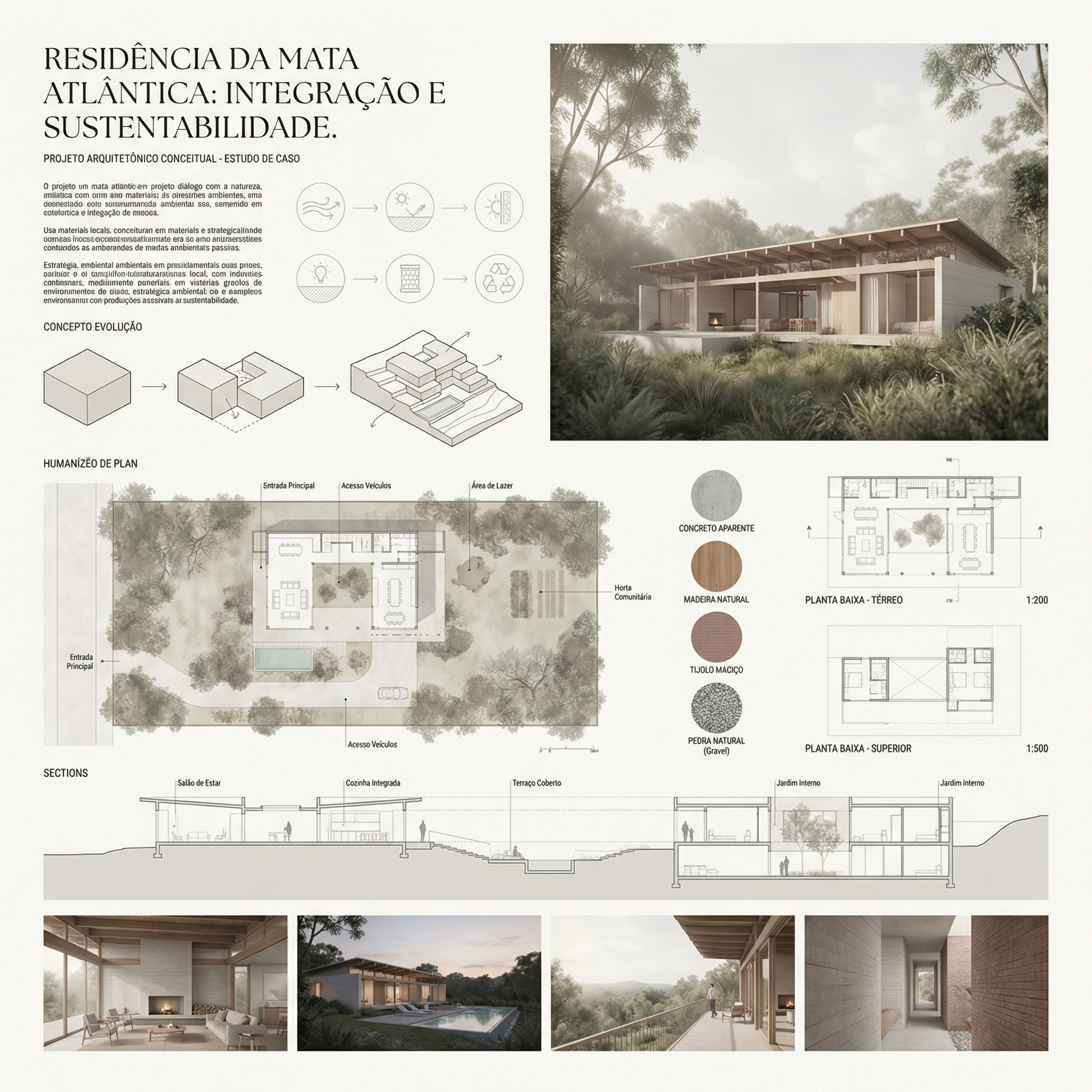
Resultado — Generado con Redraw
Envía los elementos separados: La IA arma mejor cuando recibe renders, plantas y cortes como imágenes separadas que ella organiza en el layout, en lugar de intentar extraer elementos de una imagen compuesta.
Especifica el nombre del proyecto: Añade al prompt: “Project name: [nombre del proyecto]. Subtitle: [tipo/ubicación].”
Paleta personalizada: Si tu proyecto tiene una identidad visual definida, añade: “Use [color] as the primary accent color throughout the board.”
Formato de salida: La IA va a generar una imagen del layout. Para edición posterior en Illustrator o InDesign, puedes usar la imagen como referencia de composición y recrear el layout con los archivos originales.
Usa estos prompts complementarios cuando la IA altere elementos que no debería en tus diagramas o láminas.
Preserve 100% of the original architecture, layout, furniture placement, materials, colors, textures, decorative elements, proportions, lighting positions, and camera angle. Strictly forbid adding, removing, replacing, resizing, repositioning, or redesigning any element. The purpose of this transformation is ONLY to enhance realism, lighting behavior, and material response without altering the original design in any way.
Preserve the original lighting design exactly as shown in the image. Do not add new light sources, remove existing lights, or modify lighting positions. Only enhance realism through natural light diffusion, realistic light bounce, soft shadow transitions, and accurate material interaction with existing lighting.
Preserve all original materials and textures exactly as shown. Do not replace, reinterpret, or stylize materials. Enhance realism only through improved surface detailing, micro imperfections, and physically accurate light response.
Use the uploaded image strictly as the ONLY architectural reference. The architecture and scene composition are completely locked. Preserve 100% of the original: Architecture • Walls and openings • Furniture placement • Materials and colors • Textures • Layout and proportions. Enhance the scene by making natural daylight more predominant and realistic. The project must remain 100% identical to the original image. Only the lighting quality and natural daylight intensity may be improved. Ultra realistic architectural photography, high dynamic range, 8K detail.
Para diagramas de partido, análisis ambientales y layouts de láminas, las herramientas de generación de imagen por texto con los prompts de esta guía son el workflow más eficiente disponible — la IA lee la volumetría y genera el diagrama en minutos.
Para los renders que componen la lámina — perspectivas exteriores, renders de interiores, fachadas — Redraw es la herramienta más directa y fiel al proyecto. No necesitas prompts largos: subes el modelo (SketchUp, Archicad, Revit, Rhino, 3DS), eliges el estilo y el ambiente en clics, y el render sale en 20 a 40 segundos.
Dentro de Redraw también accedes a ChatGPT para escribir el texto conceptual de la lámina y Nano Banana para generar videos de presentación del proyecto — todo en un único hub, sin múltiples suscripciones.