

Sergio is a specialist in generative AI and technology, and leads the Redraw development team.



Guía de prompts para plantas humanizadas con IA, ultra realista, clean editorial, monocromática y lujo.
Redraw
Comece hoje mesmo a transformar os seus projeto usando o Redraw.



La planta humanizada es una de las representaciones más solicitadas en presentaciones residenciales, portafolios y materiales de venta inmobiliaria. Transforma la planta técnica, llena de cotas, tramas y símbolos, en una visualización que el cliente lego puede entender e imaginarse habitando.
Con IA es posible humanizar una planta en segundos. Pero el desafío es siempre el mismo: la IA no puede alterar el layout, mover paredes, redimensionar habitaciones ni cambiar la planta original de ninguna forma. Los prompts de esta guía fueron desarrollados con esa premisa central.
Aviso práctico: antes de procesar cualquier planta con IA, expórtala limpia, sin cotas, sin textos de leyenda y sin tramas pesadas. El prompt ya instruye a la IA a ignorar textos y anotaciones, pero cuanto más limpia la entrada, más preciso el resultado. Para saltarte esta etapa entera, Redraw procesa el modelo 3D directamente.
El arquitecto no debería necesitar aprender lenguaje de máquina para generar una representación profesional. Esa premisa guió la construcción de Redraw.
En lugar de escribir luz natural cálida de fin de tarde, sombras alargadas entrando lateralmente, en Redraw haces clic en “Atardecer”.
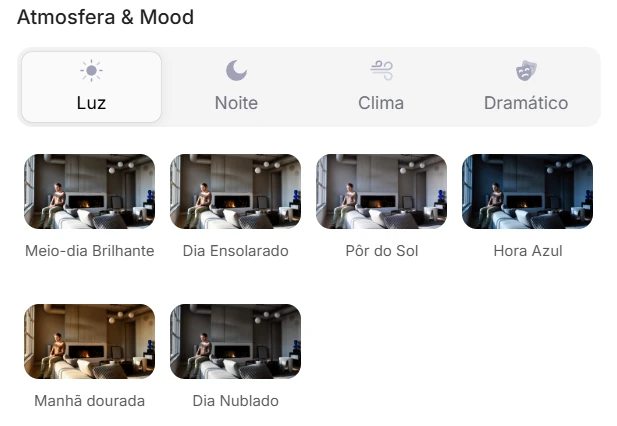
Atmósfera & Mood en Redraw: iluminación en un clic, sin prompt largo.
En lugar de describir calle residencial suburbana con vecinos visibles al fondo, seleccionas el escenario directamente en la interfaz visual.
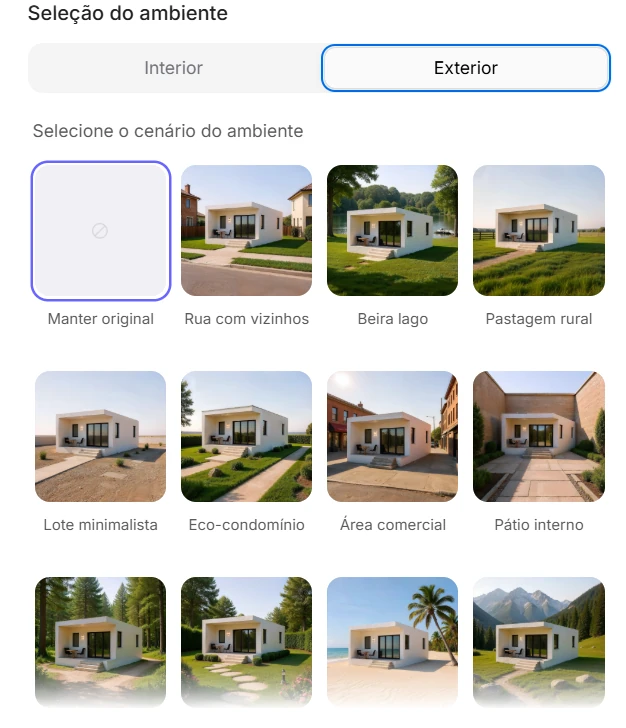
Selección del Ambiente en Redraw: escenario en un clic, sin descripción textual.
Cada elección que harías en un prompt largo, iluminación, ambiente, estilo, cámara, se convierte en un clic. Y como Redraw fue entrenado exclusivamente para arquitectura, el modelo ya “entiende” el contexto del proyecto sin que tengas que explicar.
“En Redraw, cuanto menos prompt ponen los usuarios, mejores son los resultados.”
Para plantas humanizadas, los prompts de esta guía siguen siendo el camino más eficiente, Redraw se especializa en renders fotorrealistas de interiores y fachadas. La combinación ideal: plantas humanizadas con prompts + renders y perspectivas con Redraw = presentación completa en minutos.
| Característica | Herramientas con Prompt Textual | Redraw |
|---|---|---|
| Complejidad del prompt | Alta, requiere estructura técnica y larga | Baja, lenguaje natural y simple |
| Control de iluminación | Basado en texto técnico | Basado en clics visuales (Atmósfera & Mood) |
| Control de ambiente | Basado en texto descriptivo | Basado en clics visuales (Selección del Ambiente) |
| Fidelidad al proyecto 3D | Variable, depende de la referencia y el prompt | Alta, procesa la geometría del modelo directamente |
| Consistencia entre generaciones | Baja | Alta |
| Foco del usuario | Aprender a comandar la IA | Describir la visión arquitectónica |
| Curva de aprendizaje | Empinada | Rápida e intuitiva |
| Tiempo por render | Alto (prompt + ajustes + post-producción) | Bajo (20–40 segundos, resultado publicable) |
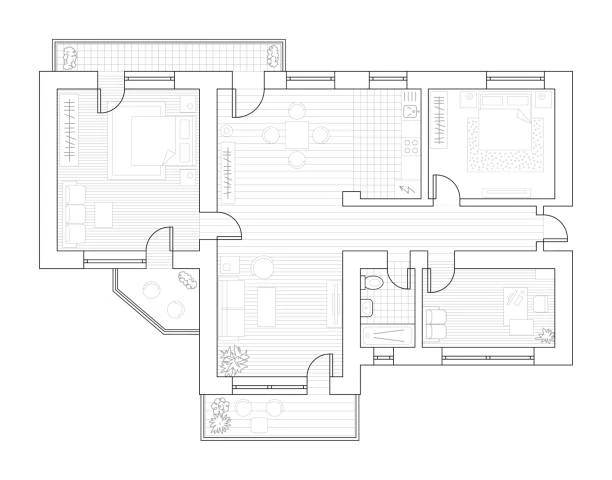
Antes, planta técnica exportada del software
Cuándo usar: Presentaciones de alto estándar, materiales de ventas inmobiliarias, portafolios donde el cliente quiere ver la planta con textura real de materiales, madera, tela, cerámica, alfombra.
Estilo visual: Vista superior ortográfica, materiales fotorrealistas, sombras sutiles de profundidad, iluminación natural simulada.
El prompt:
Transform this architectural floor plan into a highly realistic humanized floor plan. Preserve 100% of the original layout, wall positions, openings, structure thickness, furniture placement, circulation areas, proportions and dimensions. Do NOT redesign, reinterpret, move, resize or modify any architectural element. Do NOT change the scale. Ignore all texts, annotations and dimension numbers. Focus only on the architectural geometry. Apply realistic top-view materials and textures: Natural wood flooring with subtle grain variation • Soft fabric texture on bed and sofa with visible folds • Realistic bedding layers and pillows with natural volume • Matte painted walls with slight tonal variation • Subtle shadowing under furniture for depth • Realistic rugs with soft texture • Desk surface with light reflection and material response • Accurate perspective strictly in orthographic top view (no camera distortion). Lighting: Soft ambient daylight simulation • Gentle global illumination • Soft contact shadows • Subtle depth separation between spaces. Enhance realism with micro-details: Slight fabric wrinkles • Wood grain variation • Soft shadow gradients • Minimal surface imperfections • Natural color balance. Style: Professional architectural presentation • High-end real estate humanized floor plan • Clean, elegant and realistic • Ultra high resolution • Balanced color grading • Sharp but natural finish. Maintain strict architectural accuracy and original proportions.
Qué diferencia este prompt:
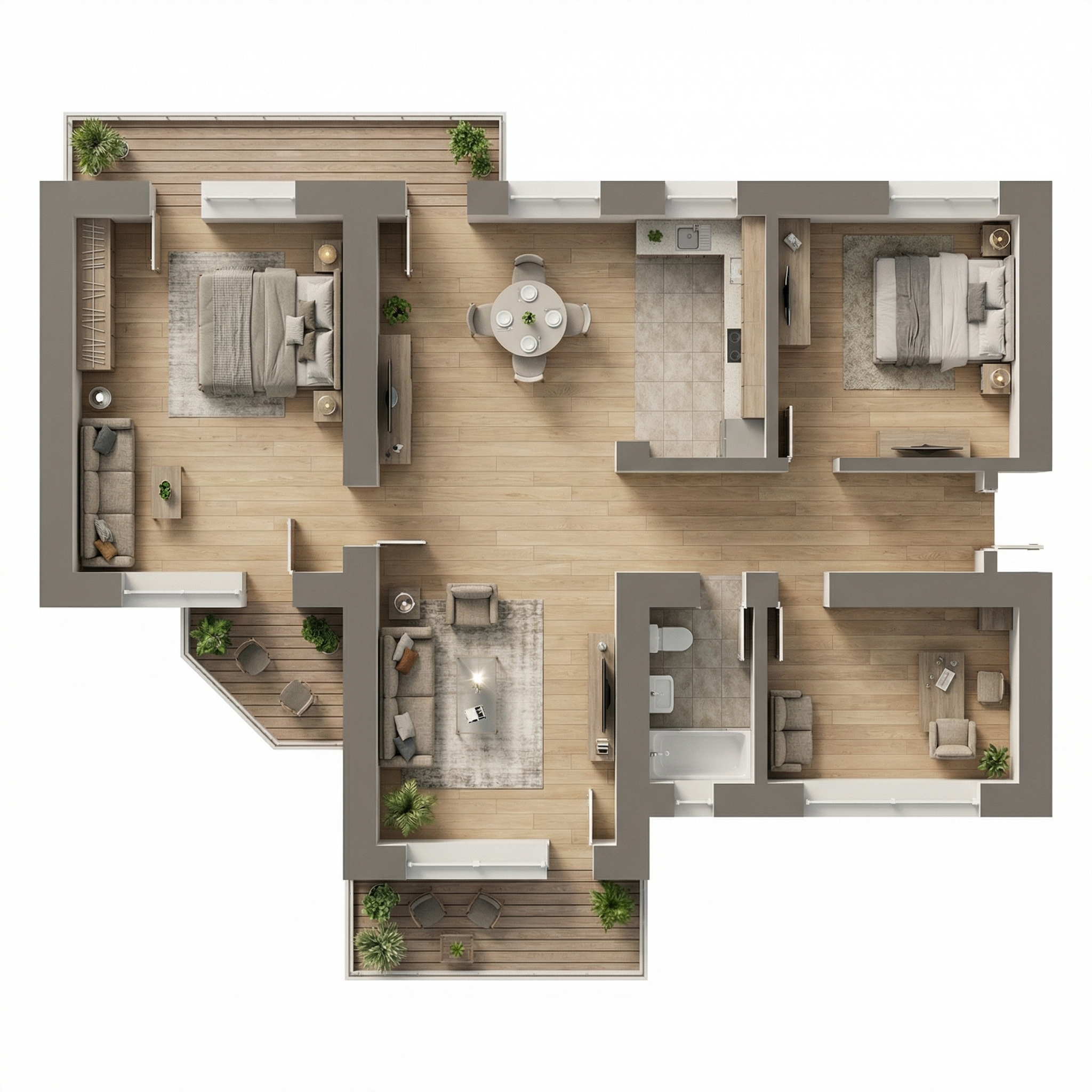
Resultado, Generado con Redraw
Cuándo usar: Láminas de presentación con estética Scandinavian/Japandi, portafolios modernos, materiales de venta inmobiliaria de medio-alto estándar. Es el estilo “Pinterest de planta”, el más compartible visualmente.
Estilo visual: Paleta neutra desaturada, madera clara, tejidos en beige suave, sombras casi imperceptibles, sensación de ligereza y claridad.
El prompt:
Transform this architectural floor plan into a soft, clean and refined humanized floor plan visualization. Preserve 100% of the original layout, walls, openings, structure thickness, furniture placement, circulation areas, proportions and dimensions. Do NOT redesign, reinterpret, move, resize or modify any architectural element. Do NOT change scale. Maintain strict orthographic top view (no perspective distortion). Ignore all texts, labels and dimension numbers. Focus only on architectural geometry. VISUAL STYLE: Create a light, neutral and calm presentation style, similar to modern editorial architectural boards. Avoid dramatic realism. Avoid strong shadows. Avoid high contrast. Avoid overly saturated wood tones. MATERIAL APPLICATION: Light natural oak wood flooring with very subtle grain • Neutral beige fabric upholstery • Soft linen bedding with delicate folds • Low-contrast rugs with minimal pattern • Matte off-white painted walls • Light natural wood furniture with minimal texture contrast • Soft ceramic surfaces in bathrooms • Minimal reflections. LIGHTING: Diffused ambient daylight • Very soft contact shadows • Subtle depth separation • No dramatic directional light • Balanced exposure • Clean brightness. The lighting should feel airy and evenly distributed. FINAL MOOD: Scandinavian-inspired softness • Pinterest-style clean floor plan • Calm neutral palette • Elegant and minimal • High resolution • Refined but not hyper-realistic. Maintain architectural precision and original proportions at all times.
La instrucción de mood final, “Scandinavian-inspired softness • Pinterest-style clean floor plan”, comunica a la IA una referencia estética coherente que resulta en una paleta muy específica y comercialmente eficiente.
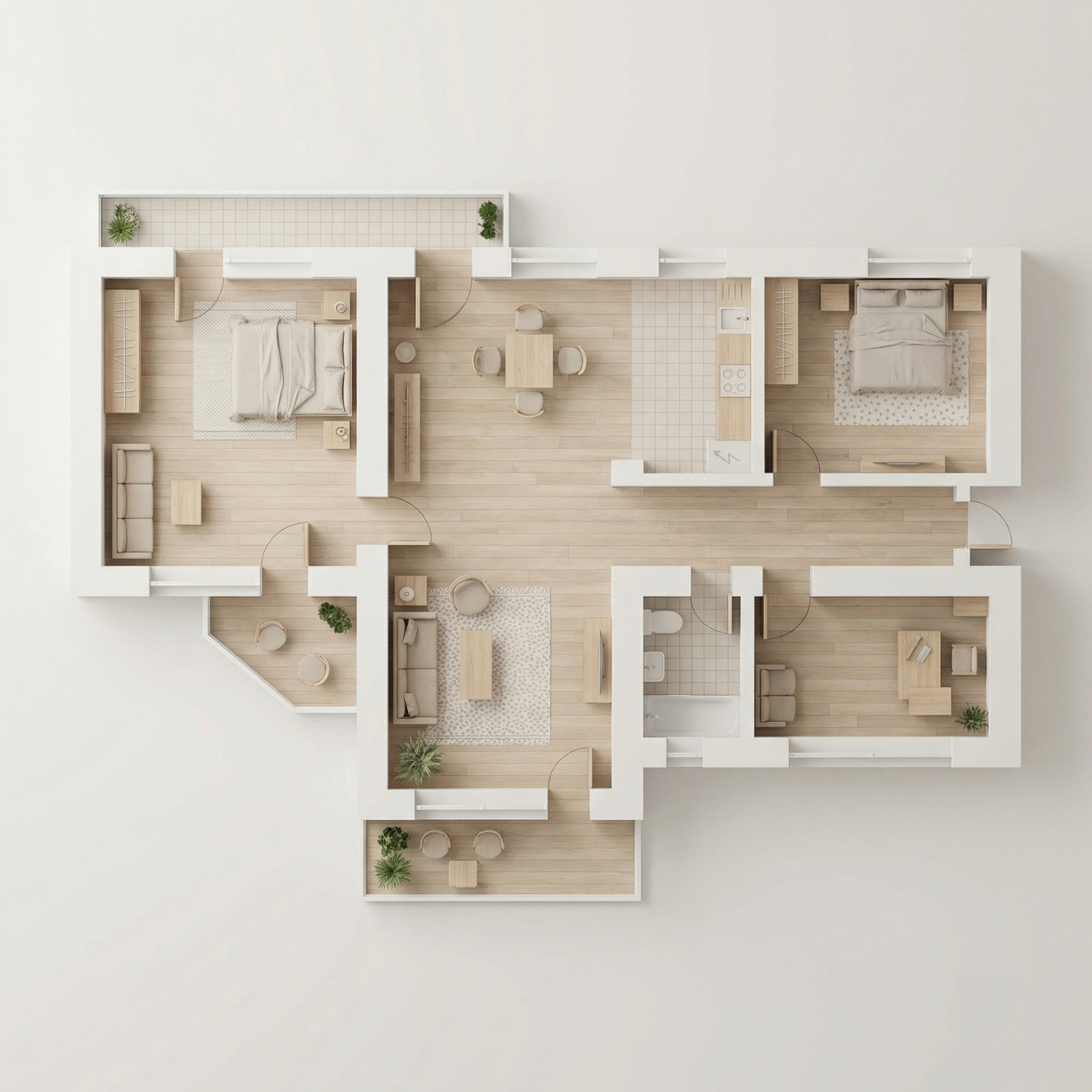
Resultado, Generado con Redraw
Cuándo usar: Láminas de concurso, presentaciones académicas, portafolios con identidad visual fuerte donde el blanco y negro es una elección estética intencional.
Estilo visual: Paredes en negro sólido, muebles en blanco/gris claro, piso con opción de herringbone sutil o gris plano, sombras delicadas.
El prompt:
Transform this architectural floor plan into a refined monochromatic humanized floor plan with strong graphic contrast. Preserve 100% of the original layout, wall thickness, openings, structure, furniture placement, circulation areas, proportions and scale. Do NOT redesign, reinterpret, move, resize or modify any architectural element. Maintain strict orthographic top view (no perspective distortion). Ignore all texts, annotations and dimension numbers. Focus only on architectural geometry. WALL TREATMENT: Render all structural walls in solid matte black or very dark charcoal • Maintain accurate wall thickness • Clean crisp edges • No texture on walls (flat graphic fill). FURNITURE STYLE: All furniture in matte white or very light grey • Soft subtle contour lines in light grey • Minimal line weight • No heavy outlines • No realistic textures • No strong material detailing. SHADOW & DEPTH: Apply very soft and diffused shadows • Subtle ambient occlusion near walls • Gentle drop shadow beneath furniture • No dramatic lighting • No strong directional light • Balanced soft contrast. FLOOR TREATMENT (Option A – more minimal): Light grey flat floor. (Option B): Very subtle light wood herringbone pattern • Low contrast • Desaturated tones. STYLE DIRECTION: Minimalist architectural board style • High contrast black and white composition • Scandinavian graphic layout • Clean negative space • Elegant presentation • Modern editorial aesthetic • Ultra high resolution. Maintain architectural precision and proportional accuracy at all times.
💡 Consejo: Especifica en tu prompt qué opción de piso quieres (A o B) añadiendo: “Use floor treatment Option A” o “Use floor treatment Option B”.
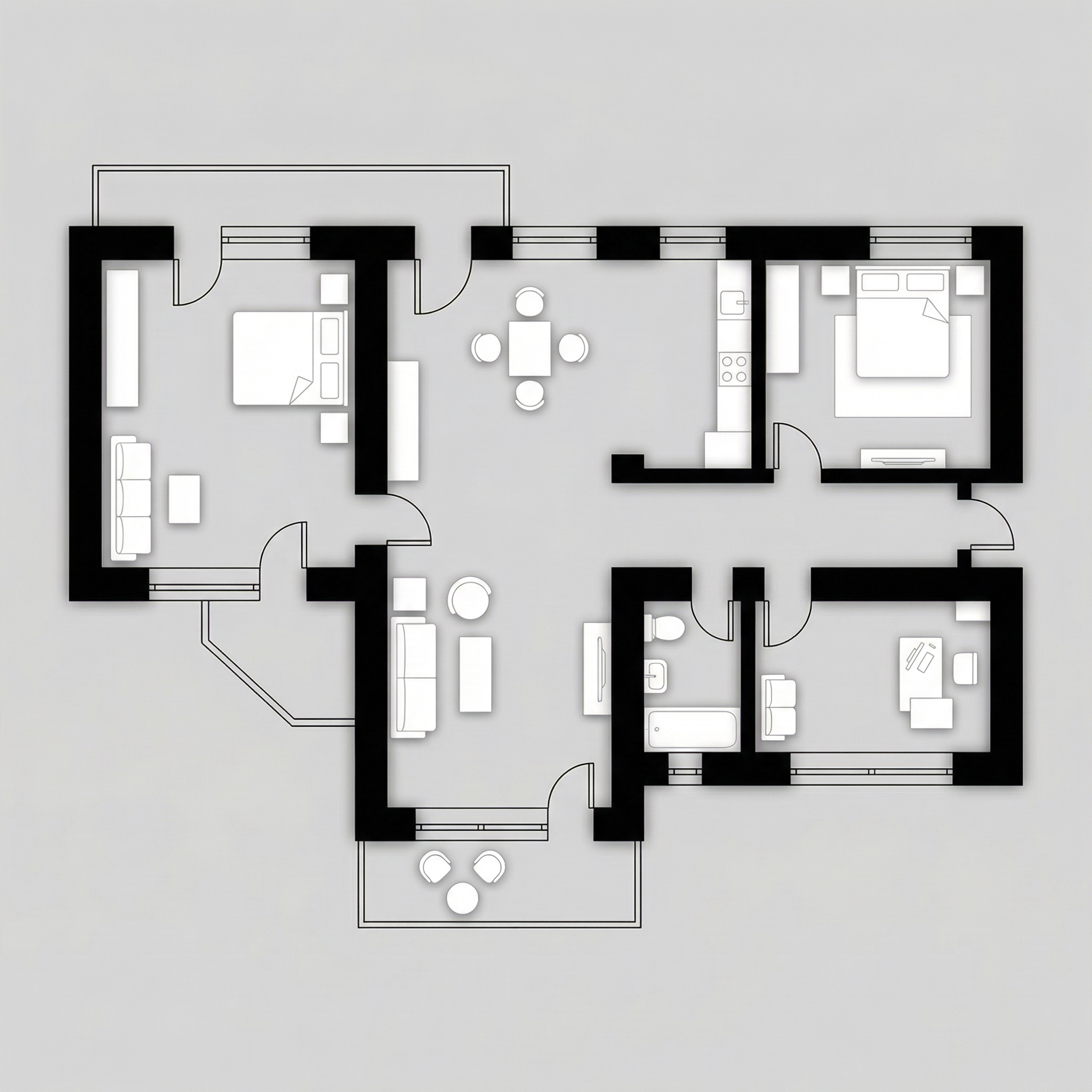
Resultado, Generado con Redraw
Cuándo usar: Proyectos de alto estándar, penthouses, casas de lujo, materiales de ventas premium. El prompt usa una paleta específica de dorado/champagne para paredes y gris elegante para piso.
Estilo visual: Piso gris medio matte, interiores en beige/arena cálido, paredes estructurales en dorado/champagne suave metálico, muebles en tonos neutros.
El prompt:
Transform this architectural floor plan into a refined luxury editorial humanized floor plan. Preserve 100% of the original layout, walls, openings, structure thickness, furniture placement, circulation areas, proportions and scale. Do NOT redesign, reinterpret, move, resize or modify any architectural element. Maintain strict orthographic top view (no perspective distortion). Ignore all texts, annotations and dimension numbers. Focus strictly on architectural geometry. FLOOR TREATMENT: Apply a smooth matte medium-light grey floor • Very subtle concrete or plaster texture • Soft tonal variation • No strong pattern • Elegant neutral base. LAYOUT BASE: Render interior surfaces in warm beige / sand tones • Soft monochromatic palette • Matte finish • Very subtle texture • Gentle depth variation between rooms. WALL TREATMENT (Golden Accent): Render structural walls in soft metallic gold or brushed champagne tone • Matte metallic finish (not glossy) • Subtle light reflection on edges • Clean crisp wall geometry • Maintain accurate wall thickness. SHADOW & DEPTH: Soft diffused ambient lighting • Gentle shadow gradients • Subtle ambient occlusion along walls • Light drop shadow beneath walls to create floating effect • No dramatic lighting. FURNITURE STYLE: Soft beige / light neutral tones • Minimal texture realism • Clean simplified forms • Subtle shadow grounding • No high contrast. STYLE DIRECTION: Luxury architectural board aesthetic • Conceptual physical model feeling • Editorial presentation style • Warm neutral sophistication • Calm and balanced composition • High resolution • Refined and minimal. Maintain architectural precision and original proportions at all times.
“Matte metallic finish (not glossy)” para las paredes doradas, es la distinción entre resultado elegante y resultado vulgar. La IA necesita esta instrucción para no exagerar el brillo.
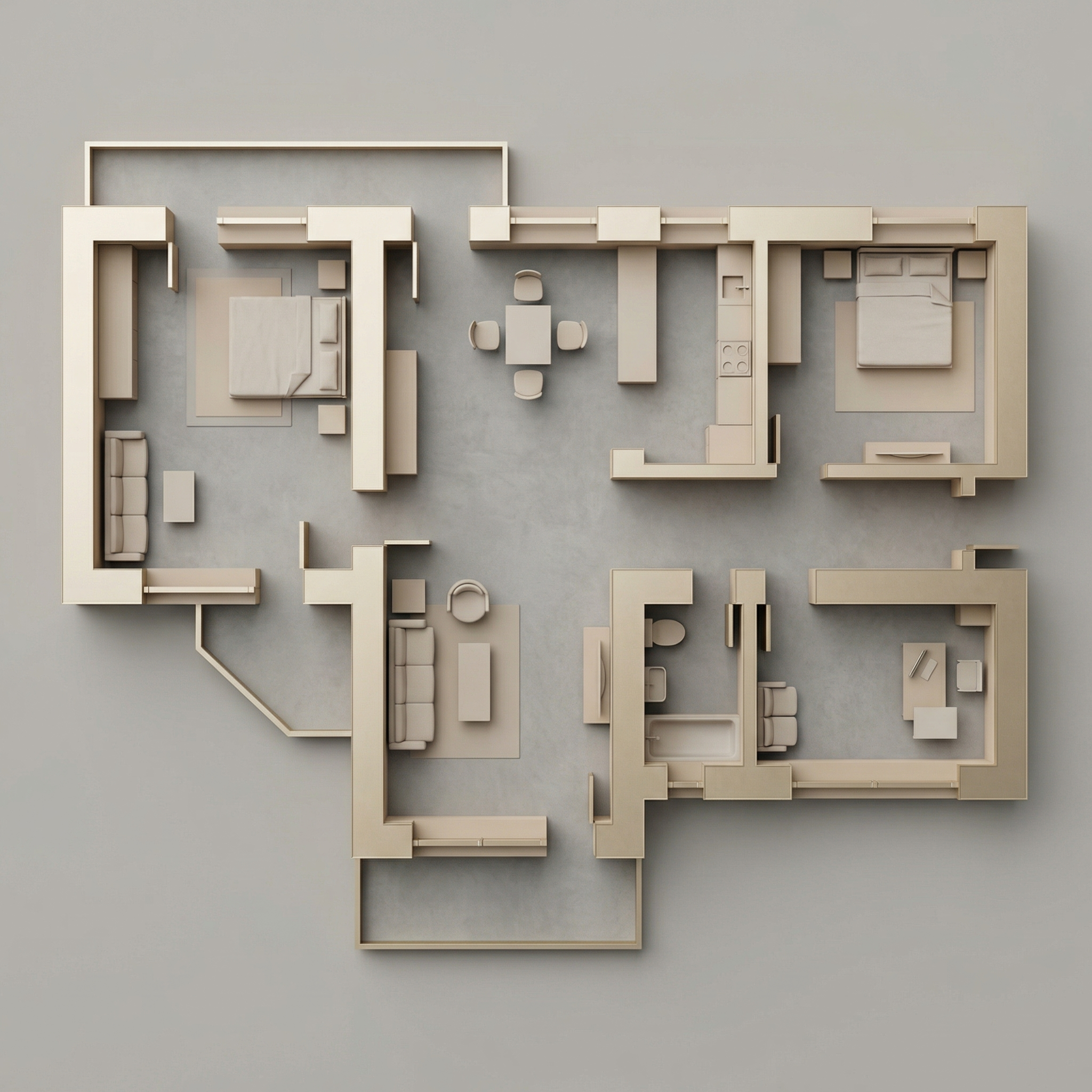
Resultado, Generado con Redraw
Cuándo usar: Tienes la planta técnica en blanco y negro (AutoCAD, Revit) y quieres añadir solo el contexto de paisajismo alrededor, sin humanizar el interior.
El prompt:
Use the uploaded floor plan image as the absolute base reference. Preserve 100% of the original drawing, including: • All walls • Openings • Lineweights • Furniture • Text • Layout • Proportions • Scale • Orientation • Colors • Shadows • Graphic style. Do NOT modify, redesign, reinterpret, crop, rotate, resize, or alter any element of the architectural drawing. The project must remain EXACTLY as provided. Your task is ONLY to add a natural green surrounding context around the perimeter of the floor plan, similar to a soft landscape presentation style. Add: Soft green ground texture surrounding the project • Subtle grass texture variations • Light watercolor-style vegetation shadows • Natural irregular lawn tones (olive, sage, muted greens) • Soft edge fading into white background • Realistic but subtle tree canopies around the perimeter • Some semi-transparent tree crowns (top view) • Organic shadow projections from trees • Low-opacity garden textures • Light dirt / soil transitions if compositionally balanced. Guidelines: The landscape must stay OUTSIDE the built area • Do NOT overlap or cover the architecture • Maintain clean visibility of the entire floor plan • Keep architecture as the main focus • Avoid exaggerated saturation • Avoid hyperrealistic grass blades • Use soft, elegant, architectural presentation aesthetic. Lighting and mood: Soft ambient shadowing • Subtle tree cast shadows • Natural daylight tone • Professional architectural board aesthetic.
Cuándo NO usar: Si tu planta ya está humanizada internamente, usa el Prompt 6.
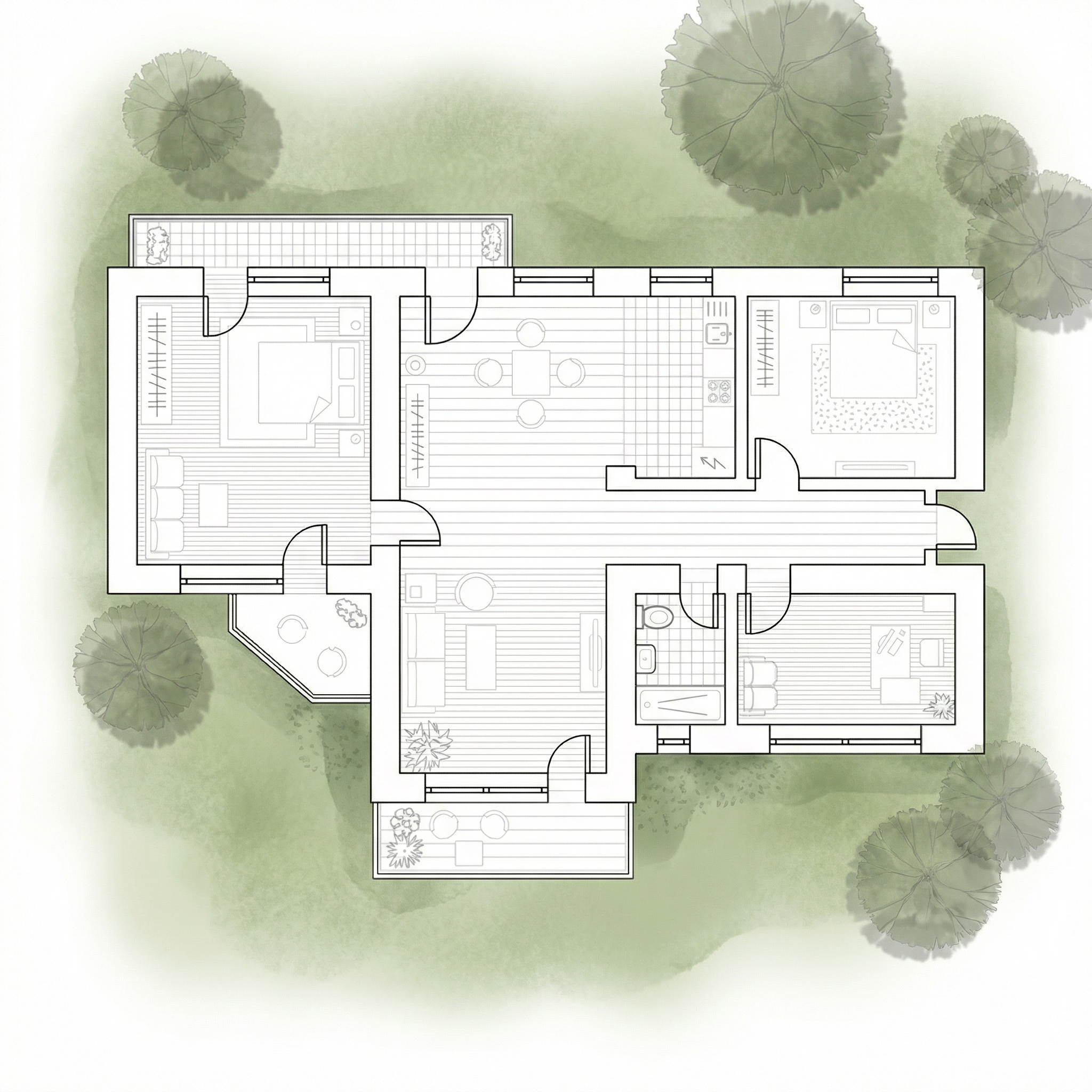
Resultado, Generado con Redraw
Cuándo usar: Ya humanizaste la planta internamente (con los prompts 1–4) y ahora quieres añadir el contexto de paisajismo alrededor, sin que la IA reinterprete el interior.
El prompt:
Use the uploaded image as a FINAL, FLATTENED architectural board. This image is already finished and humanized. You must treat the floor plan as a locked image layer. DO NOT redraw. DO NOT reinterpret. DO NOT convert to black and white. DO NOT restyle. DO NOT enhance. DO NOT relight. DO NOT change materials. DO NOT change shadows. DO NOT adjust colors. DO NOT increase or reduce contrast. DO NOT modify texture. DO NOT modify saturation. The floor plan must remain PIXEL-PERFECT identical to the uploaded image. No internal changes are allowed. OBJECTIVE: Add soft natural vegetation context ONLY around the external perimeter of the existing image. This is an additive background operation only. WHAT YOU CAN ADD (OUTSIDE ONLY): Soft green watercolor ground texture • Light grass tonal variation (olive, sage, muted green) • Semi-transparent tree canopies (top view) • Soft organic tree shadows • Slight edge fading into white background • Subtle natural landscape blending. STRICT LIMITATIONS: Do NOT overlap the building footprint • Do NOT cover walls, furniture or internal patios • Do NOT modify linework • Do NOT modify rendering style • Do NOT change perspective • Do NOT touch the interior. STYLE: Soft architectural presentation style • Competition board aesthetic • Subtle, elegant, low saturation • Top-view orthographic • Natural daylight tone.
La IA tiende a “mejorar” la imagen cuando no recibe restricciones claras, reprocesa colores, aumenta contraste, cambia materiales. Las instrucciones “DO NOT” en mayúsculas bloquean cada uno de esos comportamientos no deseados.
Usa estos prompts complementarios cuando la IA esté moviendo paredes, cambiando materiales o alterando la planta original.
Preserve 100% of the original architecture, layout, furniture placement, materials, colors, textures, decorative elements, proportions, lighting positions, and camera angle. Strictly forbid adding, removing, replacing, resizing, repositioning, or redesigning any element. The purpose of this transformation is ONLY to enhance realism, lighting behavior, and material response without altering the original design in any way.
Preserve the original lighting design exactly as shown in the image. Do not add new light sources, remove existing lights, or modify lighting positions. Only enhance realism through natural light diffusion, realistic light bounce, soft shadow transitions, and accurate material interaction with existing lighting.
Preserve all original materials and textures exactly as shown. Do not replace, reinterpret, or stylize materials. Enhance realism only through improved surface detailing, micro imperfections, and physically accurate light response.
Para plantas humanizadas, las herramientas de generación de imágenes por texto con los prompts de esta guía son el workflow más eficiente disponible.
Para todo el resto del proyecto, renders de interiores, fachadas y perspectivas, Redraw es la herramienta más directa: subes el modelo 3D, preserva la geometría y genera el resultado en segundos sin necesitar prompts largos.
La estrategia completa: plantas humanizadas con prompts textuales + renders y videos con Redraw = presentación completa y profesional.

La IA que transforma la forma de crear proyectos de arquitectura, ingeniería y diseño.